biopipen.ns.scrna
Tools to analyze single-cell RNA
SeuratLoading(Proc) — Seurat - Loading data</>SeuratPreparing(Proc) — Load, prepare and apply QC to data, usingSeurat</>SeuratClustering(Proc) — Determine the clusters of cells without reference using Seurat FindClustersprocedure. </>SeuratSubClustering(Proc) — Find clusters of a subset of cells.</>SeuratClusterStats(Proc) — Statistics of the clustering.</>HdWGCNA(Proc) — Weighted gene co-expression network analysis (WGCNA) for single-cell RNA-seq data.</>ModuleScoreCalculator(Proc) — Calculate the module scores for each cell</>CellsDistribution(Proc) — Distribution of cells (i.e. in a TCR clone) from different groupsfor each cluster </>SeuratMetadataMutater(Proc) — Mutate the metadata of the seurat object</>DimPlots(Proc) — Seurat - Dimensional reduction plots</>MarkersFinder(Proc) — Find markers between different groups of cells</>TopExpressingGenes(Proc) — Find the top expressing genes in each cluster</>ExprImputation(Proc) — This process imputes the dropout values in scRNA-seq data.</>SCImpute(Proc) — Impute the dropout values in scRNA-seq data.</>SeuratFilter(Proc) — Filtering cells from a seurat object</>SeuratSubset(Proc) — Subset a seurat object into multiple seruat objects</>SeuratSplit(Proc) — Split a seurat object into multiple seruat objects</>Subset10X(Proc) — Subset 10X data, mostly used for testing</>SeuratTo10X(Proc) — Write a Seurat object to 10X format</>ScFGSEA(Proc) — Gene set enrichment analysis for cells in different groups usingfgsea</>CellTypeAnnotation(Proc) — Annotate the cell clusters. Currently, the following ways are supported:</>GarnettClassifierTrainer(Proc) — Train aGarnettclassifierfrom a Seurat object and marker genes. </>HitypeWeightTrainer(Proc) — Trainhitypemarker weights from aSeurat object and marker genes. </>SeuratMap2Ref(Proc) — Map the seurat object to reference</>RadarPlots(Proc) — Radar plots for cell proportion in different clusters.</>MetaMarkers(Proc) — Find markers between three or more groups of cells, using one-way ANOVAor Kruskal-Wallis test. </>Seurat2AnnData(Proc) — Convert seurat object to AnnData</>AnnData2Seurat(Proc) — Convert AnnData to seurat object</>ScSimulation(Proc) — Simulate single-cell data using splatter.</>CellCellCommunication(Proc) — Cell-cell communication inference</>CellCellCommunicationPlots(Proc) — Visualization for cell-cell communication inference.</>ScVelo(Proc) — Velocity analysis for single-cell RNA-seq data</>Slingshot(Proc) — Trajectory inference using Slingshot</>LoomTo10X(Proc) — Convert Loom file to 10X format</>PseudoBulkDEG(Proc) — Pseduo-bulk differential gene expression analysis</>CellSNPLite(Proc) — Genotyping bi-allelic SNPs on single cells using cellsnp-lite.</>MQuad(Proc) — Clonal substructure discovery using single cell mitochondrial variants with MQuad.</>MQuadVcf(Proc) — Clonal substructure discovery using single cell mitochondrial variants with MQuad.</>MQuadMerge(Proc) — Merge multiple MQuad results for multiple samples.</>VireoSNP(Proc) — Demultiplexing of single-cell RNA-seq data using vireoSNP.</>
biopipen.ns.scrna.SeuratLoading(*args, **kwds) → Proc
Seurat - Loading data
Deprecated, should be superseded by SeuratPreparing
cache— Should we detect whether the jobs are cached?desc— The description of the process. Will use the summary fromthe docstring by default.dirsig— When checking the signature for caching, whether should we walkthrough the content of the directory? This is sometimes time-consuming if the directory is big.envs— The arguments that are job-independent, useful for common optionsacross jobs.envs_depth— How deep to update the envs when subclassed.error_strategy— How to deal with the errors- - retry, ignore, halt
- - halt to halt the whole pipeline, no submitting new jobs
export— When True, the results will be exported to<pipeline.outdir>Defaults to None, meaning only end processes will export. You can set it to True/False to enable or disable exporting for processesforks— How many jobs to run simultaneously?input— The keys for the input channelinput_data— The input data (will be computed for dependent processes)lang— The language for the script to run. Should be the path to theinterpreter iflangis not in$PATH.name— The name of the process. Will use the class name by default.nexts— Computed fromrequiresto build the process relationshipsnum_retries— How many times to retry to jobs once error occursorder— The execution order for this process. The bigger the numberis, the later the process will be executed. Default: 0. Note that the dependent processes will always be executed first. This doesn't work for start processes either, whose orders are determined byPipen.set_starts()output— The output keys for the output channel(the data will be computed)output_data— The output data (to pass to the next processes)output_flatten— Whether to flatten the output when saving to the outputdirectory. Normally, the output will be saved in a subdirectory named after the job index (e.g.<outdir>/0,<outdir>/1, etc.). Ifoutput_flattenis True, the output will be saved directly in the output directory without the subdirectories. This is useful when you want the job outputs to be directly revealed in the output directory. Note that this only works for processes with export=True or end processes and make sure the name of the output files won't conflict for jobs with each other when flattening. It takes 3 possible values- - None (default): flatten the output for single-job processes only
- - True: flatten the output for all processes
- - False: never flatten the output
plugin_opts— Options for process-level pluginsrequires— The dependency processesscheduler— The scheduler to run the jobsscheduler_opts— The options for the schedulerscript— The script template for the processsubmission_batch— How many jobs to be submited simultaneously.The program entrance for some schedulers may take too much resources when submitting a job or checking the job status. So we may use a smaller number here to limit the simultaneous submissions.template— Define the template engine to use.This could be either a template engine or a dict with keyengineindicating the template engine and the rest the arguments passed to the constructor of thepipen.template.Templateobject. The template engine could be either the name of the engine, currently jinja2 and liquidpy are supported, or a subclass ofpipen.template.Template. You can subclasspipen.template.Templateto use your own template engine.
metafile— The metadata of the samplesA tab-delimited file Two columns are required:- -
Sampleto specify the sample names. - -
RNADatato assign the path of the data to the samples
The path will be read byRead10X()fromSeurat
- -
rdsfile— The RDS file with a list of Seurat object
qc— The QC filter for each sample.This will be passed tosubset(obj, subset=<qc>). For examplenFeature_RNA > 200 & nFeature_RNA < 2500 & percent.mt < 5
__init_subclass__()— Do the requirements inferring since we need them to build up theprocess relationship </>from_proc(proc,name,desc,envs,envs_depth,cache,export,output_flatten,error_strategy,num_retries,forks,input_data,order,plugin_opts,requires,scheduler,scheduler_opts,submission_batch)(Type) — Create a subclass of Proc using another Proc subclass or Proc itself</>gc()— GC process for the process to save memory after it's done</>log(level,msg,*args,logger)— Log message for the process</>run()— Init all other properties and jobs</>
pipen.proc.ProcMeta(name, bases, namespace, **kwargs)
Meta class for Proc
from_proc(proc, name=None, desc=None, envs=None, envs_depth=None, cache=None, export=None, output_flatten=None, error_strategy=None, num_retries=None, forks=None, input_data=None, order=None, plugin_opts=None, requires=None, scheduler=None, scheduler_opts=None, submission_batch=None)
Create a subclass of Proc using another Proc subclass or Proc itself
proc(Type) — The Proc subclassname(str | none, optional) — The new name of the processdesc(str | none, optional) — The new description of the processenvs(Optional, optional) — The arguments of the process, will overwrite parent oneThe items that are specified will be inheritedenvs_depth(int | none, optional) — How deep to update the envs when subclassed.cache(bool | none, optional) — Whether we should check the cache for the jobsexport(bool | none, optional) — When True, the results will be exported to<pipeline.outdir>Defaults to None, meaning only end processes will export. You can set it to True/False to enable or disable exporting for processesoutput_flatten(bool | none, optional) — Whether to flatten the output when saving to the outputdirectory. Normally, the output will be saved in a subdirectory named after the job index (e.g.<outdir>/0,<outdir>/1, etc.). Ifoutput_flattenis True, the output will be saved directly in the output directory without the subdirectories. This is useful when you want the job outputs to be directly revealed in the output directory. Note that this only works for processes with export=True or end processes and make sure the name of the output files won't conflict for jobs with each other when flattening. It takes 3 possible values- - None (default): flatten the output for single-job processes only
- - True: flatten the output for all processes
- - False: never flatten the output
error_strategy(str | none, optional) — How to deal with the errors- - retry, ignore, halt
- - halt to halt the whole pipeline, no submitting new jobs
num_retries(int | none, optional) — How many times to retry to jobs once error occursforks(int | none, optional) — New forks for the new processinput_data(any | none, optional) — The input data for the process. Only when this processis a start processorder(int | none, optional) — The order to execute the new processplugin_opts(Optional, optional) — The new plugin options, unspecified items will beinherited.requires(Optional, optional) — The required processes for the new processscheduler(str | none, optional) — The new shedular to run the new processscheduler_opts(Optional, optional) — The new scheduler options, unspecified items willbe inherited.submission_batch(int | none, optional) — How many jobs to be submited simultaneously.
The new process class
__init_subclass__()
Do the requirements inferring since we need them to build up theprocess relationship
run()
Init all other properties and jobs
gc()
GC process for the process to save memory after it's done
log(level, msg, *args, logger=<LoggerAdapter pipen.core (WARNING)>)
Log message for the process
level(int | str) — The log level of the recordmsg(str) — The message to log*args— The arguments to format the messagelogger(LoggerAdapter, optional) — The logging logger
biopipen.ns.scrna.SeuratPreparing(*args, **kwds) → Proc
Load, prepare and apply QC to data, using Seurat
This process will -
- - Prepare the seurat object
- - Apply QC to the data (gene, cell, and contamination)
- - Integrate the data from different samples
See also
- - https://satijalab.org/seurat/articles/pbmc3k_tutorial.html#standard-pre-processing-workflow-1)
- - https://satijalab.org/seurat/articles/integration_introduction
This process will read the scRNA-seq data, based on the information provided bySampleInfo, specifically, the paths specified by the RNAData column.
The RNAData column should contain the path to the 10X, ParseBio data or HIVE data, either a directory or
a file If the path is a directory, the function will look for barcodes.tsv.gz, features.tsv.gz
and matrix.mtx.gz. The directory should be loaded by Seurat::Read10X, Seurat::ReadParseBio or
the HIVE data. Sometimes, there may be prefix in the file names, e.g. "'prefix'.barcodes.tsv.gz",
which is also supported. If the path is a file ending with ".loom", it will be loaded by
SeuratDisk::Connect() and converted to a Seurat object. Otherwise, if the path is a file,
it should be a h5 file that can be loaded by Seurat::Read10X_h5().
Each sample will be loaded individually and then merged into one Seurat object, and then perform QC.
In order to perform QC, some additional columns are added to the meta data of the Seurat object. They are:
precent.mt: The percentage of mitochondrial genes.percent.ribo: The percentage of ribosomal genes.precent.hb: The percentage of hemoglobin genes.percent.plat: The percentage of platelet genes.
For integration, two routes are available:
- Performing integration on datasets normalized with
SCTransform - Using
NormalizeDataandFindIntegrationAnchors
Note
When using SCTransform, the default Assay will be set to SCT in output, rather than RNA.
If you are using cca or rpca interation, the default assay will be integrated.
Note
From biopipen v0.23.0, this requires Seurat v5.0.0 or higher.
cache— Should we detect whether the jobs are cached?desc— The description of the process. Will use the summary fromthe docstring by default.dirsig— When checking the signature for caching, whether should we walkthrough the content of the directory? This is sometimes time-consuming if the directory is big.envs— The arguments that are job-independent, useful for common optionsacross jobs.envs_depth— How deep to update the envs when subclassed.error_strategy— How to deal with the errors- - retry, ignore, halt
- - halt to halt the whole pipeline, no submitting new jobs
export— When True, the results will be exported to<pipeline.outdir>Defaults to None, meaning only end processes will export. You can set it to True/False to enable or disable exporting for processesforks— How many jobs to run simultaneously?input— The keys for the input channelinput_data— The input data (will be computed for dependent processes)lang— The language for the script to run. Should be the path to theinterpreter iflangis not in$PATH.name— The name of the process. Will use the class name by default.nexts— Computed fromrequiresto build the process relationshipsnum_retries— How many times to retry to jobs once error occursorder— The execution order for this process. The bigger the numberis, the later the process will be executed. Default: 0. Note that the dependent processes will always be executed first. This doesn't work for start processes either, whose orders are determined byPipen.set_starts()output— The output keys for the output channel(the data will be computed)output_data— The output data (to pass to the next processes)output_flatten— Whether to flatten the output when saving to the outputdirectory. Normally, the output will be saved in a subdirectory named after the job index (e.g.<outdir>/0,<outdir>/1, etc.). Ifoutput_flattenis True, the output will be saved directly in the output directory without the subdirectories. This is useful when you want the job outputs to be directly revealed in the output directory. Note that this only works for processes with export=True or end processes and make sure the name of the output files won't conflict for jobs with each other when flattening. It takes 3 possible values- - None (default): flatten the output for single-job processes only
- - True: flatten the output for all processes
- - False: never flatten the output
plugin_opts— Options for process-level pluginsrequires— The dependency processesscheduler— The scheduler to run the jobsscheduler_opts— The options for the schedulerscript— The script template for the processsubmission_batch— How many jobs to be submited simultaneously.The program entrance for some schedulers may take too much resources when submitting a job or checking the job status. So we may use a smaller number here to limit the simultaneous submissions.template— Define the template engine to use.This could be either a template engine or a dict with keyengineindicating the template engine and the rest the arguments passed to the constructor of thepipen.template.Templateobject. The template engine could be either the name of the engine, currently jinja2 and liquidpy are supported, or a subclass ofpipen.template.Template. You can subclasspipen.template.Templateto use your own template engine.
metafile— The metadata of the samplesA tab-delimited file Two columns are required:Sampleto specify the sample names.RNADatato assign the path of the data to the samples The path will be read byRead10X()fromSeurat, or the path to the h5 file that can be read byRead10X_h5()fromSeurat. It can also be an RDS or qs2 file containing aSeuratobject. Note that it must has a column namedSamplein the meta.data to specify the sample names.
outfile— The qs2 file with the Seurat object with all samples integrated.Note that the cell ids are prefixied with sample names.
cell_qc— Filter expression to filter cells, usingtidyrseurat::filter(). It can also be a dictionary of expressions, where the names of the list are sample names. You can have a default expression in the list with the name "DEFAULT" for the samples that are not listed. Available QC keys includenFeature_RNA,nCount_RNA,percent.mt,percent.ribo,percent.hb, andpercent.plat.
Example
Including the columns added above, all available QC keys includenFeature_RNA,nCount_RNA,percent.mt,percent.ribo,percent.hb, andpercent.plat. For example:
will keep cells with more than 200 genes and less than 5%% mitochondrial genes.[SeuratPreparing.envs] cell_qc = "nFeature_RNA > 200 & percent.mt < 5"
features(type=auto) — Features to rename. It can be a dict with the keys asthe original feature names and the values as the new feature names, or file path to a two-column tab-delimited file (no header) with the first column as the original feature names and the second column as the new feature names.gene_qc(ns) — Filter genes.gene_qcis applied aftercell_qc.- - min_cells: The minimum number of cells that a gene must be
expressed in to be kept. - - excludes: The genes to exclude. Multiple genes can be specified by
comma separated values, or as a list.
Example
will keep genes that are expressed in at least 3 cells.[SeuratPreparing.envs] gene_qc = { min_cells = 3 }
- - min_cells: The minimum number of cells that a gene must be
min_cells(type=int) — The minimum number of cells that a gene must beexpressed in to be kept. This is used inSeurat::CreateSeuratObject(). Futher QC (envs.cell_qc,envs.gene_qc) will be performed after this. It doesn't work when data is loaded from loom files or RDS/qs2 files.min_features(type=int) — The minimum number of features that a cell mustexpress to be kept. This is used inSeurat::CreateSeuratObject(). Futher QC (envs.cell_qc,envs.gene_qc) will be performed after this. It doesn't work when data is loaded from loom files or RDS/qs2 files.mutaters(type=json) — The mutaters to mutate the metadata to the cells.These new columns will be added to the metadata of the Seurat object and will be saved in the output file. See https://pwwang.github.io/biopipen.utils.R/reference/MutateSeuratMeta.htmlncores(type=int) — Number of cores to use.Used infuture::plan(strategy = "multicore", workers = <ncores>)to parallelize some Seurat procedures.
.` d . . . . . . .
. d : . . . . o ) , ) r ) .
. .
: . . .
: .
. . . . .
. .
. . .
. . . .
. . . . . d .
. . . . . . . . . . . . . . . . . . .
. . . / . C
.
:
3
7
`
0
. . r . ` .
. . . . . .
. . . . . . . k .
. . . . .
. . y . d . t . y d .
r-bracer—- check: {{proc.lang}} <(echo "library(bracer)")
r-future—- check: {{proc.lang}} <(echo "library(future)")
r-seurat—- check: {{proc.lang}} <(echo "library(Seurat)")
__init_subclass__()— Do the requirements inferring since we need them to build up theprocess relationship </>from_proc(proc,name,desc,envs,envs_depth,cache,export,output_flatten,error_strategy,num_retries,forks,input_data,order,plugin_opts,requires,scheduler,scheduler_opts,submission_batch)(Type) — Create a subclass of Proc using another Proc subclass or Proc itself</>gc()— GC process for the process to save memory after it's done</>log(level,msg,*args,logger)— Log message for the process</>run()— Init all other properties and jobs</>
pipen.proc.ProcMeta(name, bases, namespace, **kwargs)
Meta class for Proc
from_proc(proc, name=None, desc=None, envs=None, envs_depth=None, cache=None, export=None, output_flatten=None, error_strategy=None, num_retries=None, forks=None, input_data=None, order=None, plugin_opts=None, requires=None, scheduler=None, scheduler_opts=None, submission_batch=None)
Create a subclass of Proc using another Proc subclass or Proc itself
proc(Type) — The Proc subclassname(str | none, optional) — The new name of the processdesc(str | none, optional) — The new description of the processenvs(Optional, optional) — The arguments of the process, will overwrite parent oneThe items that are specified will be inheritedenvs_depth(int | none, optional) — How deep to update the envs when subclassed.cache(bool | none, optional) — Whether we should check the cache for the jobsexport(bool | none, optional) — When True, the results will be exported to<pipeline.outdir>Defaults to None, meaning only end processes will export. You can set it to True/False to enable or disable exporting for processesoutput_flatten(bool | none, optional) — Whether to flatten the output when saving to the outputdirectory. Normally, the output will be saved in a subdirectory named after the job index (e.g.<outdir>/0,<outdir>/1, etc.). Ifoutput_flattenis True, the output will be saved directly in the output directory without the subdirectories. This is useful when you want the job outputs to be directly revealed in the output directory. Note that this only works for processes with export=True or end processes and make sure the name of the output files won't conflict for jobs with each other when flattening. It takes 3 possible values- - None (default): flatten the output for single-job processes only
- - True: flatten the output for all processes
- - False: never flatten the output
error_strategy(str | none, optional) — How to deal with the errors- - retry, ignore, halt
- - halt to halt the whole pipeline, no submitting new jobs
num_retries(int | none, optional) — How many times to retry to jobs once error occursforks(int | none, optional) — New forks for the new processinput_data(any | none, optional) — The input data for the process. Only when this processis a start processorder(int | none, optional) — The order to execute the new processplugin_opts(Optional, optional) — The new plugin options, unspecified items will beinherited.requires(Optional, optional) — The required processes for the new processscheduler(str | none, optional) — The new shedular to run the new processscheduler_opts(Optional, optional) — The new scheduler options, unspecified items willbe inherited.submission_batch(int | none, optional) — How many jobs to be submited simultaneously.
The new process class
__init_subclass__()
Do the requirements inferring since we need them to build up theprocess relationship
run()
Init all other properties and jobs
gc()
GC process for the process to save memory after it's done
log(level, msg, *args, logger=<LoggerAdapter pipen.core (WARNING)>)
Log message for the process
level(int | str) — The log level of the recordmsg(str) — The message to log*args— The arguments to format the messagelogger(LoggerAdapter, optional) — The logging logger
biopipen.ns.scrna.SeuratClustering(*args, **kwds) → Proc
Determine the clusters of cells without reference using Seurat FindClustersprocedure.
cache— Should we detect whether the jobs are cached?desc— The description of the process. Will use the summary fromthe docstring by default.dirsig— When checking the signature for caching, whether should we walkthrough the content of the directory? This is sometimes time-consuming if the directory is big.envs— The arguments that are job-independent, useful for common optionsacross jobs.envs_depth— How deep to update the envs when subclassed.error_strategy— How to deal with the errors- - retry, ignore, halt
- - halt to halt the whole pipeline, no submitting new jobs
export— When True, the results will be exported to<pipeline.outdir>Defaults to None, meaning only end processes will export. You can set it to True/False to enable or disable exporting for processesforks— How many jobs to run simultaneously?input— The keys for the input channelinput_data— The input data (will be computed for dependent processes)lang— The language for the script to run. Should be the path to theinterpreter iflangis not in$PATH.name— The name of the process. Will use the class name by default.nexts— Computed fromrequiresto build the process relationshipsnum_retries— How many times to retry to jobs once error occursorder— The execution order for this process. The bigger the numberis, the later the process will be executed. Default: 0. Note that the dependent processes will always be executed first. This doesn't work for start processes either, whose orders are determined byPipen.set_starts()output— The output keys for the output channel(the data will be computed)output_data— The output data (to pass to the next processes)output_flatten— Whether to flatten the output when saving to the outputdirectory. Normally, the output will be saved in a subdirectory named after the job index (e.g.<outdir>/0,<outdir>/1, etc.). Ifoutput_flattenis True, the output will be saved directly in the output directory without the subdirectories. This is useful when you want the job outputs to be directly revealed in the output directory. Note that this only works for processes with export=True or end processes and make sure the name of the output files won't conflict for jobs with each other when flattening. It takes 3 possible values- - None (default): flatten the output for single-job processes only
- - True: flatten the output for all processes
- - False: never flatten the output
plugin_opts— Options for process-level pluginsrequires— The dependency processesscheduler— The scheduler to run the jobsscheduler_opts— The options for the schedulerscript— The script template for the processsubmission_batch— How many jobs to be submited simultaneously.The program entrance for some schedulers may take too much resources when submitting a job or checking the job status. So we may use a smaller number here to limit the simultaneous submissions.template— Define the template engine to use.This could be either a template engine or a dict with keyengineindicating the template engine and the rest the arguments passed to the constructor of thepipen.template.Templateobject. The template engine could be either the name of the engine, currently jinja2 and liquidpy are supported, or a subclass ofpipen.template.Template. You can subclasspipen.template.Templateto use your own template engine.
srtobj— The seurat object loaded by SeuratPreparing
outfile— The seurat object with cluster information atseurat_clustersorthe name specified byenvs.ident
FindClusters(ns) — Arguments forFindClusters().objectis specified internally, and-in the key will be replaced with.. The cluster labels will be saved in cluster names and prefixed with "c". The first cluster will be "c1", instead of "c0".- - resolution (type=auto): The resolution of the clustering. You can have multiple resolutions as a list or as a string separated by comma.
Ranges are also supported, for example:0.1:0.5:0.1will generate0.1, 0.2, 0.3, 0.4, 0.5. The step can be omitted, defaulting to 0.1.
The results will be saved in<ident>_<resolution>.
The final resolution will be used to define the clusters at<ident>. - -
: See https://satijalab.org/seurat/reference/findclusters
- - resolution (type=auto): The resolution of the clustering. You can have multiple resolutions as a list or as a string separated by comma.
FindNeighbors(ns) — Arguments forFindNeighbors().objectis specified internally, and-in the key will be replaced with..- - reduction: The reduction to use.
If not provided,sobj@misc$integrated_new_reductionwill be used. - -
: See https://satijalab.org/seurat/reference/findneighbors
- - reduction: The reduction to use.
RunPCA(ns) — Arguments forRunPCA().RunUMAP(ns) — Arguments forRunUMAP().objectis specified internally, and-in the key will be replaced with..dims=Nwill be expanded todims=1:N; The maximal value ofNwill be the minimum ofNand the number of columns - 1 for each sample. You can also specifyfeaturesinstead ofdimsto use specific features for UMAP. It can be a list with the following fields:order(the order of the markers to use for UMAP, e.g. "desc(abs(avg_log2FC))", andn(the number of total features to use for UMAP, e.g. 30). Iffeaturesis a list, it will runbiopipen.utils::RunSeuratDEAnalysisto get the markers for each group, and then select the topn/ngroupsfeatures for each group based on theorderfield. Iffeaturesis a numeric value, it will be treated as thenfield in the list above, with the defaultorderbeing "desc(abs(avg_log2FC))".- - dims (type=int): The number of PCs to use
- - reduction: The reduction to use for UMAP.
If not provided,sobj@misc$integrated_new_reductionwill be used. - -
: See https://satijalab.org/seurat/reference/runumap
cache(type=auto) — Where to cache the information at different steps.IfTrue, the seurat object will be cached in the job output directory, which will be not cleaned up when job is rerunning. Set toFalseto not cache the results.ident— The name in the metadata to save the cluster labels.A shortcut forenvs["FindClusters"]["cluster.name"].ncores(type=int;order=-100) — Number of cores to use.Used infuture::plan(strategy = "multicore", workers = <ncores>)to parallelize some Seurat procedures. See also: https://satijalab.org/seurat/articles/future_vignette.htmlpython— The path to the python executable whereumap-learnis installed.Needed forRunUMAPwhenumap.methodis set toumap-learn.
r-dplyr—- check: {{proc.lang}} <(echo "library(dplyr)")
r-seurat—- check: {{proc.lang}} <(echo "library(Seurat)")
r-tidyr—- check: {{proc.lang}} <(echo "library(tidyr)")
__init_subclass__()— Do the requirements inferring since we need them to build up theprocess relationship </>from_proc(proc,name,desc,envs,envs_depth,cache,export,output_flatten,error_strategy,num_retries,forks,input_data,order,plugin_opts,requires,scheduler,scheduler_opts,submission_batch)(Type) — Create a subclass of Proc using another Proc subclass or Proc itself</>gc()— GC process for the process to save memory after it's done</>log(level,msg,*args,logger)— Log message for the process</>run()— Init all other properties and jobs</>
pipen.proc.ProcMeta(name, bases, namespace, **kwargs)
Meta class for Proc
from_proc(proc, name=None, desc=None, envs=None, envs_depth=None, cache=None, export=None, output_flatten=None, error_strategy=None, num_retries=None, forks=None, input_data=None, order=None, plugin_opts=None, requires=None, scheduler=None, scheduler_opts=None, submission_batch=None)
Create a subclass of Proc using another Proc subclass or Proc itself
proc(Type) — The Proc subclassname(str | none, optional) — The new name of the processdesc(str | none, optional) — The new description of the processenvs(Optional, optional) — The arguments of the process, will overwrite parent oneThe items that are specified will be inheritedenvs_depth(int | none, optional) — How deep to update the envs when subclassed.cache(bool | none, optional) — Whether we should check the cache for the jobsexport(bool | none, optional) — When True, the results will be exported to<pipeline.outdir>Defaults to None, meaning only end processes will export. You can set it to True/False to enable or disable exporting for processesoutput_flatten(bool | none, optional) — Whether to flatten the output when saving to the outputdirectory. Normally, the output will be saved in a subdirectory named after the job index (e.g.<outdir>/0,<outdir>/1, etc.). Ifoutput_flattenis True, the output will be saved directly in the output directory without the subdirectories. This is useful when you want the job outputs to be directly revealed in the output directory. Note that this only works for processes with export=True or end processes and make sure the name of the output files won't conflict for jobs with each other when flattening. It takes 3 possible values- - None (default): flatten the output for single-job processes only
- - True: flatten the output for all processes
- - False: never flatten the output
error_strategy(str | none, optional) — How to deal with the errors- - retry, ignore, halt
- - halt to halt the whole pipeline, no submitting new jobs
num_retries(int | none, optional) — How many times to retry to jobs once error occursforks(int | none, optional) — New forks for the new processinput_data(any | none, optional) — The input data for the process. Only when this processis a start processorder(int | none, optional) — The order to execute the new processplugin_opts(Optional, optional) — The new plugin options, unspecified items will beinherited.requires(Optional, optional) — The required processes for the new processscheduler(str | none, optional) — The new shedular to run the new processscheduler_opts(Optional, optional) — The new scheduler options, unspecified items willbe inherited.submission_batch(int | none, optional) — How many jobs to be submited simultaneously.
The new process class
__init_subclass__()
Do the requirements inferring since we need them to build up theprocess relationship
run()
Init all other properties and jobs
gc()
GC process for the process to save memory after it's done
log(level, msg, *args, logger=<LoggerAdapter pipen.core (WARNING)>)
Log message for the process
level(int | str) — The log level of the recordmsg(str) — The message to log*args— The arguments to format the messagelogger(LoggerAdapter, optional) — The logging logger
biopipen.ns.scrna.SeuratSubClustering(*args, **kwds) → Proc
Find clusters of a subset of cells.
It's unlike [Seurat::FindSubCluster], which only finds subclusters of a single
cluster. Instead, it will perform the whole clustering procedure on the subset of
cells. One can use metadata to specify the subset of cells to perform clustering on.
For the subset of cells, the reductions will be re-performed on the subset of cells,
and then the clustering will be performed on the subset of cells. The reduction
will be saved in object@reduction$<casename>.<reduction> of the original object and the
clustering will be saved in the metadata of the original object using the casename
as the column name.
cache— Should we detect whether the jobs are cached?desc— The description of the process. Will use the summary fromthe docstring by default.dirsig— When checking the signature for caching, whether should we walkthrough the content of the directory? This is sometimes time-consuming if the directory is big.envs— The arguments that are job-independent, useful for common optionsacross jobs.envs_depth— How deep to update the envs when subclassed.error_strategy— How to deal with the errors- - retry, ignore, halt
- - halt to halt the whole pipeline, no submitting new jobs
export— When True, the results will be exported to<pipeline.outdir>Defaults to None, meaning only end processes will export. You can set it to True/False to enable or disable exporting for processesforks— How many jobs to run simultaneously?input— The keys for the input channelinput_data— The input data (will be computed for dependent processes)lang— The language for the script to run. Should be the path to theinterpreter iflangis not in$PATH.name— The name of the process. Will use the class name by default.nexts— Computed fromrequiresto build the process relationshipsnum_retries— How many times to retry to jobs once error occursorder— The execution order for this process. The bigger the numberis, the later the process will be executed. Default: 0. Note that the dependent processes will always be executed first. This doesn't work for start processes either, whose orders are determined byPipen.set_starts()output— The output keys for the output channel(the data will be computed)output_data— The output data (to pass to the next processes)output_flatten— Whether to flatten the output when saving to the outputdirectory. Normally, the output will be saved in a subdirectory named after the job index (e.g.<outdir>/0,<outdir>/1, etc.). Ifoutput_flattenis True, the output will be saved directly in the output directory without the subdirectories. This is useful when you want the job outputs to be directly revealed in the output directory. Note that this only works for processes with export=True or end processes and make sure the name of the output files won't conflict for jobs with each other when flattening. It takes 3 possible values- - None (default): flatten the output for single-job processes only
- - True: flatten the output for all processes
- - False: never flatten the output
plugin_opts— Options for process-level pluginsrequires— The dependency processesscheduler— The scheduler to run the jobsscheduler_opts— The options for the schedulerscript— The script template for the processsubmission_batch— How many jobs to be submited simultaneously.The program entrance for some schedulers may take too much resources when submitting a job or checking the job status. So we may use a smaller number here to limit the simultaneous submissions.template— Define the template engine to use.This could be either a template engine or a dict with keyengineindicating the template engine and the rest the arguments passed to the constructor of thepipen.template.Templateobject. The template engine could be either the name of the engine, currently jinja2 and liquidpy are supported, or a subclass ofpipen.template.Template. You can subclasspipen.template.Templateto use your own template engine.
srtobj— The seurat object in RDS or qs/qs2 format.
outfile— The seurat object with the subclustering information in qs/qs2 format.
FindClusters(ns) — Arguments forFindClusters().objectis specified internally, and-in the key will be replaced with.. The cluster labels will be prefixed with "s". The first cluster will be "s1", instead of "s0".- - resolution (type=auto): The resolution of the clustering. You can have multiple resolutions as a list or as a string separated by comma.
Ranges are also supported, for example:0.1:0.5:0.1will generate0.1, 0.2, 0.3, 0.4, 0.5. The step can be omitted, defaulting to 0.1.
The results will be saved in<casename>_<resolution>.
The final resolution will be used to define the clusters at<casename>. - -
: See https://satijalab.org/seurat/reference/findclusters
- - resolution (type=auto): The resolution of the clustering. You can have multiple resolutions as a list or as a string separated by comma.
FindNeighbors(ns) — Arguments forFindNeighbors().objectis specified internally, and-in the key will be replaced with..- - reduction: The reduction to use.
If not provided,object@misc$integrated_new_reductionwill be used. - -
: See https://satijalab.org/seurat/reference/findneighbors
- - reduction: The reduction to use.
RunPCA(ns) — Arguments forRunPCA().objectis specified internally as the subset object, and-in the key will be replaced with..RunUMAP(ns) — Arguments forRunUMAP().objectis specified internally as the subset object, and-in the key will be replaced with..dims=Nwill be expanded todims=1:N; The maximal value ofNwill be the minimum ofNand the number of columns - 1 for each sample. You can also specifyfeaturesinstead ofdimsto use specific features for UMAP. It can be a list with the following fields:order(the order of the markers to use for UMAP, e.g. "desc(abs(avg_log2FC))", andn(the number of total features to use for UMAP, e.g. 30). Iffeaturesis a list, it will runbiopipen.utils::RunSeuratDEAnalysisto get the markers for each group, and then select the topn/ngroupsfeatures for each group based on theorderfield. Iffeaturesis a numeric value, it will be treated as thenfield in the list above, with the defaultorderbeing "desc(abs(avg_log2FC))".- - dims (type=int): The number of PCs to use
- - reduction: The reduction to use for UMAP.
If not provided,sobj@misc$integrated_new_reductionwill be used. - -
: See https://satijalab.org/seurat/reference/runumap
cache(type=auto) — Whether to cache the results.IfTrue, the seurat object will be cached in the job output directory, which will be not cleaned up when job is rerunning. Set toFalseto not cache the results.cases(type=json) — The cases to perform subclustering.Keys are the names of the cases and values are the dicts inherited fromenvsexceptmutatersandcache. If empty, a case with namesubclusterwill be created with default parameters. The case name will be passed tobiopipen.utils::SeuratSubCluster()asname. It will be used as the prefix for the reduction name, keys and cluster names. For reduction keys, it will betoupper(<name>)+ "PC_" andtoupper(<name>)+ "UMAP_". For cluster names, it will be<name>+ "." + resolution. And the final cluster name will be<name>. Note that thenameshould be alphanumeric and anything other than alphanumeric will be removed.mutaters(type=json) — The mutaters to mutate the metadata to subset the cells.The mutaters will be applied in the order specified. See https://pwwang.github.io/biopipen.utils.R/reference/MutateSeuratMeta.htmlncores(type=int;order=-100) — Number of cores to use.Used infuture::plan(strategy = "multicore", workers = <ncores>)to parallelize some Seurat procedures.python— The path to the python executable whereumap-learnis installed.Needed forRunUMAPwhenumap.methodis set toumap-learn.subset— An expression to subset the cells, will be passed totidyseurat::filter().
__init_subclass__()— Do the requirements inferring since we need them to build up theprocess relationship </>from_proc(proc,name,desc,envs,envs_depth,cache,export,output_flatten,error_strategy,num_retries,forks,input_data,order,plugin_opts,requires,scheduler,scheduler_opts,submission_batch)(Type) — Create a subclass of Proc using another Proc subclass or Proc itself</>gc()— GC process for the process to save memory after it's done</>log(level,msg,*args,logger)— Log message for the process</>run()— Init all other properties and jobs</>
pipen.proc.ProcMeta(name, bases, namespace, **kwargs)
Meta class for Proc
from_proc(proc, name=None, desc=None, envs=None, envs_depth=None, cache=None, export=None, output_flatten=None, error_strategy=None, num_retries=None, forks=None, input_data=None, order=None, plugin_opts=None, requires=None, scheduler=None, scheduler_opts=None, submission_batch=None)
Create a subclass of Proc using another Proc subclass or Proc itself
proc(Type) — The Proc subclassname(str | none, optional) — The new name of the processdesc(str | none, optional) — The new description of the processenvs(Optional, optional) — The arguments of the process, will overwrite parent oneThe items that are specified will be inheritedenvs_depth(int | none, optional) — How deep to update the envs when subclassed.cache(bool | none, optional) — Whether we should check the cache for the jobsexport(bool | none, optional) — When True, the results will be exported to<pipeline.outdir>Defaults to None, meaning only end processes will export. You can set it to True/False to enable or disable exporting for processesoutput_flatten(bool | none, optional) — Whether to flatten the output when saving to the outputdirectory. Normally, the output will be saved in a subdirectory named after the job index (e.g.<outdir>/0,<outdir>/1, etc.). Ifoutput_flattenis True, the output will be saved directly in the output directory without the subdirectories. This is useful when you want the job outputs to be directly revealed in the output directory. Note that this only works for processes with export=True or end processes and make sure the name of the output files won't conflict for jobs with each other when flattening. It takes 3 possible values- - None (default): flatten the output for single-job processes only
- - True: flatten the output for all processes
- - False: never flatten the output
error_strategy(str | none, optional) — How to deal with the errors- - retry, ignore, halt
- - halt to halt the whole pipeline, no submitting new jobs
num_retries(int | none, optional) — How many times to retry to jobs once error occursforks(int | none, optional) — New forks for the new processinput_data(any | none, optional) — The input data for the process. Only when this processis a start processorder(int | none, optional) — The order to execute the new processplugin_opts(Optional, optional) — The new plugin options, unspecified items will beinherited.requires(Optional, optional) — The required processes for the new processscheduler(str | none, optional) — The new shedular to run the new processscheduler_opts(Optional, optional) — The new scheduler options, unspecified items willbe inherited.submission_batch(int | none, optional) — How many jobs to be submited simultaneously.
The new process class
__init_subclass__()
Do the requirements inferring since we need them to build up theprocess relationship
run()
Init all other properties and jobs
gc()
GC process for the process to save memory after it's done
log(level, msg, *args, logger=<LoggerAdapter pipen.core (WARNING)>)
Log message for the process
level(int | str) — The log level of the recordmsg(str) — The message to log*args— The arguments to format the messagelogger(LoggerAdapter, optional) — The logging logger
biopipen.ns.scrna.SeuratClusterStats(*args, **kwds) → Proc
Statistics of the clustering.
Including the number/fraction of cells in each cluster, the gene expression values and dimension reduction plots. It's also possible to perform stats on TCR clones/clusters or other metadata for each T-cell cluster.
cache— Should we detect whether the jobs are cached?desc— The description of the process. Will use the summary fromthe docstring by default.dirsig— When checking the signature for caching, whether should we walkthrough the content of the directory? This is sometimes time-consuming if the directory is big.envs— The arguments that are job-independent, useful for common optionsacross jobs.envs_depth— How deep to update the envs when subclassed.error_strategy— How to deal with the errors- - retry, ignore, halt
- - halt to halt the whole pipeline, no submitting new jobs
export— When True, the results will be exported to<pipeline.outdir>Defaults to None, meaning only end processes will export. You can set it to True/False to enable or disable exporting for processesforks— How many jobs to run simultaneously?input— The keys for the input channelinput_data— The input data (will be computed for dependent processes)lang— The language for the script to run. Should be the path to theinterpreter iflangis not in$PATH.name— The name of the process. Will use the class name by default.nexts— Computed fromrequiresto build the process relationshipsnum_retries— How many times to retry to jobs once error occursorder— The execution order for this process. The bigger the numberis, the later the process will be executed. Default: 0. Note that the dependent processes will always be executed first. This doesn't work for start processes either, whose orders are determined byPipen.set_starts()output— The output keys for the output channel(the data will be computed)output_data— The output data (to pass to the next processes)output_flatten— Whether to flatten the output when saving to the outputdirectory. Normally, the output will be saved in a subdirectory named after the job index (e.g.<outdir>/0,<outdir>/1, etc.). Ifoutput_flattenis True, the output will be saved directly in the output directory without the subdirectories. This is useful when you want the job outputs to be directly revealed in the output directory. Note that this only works for processes with export=True or end processes and make sure the name of the output files won't conflict for jobs with each other when flattening. It takes 3 possible values- - None (default): flatten the output for single-job processes only
- - True: flatten the output for all processes
- - False: never flatten the output
plugin_opts— Options for process-level pluginsrequires— The dependency processesscheduler— The scheduler to run the jobsscheduler_opts— The options for the schedulerscript— The script template for the processsubmission_batch— How many jobs to be submited simultaneously.The program entrance for some schedulers may take too much resources when submitting a job or checking the job status. So we may use a smaller number here to limit the simultaneous submissions.template— Define the template engine to use.This could be either a template engine or a dict with keyengineindicating the template engine and the rest the arguments passed to the constructor of thepipen.template.Templateobject. The template engine could be either the name of the engine, currently jinja2 and liquidpy are supported, or a subclass ofpipen.template.Template. You can subclasspipen.template.Templateto use your own template engine.
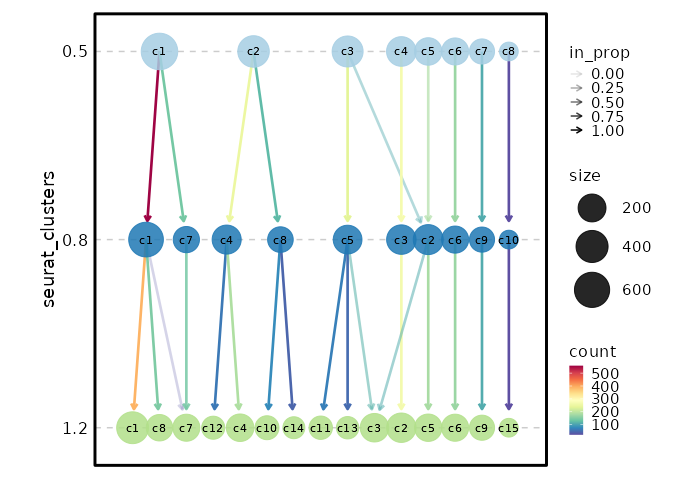
Clustree Plot
[SeuratClusterStats.envs.clustrees."Clustree Plot"]
prefix = "seurat_clusters"
devpars = {height = 500}
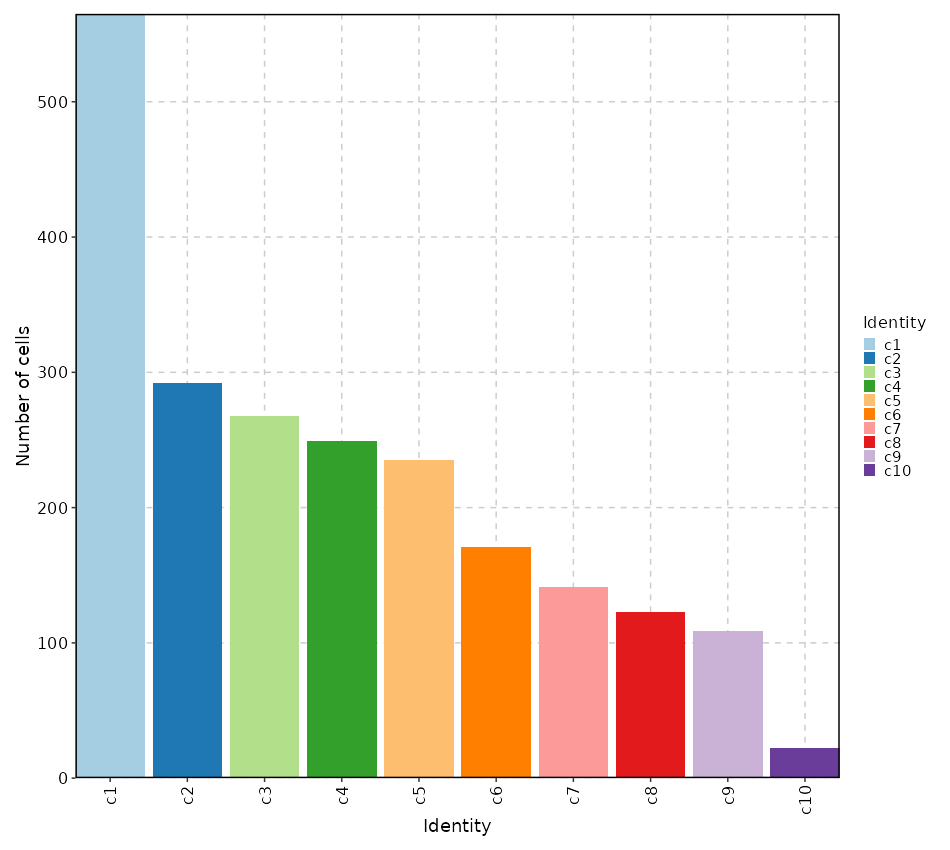
Number of cells in each cluster (Bar Chart)
[SeuratClusterStats.envs.stats."Number of cells in each cluster (Bar Chart)"]
plot_type = "bar"
x_text_angle = 90
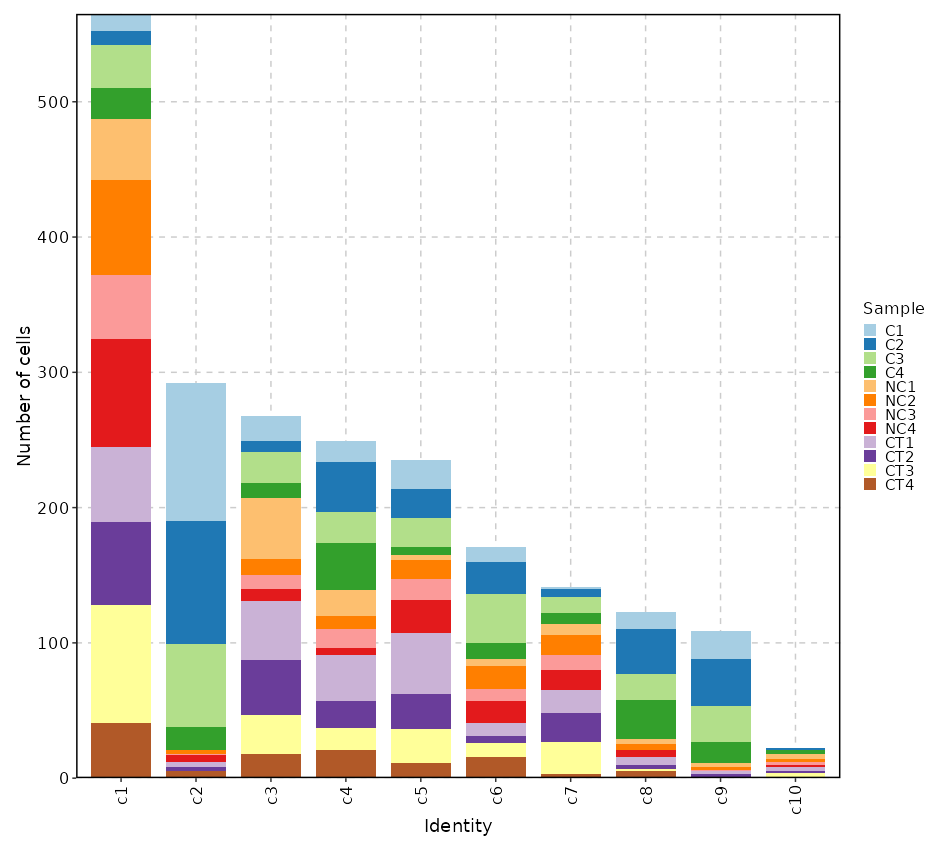
Number of cells in each cluster by Sample (Bar Chart)
[SeuratClusterStats.envs.stats."Number of cells in each cluster by Sample (Bar Chart)"]
plot_type = "bar"
group_by = "Sample"
x_text_angle = 90
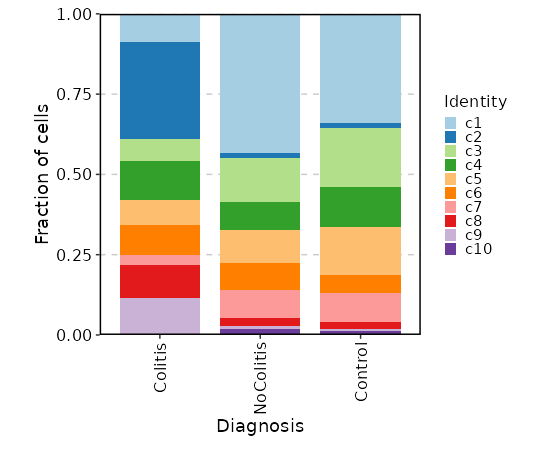
Number of cells in each cluster by Diagnosis
[SeuratClusterStats.envs.stats."Number of cells in each cluster by Diagnosis"]
plot_type = "bar"
group_by = "Diagnosis"
frac = "group"
x_text_angle = 90
swap = true
position = "stack"
Number of cells in each cluster by Diagnosis (Circos Plot)
[SeuratClusterStats.envs.stats."Number of cells in each cluster by Diagnosis (Circos Plot)"]
plot_type = "circos"
group_by = "Diagnosis"
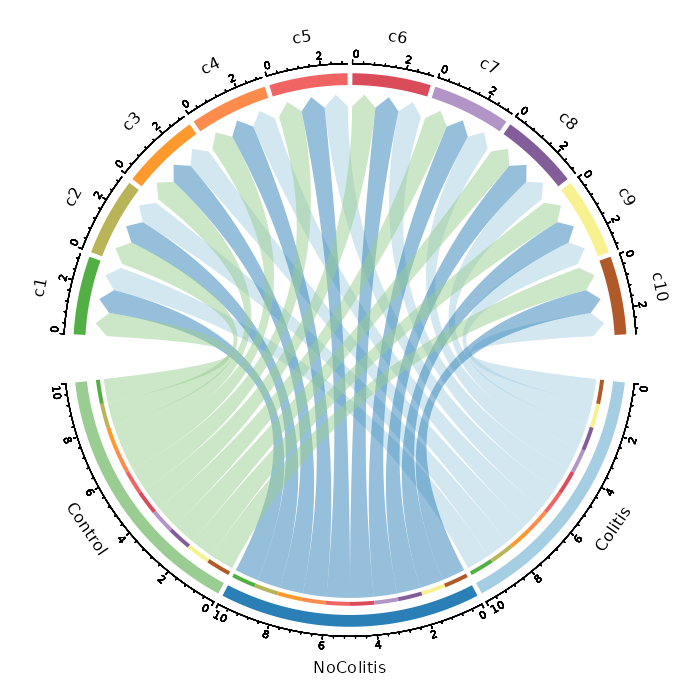
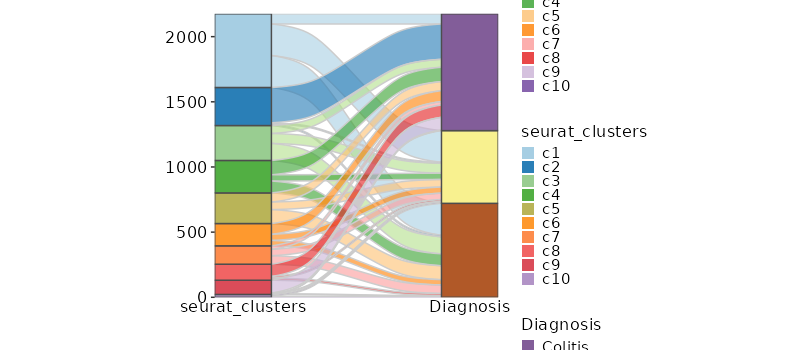
Number of cells in each cluster by Diagnosis (Sankey Plot)
[SeuratClusterStats.envs.stats."Number of cells in each cluster by Diagnosis (Sankey Plot)"]
plot_type = "sankey"
group_by = ["seurat_clusters", "Diagnosis"]
links_alpha = 0.6
devpars = {width = 800}
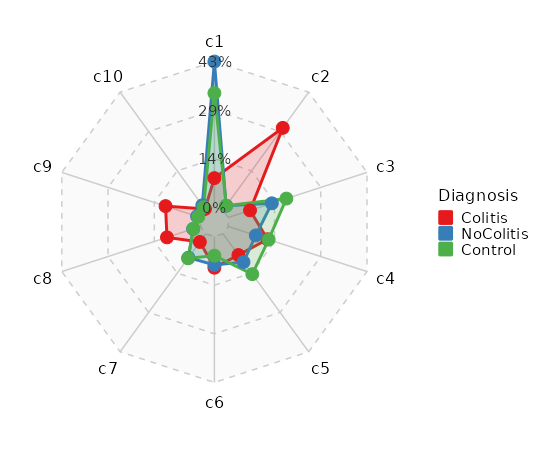
Number of cells in each cluster by Sample (Spider Plot)
[SeuratClusterStats.envs.stats."Number of cells in each cluster by Sample (Spider Plot)"]
plot_type = "spider"
group_by = "Diagnosis"
palette = "Set1"
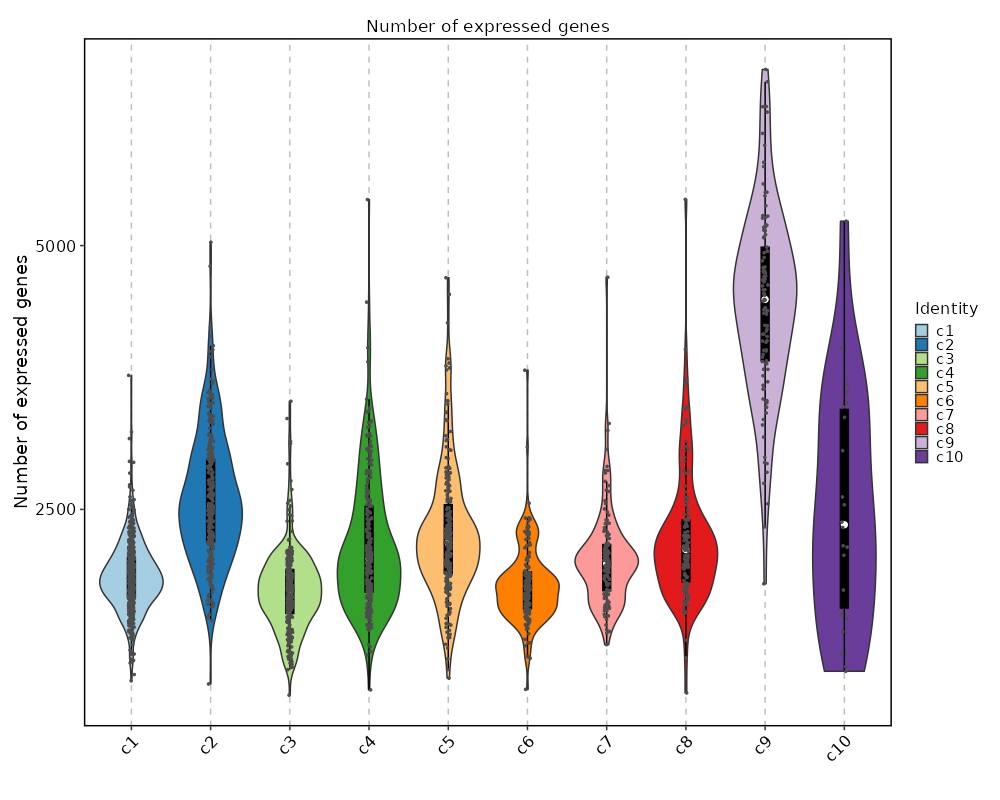
Number of genes detected in each cluster
[SeuratClusterStats.envs.ngenes."Number of genes detected in each cluster"]
plot_type = "violin"
add_box = true
add_point = true
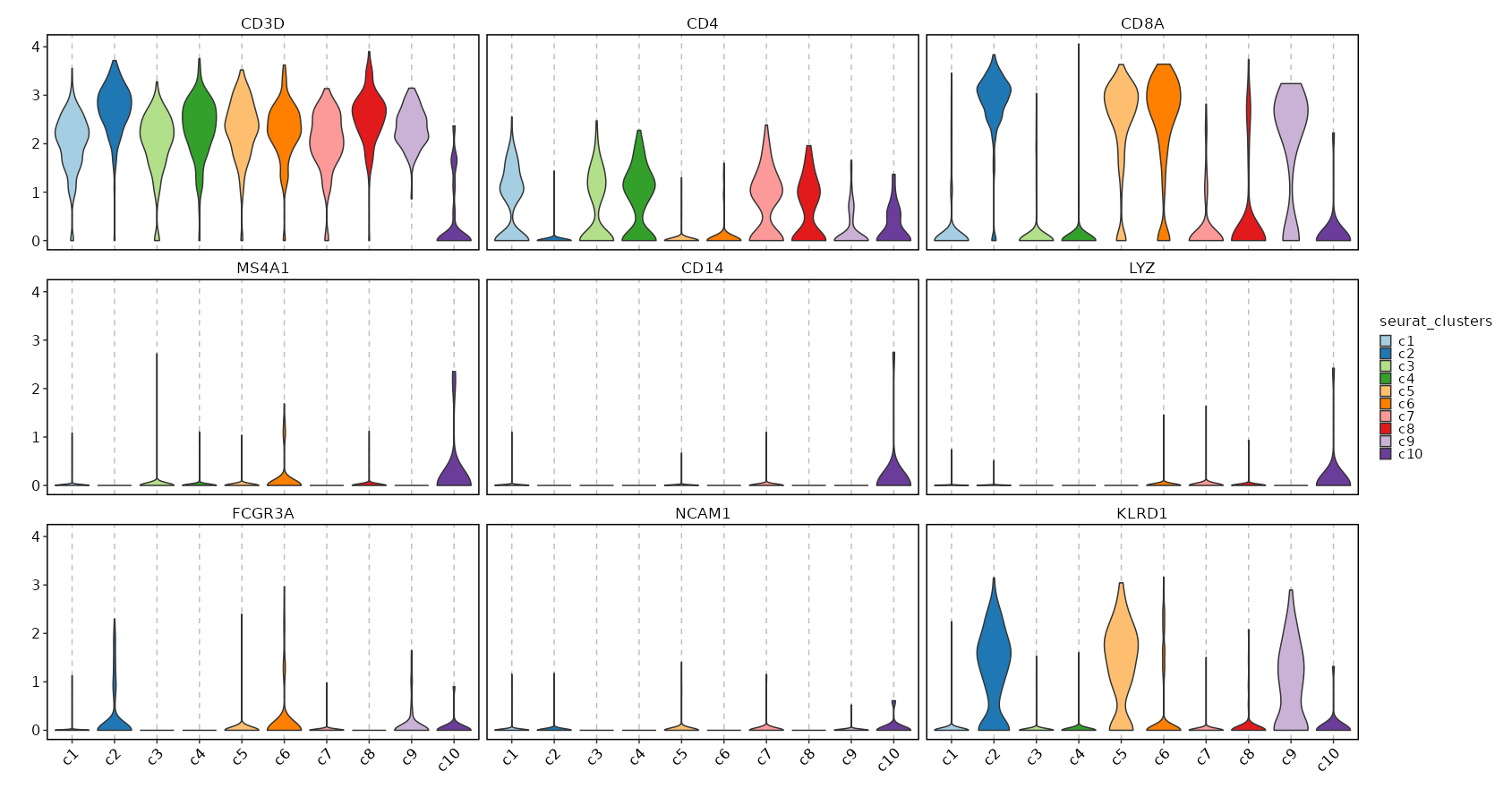
Feature Expression in Clusters (Violin Plots)
[SeuratClusterStats.envs.features_defaults]
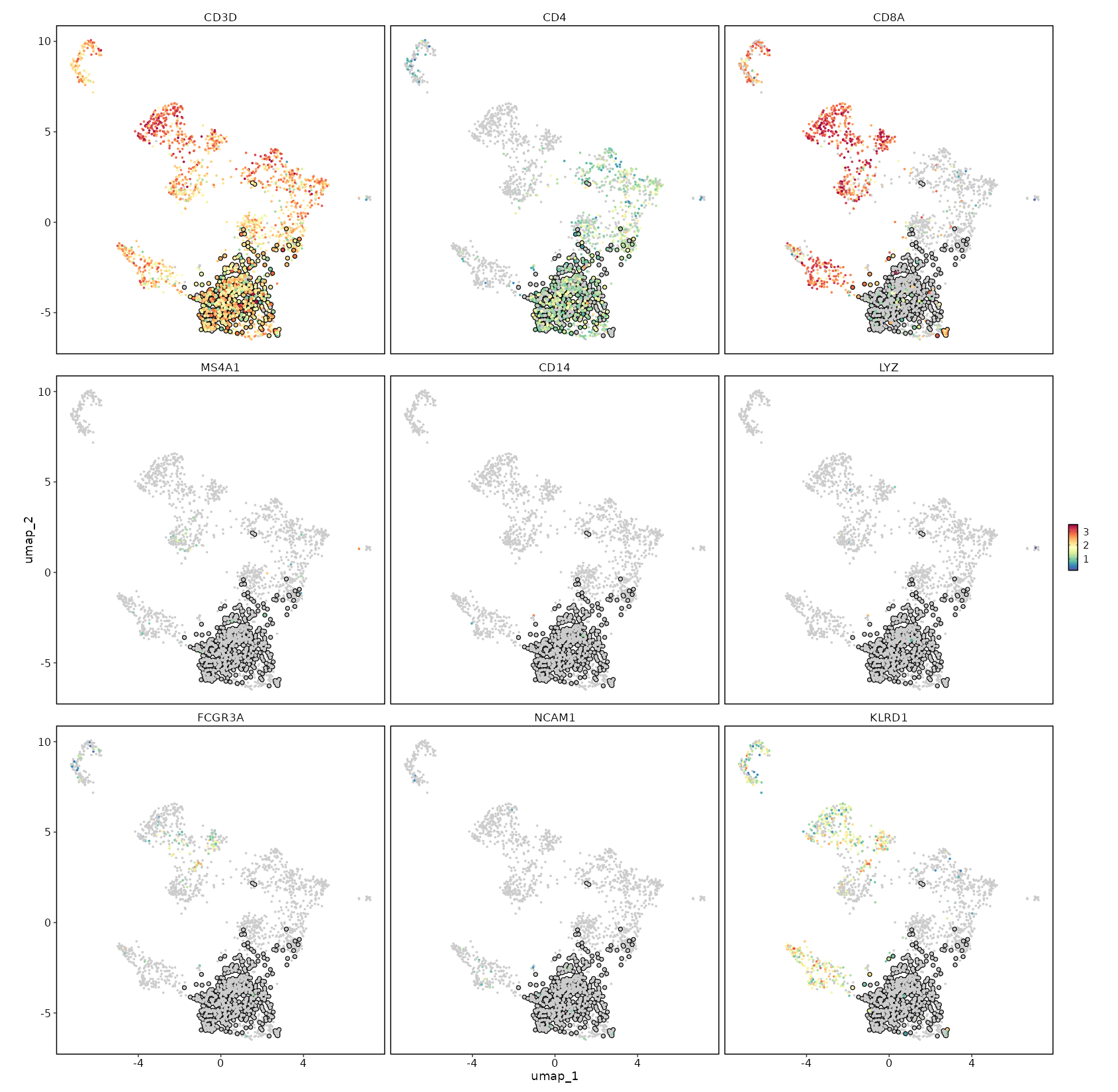
features = ["CD3D", "CD4", "CD8A", "MS4A1", "CD14", "LYZ", "FCGR3A", "NCAM1", "KLRD1"]

[SeuratClusterStats.envs.features."Feature Expression in Clusters (Violin Plots)"]
plot_type = "violin"
ident = "seurat_clusters"
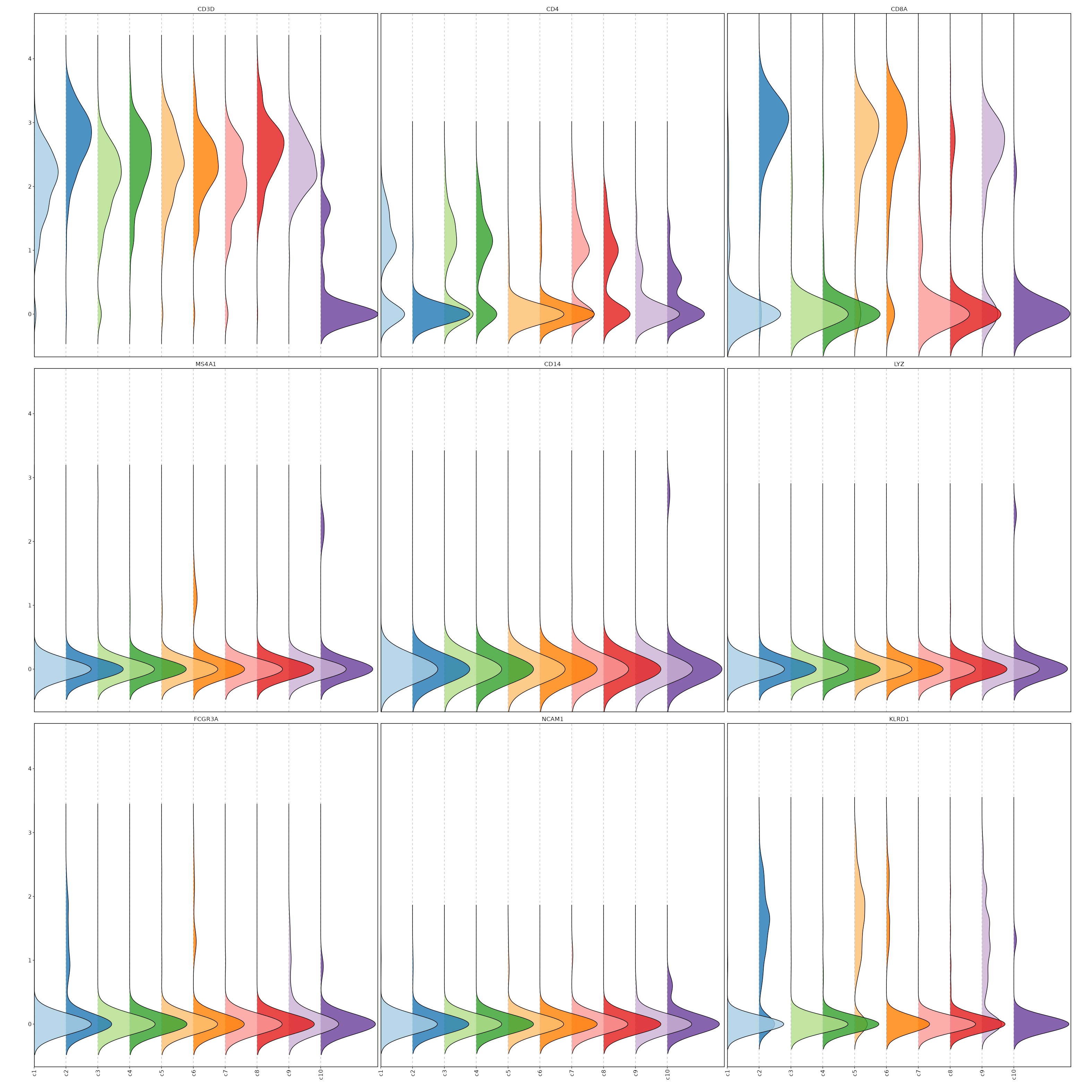
Feature Expression in Clusters (Ridge Plots)
# Using the same features as above
[SeuratClusterStats.envs.features."Feature Expression in Clusters (Ridge Plots)"]
plot_type = "ridge"
ident = "seurat_clusters"
flip = true
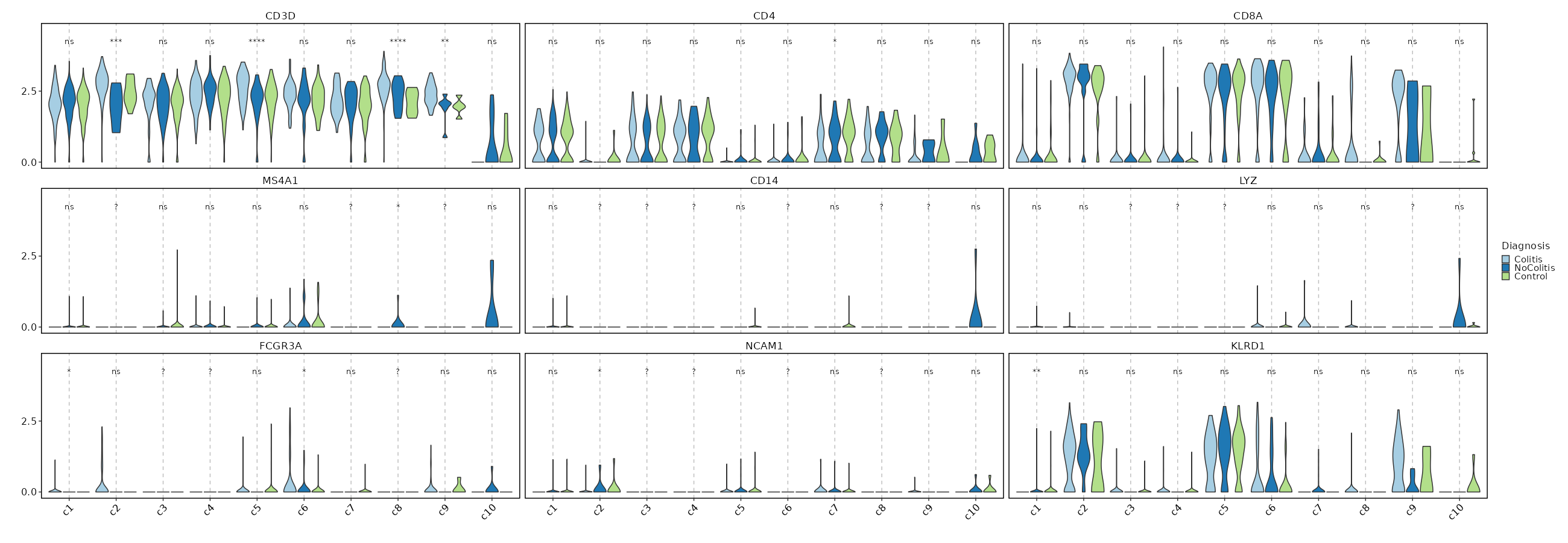
Feature Expression in Clusters by Diagnosis
# Using the same features as above
[SeuratClusterStats.envs.features."Feature Expression in Clusters by Diagnosis"]
plot_type = "violin"
group_by = "Diagnosis"
ident = "seurat_clusters"
comparisons = true
sig_label = "p.signif"
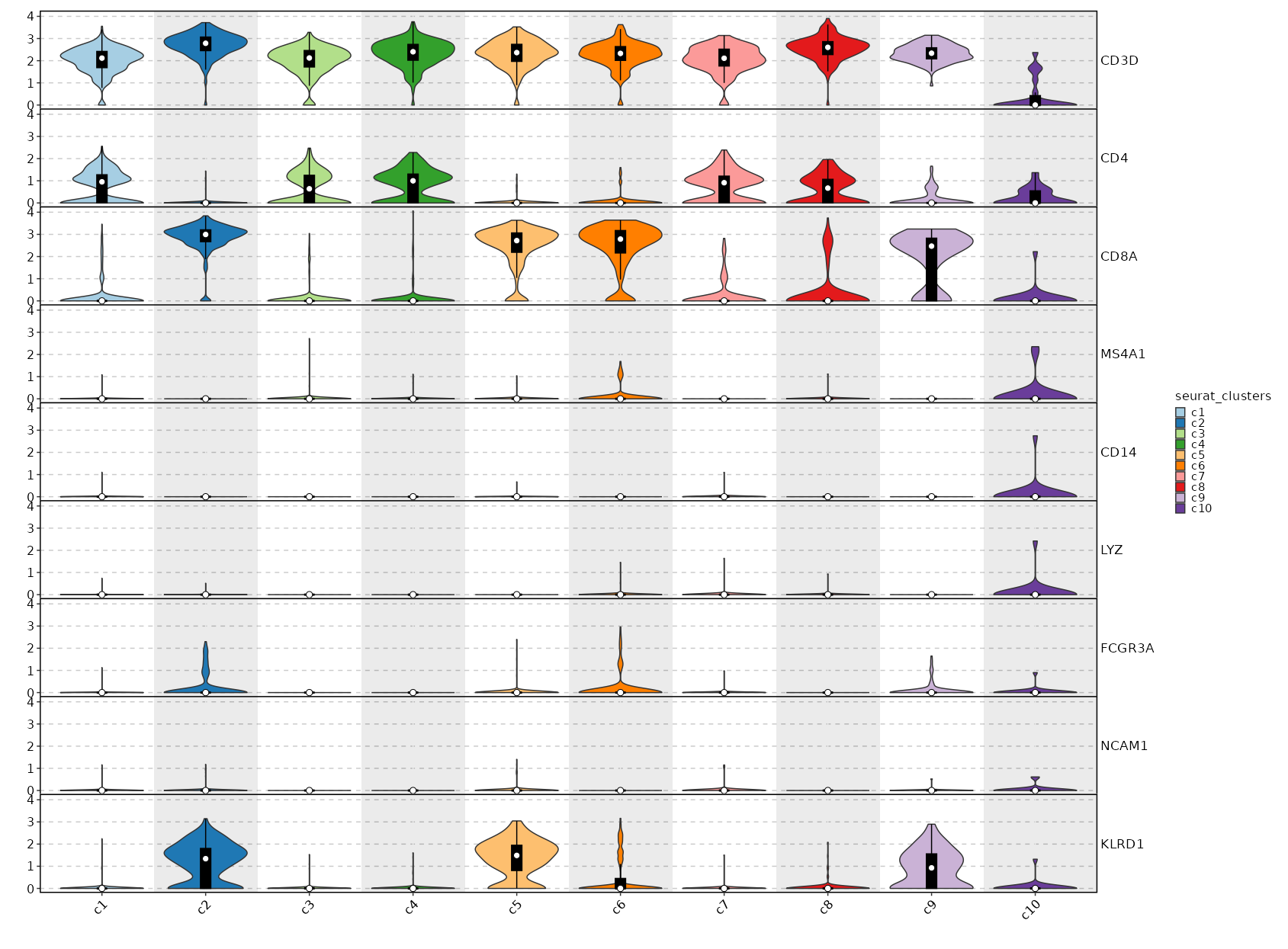
Feature Expression in Clusters (stacked)
# Using the same features as above
[SeuratClusterStats.envs.features."Feature Expression in Clusters (stacked)"]
plot_type = "violin"
ident = "seurat_clusters"
add_bg = true
stack = true
add_box = true
CD4 Expression on UMAP
[SeuratClusterStats.envs.features."CD4 Expression on UMAP"]
plot_type = "dim"
feature = "CD4"
highlight = "seurat_clusters == 'c1'"
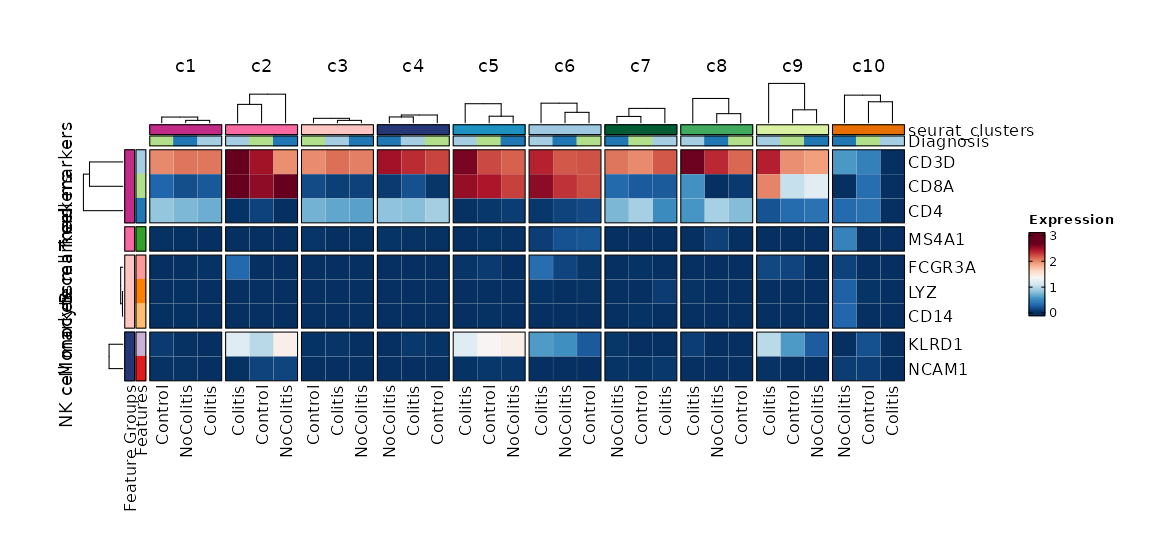
Feature Expression in Clusters by Diagnosis (Heatmap)
[SeuratClusterStats.envs.features."Feature Expression in Clusters by Diagnosis (Heatmap)"]
# Grouped features
features = {"T cell markers" = ["CD3D", "CD4", "CD8A"], "B cell markers" = ["MS4A1"], "Monocyte markers" = ["CD14", "LYZ", "FCGR3A"], "NK cell markers" = ["NCAM1", "KLRD1"]}
plot_type = "heatmap"
ident = "Diagnosis"
columns_split_by = "seurat_clusters"
name = "Expression"
devpars = {height = 560}
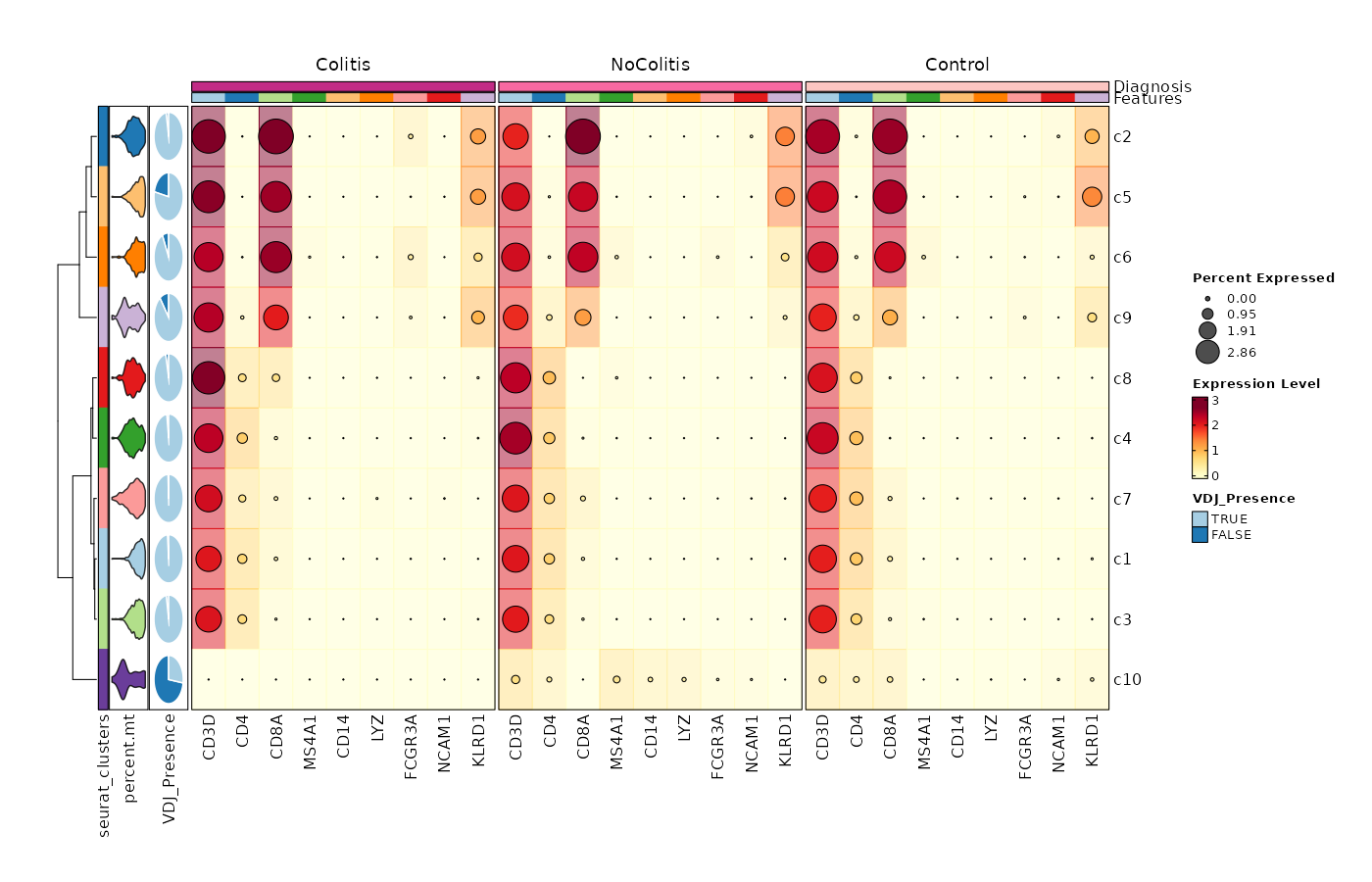
Feature Expression in Clusters by Diagnosis (Heatmap with annotations)
# Using the default features
[SeuratClusterStats.envs.features."Feature Expression in Clusters by Diagnosis (Heatmap with annotations)"]
ident = "seurat_clusters"
cell_type = "dot"
plot_type = "heatmap"
name = "Expression Level"
dot_size = "nanmean"
dot_size_name = "Percent Expressed"
add_bg = true
rows_split_by = "Diagnosis"
cluster_rows = false
flip = true
palette = "YlOrRd"
column_annotation = ["percent.mt", "VDJ_Presence"]
column_annotation_type = {"percent.mt" = "violin", VDJ_Presence = "pie"}
column_annotation_params = {"percent.mt" = {show_legend = false}}
devpars = {width = 1400, height = 900}
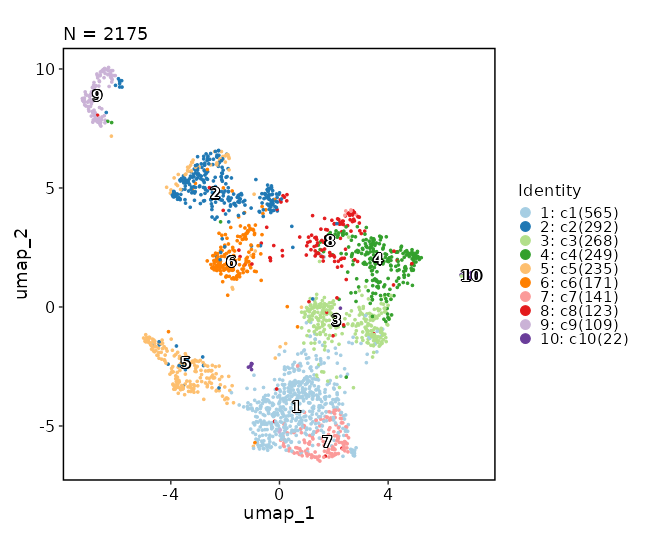
Dimensional reduction plot
[SeuratClusterStats.envs.features."Dimensional reduction plot"]
label = true
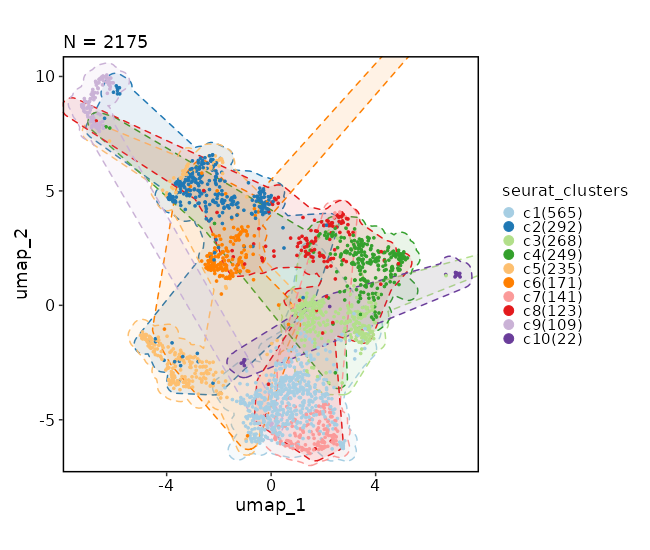
Dimensional reduction plot (with marks)
[SeuratClusterStats.envs.dimplots."Dimensional reduction plot (with marks)"]
add_mark = true
mark_linetype = 2
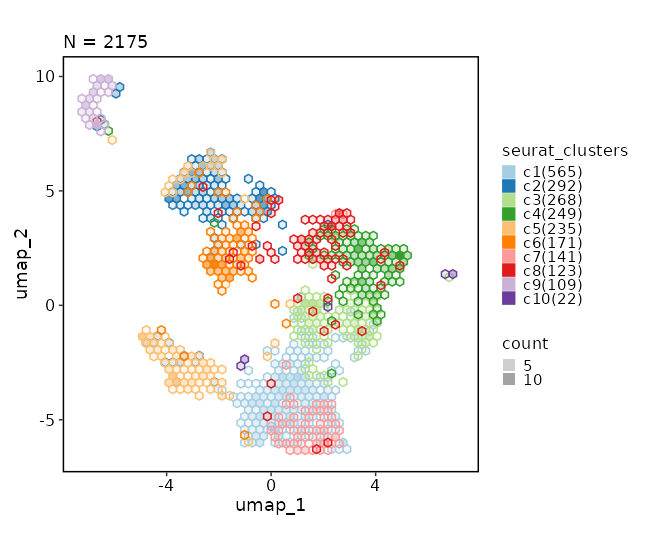
Dimensional reduction plot (with hex bins)
[SeuratClusterStats.envs.dimplots."Dimensional reduction plot (with hex bins)"]
hex = true
hex_bins = 50
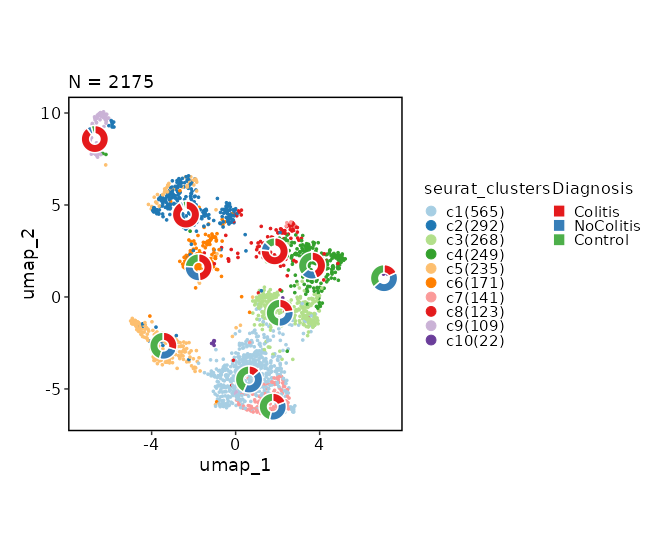
Dimensional reduction plot (with Diagnosis stats)
[SeuratClusterStats.envs.dimplots."Dimensional reduction plot (with Diagnosis stats)"]
stat_by = "Diagnosis"
stat_plot_type = "ring"
stat_plot_size = 0.15
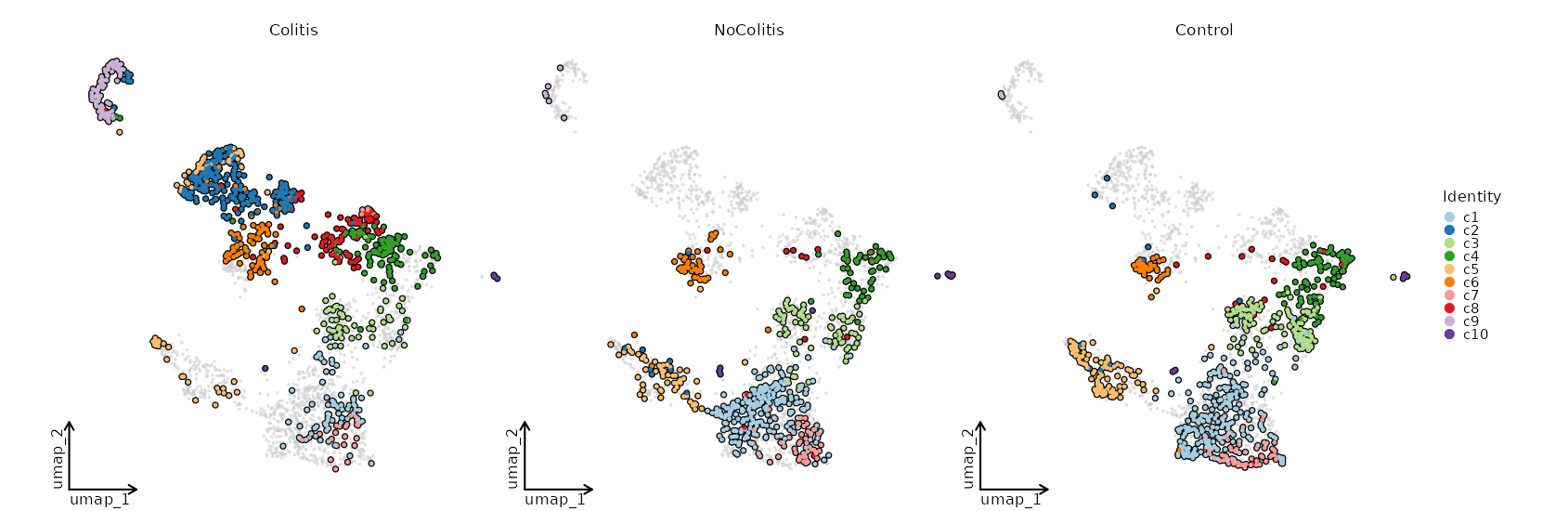
Dimensional reduction plot by Diagnosis
[SeuratClusterStats.envs.dimplots."Dimensional reduction plot by Diagnosis"]
facet_by = "Diagnosis"
highlight = true
theme = "theme_blank"
srtobj— The seurat object loaded bySeuratClustering
outdir— The output directory.Different types of plots will be saved in different subdirectories. For example,clustreeplots will be saved inclustreessubdirectory. For each case inenvs.clustrees, both the png and pdf files will be saved.
cache(type=auto) — Whether to cache the plots.Currently only plots for features are supported, since creating the those plots can be time consuming. IfTrue, the plots will be cached in the job output directory, which will be not cleaned up when job is rerunning.clustrees(type=json) — The cases for clustree plots.Keys are the names of the plots and values are the dicts inherited fromenv.clustrees_defaultsexceptprefix. There is no default case forclustrees.clustrees_defaults(ns) — The parameters for the clustree plots.- - devpars (ns): The device parameters for the clustree plot.
- res (type=int): The resolution of the plots.
- height (type=int): The height of the plots.
- width (type=int): The width of the plots. - - more_formats (type=list): The formats to save the plots other than
png. - - save_code (flag): Whether to save the code to reproduce the plot.
- - prefix (type=auto): string indicating columns containing clustering information.
The trailing dot is not necessary and will be added automatically.
WhenTRUE, clustrees will be plotted when there isFindClustersor
FindClusters.*in theobj@commands.
The latter is generated bySeuratSubClustering.
This will be ignored whenenvs.clustreesis specified
(the prefix of each case must be specified separately). - -
: Other arguments passed to scplotter::ClustreePlot.
See https://pwwang.github.io/scplotter/reference/ClustreePlot.html
- - devpars (ns): The device parameters for the clustree plot.
dimplots(type=json) — The dimensional reduction plots.Keys are the titles of the plots and values are the dicts inherited fromenv.dimplots_defaults. It can also have other parameters fromscplotter::CellDimPlot.dimplots_defaults(ns) — The default parameters fordimplots.You can also setdimsto[1, 2, 3]to make a 3D dimensional reduction plot. Note that the defaultn.componentsforRunUMAPis 2, so if you want to make a 3D UMAP plot, you need to setn.componentsto 3 inRunUMAPparameters inSeuratSubClusteringorSeuratClustering.- - group_by: The identity to use.
- - split_by: The column name in metadata to split the cells into different plots.
- - subset: An expression to subset the cells, will be passed to
tidyrseurat::filter(). - - devpars (ns): The device parameters for the plots.
- res (type=int): The resolution of the plots.
- height (type=int): The height of the plots.
- width (type=int): The width of the plots. - - reduction (choice): Which dimensionality reduction to use.
- dim: Ifidentis from subclustering,<group_by>.<reduction>will be used.
Otherwise,scplotter:::default_dimreduc(obj)will be used to determine
the default dimensionality reduction to use based on the reductions available in the object.
- auto: Same asdim
- umap: UseSeurat::UMAPPlot.
- tsne: UseSeurat::TSNEPlot.
- pca: UseSeurat::PCAPlot. - -
: See https://pwwang.github.io/scplotter/reference/CellDimPlot.html
features(type=json) — The plots for features, include gene expressions, and columns from metadata.Keys are the titles of the cases and values are the dicts inherited fromenv.features_defaults.features_defaults(ns) — The default parameters forfeatures.- - features (type=auto): The features to plot.
It can be either a string with comma separated features, a list of features, a file path withfile://prefix with features
(one per line), or an integer to use the top N features fromVariantFeatures(srtobj).
It can also be a dict with the keys as the feature group names and the values as the features, which
is used for heatmap to group the features. - - order_by (type=auto): The order of the clusters to show on the plot.
An expression passed todplyr::arrange()on the grouped meta data frame (byident).
For example, you can order the clusters by the activation score of
the cluster:desc(mean(ActivationScore, na.rm = TRUE)), suppose you have a column
ActivationScorein the metadata.
You may also specify the literal order of the clusters by a list of strings (at least two). - - subset: An expression to subset the cells, will be passed to
tidyrseurat::filter(). - - devpars (ns): The device parameters for the plots.
- res (type=int): The resolution of the plots.
- height (type=int): The height of the plots.
- width (type=int): The width of the plots. - - descr: The description of the plot, showing in the report.
- - more_formats (type=list): The formats to save the plots other than
png. - - save_code (flag): Whether to save the code to reproduce the plot.
- - save_data (flag): Whether to save the data used to generate the plot.
- -
: Other arguments passed to scplotter::FeatureStatPlot.
See https://pwwang.github.io/scplotter/reference/FeatureStatPlot.html
- - features (type=auto): The features to plot.
mutaters(type=json) — The mutaters to mutate the metadata to subset the cells.The mutaters will be applied in the order specified. You can also use the clone selectors to select the TCR clones/clusters. See https://pwwang.github.io/scplotter/reference/clone_selectors.html. You can also use key<newcol>:identto set the<newcol>as the default ident for the stats. See also https://pwwang.github.io/biopipen.utils.R/reference/MutateSeuratMeta.htmlncores(type=int) — Number of cores to use for reading and writing the data.ngenes(type=json) — The number of genes expressed in each cell.Keys are the names of the plots and values are the dicts inherited fromenv.ngenes_defaults.ngenes_defaults(ns) — The default parameters forngenes.The default parameters to plot the number of genes expressed in each cell.- - more_formats (type=list): The formats to save the plots other than
png. - - subset: An expression to subset the cells, will be passed to
tidyrseurat::filter(). - - devpars (ns): The device parameters for the plots.
- res (type=int): The resolution of the plots.
- height (type=int): The height of the plots.
- width (type=int): The width of the plots.
- - more_formats (type=list): The formats to save the plots other than
stats(type=json) — The number/fraction of cells to plot.Keys are the names of the plots and values are the dicts inherited fromenv.stats_defaults.stats_defaults(ns) — The default parameters forstats.This is to do some basic statistics on the clusters/cells. For more comprehensive analysis, see https://pwwang.github.io/scplotter/reference/CellStatPlot.html. The parameters from the cases can overwrite the default parameters.- - subset: An expression to subset the cells, will be passed to
tidyrseurat::filter(). - - devpars (ns): The device parameters for the clustree plot.
- res (type=int): The resolution of the plots.
- height (type=int): The height of the plots.
- width (type=int): The width of the plots. - - descr: The description of the plot, showing in the report.
- - more_formats (type=list): The formats to save the plots other than
png. - - save_code (flag): Whether to save the code to reproduce the plot.
- - save_data (flag): Whether to save the data used to generate the plot.
- -
: Other arguments passed to scplotter::CellStatPlot.
See https://pwwang.github.io/scplotter/reference/CellStatPlot.html.
- - subset: An expression to subset the cells, will be passed to
r-seurat—- check: {{proc.lang}} -e "library(Seurat)"
__init_subclass__()— Do the requirements inferring since we need them to build up theprocess relationship </>from_proc(proc,name,desc,envs,envs_depth,cache,export,output_flatten,error_strategy,num_retries,forks,input_data,order,plugin_opts,requires,scheduler,scheduler_opts,submission_batch)(Type) — Create a subclass of Proc using another Proc subclass or Proc itself</>gc()— GC process for the process to save memory after it's done</>log(level,msg,*args,logger)— Log message for the process</>run()— Init all other properties and jobs</>
pipen.proc.ProcMeta(name, bases, namespace, **kwargs)
Meta class for Proc
from_proc(proc, name=None, desc=None, envs=None, envs_depth=None, cache=None, export=None, output_flatten=None, error_strategy=None, num_retries=None, forks=None, input_data=None, order=None, plugin_opts=None, requires=None, scheduler=None, scheduler_opts=None, submission_batch=None)
Create a subclass of Proc using another Proc subclass or Proc itself
proc(Type) — The Proc subclassname(str | none, optional) — The new name of the processdesc(str | none, optional) — The new description of the processenvs(Optional, optional) — The arguments of the process, will overwrite parent oneThe items that are specified will be inheritedenvs_depth(int | none, optional) — How deep to update the envs when subclassed.cache(bool | none, optional) — Whether we should check the cache for the jobsexport(bool | none, optional) — When True, the results will be exported to<pipeline.outdir>Defaults to None, meaning only end processes will export. You can set it to True/False to enable or disable exporting for processesoutput_flatten(bool | none, optional) — Whether to flatten the output when saving to the outputdirectory. Normally, the output will be saved in a subdirectory named after the job index (e.g.<outdir>/0,<outdir>/1, etc.). Ifoutput_flattenis True, the output will be saved directly in the output directory without the subdirectories. This is useful when you want the job outputs to be directly revealed in the output directory. Note that this only works for processes with export=True or end processes and make sure the name of the output files won't conflict for jobs with each other when flattening. It takes 3 possible values- - None (default): flatten the output for single-job processes only
- - True: flatten the output for all processes
- - False: never flatten the output
error_strategy(str | none, optional) — How to deal with the errors- - retry, ignore, halt
- - halt to halt the whole pipeline, no submitting new jobs
num_retries(int | none, optional) — How many times to retry to jobs once error occursforks(int | none, optional) — New forks for the new processinput_data(any | none, optional) — The input data for the process. Only when this processis a start processorder(int | none, optional) — The order to execute the new processplugin_opts(Optional, optional) — The new plugin options, unspecified items will beinherited.requires(Optional, optional) — The required processes for the new processscheduler(str | none, optional) — The new shedular to run the new processscheduler_opts(Optional, optional) — The new scheduler options, unspecified items willbe inherited.submission_batch(int | none, optional) — How many jobs to be submited simultaneously.
The new process class
__init_subclass__()
Do the requirements inferring since we need them to build up theprocess relationship
run()
Init all other properties and jobs
gc()
GC process for the process to save memory after it's done
log(level, msg, *args, logger=<LoggerAdapter pipen.core (WARNING)>)
Log message for the process
level(int | str) — The log level of the recordmsg(str) — The message to log*args— The arguments to format the messagelogger(LoggerAdapter, optional) — The logging logger
biopipen.ns.scrna.HdWGCNA(*args, **kwds) → Proc
Weighted gene co-expression network analysis (WGCNA) for single-cell RNA-seq data.
Wrapping hdWGCNA (v0.4.12).
For a comprehensive introduction and usage guide, please refer to
the hdWGCNA tutorials.
The analysis includes the following steps:
- Setup:
SetupForWGCNAto select the genes for WGCNA. - Data aggregation (choose one):
- Metacells (recommended):
MetacellsByGroups+NormalizeMetacells, with optionalScaleMetacells,RunPCAMetacells,RunHarmonyMetacellsandRunUMAPMetacells. - Pseudobulk:
AggregatePseudobulk+NormalizeCounts(DESeq2 VST). - Network construction:
SetDatExpr+TestSoftPowers+ConstructNetwork, orSetMultiExpr+TestSoftPowersConsensus+ConstructNetworkfor a consensus network (use_consensus). - Module analysis:
ModuleEigengenes+ModuleConnectivity(kME), optionallyResetModuleNames/ResetModuleColors, andGetHubGenesfor hub genes. - Downstream analyses: module visualization (
plots), differential module expression (dmes), module-trait correlation (module_trait_corr), functional enrichment (enrich), module preservation/projection (module_preservations), TF regulatory networks (tf_network) and motif overlap (motifs).
The envs that configure a single hdWGCNA function are named after the function itself
(e.g. SetupForWGCNA, MetacellsByGroups), and the keys within them are the argument
names of the corresponding R function, with - used in place of . in the argument
names (e.g. group.by -> group-by). The envs that bundle several functions
(plots, dmes, module_trait_corr, enrich, module_preservations, tf_network,
motifs) are case-based, where the keys are the titles of the cases and the values
inherit from the corresponding *_defaults env.
Packages:
Core (required for any analysis, checked by Requires):
Seurat, hdWGCNA,
WGCNA, igraph,
patchwork,
tidyseurat, glue and
biopipen.utils (provides RunEnrichment/
VizEnrichment).
**Advanced** (only when the corresponding analyses are enabled):
- - **Enrichment** (`enrich`): [enrichit](https://github.com/pwwang/enrichit)
(via `biopipen.utils::RunEnrichment`, requires internet access for the
Enrichr API). - - **GSEA** (`gsea`): [fgsea](https://bioconductor.org/packages/fgsea/);
[msigdbr](https://cran.r-project.org/package=msigdbr) only when
`genesets` is given as a dict of arguments for `msigdbr::msigdbr()`
(e.g. `{species: "human", collection: "C5", subcollection: "BP"}`) —
a GMT file needs no extra package. - - **Motif scan** (`tf_network.motif_scan` and `motifs`):
[TFBSTools](https://bioconductor.org/packages/TFBSTools/),
[motifmatchr](https://bioconductor.org/packages/motifmatchr/),
a JASPAR package (e.g. [JASPAR2020](https://bioconductor.org/packages/JASPAR2020/)),
a BSgenome package (e.g. `BSgenome.Hsapiens.UCSC.hg38`, set via
`species_genome`), and an EnsDb package (e.g. `EnsDb.Hsapiens.v86`,
set via `ensdb_package`). - - **TF network** (`tf_network.construct`): [xgboost](https://cran.r-project.org/package=xgboost).
- - **Regulon scores** (`tf_network.regulon_scores`, and `ModuleExprScore`
with `method: "UCell"`): [UCell](https://github.com/carmonalab/UCell). - - **Regulon enrichment** (`tf_network.enrich_regulons`): [enrichit](https://github.com/pwwang/enrichit)
(via `biopipen.utils::RunEnrichment`, requires internet access for the
Enrichr API). - - **Regulatory heatmap** (`tf_network.regulatory_heatmap`): [forcats](https://forcats.tidyverse.org/)
(hdWGCNA uses `fct_rev()` in the heatmap's aes without importing forcats). - - **Module preservation** (`module_preservations.netrep`): [NetRep](https://cran.r-project.org/package=NetRep).
- - **Metacells** (`RunHarmonyMetacells`): [harmony](https://cran.r-project.org/package=harmony).
- - **Pseudobulk** (`NormalizeCounts` with `method: "VST"`): [DESeq2](https://bioconductor.org/packages/DESeq2).
cache— Should we detect whether the jobs are cached?desc— The description of the process. Will use the summary fromthe docstring by default.dirsig— When checking the signature for caching, whether should we walkthrough the content of the directory? This is sometimes time-consuming if the directory is big.envs— The arguments that are job-independent, useful for common optionsacross jobs.envs_depth— How deep to update the envs when subclassed.error_strategy— How to deal with the errors- - retry, ignore, halt
- - halt to halt the whole pipeline, no submitting new jobs
export— When True, the results will be exported to<pipeline.outdir>Defaults to None, meaning only end processes will export. You can set it to True/False to enable or disable exporting for processesforks— How many jobs to run simultaneously?input— The keys for the input channelinput_data— The input data (will be computed for dependent processes)lang— The language for the script to run. Should be the path to theinterpreter iflangis not in$PATH.name— The name of the process. Will use the class name by default.nexts— Computed fromrequiresto build the process relationshipsnum_retries— How many times to retry to jobs once error occursorder— The execution order for this process. The bigger the numberis, the later the process will be executed. Default: 0. Note that the dependent processes will always be executed first. This doesn't work for start processes either, whose orders are determined byPipen.set_starts()output— The output keys for the output channel(the data will be computed)output_data— The output data (to pass to the next processes)output_flatten— Whether to flatten the output when saving to the outputdirectory. Normally, the output will be saved in a subdirectory named after the job index (e.g.<outdir>/0,<outdir>/1, etc.). Ifoutput_flattenis True, the output will be saved directly in the output directory without the subdirectories. This is useful when you want the job outputs to be directly revealed in the output directory. Note that this only works for processes with export=True or end processes and make sure the name of the output files won't conflict for jobs with each other when flattening. It takes 3 possible values- - None (default): flatten the output for single-job processes only
- - True: flatten the output for all processes
- - False: never flatten the output
plugin_opts— Options for process-level pluginsrequires— The dependency processesscheduler— The scheduler to run the jobsscheduler_opts— The options for the schedulerscript— The script template for the processsubmission_batch— How many jobs to be submited simultaneously.The program entrance for some schedulers may take too much resources when submitting a job or checking the job status. So we may use a smaller number here to limit the simultaneous submissions.template— Define the template engine to use.This could be either a template engine or a dict with keyengineindicating the template engine and the rest the arguments passed to the constructor of thepipen.template.Templateobject. The template engine could be either the name of the engine, currently jinja2 and liquidpy are supported, or a subclass ofpipen.template.Template. You can subclasspipen.template.Templateto use your own template engine.
srtobj— The Seurat object to analyze
outdir— The output directory
AggregatePseudobulk(type=json) — The arguments forhdWGCNA::AggregatePseudobulk.- - replicate_col: The column in metadata for the replicate (sample) of each cell.
- - group_col: The column in metadata for the group of each cell.
ConstructNetwork(type=json) — The arguments forhdWGCNA::ConstructNetwork.- - soft_power: The soft power to use.
Noneto use the one determined byTestSoftPowers. - - tom_name: The name of the TOM matrix. Defaults to the
wgcna_name. - - minModuleSize: The minimum number of genes in a module.
- - mergeCutHeight: The cut height for merging similar modules.
- - soft_power: The soft power to use.
GetHubGenes(type=json) — The arguments forhdWGCNA::GetHubGenes.MetacellsByGroups(type=json) — The arguments forhdWGCNA::MetacellsByGroups.- - group-by: The metadata columns to group the cells by.
- - ident-group: The column to use as the identity of the metacells.
ModuleConnectivity(type=json) — The arguments forhdWGCNA::ModuleConnectivity.ModuleEigengenes(type=json) — The arguments forhdWGCNA::ModuleEigengenes.ModuleExprScore— The arguments forhdWGCNA::ModuleExprScore.Runs beforedmesso that the module scores can be used as the features for DMEs.Noneto skip.NormalizeCounts(type=json) — The arguments forhdWGCNA::NormalizeCounts.NormalizeMetacells(type=json) — The arguments forhdWGCNA::NormalizeMetacells.ResetModuleColors— The arguments forhdWGCNA::ResetModuleColors.Noneto skip.ResetModuleNames— The arguments forhdWGCNA::ResetModuleNames.Noneto skip. e.g.{new_name: "M"}to rename the modules toM1,M2, ...RunHarmonyMetacells— The arguments forhdWGCNA::RunHarmonyMetacells.Noneto skip. Requiresgroup-by-varsto be set.RunPCAMetacells— The arguments forhdWGCNA::RunPCAMetacells.Noneto skip.RunUMAPMetacells— The arguments forhdWGCNA::RunUMAPMetacells.Noneto skip.ScaleMetacells— The arguments forhdWGCNA::ScaleMetacells.Noneto skip.SetDatExpr(type=json) — The arguments forhdWGCNA::SetDatExpr.Note that in the pseudobulk mode,matandlayerare set automatically.SetMultiExpr— The arguments forhdWGCNA::SetMultiExpr.Required whenuse_consensusis true. Whenuse_pseudobulkis true,matandlayerare set automatically, andmulti-group-byshould be set to the column in the pseudobulk metadata that defines the groups (e.g.cell_type).SetupForWGCNA(type=json) — The arguments forhdWGCNA::SetupForWGCNA.- - wgcna_name: The name of the WGCNA network, will be used throughout the analysis.
- - gene_select: The gene selection method.
- - fraction: The fraction of cells that a gene needs to be expressed in to be
included whengene_select = "fraction".
TestSoftPowers(type=json) — The arguments forhdWGCNA::TestSoftPowers.TestSoftPowersConsensus(type=json) — The arguments forhdWGCNA::TestSoftPowersConsensus.cache— The directory to cache the TOM matrices (they are large).trueto use the joboutput directory. By default, the TOM matrices are cached in the output directory.dmes(type=json) — The differential module expression analyses. Keys are the titles of thecases and values are the dicts inherited fromdmes_defaults. Other arguments ofFindAllDMEs/FindDMEscan also be set, pluspvaluefor the p-value column used by the lollipop plot (default:p_val_adj).dmes_defaults(ns) — The default parameters for the cases indmes.- - mode (choice):
find_allto useFindAllDMEs,findto useFindDMEs. - - group-by: The column in metadata to group the cells by (for
find_all). - - barcodes1: The barcodes of the first group to compare (for
find). - - barcodes2: The barcodes of the second group to compare (for
find). - - lollipop (flag): Whether to make the lollipop plot.
- - volcano (flag): Whether to make the volcano plot.
- - devpars (ns): The device parameters for the plots.
- - mode (choice):
enrich(type=json) — The functional enrichment analyses for the module genes. Keys are thetitles of the cases and values are the dicts inherited fromenrich_defaults. The enrichment is done byenrichit::RunEnrichmentand the plots byplotthis::VizEnrichment. Requires internet access.enrich_defaults(ns) — The default parameters for the cases inenrich.- - dbs: The databases to use for the enrichment analysis (via enrichit).
- - enrich_plots (type=json): The plots to make for each module. Keys are the titles of
the plots and values are the arguments for
plotthis::VizEnrichment,
includingdb,plot_type,top_term,metric, etc. - - devpars (ns): The device parameters for the plots.
gsea(type=json) — The gene set enrichment analyses of the module gene ranks (kME) foreach module. Keys are the titles of the cases and values are the dicts inherited fromgsea_defaults. Other arguments ofbiopipen.utils::RunGSEA(e.g.minSize,maxSize) can also be set. The analysis is done byfgseaand the plots byplotthis::VizGSEA(GSEASummaryPlot/GSEAPlot).gsea_defaults(ns) — The default parameters for the cases ingsea.- - genesets: The gene sets to test against. A dict of arguments for
msigdbr::msigdbr()
(e.g.{species: "human", collection: "C5", subcollection: "BP"}), or a GMT file. - - metric: The significance metric used to rank the terms,
p.adjustorpvalue. - - cutoff: The significance cutoff for the terms (on the
metriccolumn). - - top_term (type=int): The number of top terms to show in the summary plot, and
the default number of terms for the running-score plots. - - gsea_plots (type=json): The running-score plots. Keys are the titles and values are
the arguments for
plotthis::VizGSEA
withplot_type: "gsea"(the summary plot is always made),
includinggs(the gene set IDs to plot; default: the top significant terms),
top_term, etc. - - devpars (ns): The device parameters for the plots.
- - genesets: The gene sets to test against. A dict of arguments for
module_preservations(type=json) — The module preservation/projection analyses. Keys are thetitles of the cases and values are the dicts inherited frommodule_preservations_defaults. Requiresref_srtobjto be set.module_preservations_defaults(ns) — The default parameters for the cases inmodule_preservations.- - project_modules (flag): Whether to project the modules to the reference object
(viaProjectModules). - - preserve (flag): Whether to test the module preservation
(viaModulePreservation). - - project_args (ns): The arguments for
ProjectModules. - - preserve_args (ns): The arguments for
ModulePreservation. - - plot (flag): Whether to make the preservation plot.
- - lollipop (flag): Whether to make the lollipop plot.
- - netrep (ns): The network reproduction test (via
ModulePreservationNetRep).{}to skip.
- args: The arguments forModulePreservationNetRep.
- topology_heatmap (type=json): The topology heatmaps. Keys are the titles and values
are the arguments forModuleTopologyHeatmap, withmodrequired.
- topology_barplot (type=json): The topology barplots. Keys are the titles and values
are the arguments forModuleTopologyBarplot, withmodrequired. - - devpars (ns): The device parameters for the plots.
- - project_modules (flag): Whether to project the modules to the reference object
module_trait_corr(type=json) — The module-trait correlation analyses. Keys are the titlesof the cases and values are the dicts inherited frommodule_trait_corr_defaults.module_trait_corr_defaults(ns) — The default parameters for the cases inmodule_trait_corr.- - traits: The columns in metadata to use as the traits (a character vector).
- - group-by: The column in metadata to group the cells by.
- - devpars (ns): The device parameters for the plots.
motifs(ns) — The motif overlap analysis.{}to skip. Requirestf_network.motif_scanto be run.- - overlap_bar_plot (ns): The arguments for
MotifOverlapBarPlot. The plots are written
to<outdir>/plots/MotifOverlap.
- - overlap_bar_plot (ns): The arguments for
mutaters(type=json) — The columns to add to the metadata of the object.SeeSeuratPreparingfor more details.ncores(type=int) — The number of cores to use.plots(type=json) — The plots to make. Keys are the titles of the plots and valuesare the dicts inherited fromplots_defaults.- - kind: The kind of the plot, one of
soft_powers(the soft power selection plots,
SFT and fit, saved as<title>.sft.pngand<title>.fit.png),dendrogram
(the gene dendrogram),kmes(the kME module membership plots, arguments for
PlotKMEs),module_umap(the module UMAP, arguments forRunModuleUMAPat the
case level exceptumap_plot_args, and the arguments forModuleUMAPPlotin the
sub-dictumap_plot_args),module_network(the module network plots,
ModuleNetworkPlotwrites the plots to<outdir>/plots/ModuleNetworks.<title>),
hub_gene_network,module_feature(arguments forModuleFeaturePlot),
module_radar(arguments forModuleRadarPlot),module_correlogram
(arguments forModuleCorrelogram),consensus_compare(only when
use_consensusis true: re-runs the standard non-consensus workflow on the
same data understandard_name, then plots both the consensus and standard
module colors on the consensus dendrogram viaWGCNA::plotDendroAndColors;
acceptsstandard_name(required),soft_powerfor the standard network
(given, the soft power test is skipped), and otherSetDatExpr/ConstructNetwork
arguments, plusmainfor the plot title). - - descr: The description of the plot, showing in the report.
- - kind: The kind of the plot, one of
plots_defaults(ns) — The default parameters for the cases inplots.- - kind: The kind of the plot. See
plotsfor the available kinds. - - devpars (ns): The device parameters for the plots.
- - more_formats (type=list): The formats to save the plots other than
png.
- - kind: The kind of the plot. See
ref_srtobj— The reference Seurat object (RDS/qs file) for module preservation/projection.Relative paths are resolved against the directory of the input object. Use"self"to test the preservation of the modules against the query object itself (self-preservation test).seed(type=int) — The random seed.subset— An expression to subset the cells, will be passed totidyrseurat::filter().tf_network(ns) — The TF regulatory network analysis.{}to skip.- - motif_scan (ns): The arguments for
MotifScan. ThepfmandEnsDbare constructed
from the JASPAR and Ensembl databases automatically.
- species_genome: The genome build name, e.g.hg38ormm39.
- ensdb_package: The name of the EnsDb package, e.g.EnsDb.Hsapiens.v86.
- jaspar_package: The name of the JASPAR package, defaultJASPAR2020.
- collection: The JASPAR collection, e.g.CORE.
- tax_group: The JASPAR taxonomic group, e.g.vertebrates.
- all_versions: Whether to include all versions of the JASPAR matrices. - - construct (ns): The arguments for
ConstructTFNetwork, withmodel_paramsrequired.
nthreadinmodel_paramsis set toncoresautomatically if not set. - - assign (ns): The arguments for
AssignTFRegulons. - - regulon_scores (ns): The arguments for
RegulonScores.{}to skip. - - plots (type=json): The TF network plots. Keys are the titles and values are the
arguments forTFNetworkPlot, withselected_tfsrequired. - - regulon_bar_plots (type=json): The regulon bar plots. Keys are the titles and values
are the arguments forRegulonBarPlot, withselected_tfrequired. - - differential_regulons (type=json): The differential regulon analyses. Keys are the
titles and values are the arguments forFindDifferentialRegulons, with
barcodes1andbarcodes2required. - - enrich_regulons (ns): The regulon enrichment of the positive/negative TF targets
against the Enrichr databases, using enrichit (viabiopipen.utils::RunEnrichment,
requires internet access).Noneto skip.
- dbs: The Enrichr databases to test against.
- depth: The depth of the TF regulatory network to include.
- use_regulons: Whether to use only the regulon genes (instead of all targets).
- min_genes: The minimum number of target genes required to run the enrichment. - - regulatory_heatmap (ns): The arguments for
ModuleRegulatoryHeatmap.Noneto skip. - - regulatory_network (ns): The arguments for
ModuleRegulatoryNetworkPlot.Noneto skip.
- - motif_scan (ns): The arguments for
use_consensus(flag) — Whether to construct a consensus network(requiresSetMultiExprto be set).use_pseudobulk(flag) — Whether to aggregate the cells into pseudobulk(viaAggregatePseudobulk+NormalizeCounts) instead of metacells.
r-hdwgcn—- check: {{proc.lang}} <(echo "library(hdWGCNA)")
r-igraph—- check: {{proc.lang}} <(echo "library(igraph)")
r-seurat—- check: {{proc.lang}} <(echo "library(Seurat)")
r-wgcna—- check: {{proc.lang}} <(echo "library(WGCNA)")
__init_subclass__()— Do the requirements inferring since we need them to build up theprocess relationship </>from_proc(proc,name,desc,envs,envs_depth,cache,export,output_flatten,error_strategy,num_retries,forks,input_data,order,plugin_opts,requires,scheduler,scheduler_opts,submission_batch)(Type) — Create a subclass of Proc using another Proc subclass or Proc itself</>gc()— GC process for the process to save memory after it's done</>log(level,msg,*args,logger)— Log message for the process</>run()— Init all other properties and jobs</>
pipen.proc.ProcMeta(name, bases, namespace, **kwargs)
Meta class for Proc
from_proc(proc, name=None, desc=None, envs=None, envs_depth=None, cache=None, export=None, output_flatten=None, error_strategy=None, num_retries=None, forks=None, input_data=None, order=None, plugin_opts=None, requires=None, scheduler=None, scheduler_opts=None, submission_batch=None)
Create a subclass of Proc using another Proc subclass or Proc itself
proc(Type) — The Proc subclassname(str | none, optional) — The new name of the processdesc(str | none, optional) — The new description of the processenvs(Optional, optional) — The arguments of the process, will overwrite parent oneThe items that are specified will be inheritedenvs_depth(int | none, optional) — How deep to update the envs when subclassed.cache(bool | none, optional) — Whether we should check the cache for the jobsexport(bool | none, optional) — When True, the results will be exported to<pipeline.outdir>Defaults to None, meaning only end processes will export. You can set it to True/False to enable or disable exporting for processesoutput_flatten(bool | none, optional) — Whether to flatten the output when saving to the outputdirectory. Normally, the output will be saved in a subdirectory named after the job index (e.g.<outdir>/0,<outdir>/1, etc.). Ifoutput_flattenis True, the output will be saved directly in the output directory without the subdirectories. This is useful when you want the job outputs to be directly revealed in the output directory. Note that this only works for processes with export=True or end processes and make sure the name of the output files won't conflict for jobs with each other when flattening. It takes 3 possible values- - None (default): flatten the output for single-job processes only
- - True: flatten the output for all processes
- - False: never flatten the output
error_strategy(str | none, optional) — How to deal with the errors- - retry, ignore, halt
- - halt to halt the whole pipeline, no submitting new jobs
num_retries(int | none, optional) — How many times to retry to jobs once error occursforks(int | none, optional) — New forks for the new processinput_data(any | none, optional) — The input data for the process. Only when this processis a start processorder(int | none, optional) — The order to execute the new processplugin_opts(Optional, optional) — The new plugin options, unspecified items will beinherited.requires(Optional, optional) — The required processes for the new processscheduler(str | none, optional) — The new shedular to run the new processscheduler_opts(Optional, optional) — The new scheduler options, unspecified items willbe inherited.submission_batch(int | none, optional) — How many jobs to be submited simultaneously.
The new process class
__init_subclass__()
Do the requirements inferring since we need them to build up theprocess relationship
run()
Init all other properties and jobs
gc()
GC process for the process to save memory after it's done
log(level, msg, *args, logger=<LoggerAdapter pipen.core (WARNING)>)
Log message for the process
level(int | str) — The log level of the recordmsg(str) — The message to log*args— The arguments to format the messagelogger(LoggerAdapter, optional) — The logging logger
biopipen.ns.scrna.ModuleScoreCalculator(*args, **kwds) → Proc
Calculate the module scores for each cell
The module scores are calculated by
biopipen.utils::RunModuleScoring()
with the scoring method specified by env.defaults.method (or per module
by method in the module dict):
seurat:Seurat::AddModuleScore(), the default. The module scores are calculated as the average expression levels of each program on single cell level, subtracted by the aggregated expression of control feature sets. All analyzed features are binned based on averaged expression, and the control features are randomly selected from each bin. (Tirosh I, et al. 2016. Dissecting the multicellular ecosystem of metastatic melanoma by single-cell RNA-seq. Science 352(6282):189-196. https://www.science.org/doi/10.1126/science.aad0501)ucell:UCell::AddModuleScore_UCell()(Andreatta M, Carmona SJ. 2021. UCell: Robust and scalable single-cell gene signature scoring. Comput Struct Biotechnol J 19:3796-3798. https://doi.org/10.1016/j.csbj.2021.06.043). Missing genes are imputed with expression 0 (with a warning).aucell:AUCell::AUCell_calcAUC()(Aibar S, et al. 2017. SCENIC: single-cell regulatory network inference and clustering. Nat Methods 14:1083-1086. https://doi.org/10.1038/nmeth.4463)ssgsea:GSVA::gsva()withmethod = "ssgsea"(Barbie DA, et al. 2009. Systematic RNA interference reveals that oncogenic KRAS-driven cancers require TBK1. Nature 462:108-112. https://doi.org/10.1038/nature08460)jasmine: (Noureen N, et al. 2022. Integrated analysis of telomerase enzymatic activity unravels an association with cancer stemness and proliferation. eLife 11:e71994. https://doi.org/10.7554/eLife.71994)scse: (Pont F, et al. 2019. Single-cell signature explorer for personalized transcriptomics studies and drug discovery. Nucleic Acids Res 47(19):e90. https://doi.org/10.1093/nar/gkz601)scps: (the scPS benchmarking study: https://academic.oup.com/nargab/article/6/3/lqae124/7770961)
Scores from different methods are not comparable with each other — only the column names are consistent.
cache— Should we detect whether the jobs are cached?desc— The description of the process. Will use the summary fromthe docstring by default.dirsig— When checking the signature for caching, whether should we walkthrough the content of the directory? This is sometimes time-consuming if the directory is big.envs— The arguments that are job-independent, useful for common optionsacross jobs.envs_depth— How deep to update the envs when subclassed.error_strategy— How to deal with the errors- - retry, ignore, halt
- - halt to halt the whole pipeline, no submitting new jobs
export— When True, the results will be exported to<pipeline.outdir>Defaults to None, meaning only end processes will export. You can set it to True/False to enable or disable exporting for processesforks— How many jobs to run simultaneously?input— The keys for the input channelinput_data— The input data (will be computed for dependent processes)lang— The language for the script to run. Should be the path to theinterpreter iflangis not in$PATH.name— The name of the process. Will use the class name by default.nexts— Computed fromrequiresto build the process relationshipsnum_retries— How many times to retry to jobs once error occursorder— The execution order for this process. The bigger the numberis, the later the process will be executed. Default: 0. Note that the dependent processes will always be executed first. This doesn't work for start processes either, whose orders are determined byPipen.set_starts()output— The output keys for the output channel(the data will be computed)output_data— The output data (to pass to the next processes)output_flatten— Whether to flatten the output when saving to the outputdirectory. Normally, the output will be saved in a subdirectory named after the job index (e.g.<outdir>/0,<outdir>/1, etc.). Ifoutput_flattenis True, the output will be saved directly in the output directory without the subdirectories. This is useful when you want the job outputs to be directly revealed in the output directory. Note that this only works for processes with export=True or end processes and make sure the name of the output files won't conflict for jobs with each other when flattening. It takes 3 possible values- - None (default): flatten the output for single-job processes only
- - True: flatten the output for all processes
- - False: never flatten the output
plugin_opts— Options for process-level pluginsrequires— The dependency processesscheduler— The scheduler to run the jobsscheduler_opts— The options for the schedulerscript— The script template for the processsubmission_batch— How many jobs to be submited simultaneously.The program entrance for some schedulers may take too much resources when submitting a job or checking the job status. So we may use a smaller number here to limit the simultaneous submissions.template— Define the template engine to use.This could be either a template engine or a dict with keyengineindicating the template engine and the rest the arguments passed to the constructor of thepipen.template.Templateobject. The template engine could be either the name of the engine, currently jinja2 and liquidpy are supported, or a subclass ofpipen.template.Template. You can subclasspipen.template.Templateto use your own template engine.
srtobj— The seurat object loaded bySeuratClustering
rdsfile— The seurat object with module scores added to the metadata.
defaults(ns) — The default parameters formodules.- - method (choice): The scoring method to use, one of
seurat,
ucell,aucell,ssgsea,jasmine,scseorscps.
Can be overridden per module. - - features: The features (genes) to calculate the scores.
A comma-separated string of genes, e.g.
"HAVCR2,ENTPD1,LAYN,LAG3", yields one score column named by
the module key. A list of gene vectors, e.g.
["HAVCR2","ENTPD1"], yields one column per element, named
{key}1,{key}2, ... if unnamed, or{key}_{name}if
named. You can also specifycc.genes,
cc.genes.updated.2019orcc.genes.mouse(or use
kind: "cc", withfeaturesdefaulting tocc.genes) to
calculate cell cycle scores. Three columns will be added to
the metadata:{key}_S.Score,{key}_G2M.Scoreand
{key}_Phase. This works for all methods. Use one of the
reserved no-prefix keys ("_","-","*"or"#") as the
module key to keep the plainS.Score,G2M.Scoreand
Phasenames. For diffusion map modules (kind: "dm"), this
is the number of components to keep (default 2). - - nbin (type=int): Number of bins of aggregate expression levels
for all analyzed features. Only for theseuratmethod. - - ctrl (type=int): Number of control features selected from
the same bin per analyzed feature. Only for theseurat
method. - - k (flag): Use feature clusters returned from
DoKMeans.
Only for theseuratmethod. - - assay: The assay to use (for tools that accept it).
- - seed (type=int): Set a random seed. Only for the
seuratmethod. - - search (flag): Search for symbol synonyms for features that
don't match features in object? Only for theseuratmethod. - -
: Other parameters, passed to the underlying tool of the
method. Forseurat, they go toSeurat::AddModuleScore()
orSeurat::CellCycleScoring()(see
https://satijalab.org/seurat/reference/addmodulescore and
https://satijalab.org/seurat/reference/cellcyclescoring).
Forucell:maxRank,w_negandslot(default
"counts", notlayer). Foraucell:aucMaxRank,
plotStats. Forssgsea:kcdf,verbose,min.sz,
max.sz,tau, etc. Forscse/scps:layer(default
"data").scpsuses the bundled scPS implementation, which
runs PCA on thescale.dataof the object, so the signature
genes must be scaled first (ScaleData(features = ...)or
SCTransform); it also requires the
GSEABase
package. For diffmap modules (kind: "dm"):n_pcs(use PCA
embeddings instead of assay data) and other arguments passed
to
destiny::DiffusionMap().
Theaggandkeepparameters from old versions are removed
and ignored.
- - method (choice): The scoring method to use, one of
modules(type=json) — The modules to calculate the scores.Keys are the names of the expression programs and values are the dicts inherited fromenv.defaults. Here are some examples -
For{ "CellCycleMouse": {"features": "cc.genes.mouse"}, "CellCycle": {"kind": "cc", "features": "cc.genes.updated.2019"}, "TcellState": { "features": { "Exhaustion": ["HAVCR2", "ENTPD1", "LAYN", "LAG3"], "Activation": ["IFNG"] }, "method": "ucell", "maxRank": 500 }, "Proliferation": {"features": "STMN1,TUBB"}, "DC": {"kind": "dm"} }
CellCycle, the columnsCellCycle_S.Score,CellCycle_G2M.ScoreandCellCycle_Phasewill be added to the metadata.
ForTcellState, the columnsTcellState_ExhaustionandTcellState_Activationwill be added to the metadata, one for each program in the namedfeatureslist (the list values are gene vectors, not comma-separated strings).
ForDC, a diffusion map will be calculated withdestiny(regardless ofmethod), and the first 2 components will be added as theDCreduction as well as theDC_1andDC_2columns to the metadata.dmis a shortcut fordiffmap/diffusion_map. You can later plot the diffusion map by usingreduction = "DC"inenv.dimplotsinSeuratClusterStats. This requiresSingleCellExperimentanddestinyR packages.ncores(type=int) — The number of cores to use for reading and writing the seurat object.post_mutaters(type=json) — The mutaters to mutate the metadata aftercalculating the module scores. The mutaters will be applied in the order specified. This is useful when you want to create new scores based on the calculated module scores.
__init_subclass__()— Do the requirements inferring since we need them to build up theprocess relationship </>from_proc(proc,name,desc,envs,envs_depth,cache,export,output_flatten,error_strategy,num_retries,forks,input_data,order,plugin_opts,requires,scheduler,scheduler_opts,submission_batch)(Type) — Create a subclass of Proc using another Proc subclass or Proc itself</>gc()— GC process for the process to save memory after it's done</>log(level,msg,*args,logger)— Log message for the process</>run()— Init all other properties and jobs</>
pipen.proc.ProcMeta(name, bases, namespace, **kwargs)
Meta class for Proc
from_proc(proc, name=None, desc=None, envs=None, envs_depth=None, cache=None, export=None, output_flatten=None, error_strategy=None, num_retries=None, forks=None, input_data=None, order=None, plugin_opts=None, requires=None, scheduler=None, scheduler_opts=None, submission_batch=None)
Create a subclass of Proc using another Proc subclass or Proc itself
proc(Type) — The Proc subclassname(str | none, optional) — The new name of the processdesc(str | none, optional) — The new description of the processenvs(Optional, optional) — The arguments of the process, will overwrite parent oneThe items that are specified will be inheritedenvs_depth(int | none, optional) — How deep to update the envs when subclassed.cache(bool | none, optional) — Whether we should check the cache for the jobsexport(bool | none, optional) — When True, the results will be exported to<pipeline.outdir>Defaults to None, meaning only end processes will export. You can set it to True/False to enable or disable exporting for processesoutput_flatten(bool | none, optional) — Whether to flatten the output when saving to the outputdirectory. Normally, the output will be saved in a subdirectory named after the job index (e.g.<outdir>/0,<outdir>/1, etc.). Ifoutput_flattenis True, the output will be saved directly in the output directory without the subdirectories. This is useful when you want the job outputs to be directly revealed in the output directory. Note that this only works for processes with export=True or end processes and make sure the name of the output files won't conflict for jobs with each other when flattening. It takes 3 possible values- - None (default): flatten the output for single-job processes only
- - True: flatten the output for all processes
- - False: never flatten the output
error_strategy(str | none, optional) — How to deal with the errors- - retry, ignore, halt
- - halt to halt the whole pipeline, no submitting new jobs
num_retries(int | none, optional) — How many times to retry to jobs once error occursforks(int | none, optional) — New forks for the new processinput_data(any | none, optional) — The input data for the process. Only when this processis a start processorder(int | none, optional) — The order to execute the new processplugin_opts(Optional, optional) — The new plugin options, unspecified items will beinherited.requires(Optional, optional) — The required processes for the new processscheduler(str | none, optional) — The new shedular to run the new processscheduler_opts(Optional, optional) — The new scheduler options, unspecified items willbe inherited.submission_batch(int | none, optional) — How many jobs to be submited simultaneously.
The new process class
__init_subclass__()
Do the requirements inferring since we need them to build up theprocess relationship
run()
Init all other properties and jobs
gc()
GC process for the process to save memory after it's done
log(level, msg, *args, logger=<LoggerAdapter pipen.core (WARNING)>)
Log message for the process
level(int | str) — The log level of the recordmsg(str) — The message to log*args— The arguments to format the messagelogger(LoggerAdapter, optional) — The logging logger
biopipen.ns.scrna.CellsDistribution(*args, **kwds) → Proc
Distribution of cells (i.e. in a TCR clone) from different groupsfor each cluster
This generates a set of pie charts with proportion of cells in each cluster Rows are the cells identities (i.e. TCR clones or TCR clusters), columns are groups (i.e. clinic groups).
cache— Should we detect whether the jobs are cached?desc— The description of the process. Will use the summary fromthe docstring by default.dirsig— When checking the signature for caching, whether should we walkthrough the content of the directory? This is sometimes time-consuming if the directory is big.envs— The arguments that are job-independent, useful for common optionsacross jobs.envs_depth— How deep to update the envs when subclassed.error_strategy— How to deal with the errors- - retry, ignore, halt
- - halt to halt the whole pipeline, no submitting new jobs
export— When True, the results will be exported to<pipeline.outdir>Defaults to None, meaning only end processes will export. You can set it to True/False to enable or disable exporting for processesforks— How many jobs to run simultaneously?input— The keys for the input channelinput_data— The input data (will be computed for dependent processes)lang— The language for the script to run. Should be the path to theinterpreter iflangis not in$PATH.name— The name of the process. Will use the class name by default.nexts— Computed fromrequiresto build the process relationshipsnum_retries— How many times to retry to jobs once error occursorder— The execution order for this process. The bigger the numberis, the later the process will be executed. Default: 0. Note that the dependent processes will always be executed first. This doesn't work for start processes either, whose orders are determined byPipen.set_starts()output— The output keys for the output channel(the data will be computed)output_data— The output data (to pass to the next processes)output_flatten— Whether to flatten the output when saving to the outputdirectory. Normally, the output will be saved in a subdirectory named after the job index (e.g.<outdir>/0,<outdir>/1, etc.). Ifoutput_flattenis True, the output will be saved directly in the output directory without the subdirectories. This is useful when you want the job outputs to be directly revealed in the output directory. Note that this only works for processes with export=True or end processes and make sure the name of the output files won't conflict for jobs with each other when flattening. It takes 3 possible values- - None (default): flatten the output for single-job processes only
- - True: flatten the output for all processes
- - False: never flatten the output
plugin_opts— Options for process-level pluginsrequires— The dependency processesscheduler— The scheduler to run the jobsscheduler_opts— The options for the schedulerscript— The script template for the processsubmission_batch— How many jobs to be submited simultaneously.The program entrance for some schedulers may take too much resources when submitting a job or checking the job status. So we may use a smaller number here to limit the simultaneous submissions.template— Define the template engine to use.This could be either a template engine or a dict with keyengineindicating the template engine and the rest the arguments passed to the constructor of thepipen.template.Templateobject. The template engine could be either the name of the engine, currently jinja2 and liquidpy are supported, or a subclass ofpipen.template.Template. You can subclasspipen.template.Templateto use your own template engine.
[CellsDistribution.envs.mutaters]# Add Patient1_Tumor_Expanded column with CDR3.aa that
# expands in Tumor of patient 1
Patient1_Tumor_Expanded = '''
  expanded(., region, "Tumor", subset = patient == "Lung1", uniq = FALSE)
'''

[CellsDistribution.envs.cases.Patient1_Tumor_Expanded]
cells_by = "Patient1_Tumor_Expanded"
cells_orderby = "desc(CloneSize)"
group_by = "region"
group_order = [ "Tumor", "Normal" ]
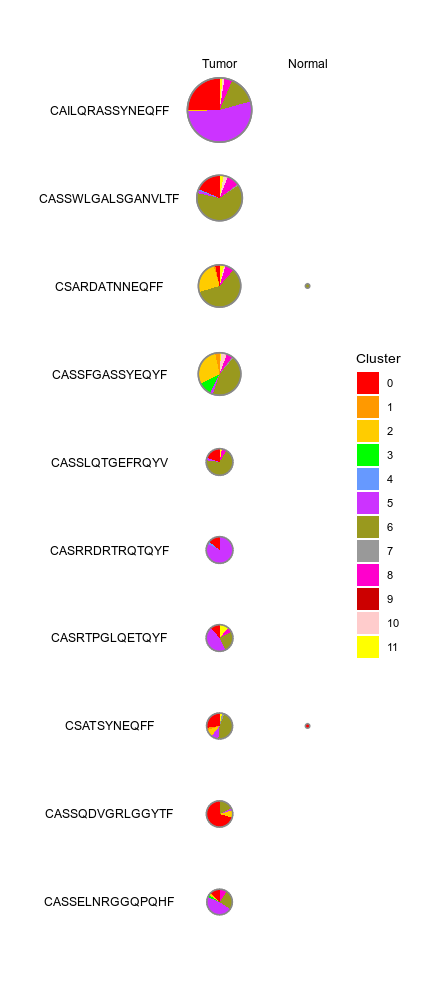
srtobj— The seurat object in RDS format
outdir— The output directory.The results for each case will be saved in a subdirectory.
cases(type=json;order=99) — If you have multiple cases, you can specify them here.Keys are the names of the cases and values are the options above exceptmutaters. If some options are not specified, the options inenvswill be used. If no cases are specified, a default case will be used with case nameDEFAULT.cells_by— The column name in metadata to group the cells for the rows of the plot.If your cell groups have overlapping cells, you can also use multiple columns, separated by comma (,). These columns will be concatenated to form the cell groups. For the overlapping cells, they will be counted multiple times for different groups. So make sure the cell group names in different columns are unique.cells_n(type=int) — The max number of groups to show for each cell group identity (row).Ignored ifcells_orderis specified.cells_order(list) — The order of the cells (rows) to show on the plotcells_orderby— An expression passed todplyr::arrange()to order the cells (rows) of the plot.Only works whencells-orderis not specified. The data frame passed todplyr::arrange()is grouped bycells_bybefore ordering. You can have multiple expressions separated by semicolon (;). The expessions will be parsed byrlang::parse_exprs(). 4 extra columns were added to the metadata for ordering the rows in the plot:- *
CloneSize: The size (number of cells) of clones (identified bycells_by) - *
CloneGroupSize: The clone size in each group (identified bygroup_by) - *
CloneClusterSize: The clone size in each cluster (identified byseurat_clusters) - *
CloneGroupClusterSize: The clone size in each group and cluster (identified bygroup_byandseurat_clusters)
- *
cluster_orderby— The order of the clusters to show on the plot.An expression passed todplyr::summarise()on the grouped data frame (byseurat_clusters). The summary stat will be passed todplyr::arrange()to order the clusters. It's applied on the whole meta.data before grouping and subsetting. For example, you can order the clusters by the activation score of the cluster:desc(mean(ActivationScore, na.rm = TRUE)), suppose you have a columnActivationScorein the metadata.descr— The description of the case, will be shown in the report.devpars(ns) — The device parameters for the plots of pie charts.- - res (type=int): The resolution of the plots
- - height (type=int): The height of the plots
- - width (type=int): The width of the plots
each— The column name in metadata to separate the cells into different plots.group_by— The column name in metadata to group the cells for the columns of the plot.group_order(list) — The order of the groups (columns) to show on the plothm_devpars(ns) — The device parameters for the heatmaps.- - res (type=int): The resolution of the heatmaps.
- - height (type=int): The height of the heatmaps.
- - width (type=int): The width of the heatmaps.
mutaters(type=json) — The mutaters to mutate the metadataKeys are the names of the mutaters and values are the R expressions passed bydplyr::mutate()to mutate the metadata.overlap(list) — Plot the overlap of cell groups (values ofcells_by) in different casesunder the same section. The section must have at least 2 cases, each case should have a singlecells_bycolumn.prefix_each(flag) — Whether to prefix theeachcolumn name to thevalue as the case/section name.section— The section to show in the report. This allows different cases to be put in the same section in report.Only works wheneachis not specified.subset— An expression to subset the cells, will be passed todplyr::filter()on metadata.This will be applied prior toeach.
r-dplyr—- check: {{proc.lang}} -e "library(dplyr)"
r-seurat—- check: {{proc.lang}} -e "library(Seurat)"
r-tidyr—- check: {{proc.lang}} -e "library(tidyr)"
__init_subclass__()— Do the requirements inferring since we need them to build up theprocess relationship </>from_proc(proc,name,desc,envs,envs_depth,cache,export,output_flatten,error_strategy,num_retries,forks,input_data,order,plugin_opts,requires,scheduler,scheduler_opts,submission_batch)(Type) — Create a subclass of Proc using another Proc subclass or Proc itself</>gc()— GC process for the process to save memory after it's done</>log(level,msg,*args,logger)— Log message for the process</>run()— Init all other properties and jobs</>
pipen.proc.ProcMeta(name, bases, namespace, **kwargs)
Meta class for Proc
from_proc(proc, name=None, desc=None, envs=None, envs_depth=None, cache=None, export=None, output_flatten=None, error_strategy=None, num_retries=None, forks=None, input_data=None, order=None, plugin_opts=None, requires=None, scheduler=None, scheduler_opts=None, submission_batch=None)
Create a subclass of Proc using another Proc subclass or Proc itself
proc(Type) — The Proc subclassname(str | none, optional) — The new name of the processdesc(str | none, optional) — The new description of the processenvs(Optional, optional) — The arguments of the process, will overwrite parent oneThe items that are specified will be inheritedenvs_depth(int | none, optional) — How deep to update the envs when subclassed.cache(bool | none, optional) — Whether we should check the cache for the jobsexport(bool | none, optional) — When True, the results will be exported to<pipeline.outdir>Defaults to None, meaning only end processes will export. You can set it to True/False to enable or disable exporting for processesoutput_flatten(bool | none, optional) — Whether to flatten the output when saving to the outputdirectory. Normally, the output will be saved in a subdirectory named after the job index (e.g.<outdir>/0,<outdir>/1, etc.). Ifoutput_flattenis True, the output will be saved directly in the output directory without the subdirectories. This is useful when you want the job outputs to be directly revealed in the output directory. Note that this only works for processes with export=True or end processes and make sure the name of the output files won't conflict for jobs with each other when flattening. It takes 3 possible values- - None (default): flatten the output for single-job processes only
- - True: flatten the output for all processes
- - False: never flatten the output
error_strategy(str | none, optional) — How to deal with the errors- - retry, ignore, halt
- - halt to halt the whole pipeline, no submitting new jobs
num_retries(int | none, optional) — How many times to retry to jobs once error occursforks(int | none, optional) — New forks for the new processinput_data(any | none, optional) — The input data for the process. Only when this processis a start processorder(int | none, optional) — The order to execute the new processplugin_opts(Optional, optional) — The new plugin options, unspecified items will beinherited.requires(Optional, optional) — The required processes for the new processscheduler(str | none, optional) — The new shedular to run the new processscheduler_opts(Optional, optional) — The new scheduler options, unspecified items willbe inherited.submission_batch(int | none, optional) — How many jobs to be submited simultaneously.
The new process class
__init_subclass__()
Do the requirements inferring since we need them to build up theprocess relationship
run()
Init all other properties and jobs
gc()
GC process for the process to save memory after it's done
log(level, msg, *args, logger=<LoggerAdapter pipen.core (WARNING)>)
Log message for the process
level(int | str) — The log level of the recordmsg(str) — The message to log*args— The arguments to format the messagelogger(LoggerAdapter, optional) — The logging logger
biopipen.ns.scrna.SeuratMetadataMutater(*args, **kwds) → Proc
Mutate the metadata of the seurat object
cache— Should we detect whether the jobs are cached?desc— The description of the process. Will use the summary fromthe docstring by default.dirsig— When checking the signature for caching, whether should we walkthrough the content of the directory? This is sometimes time-consuming if the directory is big.envs— The arguments that are job-independent, useful for common optionsacross jobs.envs_depth— How deep to update the envs when subclassed.error_strategy— How to deal with the errors- - retry, ignore, halt
- - halt to halt the whole pipeline, no submitting new jobs
export— When True, the results will be exported to<pipeline.outdir>Defaults to None, meaning only end processes will export. You can set it to True/False to enable or disable exporting for processesforks— How many jobs to run simultaneously?input— The keys for the input channelinput_data— The input data (will be computed for dependent processes)lang— The language for the script to run. Should be the path to theinterpreter iflangis not in$PATH.name— The name of the process. Will use the class name by default.nexts— Computed fromrequiresto build the process relationshipsnum_retries— How many times to retry to jobs once error occursorder— The execution order for this process. The bigger the numberis, the later the process will be executed. Default: 0. Note that the dependent processes will always be executed first. This doesn't work for start processes either, whose orders are determined byPipen.set_starts()output— The output keys for the output channel(the data will be computed)output_data— The output data (to pass to the next processes)output_flatten— Whether to flatten the output when saving to the outputdirectory. Normally, the output will be saved in a subdirectory named after the job index (e.g.<outdir>/0,<outdir>/1, etc.). Ifoutput_flattenis True, the output will be saved directly in the output directory without the subdirectories. This is useful when you want the job outputs to be directly revealed in the output directory. Note that this only works for processes with export=True or end processes and make sure the name of the output files won't conflict for jobs with each other when flattening. It takes 3 possible values- - None (default): flatten the output for single-job processes only
- - True: flatten the output for all processes
- - False: never flatten the output
plugin_opts— Options for process-level pluginsrequires— The dependency processesscheduler— The scheduler to run the jobsscheduler_opts— The options for the schedulerscript— The script template for the processsubmission_batch— How many jobs to be submited simultaneously.The program entrance for some schedulers may take too much resources when submitting a job or checking the job status. So we may use a smaller number here to limit the simultaneous submissions.template— Define the template engine to use.This could be either a template engine or a dict with keyengineindicating the template engine and the rest the arguments passed to the constructor of thepipen.template.Templateobject. The template engine could be either the name of the engine, currently jinja2 and liquidpy are supported, or a subclass ofpipen.template.Template. You can subclasspipen.template.Templateto use your own template engine.
metafile— Additional metadataA tab-delimited file with columns as meta columns and rows as cells.srtobj— The seurat object loaded by SeuratPreparing
outfile— The seurat object with the additional metadata
mutaters(type=json) — The mutaters to mutate the metadata.The key-value pairs will be passed thedplyr::mutate()to mutate the metadata. See https://pwwang.github.io/biopipen.utils.R/reference/MutateSeuratMeta.htmlncores(type=int) — The number of cores to use for reading and writing the seurat object.subset— An expression to subset the cells, will be passed todplyr::filter().This will be applied after mutating the metadata.
r-dplyr—- check: {{proc.lang}} <(echo "library(dplyr)")
r-seurat—- check: {{proc.lang}} <(echo "library(Seurat)")
r-tibble—- check: {{proc.lang}} <(echo "library(tibble)")
__init_subclass__()— Do the requirements inferring since we need them to build up theprocess relationship </>from_proc(proc,name,desc,envs,envs_depth,cache,export,output_flatten,error_strategy,num_retries,forks,input_data,order,plugin_opts,requires,scheduler,scheduler_opts,submission_batch)(Type) — Create a subclass of Proc using another Proc subclass or Proc itself</>gc()— GC process for the process to save memory after it's done</>log(level,msg,*args,logger)— Log message for the process</>run()— Init all other properties and jobs</>
pipen.proc.ProcMeta(name, bases, namespace, **kwargs)
Meta class for Proc
from_proc(proc, name=None, desc=None, envs=None, envs_depth=None, cache=None, export=None, output_flatten=None, error_strategy=None, num_retries=None, forks=None, input_data=None, order=None, plugin_opts=None, requires=None, scheduler=None, scheduler_opts=None, submission_batch=None)
Create a subclass of Proc using another Proc subclass or Proc itself
proc(Type) — The Proc subclassname(str | none, optional) — The new name of the processdesc(str | none, optional) — The new description of the processenvs(Optional, optional) — The arguments of the process, will overwrite parent oneThe items that are specified will be inheritedenvs_depth(int | none, optional) — How deep to update the envs when subclassed.cache(bool | none, optional) — Whether we should check the cache for the jobsexport(bool | none, optional) — When True, the results will be exported to<pipeline.outdir>Defaults to None, meaning only end processes will export. You can set it to True/False to enable or disable exporting for processesoutput_flatten(bool | none, optional) — Whether to flatten the output when saving to the outputdirectory. Normally, the output will be saved in a subdirectory named after the job index (e.g.<outdir>/0,<outdir>/1, etc.). Ifoutput_flattenis True, the output will be saved directly in the output directory without the subdirectories. This is useful when you want the job outputs to be directly revealed in the output directory. Note that this only works for processes with export=True or end processes and make sure the name of the output files won't conflict for jobs with each other when flattening. It takes 3 possible values- - None (default): flatten the output for single-job processes only
- - True: flatten the output for all processes
- - False: never flatten the output
error_strategy(str | none, optional) — How to deal with the errors- - retry, ignore, halt
- - halt to halt the whole pipeline, no submitting new jobs
num_retries(int | none, optional) — How many times to retry to jobs once error occursforks(int | none, optional) — New forks for the new processinput_data(any | none, optional) — The input data for the process. Only when this processis a start processorder(int | none, optional) — The order to execute the new processplugin_opts(Optional, optional) — The new plugin options, unspecified items will beinherited.requires(Optional, optional) — The required processes for the new processscheduler(str | none, optional) — The new shedular to run the new processscheduler_opts(Optional, optional) — The new scheduler options, unspecified items willbe inherited.submission_batch(int | none, optional) — How many jobs to be submited simultaneously.
The new process class
__init_subclass__()
Do the requirements inferring since we need them to build up theprocess relationship
run()
Init all other properties and jobs
gc()
GC process for the process to save memory after it's done
log(level, msg, *args, logger=<LoggerAdapter pipen.core (WARNING)>)
Log message for the process
level(int | str) — The log level of the recordmsg(str) — The message to log*args— The arguments to format the messagelogger(LoggerAdapter, optional) — The logging logger
biopipen.ns.scrna.DimPlots(*args, **kwds) → Proc
Seurat - Dimensional reduction plots
cache— Should we detect whether the jobs are cached?desc— The description of the process. Will use the summary fromthe docstring by default.dirsig— When checking the signature for caching, whether should we walkthrough the content of the directory? This is sometimes time-consuming if the directory is big.envs— The arguments that are job-independent, useful for common optionsacross jobs.envs_depth— How deep to update the envs when subclassed.error_strategy— How to deal with the errors- - retry, ignore, halt
- - halt to halt the whole pipeline, no submitting new jobs
export— When True, the results will be exported to<pipeline.outdir>Defaults to None, meaning only end processes will export. You can set it to True/False to enable or disable exporting for processesforks— How many jobs to run simultaneously?input— The keys for the input channelinput_data— The input data (will be computed for dependent processes)lang— The language for the script to run. Should be the path to theinterpreter iflangis not in$PATH.name— The name of the process. Will use the class name by default.nexts— Computed fromrequiresto build the process relationshipsnum_retries— How many times to retry to jobs once error occursorder— The execution order for this process. The bigger the numberis, the later the process will be executed. Default: 0. Note that the dependent processes will always be executed first. This doesn't work for start processes either, whose orders are determined byPipen.set_starts()output— The output keys for the output channel(the data will be computed)output_data— The output data (to pass to the next processes)output_flatten— Whether to flatten the output when saving to the outputdirectory. Normally, the output will be saved in a subdirectory named after the job index (e.g.<outdir>/0,<outdir>/1, etc.). Ifoutput_flattenis True, the output will be saved directly in the output directory without the subdirectories. This is useful when you want the job outputs to be directly revealed in the output directory. Note that this only works for processes with export=True or end processes and make sure the name of the output files won't conflict for jobs with each other when flattening. It takes 3 possible values- - None (default): flatten the output for single-job processes only
- - True: flatten the output for all processes
- - False: never flatten the output
plugin_opts— Options for process-level pluginsrequires— The dependency processesscheduler— The scheduler to run the jobsscheduler_opts— The options for the schedulerscript— The script template for the processsubmission_batch— How many jobs to be submited simultaneously.The program entrance for some schedulers may take too much resources when submitting a job or checking the job status. So we may use a smaller number here to limit the simultaneous submissions.template— Define the template engine to use.This could be either a template engine or a dict with keyengineindicating the template engine and the rest the arguments passed to the constructor of thepipen.template.Templateobject. The template engine could be either the name of the engine, currently jinja2 and liquidpy are supported, or a subclass ofpipen.template.Template. You can subclasspipen.template.Templateto use your own template engine.
configfile— A toml configuration file with "cases"If this is given,envs.caseswill be overridenname— The name of the job, used in reportsrtobj— The seruat object in RDS format
outdir— The output directory
cases— The cases for the dim plotsKeys are the names and values are the arguments toSeurat::Dimplots
__init_subclass__()— Do the requirements inferring since we need them to build up theprocess relationship </>from_proc(proc,name,desc,envs,envs_depth,cache,export,output_flatten,error_strategy,num_retries,forks,input_data,order,plugin_opts,requires,scheduler,scheduler_opts,submission_batch)(Type) — Create a subclass of Proc using another Proc subclass or Proc itself</>gc()— GC process for the process to save memory after it's done</>log(level,msg,*args,logger)— Log message for the process</>run()— Init all other properties and jobs</>
pipen.proc.ProcMeta(name, bases, namespace, **kwargs)
Meta class for Proc
from_proc(proc, name=None, desc=None, envs=None, envs_depth=None, cache=None, export=None, output_flatten=None, error_strategy=None, num_retries=None, forks=None, input_data=None, order=None, plugin_opts=None, requires=None, scheduler=None, scheduler_opts=None, submission_batch=None)
Create a subclass of Proc using another Proc subclass or Proc itself
proc(Type) — The Proc subclassname(str | none, optional) — The new name of the processdesc(str | none, optional) — The new description of the processenvs(Optional, optional) — The arguments of the process, will overwrite parent oneThe items that are specified will be inheritedenvs_depth(int | none, optional) — How deep to update the envs when subclassed.cache(bool | none, optional) — Whether we should check the cache for the jobsexport(bool | none, optional) — When True, the results will be exported to<pipeline.outdir>Defaults to None, meaning only end processes will export. You can set it to True/False to enable or disable exporting for processesoutput_flatten(bool | none, optional) — Whether to flatten the output when saving to the outputdirectory. Normally, the output will be saved in a subdirectory named after the job index (e.g.<outdir>/0,<outdir>/1, etc.). Ifoutput_flattenis True, the output will be saved directly in the output directory without the subdirectories. This is useful when you want the job outputs to be directly revealed in the output directory. Note that this only works for processes with export=True or end processes and make sure the name of the output files won't conflict for jobs with each other when flattening. It takes 3 possible values- - None (default): flatten the output for single-job processes only
- - True: flatten the output for all processes
- - False: never flatten the output
error_strategy(str | none, optional) — How to deal with the errors- - retry, ignore, halt
- - halt to halt the whole pipeline, no submitting new jobs
num_retries(int | none, optional) — How many times to retry to jobs once error occursforks(int | none, optional) — New forks for the new processinput_data(any | none, optional) — The input data for the process. Only when this processis a start processorder(int | none, optional) — The order to execute the new processplugin_opts(Optional, optional) — The new plugin options, unspecified items will beinherited.requires(Optional, optional) — The required processes for the new processscheduler(str | none, optional) — The new shedular to run the new processscheduler_opts(Optional, optional) — The new scheduler options, unspecified items willbe inherited.submission_batch(int | none, optional) — How many jobs to be submited simultaneously.
The new process class
__init_subclass__()
Do the requirements inferring since we need them to build up theprocess relationship
run()
Init all other properties and jobs
gc()
GC process for the process to save memory after it's done
log(level, msg, *args, logger=<LoggerAdapter pipen.core (WARNING)>)
Log message for the process
level(int | str) — The log level of the recordmsg(str) — The message to log*args— The arguments to format the messagelogger(LoggerAdapter, optional) — The logging logger
biopipen.ns.scrna.MarkersFinder(*args, **kwds) → Proc
Find markers between different groups of cells
When only group_by is specified as identity column in
envs.cases, the markers will be found for all the clusters.
You can also find the differentially expressed genes between
any two groups of cells by setting group_by to a different
column name in metadata. Follow envs.cases for more details.
cache— Should we detect whether the jobs are cached?desc— The description of the process. Will use the summary fromthe docstring by default.dirsig— When checking the signature for caching, whether should we walkthrough the content of the directory? This is sometimes time-consuming if the directory is big.envs— The arguments that are job-independent, useful for common optionsacross jobs.envs_depth— How deep to update the envs when subclassed.error_strategy— How to deal with the errors- - retry, ignore, halt
- - halt to halt the whole pipeline, no submitting new jobs
export— When True, the results will be exported to<pipeline.outdir>Defaults to None, meaning only end processes will export. You can set it to True/False to enable or disable exporting for processesforks— How many jobs to run simultaneously?input— The keys for the input channelinput_data— The input data (will be computed for dependent processes)lang— The language for the script to run. Should be the path to theinterpreter iflangis not in$PATH.name— The name of the process. Will use the class name by default.nexts— Computed fromrequiresto build the process relationshipsnum_retries— How many times to retry to jobs once error occursorder— The execution order for this process. The bigger the numberis, the later the process will be executed. Default: 0. Note that the dependent processes will always be executed first. This doesn't work for start processes either, whose orders are determined byPipen.set_starts()output— The output keys for the output channel(the data will be computed)output_data— The output data (to pass to the next processes)output_flatten— Whether to flatten the output when saving to the outputdirectory. Normally, the output will be saved in a subdirectory named after the job index (e.g.<outdir>/0,<outdir>/1, etc.). Ifoutput_flattenis True, the output will be saved directly in the output directory without the subdirectories. This is useful when you want the job outputs to be directly revealed in the output directory. Note that this only works for processes with export=True or end processes and make sure the name of the output files won't conflict for jobs with each other when flattening. It takes 3 possible values- - None (default): flatten the output for single-job processes only
- - True: flatten the output for all processes
- - False: never flatten the output
plugin_opts— Options for process-level pluginsrequires— The dependency processesscheduler— The scheduler to run the jobsscheduler_opts— The options for the schedulerscript— The script template for the processsubmission_batch— How many jobs to be submited simultaneously.The program entrance for some schedulers may take too much resources when submitting a job or checking the job status. So we may use a smaller number here to limit the simultaneous submissions.template— Define the template engine to use.This could be either a template engine or a dict with keyengineindicating the template engine and the rest the arguments passed to the constructor of thepipen.template.Templateobject. The template engine could be either the name of the engine, currently jinja2 and liquidpy are supported, or a subclass ofpipen.template.Template. You can subclasspipen.template.Templateto use your own template engine.
srtobj— The seurat object loaded bySeuratPreparingIf you have yourSeuratobject prepared by yourself, you can also use it here, but you should make sure that the object has been processed byPrepSCTFindMarkersif data is not normalized usingSCTransform.
outdir— The output directory for the markers and plots
allenrich_plots(type=json) — Cases of the plots to generate for the enrichment analysis.The keys are the names of the cases and the values are the dicts inherited fromallenrich_plots_defaults. The cases underenvs.casescan inherit this options.allenrich_plots_defaults(ns) — Default options for the plots to generate for the enrichment analysis.- - plot_type: The type of the plot.
- - descr: A description of the plot to be shown above the plot image.
- - devpars (ns): The device parameters for the plots.
- res (type=int): The resolution of the plots.
- height (type=int): The height of the plots.
- width (type=int): The width of the plots. - - db (type=str): The database(s) to apply for the plot. If not specified, all databases will be applied.
dbscan also be used as an alias for this parameter. - -
: See https://pwwang.github.io/scplotter/reference/EnrichmentPlot.html.
allmarker_plots(type=json) — All marker plot cases.The keys are the names of the cases and the values are the dicts inherited fromallmarker_plots_defaults.allmarker_plots_defaults(ns) — Default options for the plots for all markers whenident_1is not specified.To reproduce whatSeurat::DoHeatmap()does, you caneach = ':seurat_cluster'to select the top N (default: 20) markers all together (instead of selecting top N markers for each cluster), and setplot_type = "heatmap"andcell_type = "bars"to plot the heatmap of the top N markers. You may also want to useorder_byto order the markers andselect = Nto select the top N markers.- - plot_type: The type of the plot.
See https://pwwang.github.io/biopipen.utils.R/reference/VizDEGs.html.
Available types areviolin,box,bar,ridge,dim,heatmapanddot. - - descr: A description of the plot to be shown above the plot image.
- - more_formats (type=list): The extra formats to save the plot in.
- - save_code (flag): Whether to save the code to generate the plot.
- - devpars (ns): The device parameters for the plots.
- res (type=int): The resolution of the plots.
- height (type=int): The height of the plots.
- width (type=int): The width of the plots. - -
: Other arguments passed to biopipen.utils::VizDEGs().
- - plot_type: The type of the plot.
assay— The assay to use.cache(type=auto) — Where to cache the results.IfTrue, cache tooutdirof the job. IfFalse, don't cache. Otherwise, specify the directory to cache to.cases(type=json) — If you have multiple cases for marker discovery, you can specify themhere. The keys are the names of the cases and the values are the above options. If some options are not specified, the default values specified above (underenvs) will be used. If no cases are specified, the default case will be added with the default values underenvswith the nameMarker Discovery.dbs(list) — The dbs to do enrichment analysis for significant markers.You can use built-in dbs inenrichit, or provide your own gmt files. See also https://pwwang.github.io/enrichit/reference/FetchGMT.html. The built-in dbs include:- * "BioCarta" or "BioCarta_2016"
- * "GO_Biological_Process" or "GO_Biological_Process_2025"
- * "GO_Cellular_Component" or "GO_Cellular_Component_2025"
- * "GO_Molecular_Function" or "GO_Molecular_Function_2025"
- * "KEGG", "KEGG_Human", "KEGG_2021", or "KEGG_2021_Human"
- * "Hallmark", "MSigDB_Hallmark", or "MSigDB_Hallmark_2020"
- * "Reactome", "Reactome_Pathways", or "Reactome_Pathways_2024"
- * "WikiPathways", "WikiPathways_2024", "WikiPathways_Human", or "WikiPathways_2024_Human"
each— The column name in metadata to separate the cells into differentcases. When this is specified, the case will be expanded for each value of the column in metadata. For example, when you haveenvs.cases."Cluster Markers".each = "Sample", then the case will be expanded asenvs.cases."Cluster Markers - Sample1",envs.cases."Cluster Markers - Sample2", etc. You can specifyallmarker_plotsandoverlapsto plot the markers for all cases in the same plot and plot the overlaps of the markers between different cases by values in this column."ident"can be used as an alias for the default identity column (e.g."seurat_clusters").enrich_plots(type=json) — Cases of the plots to generate for the enrichment analysis.The keys are the names of the cases and the values are the dicts inherited fromenrich_plots_defaults. The cases underenvs.casescan inherit this options.enrich_plots_defaults(ns) — Default options for the plots to generate for the enrichment analysis.- - plot_type: The type of the plot.
See https://pwwang.github.io/scplotter/reference/EnrichmentPlot.html.
Available types arebar,dot,lollipop,network,enrichmapandwordcloud. - - descr: A description of the plot to be shown above the plot image.
- - more_formats (type=list): The extra formats to save the plot in.
- - save_code (flag): Whether to save the code to generate the plot.
- - devpars (ns): The device parameters for the plots.
- res (type=int): The resolution of the plots.
- height (type=int): The height of the plots.
- width (type=int): The width of the plots. - -
: See https://pwwang.github.io/scplotter/reference/EnrichmentPlot.html.
- - plot_type: The type of the plot.
enrich_style(choice) — The style of the enrichment analysis.The enrichment analysis will be done byEnrichIt()fromenrichit. Two styles are available:- - enrichr:
enrichrstyle enrichment analysis (fisher's exact test will be used). - - clusterprofiler:
clusterProfilerstyle enrichment analysis (hypergeometric test will be used). - - clusterProfiler: alias for
clusterprofiler
- - enrichr:
error(flag) — Stop the job if errors happen.Helpful when no/not enough markers are found or no pathways are enriched. IfFalse, empty results will be returned.group_by— The column name in metadata to group the cells.If onlygroup_byis specified, andident_1andident_2are not specified, markers will be found for all groups in this column in the manner of "group vs rest" comparison.NAgroup will be ignored. IfNone,Seurat::Idents(srtobj)will be used, which is usually"seurat_clusters"after unsupervised clustering.ident_1— The first group of cells to compareWhen this is empty, the comparisons will be expanded to each group v.s. the rest of the cells ingroup_by.ident_2— The second group of cells to compareIf not provided, the rest of the cells are used forident_2.marker_plots(type=json) — Cases of the plots to generate for the markers.Plot cases. The keys are the names of the cases and the values are the dicts inherited frommarker_plots_defaults. The cases underenvs.casescan inherit this options.marker_plots_defaults(ns) — Default options for the plots to generate for the markers.- - plot_type: The type of the plot.
See https://pwwang.github.io/biopipen.utils.R/reference/VizDEGs.html.
Available types areviolin,box,bar,ridge,dim,heatmapanddot.
There are two additional types available -volcano_pctandvolcano_log2fc. - - descr: A description of the plot to be shown above the plot image.
- - more_formats (type=list): The extra formats to save the plot in.
- - save_code (flag): Whether to save the code to generate the plot.
- - devpars (ns): The device parameters for the plots.
- res (type=int): The resolution of the plots.
- height (type=int): The height of the plots.
- width (type=int): The width of the plots. - -
: Other arguments passed to biopipen.utils::VizDEGs().
Ifplot_typeisvolcano_pctorvolcano_log2fc, they will be passed to
scplotter::VolcanoPlot().
- - plot_type: The type of the plot.
mutaters(type=json) — The mutaters to mutate the metadata.You can also use the clone selectors to select the TCR clones/clusters. See https://pwwang.github.io/scplotter/reference/clone_selectors.html. You can also use key<newcol>:identto set the<newcol>as the default ident for the stats. See also https://pwwang.github.io/biopipen.utils.R/reference/MutateSeuratMeta.htmlncores(type=int) — Number of cores to use for parallel computing for someSeuratprocedures.- * Used in
future::plan(strategy = "multicore", workers = <ncores>)to parallelize some Seurat procedures. - * See also: https://satijalab.org/seurat/articles/future_vignette.html
- * Used in
overlaps(type=json) — Cases for investigating the overlapping of significant markers between different cases or comparisons.The keys are the names of the cases and the values are the dicts inherited fromoverlaps_defaults. There are two situations that we can perform overlaps: 1. Ifident_1is not specified, the overlaps can be performed between different comparisons. 2. Ifeachis specified, the overlaps can be performed between different cases, where in each case,ident_1must be specified.overlaps_defaults(ns) — Default options for investigating the overlapping of significant markers between different cases or comparisons.This means eitherident_1should be empty, so that they can be expanded to multiple comparisons.- - sigmarkers: The expression to filter the significant markers for each case.
If not provided,envs.sigmarkerswill be used. - - descr: A description of the plot to be shown above the plot image.
- - plot_type (choice): The type of the plot to generate for the overlaps.
- venn: Useplotthis::VennDiagram().
- upset: Useplotthis::UpsetPlot(). - - more_formats (type=list): The extra formats to save the plot in.
- - save_code (flag): Whether to save the code to generate the plot.
- - devpars (ns): The device parameters for the plots.
- res (type=int): The resolution of the plots.
- height (type=int): The height of the plots.
- width (type=int): The width of the plots. - -
: More arguments pased to plotthis::VennDiagram()
(https://pwwang.github.io/plotthis/reference/venndiagram1.html)
orplotthis::UpsetPlot()
(https://pwwang.github.io/plotthis/reference/upsetplot1.html)
- - sigmarkers: The expression to filter the significant markers for each case.
rest(ns) — Rest arguments forSeurat::FindMarkers().Use-to replace.in the argument name. For example, usemin-pctinstead ofmin.pct.sigmarkers— An expression passed todplyr::filter()to filter thesignificant markers for enrichment analysis. Available variables arep_val,avg_log2FC,pct.1,pct.2andp_val_adj. For example,"p_val_adj < 0.05 & abs(avg_log2FC) > 1"to select markers with adjusted p-value < 0.05 and absolute log2 fold change > 1.subset— An expression to subset the cells for each case.
__init_subclass__()— Do the requirements inferring since we need them to build up theprocess relationship </>from_proc(proc,name,desc,envs,envs_depth,cache,export,output_flatten,error_strategy,num_retries,forks,input_data,order,plugin_opts,requires,scheduler,scheduler_opts,submission_batch)(Type) — Create a subclass of Proc using another Proc subclass or Proc itself</>gc()— GC process for the process to save memory after it's done</>log(level,msg,*args,logger)— Log message for the process</>run()— Init all other properties and jobs</>
pipen.proc.ProcMeta(name, bases, namespace, **kwargs)
Meta class for Proc
from_proc(proc, name=None, desc=None, envs=None, envs_depth=None, cache=None, export=None, output_flatten=None, error_strategy=None, num_retries=None, forks=None, input_data=None, order=None, plugin_opts=None, requires=None, scheduler=None, scheduler_opts=None, submission_batch=None)
Create a subclass of Proc using another Proc subclass or Proc itself
proc(Type) — The Proc subclassname(str | none, optional) — The new name of the processdesc(str | none, optional) — The new description of the processenvs(Optional, optional) — The arguments of the process, will overwrite parent oneThe items that are specified will be inheritedenvs_depth(int | none, optional) — How deep to update the envs when subclassed.cache(bool | none, optional) — Whether we should check the cache for the jobsexport(bool | none, optional) — When True, the results will be exported to<pipeline.outdir>Defaults to None, meaning only end processes will export. You can set it to True/False to enable or disable exporting for processesoutput_flatten(bool | none, optional) — Whether to flatten the output when saving to the outputdirectory. Normally, the output will be saved in a subdirectory named after the job index (e.g.<outdir>/0,<outdir>/1, etc.). Ifoutput_flattenis True, the output will be saved directly in the output directory without the subdirectories. This is useful when you want the job outputs to be directly revealed in the output directory. Note that this only works for processes with export=True or end processes and make sure the name of the output files won't conflict for jobs with each other when flattening. It takes 3 possible values- - None (default): flatten the output for single-job processes only
- - True: flatten the output for all processes
- - False: never flatten the output
error_strategy(str | none, optional) — How to deal with the errors- - retry, ignore, halt
- - halt to halt the whole pipeline, no submitting new jobs
num_retries(int | none, optional) — How many times to retry to jobs once error occursforks(int | none, optional) — New forks for the new processinput_data(any | none, optional) — The input data for the process. Only when this processis a start processorder(int | none, optional) — The order to execute the new processplugin_opts(Optional, optional) — The new plugin options, unspecified items will beinherited.requires(Optional, optional) — The required processes for the new processscheduler(str | none, optional) — The new shedular to run the new processscheduler_opts(Optional, optional) — The new scheduler options, unspecified items willbe inherited.submission_batch(int | none, optional) — How many jobs to be submited simultaneously.
The new process class
__init_subclass__()
Do the requirements inferring since we need them to build up theprocess relationship
run()
Init all other properties and jobs
gc()
GC process for the process to save memory after it's done
log(level, msg, *args, logger=<LoggerAdapter pipen.core (WARNING)>)
Log message for the process
level(int | str) — The log level of the recordmsg(str) — The message to log*args— The arguments to format the messagelogger(LoggerAdapter, optional) — The logging logger
biopipen.ns.scrna.TopExpressingGenes(*args, **kwds) → Proc
Find the top expressing genes in each cluster
cache— Should we detect whether the jobs are cached?desc— The description of the process. Will use the summary fromthe docstring by default.dirsig— When checking the signature for caching, whether should we walkthrough the content of the directory? This is sometimes time-consuming if the directory is big.envs— The arguments that are job-independent, useful for common optionsacross jobs.envs_depth— How deep to update the envs when subclassed.error_strategy— How to deal with the errors- - retry, ignore, halt
- - halt to halt the whole pipeline, no submitting new jobs
export— When True, the results will be exported to<pipeline.outdir>Defaults to None, meaning only end processes will export. You can set it to True/False to enable or disable exporting for processesforks— How many jobs to run simultaneously?input— The keys for the input channelinput_data— The input data (will be computed for dependent processes)lang— The language for the script to run. Should be the path to theinterpreter iflangis not in$PATH.name— The name of the process. Will use the class name by default.nexts— Computed fromrequiresto build the process relationshipsnum_retries— How many times to retry to jobs once error occursorder— The execution order for this process. The bigger the numberis, the later the process will be executed. Default: 0. Note that the dependent processes will always be executed first. This doesn't work for start processes either, whose orders are determined byPipen.set_starts()output— The output keys for the output channel(the data will be computed)output_data— The output data (to pass to the next processes)output_flatten— Whether to flatten the output when saving to the outputdirectory. Normally, the output will be saved in a subdirectory named after the job index (e.g.<outdir>/0,<outdir>/1, etc.). Ifoutput_flattenis True, the output will be saved directly in the output directory without the subdirectories. This is useful when you want the job outputs to be directly revealed in the output directory. Note that this only works for processes with export=True or end processes and make sure the name of the output files won't conflict for jobs with each other when flattening. It takes 3 possible values- - None (default): flatten the output for single-job processes only
- - True: flatten the output for all processes
- - False: never flatten the output
plugin_opts— Options for process-level pluginsrequires— The dependency processesscheduler— The scheduler to run the jobsscheduler_opts— The options for the schedulerscript— The script template for the processsubmission_batch— How many jobs to be submited simultaneously.The program entrance for some schedulers may take too much resources when submitting a job or checking the job status. So we may use a smaller number here to limit the simultaneous submissions.template— Define the template engine to use.This could be either a template engine or a dict with keyengineindicating the template engine and the rest the arguments passed to the constructor of thepipen.template.Templateobject. The template engine could be either the name of the engine, currently jinja2 and liquidpy are supported, or a subclass ofpipen.template.Template. You can subclasspipen.template.Templateto use your own template engine.
srtobj— The seurat object in RDS or qs/qs2 format
outdir— The output directory for the tables and plots
cases(type=json) — If you have multiple cases, you can specify themhere. The keys are the names of the cases and the values are the above options exceptmutaters. If some options are not specified, the default values specified above will be used. If no cases are specified, the default case will be added with the default values underenvswith the nameTop Expressing Genes.dbs(list) — The dbs to do enrichment analysis for significant markers.You can use built-in dbs inenrichit, or provide your own gmt files. See also https://pwwang.github.io/enrichit/reference/FetchGMT.html. The built-in dbs include:- * "BioCarta" or "BioCarta_2016"
- * "GO_Biological_Process" or "GO_Biological_Process_2025"
- * "GO_Cellular_Component" or "GO_Cellular_Component_2025"
- * "GO_Molecular_Function" or "GO_Molecular_Function_2025"
- * "KEGG", "KEGG_Human", "KEGG_2021", or "KEGG_2021_Human"
- * "Hallmark", "MSigDB_Hallmark", or "MSigDB_Hallmark_2020"
- * "Reactome", "Reactome_Pathways", or "Reactome_Pathways_2024"
- * "WikiPathways", "WikiPathways_2024", "WikiPathways_Human", or "WikiPathways_2024_Human"
each— The column name in metadata to separate the cells into differentcases."ident"can be used as an alias for the default identity column (e.g."seurat_clusters").enrich_plots(type=json) — Cases of the plots to generate for the enrichment analysis.The keys are the names of the cases and the values are the dicts inherited fromenrich_plots_defaults. The cases underenvs.casescan inherit this options.enrich_plots_defaults(ns) — Default options for the plots to generate for the enrichment analysis.- - plot_type: The type of the plot.
See https://pwwang.github.io/scplotter/reference/EnrichmentPlot.html.
Available types arebar,dot,lollipop,network,enrichmapandwordcloud. - - descr: A description of the plot to be shown above the plot image.
- - more_formats (type=list): The extra formats to save the plot in.
- - save_code (flag): Whether to save the code to generate the plot.
- - devpars (ns): The device parameters for the plots.
- res (type=int): The resolution of the plots.
- height (type=int): The height of the plots.
- width (type=int): The width of the plots. - -
: See https://pwwang.github.io/scplotter/reference/EnrichmentPlot.htmll.
- - plot_type: The type of the plot.
enrich_style(choice) — The style of the enrichment analysis.The enrichment analysis will be done byEnrichIt()fromenrichit. Two styles are available:- - enrichr:
enrichrstyle enrichment analysis (fisher's exact test will be used). - - clusterprofiler:
clusterProfilerstyle enrichment analysis (hypergeometric test will be used). - - clusterProfiler: alias for
clusterprofiler
- - enrichr:
error(flag) — Stop the job if errors happen.Helpful when no/not enough markers are found or no pathways are enriched. IfFalse, empty results will be returned.group_by— The column name in metadata to group the cells.ident— The group of cells to find the top expressing genes.The cells will be selected by thegroup_bycolumn with thisidentvalue in metadata. If not provided, the top expressing genes will be found for all groups of cells in thegroup_bycolumn.mutaters(type=json) — The mutaters to mutate the metadata.You can also use the clone selectors to select the TCR clones/clusters. See https://pwwang.github.io/scplotter/reference/clone_selectors.html. You can also use key<newcol>:identto set the<newcol>as the default ident for the stats. See also https://pwwang.github.io/biopipen.utils.R/reference/MutateSeuratMeta.htmln(type=int) — The number of top expressing genes to find.ncores(type=int) — Number of cores to use for reading and writing the seurat object.subset— An expression to subset the cells for each case.
__init_subclass__()— Do the requirements inferring since we need them to build up theprocess relationship </>from_proc(proc,name,desc,envs,envs_depth,cache,export,output_flatten,error_strategy,num_retries,forks,input_data,order,plugin_opts,requires,scheduler,scheduler_opts,submission_batch)(Type) — Create a subclass of Proc using another Proc subclass or Proc itself</>gc()— GC process for the process to save memory after it's done</>log(level,msg,*args,logger)— Log message for the process</>run()— Init all other properties and jobs</>
pipen.proc.ProcMeta(name, bases, namespace, **kwargs)
Meta class for Proc
from_proc(proc, name=None, desc=None, envs=None, envs_depth=None, cache=None, export=None, output_flatten=None, error_strategy=None, num_retries=None, forks=None, input_data=None, order=None, plugin_opts=None, requires=None, scheduler=None, scheduler_opts=None, submission_batch=None)
Create a subclass of Proc using another Proc subclass or Proc itself
proc(Type) — The Proc subclassname(str | none, optional) — The new name of the processdesc(str | none, optional) — The new description of the processenvs(Optional, optional) — The arguments of the process, will overwrite parent oneThe items that are specified will be inheritedenvs_depth(int | none, optional) — How deep to update the envs when subclassed.cache(bool | none, optional) — Whether we should check the cache for the jobsexport(bool | none, optional) — When True, the results will be exported to<pipeline.outdir>Defaults to None, meaning only end processes will export. You can set it to True/False to enable or disable exporting for processesoutput_flatten(bool | none, optional) — Whether to flatten the output when saving to the outputdirectory. Normally, the output will be saved in a subdirectory named after the job index (e.g.<outdir>/0,<outdir>/1, etc.). Ifoutput_flattenis True, the output will be saved directly in the output directory without the subdirectories. This is useful when you want the job outputs to be directly revealed in the output directory. Note that this only works for processes with export=True or end processes and make sure the name of the output files won't conflict for jobs with each other when flattening. It takes 3 possible values- - None (default): flatten the output for single-job processes only
- - True: flatten the output for all processes
- - False: never flatten the output
error_strategy(str | none, optional) — How to deal with the errors- - retry, ignore, halt
- - halt to halt the whole pipeline, no submitting new jobs
num_retries(int | none, optional) — How many times to retry to jobs once error occursforks(int | none, optional) — New forks for the new processinput_data(any | none, optional) — The input data for the process. Only when this processis a start processorder(int | none, optional) — The order to execute the new processplugin_opts(Optional, optional) — The new plugin options, unspecified items will beinherited.requires(Optional, optional) — The required processes for the new processscheduler(str | none, optional) — The new shedular to run the new processscheduler_opts(Optional, optional) — The new scheduler options, unspecified items willbe inherited.submission_batch(int | none, optional) — How many jobs to be submited simultaneously.
The new process class
__init_subclass__()
Do the requirements inferring since we need them to build up theprocess relationship
run()
Init all other properties and jobs
gc()
GC process for the process to save memory after it's done
log(level, msg, *args, logger=<LoggerAdapter pipen.core (WARNING)>)
Log message for the process
level(int | str) — The log level of the recordmsg(str) — The message to log*args— The arguments to format the messagelogger(LoggerAdapter, optional) — The logging logger
biopipen.ns.scrna.ExprImputation(*args, **kwds) → Proc
This process imputes the dropout values in scRNA-seq data.
It takes the Seurat object as input and outputs the Seurat object with imputed expression data.
Reference:
- - Linderman, George C., Jun Zhao, and Yuval Kluger. "Zero-preserving imputation of scRNA-seq data using low-rank approximation." BioRxiv (2018): 397588.
- - Li, Wei Vivian, and Jingyi Jessica Li. "An accurate and robust imputation method scImpute for single-cell RNA-seq data." Nature communications 9.1 (2018): 997.
- - Dijk, David van, et al. "MAGIC: A diffusion-based imputation method reveals gene-gene interactions in single-cell RNA-sequencing data." BioRxiv (2017): 111591.
cache— Should we detect whether the jobs are cached?desc— The description of the process. Will use the summary fromthe docstring by default.dirsig— When checking the signature for caching, whether should we walkthrough the content of the directory? This is sometimes time-consuming if the directory is big.envs— The arguments that are job-independent, useful for common optionsacross jobs.envs_depth— How deep to update the envs when subclassed.error_strategy— How to deal with the errors- - retry, ignore, halt
- - halt to halt the whole pipeline, no submitting new jobs
export— When True, the results will be exported to<pipeline.outdir>Defaults to None, meaning only end processes will export. You can set it to True/False to enable or disable exporting for processesforks— How many jobs to run simultaneously?input— The keys for the input channelinput_data— The input data (will be computed for dependent processes)lang— The language for the script to run. Should be the path to theinterpreter iflangis not in$PATH.name— The name of the process. Will use the class name by default.nexts— Computed fromrequiresto build the process relationshipsnum_retries— How many times to retry to jobs once error occursorder— The execution order for this process. The bigger the numberis, the later the process will be executed. Default: 0. Note that the dependent processes will always be executed first. This doesn't work for start processes either, whose orders are determined byPipen.set_starts()output— The output keys for the output channel(the data will be computed)output_data— The output data (to pass to the next processes)output_flatten— Whether to flatten the output when saving to the outputdirectory. Normally, the output will be saved in a subdirectory named after the job index (e.g.<outdir>/0,<outdir>/1, etc.). Ifoutput_flattenis True, the output will be saved directly in the output directory without the subdirectories. This is useful when you want the job outputs to be directly revealed in the output directory. Note that this only works for processes with export=True or end processes and make sure the name of the output files won't conflict for jobs with each other when flattening. It takes 3 possible values- - None (default): flatten the output for single-job processes only
- - True: flatten the output for all processes
- - False: never flatten the output
plugin_opts— Options for process-level pluginsrequires— The dependency processesscheduler— The scheduler to run the jobsscheduler_opts— The options for the schedulerscript— The script template for the processsubmission_batch— How many jobs to be submited simultaneously.The program entrance for some schedulers may take too much resources when submitting a job or checking the job status. So we may use a smaller number here to limit the simultaneous submissions.template— Define the template engine to use.This could be either a template engine or a dict with keyengineindicating the template engine and the rest the arguments passed to the constructor of thepipen.template.Templateobject. The template engine could be either the name of the engine, currently jinja2 and liquidpy are supported, or a subclass ofpipen.template.Template. You can subclasspipen.template.Templateto use your own template engine.
infile— The input file in RDS/qs format of Seurat object
outfile— The output file in RDS format of Seurat objectNote that with rmagic and alra, the original default assay will be renamed toRAWand the imputed RNA assay will be renamed toRNAand set as default assay.
alra_args(type=json) — The arguments forRunALRA()ncores(type=int) — Number of cores to use for reading and writing,the Seurat object, and for scimpute and rmagic if applicable.rmagic_args(ns) — The arguments for rmagic- - python: The python path where magic-impute is installed.
- - threshold (type=float): The threshold for magic imputation.
Only the genes with dropout rates greater than this threshold (No. of
cells with non-zero expression / total number of cells) will be imputed.
scimpute_args(ns) — The arguments for scimpute- - drop_thre (type=float): The dropout threshold
- - kcluster (type=int): Number of clusters to use
- - refgene: The reference gene file
tool(choice) — Either alra, scimpute or rmagic- - alra: Use RunALRA() from Seurat
- - scimpute: Use scImpute() from scimpute
- - rmagic: Use magic() from Rmagic
magic-impute—- if: {{proc.envs.tool == "rmagic"}}
- check: {{proc.envs.rmagic_args.python}} -c "import magic")
r-dplyr—- if: {{proc.envs.tool == "scimpute"}}
- check: {{proc.lang}} <(echo "library(dplyr)")
r-rmagic—- if: {{proc.envs.tool == "rmagic"}}
- check: | {{proc.lang}} <( echo " tryCatch( { setwd(dirname(Sys.getenv('CONDA_PREFIX'))) }, error = function(e) NULL ); library(Rmagic) " )
r-scimpute—- if: {{proc.envs.tool == "scimpute"}}
- check: {{proc.lang}} <(echo "library(scImpute)")
r-seurat—- check: {{proc.lang}} <(echo "library(Seurat)")
r-seuratwrappers—- if: {{proc.envs.tool == "alra"}}
- check: {{proc.lang}} <(echo "library(SeuratWrappers)")
__init_subclass__()— Do the requirements inferring since we need them to build up theprocess relationship </>from_proc(proc,name,desc,envs,envs_depth,cache,export,output_flatten,error_strategy,num_retries,forks,input_data,order,plugin_opts,requires,scheduler,scheduler_opts,submission_batch)(Type) — Create a subclass of Proc using another Proc subclass or Proc itself</>gc()— GC process for the process to save memory after it's done</>log(level,msg,*args,logger)— Log message for the process</>run()— Init all other properties and jobs</>
pipen.proc.ProcMeta(name, bases, namespace, **kwargs)
Meta class for Proc
from_proc(proc, name=None, desc=None, envs=None, envs_depth=None, cache=None, export=None, output_flatten=None, error_strategy=None, num_retries=None, forks=None, input_data=None, order=None, plugin_opts=None, requires=None, scheduler=None, scheduler_opts=None, submission_batch=None)
Create a subclass of Proc using another Proc subclass or Proc itself
proc(Type) — The Proc subclassname(str | none, optional) — The new name of the processdesc(str | none, optional) — The new description of the processenvs(Optional, optional) — The arguments of the process, will overwrite parent oneThe items that are specified will be inheritedenvs_depth(int | none, optional) — How deep to update the envs when subclassed.cache(bool | none, optional) — Whether we should check the cache for the jobsexport(bool | none, optional) — When True, the results will be exported to<pipeline.outdir>Defaults to None, meaning only end processes will export. You can set it to True/False to enable or disable exporting for processesoutput_flatten(bool | none, optional) — Whether to flatten the output when saving to the outputdirectory. Normally, the output will be saved in a subdirectory named after the job index (e.g.<outdir>/0,<outdir>/1, etc.). Ifoutput_flattenis True, the output will be saved directly in the output directory without the subdirectories. This is useful when you want the job outputs to be directly revealed in the output directory. Note that this only works for processes with export=True or end processes and make sure the name of the output files won't conflict for jobs with each other when flattening. It takes 3 possible values- - None (default): flatten the output for single-job processes only
- - True: flatten the output for all processes
- - False: never flatten the output
error_strategy(str | none, optional) — How to deal with the errors- - retry, ignore, halt
- - halt to halt the whole pipeline, no submitting new jobs
num_retries(int | none, optional) — How many times to retry to jobs once error occursforks(int | none, optional) — New forks for the new processinput_data(any | none, optional) — The input data for the process. Only when this processis a start processorder(int | none, optional) — The order to execute the new processplugin_opts(Optional, optional) — The new plugin options, unspecified items will beinherited.requires(Optional, optional) — The required processes for the new processscheduler(str | none, optional) — The new shedular to run the new processscheduler_opts(Optional, optional) — The new scheduler options, unspecified items willbe inherited.submission_batch(int | none, optional) — How many jobs to be submited simultaneously.
The new process class
__init_subclass__()
Do the requirements inferring since we need them to build up theprocess relationship
run()
Init all other properties and jobs
gc()
GC process for the process to save memory after it's done
log(level, msg, *args, logger=<LoggerAdapter pipen.core (WARNING)>)
Log message for the process
level(int | str) — The log level of the recordmsg(str) — The message to log*args— The arguments to format the messagelogger(LoggerAdapter, optional) — The logging logger
biopipen.ns.scrna.SCImpute(*args, **kwds) → Proc
Impute the dropout values in scRNA-seq data.
Deprecated. Use ExprImputation instead.
cache— Should we detect whether the jobs are cached?desc— The description of the process. Will use the summary fromthe docstring by default.dirsig— When checking the signature for caching, whether should we walkthrough the content of the directory? This is sometimes time-consuming if the directory is big.envs— The arguments that are job-independent, useful for common optionsacross jobs.envs_depth— How deep to update the envs when subclassed.error_strategy— How to deal with the errors- - retry, ignore, halt
- - halt to halt the whole pipeline, no submitting new jobs
export— When True, the results will be exported to<pipeline.outdir>Defaults to None, meaning only end processes will export. You can set it to True/False to enable or disable exporting for processesforks— How many jobs to run simultaneously?input— The keys for the input channelinput_data— The input data (will be computed for dependent processes)lang— The language for the script to run. Should be the path to theinterpreter iflangis not in$PATH.name— The name of the process. Will use the class name by default.nexts— Computed fromrequiresto build the process relationshipsnum_retries— How many times to retry to jobs once error occursorder— The execution order for this process. The bigger the numberis, the later the process will be executed. Default: 0. Note that the dependent processes will always be executed first. This doesn't work for start processes either, whose orders are determined byPipen.set_starts()output— The output keys for the output channel(the data will be computed)output_data— The output data (to pass to the next processes)output_flatten— Whether to flatten the output when saving to the outputdirectory. Normally, the output will be saved in a subdirectory named after the job index (e.g.<outdir>/0,<outdir>/1, etc.). Ifoutput_flattenis True, the output will be saved directly in the output directory without the subdirectories. This is useful when you want the job outputs to be directly revealed in the output directory. Note that this only works for processes with export=True or end processes and make sure the name of the output files won't conflict for jobs with each other when flattening. It takes 3 possible values- - None (default): flatten the output for single-job processes only
- - True: flatten the output for all processes
- - False: never flatten the output
plugin_opts— Options for process-level pluginsrequires— The dependency processesscheduler— The scheduler to run the jobsscheduler_opts— The options for the schedulerscript— The script template for the processsubmission_batch— How many jobs to be submited simultaneously.The program entrance for some schedulers may take too much resources when submitting a job or checking the job status. So we may use a smaller number here to limit the simultaneous submissions.template— Define the template engine to use.This could be either a template engine or a dict with keyengineindicating the template engine and the rest the arguments passed to the constructor of thepipen.template.Templateobject. The template engine could be either the name of the engine, currently jinja2 and liquidpy are supported, or a subclass ofpipen.template.Template. You can subclasspipen.template.Templateto use your own template engine.
groupfile— The file to subset the matrix or label the cellsCould be an output from ImmunarchFilterinfile— The input file for imputationEither a SeuratObject or a matrix of count/TPM
outfile— The output matrix
infmt— The input format.Eitherseuratormatrix
__init_subclass__()— Do the requirements inferring since we need them to build up theprocess relationship </>from_proc(proc,name,desc,envs,envs_depth,cache,export,output_flatten,error_strategy,num_retries,forks,input_data,order,plugin_opts,requires,scheduler,scheduler_opts,submission_batch)(Type) — Create a subclass of Proc using another Proc subclass or Proc itself</>gc()— GC process for the process to save memory after it's done</>log(level,msg,*args,logger)— Log message for the process</>run()— Init all other properties and jobs</>
pipen.proc.ProcMeta(name, bases, namespace, **kwargs)
Meta class for Proc
from_proc(proc, name=None, desc=None, envs=None, envs_depth=None, cache=None, export=None, output_flatten=None, error_strategy=None, num_retries=None, forks=None, input_data=None, order=None, plugin_opts=None, requires=None, scheduler=None, scheduler_opts=None, submission_batch=None)
Create a subclass of Proc using another Proc subclass or Proc itself
proc(Type) — The Proc subclassname(str | none, optional) — The new name of the processdesc(str | none, optional) — The new description of the processenvs(Optional, optional) — The arguments of the process, will overwrite parent oneThe items that are specified will be inheritedenvs_depth(int | none, optional) — How deep to update the envs when subclassed.cache(bool | none, optional) — Whether we should check the cache for the jobsexport(bool | none, optional) — When True, the results will be exported to<pipeline.outdir>Defaults to None, meaning only end processes will export. You can set it to True/False to enable or disable exporting for processesoutput_flatten(bool | none, optional) — Whether to flatten the output when saving to the outputdirectory. Normally, the output will be saved in a subdirectory named after the job index (e.g.<outdir>/0,<outdir>/1, etc.). Ifoutput_flattenis True, the output will be saved directly in the output directory without the subdirectories. This is useful when you want the job outputs to be directly revealed in the output directory. Note that this only works for processes with export=True or end processes and make sure the name of the output files won't conflict for jobs with each other when flattening. It takes 3 possible values- - None (default): flatten the output for single-job processes only
- - True: flatten the output for all processes
- - False: never flatten the output
error_strategy(str | none, optional) — How to deal with the errors- - retry, ignore, halt
- - halt to halt the whole pipeline, no submitting new jobs
num_retries(int | none, optional) — How many times to retry to jobs once error occursforks(int | none, optional) — New forks for the new processinput_data(any | none, optional) — The input data for the process. Only when this processis a start processorder(int | none, optional) — The order to execute the new processplugin_opts(Optional, optional) — The new plugin options, unspecified items will beinherited.requires(Optional, optional) — The required processes for the new processscheduler(str | none, optional) — The new shedular to run the new processscheduler_opts(Optional, optional) — The new scheduler options, unspecified items willbe inherited.submission_batch(int | none, optional) — How many jobs to be submited simultaneously.
The new process class
__init_subclass__()
Do the requirements inferring since we need them to build up theprocess relationship
run()
Init all other properties and jobs
gc()
GC process for the process to save memory after it's done
log(level, msg, *args, logger=<LoggerAdapter pipen.core (WARNING)>)
Log message for the process
level(int | str) — The log level of the recordmsg(str) — The message to log*args— The arguments to format the messagelogger(LoggerAdapter, optional) — The logging logger
biopipen.ns.scrna.SeuratFilter(*args, **kwds) → Proc
Filtering cells from a seurat object
cache— Should we detect whether the jobs are cached?desc— The description of the process. Will use the summary fromthe docstring by default.dirsig— When checking the signature for caching, whether should we walkthrough the content of the directory? This is sometimes time-consuming if the directory is big.envs— The arguments that are job-independent, useful for common optionsacross jobs.envs_depth— How deep to update the envs when subclassed.error_strategy— How to deal with the errors- - retry, ignore, halt
- - halt to halt the whole pipeline, no submitting new jobs
export— When True, the results will be exported to<pipeline.outdir>Defaults to None, meaning only end processes will export. You can set it to True/False to enable or disable exporting for processesforks— How many jobs to run simultaneously?input— The keys for the input channelinput_data— The input data (will be computed for dependent processes)lang— The language for the script to run. Should be the path to theinterpreter iflangis not in$PATH.name— The name of the process. Will use the class name by default.nexts— Computed fromrequiresto build the process relationshipsnum_retries— How many times to retry to jobs once error occursorder— The execution order for this process. The bigger the numberis, the later the process will be executed. Default: 0. Note that the dependent processes will always be executed first. This doesn't work for start processes either, whose orders are determined byPipen.set_starts()output— The output keys for the output channel(the data will be computed)output_data— The output data (to pass to the next processes)output_flatten— Whether to flatten the output when saving to the outputdirectory. Normally, the output will be saved in a subdirectory named after the job index (e.g.<outdir>/0,<outdir>/1, etc.). Ifoutput_flattenis True, the output will be saved directly in the output directory without the subdirectories. This is useful when you want the job outputs to be directly revealed in the output directory. Note that this only works for processes with export=True or end processes and make sure the name of the output files won't conflict for jobs with each other when flattening. It takes 3 possible values- - None (default): flatten the output for single-job processes only
- - True: flatten the output for all processes
- - False: never flatten the output
plugin_opts— Options for process-level pluginsrequires— The dependency processesscheduler— The scheduler to run the jobsscheduler_opts— The options for the schedulerscript— The script template for the processsubmission_batch— How many jobs to be submited simultaneously.The program entrance for some schedulers may take too much resources when submitting a job or checking the job status. So we may use a smaller number here to limit the simultaneous submissions.template— Define the template engine to use.This could be either a template engine or a dict with keyengineindicating the template engine and the rest the arguments passed to the constructor of thepipen.template.Templateobject. The template engine could be either the name of the engine, currently jinja2 and liquidpy are supported, or a subclass ofpipen.template.Template. You can subclasspipen.template.Templateto use your own template engine.
filters— The filters to apply. Could be a file or string in TOML, ora python dictionary, with following keys:- - mutaters: Create new columns in the metadata
- - filter: A R expression that will pass to
subset(sobj, subset = ...)to filter the cells
srtobj— The seurat object in RDS
outfile— The filtered seurat object in RDS
invert— Invert the selection?
r-dplyr—- check: {{proc.lang}} <(echo "library('dplyr')")
r-seurat—- check: {{proc.lang}} <(echo "library('Seurat')")
__init_subclass__()— Do the requirements inferring since we need them to build up theprocess relationship </>from_proc(proc,name,desc,envs,envs_depth,cache,export,output_flatten,error_strategy,num_retries,forks,input_data,order,plugin_opts,requires,scheduler,scheduler_opts,submission_batch)(Type) — Create a subclass of Proc using another Proc subclass or Proc itself</>gc()— GC process for the process to save memory after it's done</>log(level,msg,*args,logger)— Log message for the process</>run()— Init all other properties and jobs</>
pipen.proc.ProcMeta(name, bases, namespace, **kwargs)
Meta class for Proc
from_proc(proc, name=None, desc=None, envs=None, envs_depth=None, cache=None, export=None, output_flatten=None, error_strategy=None, num_retries=None, forks=None, input_data=None, order=None, plugin_opts=None, requires=None, scheduler=None, scheduler_opts=None, submission_batch=None)
Create a subclass of Proc using another Proc subclass or Proc itself
proc(Type) — The Proc subclassname(str | none, optional) — The new name of the processdesc(str | none, optional) — The new description of the processenvs(Optional, optional) — The arguments of the process, will overwrite parent oneThe items that are specified will be inheritedenvs_depth(int | none, optional) — How deep to update the envs when subclassed.cache(bool | none, optional) — Whether we should check the cache for the jobsexport(bool | none, optional) — When True, the results will be exported to<pipeline.outdir>Defaults to None, meaning only end processes will export. You can set it to True/False to enable or disable exporting for processesoutput_flatten(bool | none, optional) — Whether to flatten the output when saving to the outputdirectory. Normally, the output will be saved in a subdirectory named after the job index (e.g.<outdir>/0,<outdir>/1, etc.). Ifoutput_flattenis True, the output will be saved directly in the output directory without the subdirectories. This is useful when you want the job outputs to be directly revealed in the output directory. Note that this only works for processes with export=True or end processes and make sure the name of the output files won't conflict for jobs with each other when flattening. It takes 3 possible values- - None (default): flatten the output for single-job processes only
- - True: flatten the output for all processes
- - False: never flatten the output
error_strategy(str | none, optional) — How to deal with the errors- - retry, ignore, halt
- - halt to halt the whole pipeline, no submitting new jobs
num_retries(int | none, optional) — How many times to retry to jobs once error occursforks(int | none, optional) — New forks for the new processinput_data(any | none, optional) — The input data for the process. Only when this processis a start processorder(int | none, optional) — The order to execute the new processplugin_opts(Optional, optional) — The new plugin options, unspecified items will beinherited.requires(Optional, optional) — The required processes for the new processscheduler(str | none, optional) — The new shedular to run the new processscheduler_opts(Optional, optional) — The new scheduler options, unspecified items willbe inherited.submission_batch(int | none, optional) — How many jobs to be submited simultaneously.
The new process class
__init_subclass__()
Do the requirements inferring since we need them to build up theprocess relationship
run()
Init all other properties and jobs
gc()
GC process for the process to save memory after it's done
log(level, msg, *args, logger=<LoggerAdapter pipen.core (WARNING)>)
Log message for the process
level(int | str) — The log level of the recordmsg(str) — The message to log*args— The arguments to format the messagelogger(LoggerAdapter, optional) — The logging logger
biopipen.ns.scrna.SeuratSubset(*args, **kwds) → Proc
Subset a seurat object into multiple seruat objects
cache— Should we detect whether the jobs are cached?desc— The description of the process. Will use the summary fromthe docstring by default.dirsig— When checking the signature for caching, whether should we walkthrough the content of the directory? This is sometimes time-consuming if the directory is big.envs— The arguments that are job-independent, useful for common optionsacross jobs.envs_depth— How deep to update the envs when subclassed.error_strategy— How to deal with the errors- - retry, ignore, halt
- - halt to halt the whole pipeline, no submitting new jobs
export— When True, the results will be exported to<pipeline.outdir>Defaults to None, meaning only end processes will export. You can set it to True/False to enable or disable exporting for processesforks— How many jobs to run simultaneously?input— The keys for the input channelinput_data— The input data (will be computed for dependent processes)lang— The language for the script to run. Should be the path to theinterpreter iflangis not in$PATH.name— The name of the process. Will use the class name by default.nexts— Computed fromrequiresto build the process relationshipsnum_retries— How many times to retry to jobs once error occursorder— The execution order for this process. The bigger the numberis, the later the process will be executed. Default: 0. Note that the dependent processes will always be executed first. This doesn't work for start processes either, whose orders are determined byPipen.set_starts()output— The output keys for the output channel(the data will be computed)output_data— The output data (to pass to the next processes)output_flatten— Whether to flatten the output when saving to the outputdirectory. Normally, the output will be saved in a subdirectory named after the job index (e.g.<outdir>/0,<outdir>/1, etc.). Ifoutput_flattenis True, the output will be saved directly in the output directory without the subdirectories. This is useful when you want the job outputs to be directly revealed in the output directory. Note that this only works for processes with export=True or end processes and make sure the name of the output files won't conflict for jobs with each other when flattening. It takes 3 possible values- - None (default): flatten the output for single-job processes only
- - True: flatten the output for all processes
- - False: never flatten the output
plugin_opts— Options for process-level pluginsrequires— The dependency processesscheduler— The scheduler to run the jobsscheduler_opts— The options for the schedulerscript— The script template for the processsubmission_batch— How many jobs to be submited simultaneously.The program entrance for some schedulers may take too much resources when submitting a job or checking the job status. So we may use a smaller number here to limit the simultaneous submissions.template— Define the template engine to use.This could be either a template engine or a dict with keyengineindicating the template engine and the rest the arguments passed to the constructor of thepipen.template.Templateobject. The template engine could be either the name of the engine, currently jinja2 and liquidpy are supported, or a subclass ofpipen.template.Template. You can subclasspipen.template.Templateto use your own template engine.
srtobj— The seurat object in RDSsubsets— The subsettings to apply. Could be a file or string in TOML, ora python dictionary, with following keys:- -
: Name of the case
mutaters: Create new columns in the metadata
subset: A R expression that will pass to
subset(sobj, subset = ...)
groupby: The column to group by, each value will be a case
If groupby is given, subset will be ignored, each value
of the groupby column will be a case
- -
outdir— The output directory with the subset seurat objects
ignore_nas— Ignore NA values?
r-dplyr—- check: {{proc.lang}} <(echo "library('dplyr')")
r-seurat—- check: {{proc.lang}} <(echo "library('Seurat')")
__init_subclass__()— Do the requirements inferring since we need them to build up theprocess relationship </>from_proc(proc,name,desc,envs,envs_depth,cache,export,output_flatten,error_strategy,num_retries,forks,input_data,order,plugin_opts,requires,scheduler,scheduler_opts,submission_batch)(Type) — Create a subclass of Proc using another Proc subclass or Proc itself</>gc()— GC process for the process to save memory after it's done</>log(level,msg,*args,logger)— Log message for the process</>run()— Init all other properties and jobs</>
pipen.proc.ProcMeta(name, bases, namespace, **kwargs)
Meta class for Proc
from_proc(proc, name=None, desc=None, envs=None, envs_depth=None, cache=None, export=None, output_flatten=None, error_strategy=None, num_retries=None, forks=None, input_data=None, order=None, plugin_opts=None, requires=None, scheduler=None, scheduler_opts=None, submission_batch=None)
Create a subclass of Proc using another Proc subclass or Proc itself
proc(Type) — The Proc subclassname(str | none, optional) — The new name of the processdesc(str | none, optional) — The new description of the processenvs(Optional, optional) — The arguments of the process, will overwrite parent oneThe items that are specified will be inheritedenvs_depth(int | none, optional) — How deep to update the envs when subclassed.cache(bool | none, optional) — Whether we should check the cache for the jobsexport(bool | none, optional) — When True, the results will be exported to<pipeline.outdir>Defaults to None, meaning only end processes will export. You can set it to True/False to enable or disable exporting for processesoutput_flatten(bool | none, optional) — Whether to flatten the output when saving to the outputdirectory. Normally, the output will be saved in a subdirectory named after the job index (e.g.<outdir>/0,<outdir>/1, etc.). Ifoutput_flattenis True, the output will be saved directly in the output directory without the subdirectories. This is useful when you want the job outputs to be directly revealed in the output directory. Note that this only works for processes with export=True or end processes and make sure the name of the output files won't conflict for jobs with each other when flattening. It takes 3 possible values- - None (default): flatten the output for single-job processes only
- - True: flatten the output for all processes
- - False: never flatten the output
error_strategy(str | none, optional) — How to deal with the errors- - retry, ignore, halt
- - halt to halt the whole pipeline, no submitting new jobs
num_retries(int | none, optional) — How many times to retry to jobs once error occursforks(int | none, optional) — New forks for the new processinput_data(any | none, optional) — The input data for the process. Only when this processis a start processorder(int | none, optional) — The order to execute the new processplugin_opts(Optional, optional) — The new plugin options, unspecified items will beinherited.requires(Optional, optional) — The required processes for the new processscheduler(str | none, optional) — The new shedular to run the new processscheduler_opts(Optional, optional) — The new scheduler options, unspecified items willbe inherited.submission_batch(int | none, optional) — How many jobs to be submited simultaneously.
The new process class
__init_subclass__()
Do the requirements inferring since we need them to build up theprocess relationship
run()
Init all other properties and jobs
gc()
GC process for the process to save memory after it's done
log(level, msg, *args, logger=<LoggerAdapter pipen.core (WARNING)>)
Log message for the process
level(int | str) — The log level of the recordmsg(str) — The message to log*args— The arguments to format the messagelogger(LoggerAdapter, optional) — The logging logger
biopipen.ns.scrna.SeuratSplit(*args, **kwds) → Proc
Split a seurat object into multiple seruat objects
cache— Should we detect whether the jobs are cached?desc— The description of the process. Will use the summary fromthe docstring by default.dirsig— When checking the signature for caching, whether should we walkthrough the content of the directory? This is sometimes time-consuming if the directory is big.envs— The arguments that are job-independent, useful for common optionsacross jobs.envs_depth— How deep to update the envs when subclassed.error_strategy— How to deal with the errors- - retry, ignore, halt
- - halt to halt the whole pipeline, no submitting new jobs
export— When True, the results will be exported to<pipeline.outdir>Defaults to None, meaning only end processes will export. You can set it to True/False to enable or disable exporting for processesforks— How many jobs to run simultaneously?input— The keys for the input channelinput_data— The input data (will be computed for dependent processes)lang— The language for the script to run. Should be the path to theinterpreter iflangis not in$PATH.name— The name of the process. Will use the class name by default.nexts— Computed fromrequiresto build the process relationshipsnum_retries— How many times to retry to jobs once error occursorder— The execution order for this process. The bigger the numberis, the later the process will be executed. Default: 0. Note that the dependent processes will always be executed first. This doesn't work for start processes either, whose orders are determined byPipen.set_starts()output— The output keys for the output channel(the data will be computed)output_data— The output data (to pass to the next processes)output_flatten— Whether to flatten the output when saving to the outputdirectory. Normally, the output will be saved in a subdirectory named after the job index (e.g.<outdir>/0,<outdir>/1, etc.). Ifoutput_flattenis True, the output will be saved directly in the output directory without the subdirectories. This is useful when you want the job outputs to be directly revealed in the output directory. Note that this only works for processes with export=True or end processes and make sure the name of the output files won't conflict for jobs with each other when flattening. It takes 3 possible values- - None (default): flatten the output for single-job processes only
- - True: flatten the output for all processes
- - False: never flatten the output
plugin_opts— Options for process-level pluginsrequires— The dependency processesscheduler— The scheduler to run the jobsscheduler_opts— The options for the schedulerscript— The script template for the processsubmission_batch— How many jobs to be submited simultaneously.The program entrance for some schedulers may take too much resources when submitting a job or checking the job status. So we may use a smaller number here to limit the simultaneous submissions.template— Define the template engine to use.This could be either a template engine or a dict with keyengineindicating the template engine and the rest the arguments passed to the constructor of thepipen.template.Templateobject. The template engine could be either the name of the engine, currently jinja2 and liquidpy are supported, or a subclass ofpipen.template.Template. You can subclasspipen.template.Templateto use your own template engine.
by— The metadata column to split bysrtobj— The seurat object in RDS
outdir— The output directory with the subset seurat objects
by— The metadata column to split byIgnored ifbyis given in the inputrecell— Rename the cell ids using thebycolumnA string of R function taking the original cell ids andby
__init_subclass__()— Do the requirements inferring since we need them to build up theprocess relationship </>from_proc(proc,name,desc,envs,envs_depth,cache,export,output_flatten,error_strategy,num_retries,forks,input_data,order,plugin_opts,requires,scheduler,scheduler_opts,submission_batch)(Type) — Create a subclass of Proc using another Proc subclass or Proc itself</>gc()— GC process for the process to save memory after it's done</>log(level,msg,*args,logger)— Log message for the process</>run()— Init all other properties and jobs</>
pipen.proc.ProcMeta(name, bases, namespace, **kwargs)
Meta class for Proc
from_proc(proc, name=None, desc=None, envs=None, envs_depth=None, cache=None, export=None, output_flatten=None, error_strategy=None, num_retries=None, forks=None, input_data=None, order=None, plugin_opts=None, requires=None, scheduler=None, scheduler_opts=None, submission_batch=None)
Create a subclass of Proc using another Proc subclass or Proc itself
proc(Type) — The Proc subclassname(str | none, optional) — The new name of the processdesc(str | none, optional) — The new description of the processenvs(Optional, optional) — The arguments of the process, will overwrite parent oneThe items that are specified will be inheritedenvs_depth(int | none, optional) — How deep to update the envs when subclassed.cache(bool | none, optional) — Whether we should check the cache for the jobsexport(bool | none, optional) — When True, the results will be exported to<pipeline.outdir>Defaults to None, meaning only end processes will export. You can set it to True/False to enable or disable exporting for processesoutput_flatten(bool | none, optional) — Whether to flatten the output when saving to the outputdirectory. Normally, the output will be saved in a subdirectory named after the job index (e.g.<outdir>/0,<outdir>/1, etc.). Ifoutput_flattenis True, the output will be saved directly in the output directory without the subdirectories. This is useful when you want the job outputs to be directly revealed in the output directory. Note that this only works for processes with export=True or end processes and make sure the name of the output files won't conflict for jobs with each other when flattening. It takes 3 possible values- - None (default): flatten the output for single-job processes only
- - True: flatten the output for all processes
- - False: never flatten the output
error_strategy(str | none, optional) — How to deal with the errors- - retry, ignore, halt
- - halt to halt the whole pipeline, no submitting new jobs
num_retries(int | none, optional) — How many times to retry to jobs once error occursforks(int | none, optional) — New forks for the new processinput_data(any | none, optional) — The input data for the process. Only when this processis a start processorder(int | none, optional) — The order to execute the new processplugin_opts(Optional, optional) — The new plugin options, unspecified items will beinherited.requires(Optional, optional) — The required processes for the new processscheduler(str | none, optional) — The new shedular to run the new processscheduler_opts(Optional, optional) — The new scheduler options, unspecified items willbe inherited.submission_batch(int | none, optional) — How many jobs to be submited simultaneously.
The new process class
__init_subclass__()
Do the requirements inferring since we need them to build up theprocess relationship
run()
Init all other properties and jobs
gc()
GC process for the process to save memory after it's done
log(level, msg, *args, logger=<LoggerAdapter pipen.core (WARNING)>)
Log message for the process
level(int | str) — The log level of the recordmsg(str) — The message to log*args— The arguments to format the messagelogger(LoggerAdapter, optional) — The logging logger
biopipen.ns.scrna.Subset10X(*args, **kwds) → Proc
Subset 10X data, mostly used for testing
Requires r-matrix to load matrix.mtx.gz
cache— Should we detect whether the jobs are cached?desc— The description of the process. Will use the summary fromthe docstring by default.dirsig— When checking the signature for caching, whether should we walkthrough the content of the directory? This is sometimes time-consuming if the directory is big.envs— The arguments that are job-independent, useful for common optionsacross jobs.envs_depth— How deep to update the envs when subclassed.error_strategy— How to deal with the errors- - retry, ignore, halt
- - halt to halt the whole pipeline, no submitting new jobs
export— When True, the results will be exported to<pipeline.outdir>Defaults to None, meaning only end processes will export. You can set it to True/False to enable or disable exporting for processesforks— How many jobs to run simultaneously?input— The keys for the input channelinput_data— The input data (will be computed for dependent processes)lang— The language for the script to run. Should be the path to theinterpreter iflangis not in$PATH.name— The name of the process. Will use the class name by default.nexts— Computed fromrequiresto build the process relationshipsnum_retries— How many times to retry to jobs once error occursorder— The execution order for this process. The bigger the numberis, the later the process will be executed. Default: 0. Note that the dependent processes will always be executed first. This doesn't work for start processes either, whose orders are determined byPipen.set_starts()output— The output keys for the output channel(the data will be computed)output_data— The output data (to pass to the next processes)output_flatten— Whether to flatten the output when saving to the outputdirectory. Normally, the output will be saved in a subdirectory named after the job index (e.g.<outdir>/0,<outdir>/1, etc.). Ifoutput_flattenis True, the output will be saved directly in the output directory without the subdirectories. This is useful when you want the job outputs to be directly revealed in the output directory. Note that this only works for processes with export=True or end processes and make sure the name of the output files won't conflict for jobs with each other when flattening. It takes 3 possible values- - None (default): flatten the output for single-job processes only
- - True: flatten the output for all processes
- - False: never flatten the output
plugin_opts— Options for process-level pluginsrequires— The dependency processesscheduler— The scheduler to run the jobsscheduler_opts— The options for the schedulerscript— The script template for the processsubmission_batch— How many jobs to be submited simultaneously.The program entrance for some schedulers may take too much resources when submitting a job or checking the job status. So we may use a smaller number here to limit the simultaneous submissions.template— Define the template engine to use.This could be either a template engine or a dict with keyengineindicating the template engine and the rest the arguments passed to the constructor of thepipen.template.Templateobject. The template engine could be either the name of the engine, currently jinja2 and liquidpy are supported, or a subclass ofpipen.template.Template. You can subclasspipen.template.Templateto use your own template engine.
indir— The input directory
outdir— The output directory
feats_to_keep— The features/genes to keep.The final features list will befeats_to_keep+nfeatsncells— The number of cells to keep.If <=1 then it will be the percentage of cells to keepnfeats— The number of features to keep.If <=1 then it will be the percentage of features to keepseed— The seed for random number generator
__init_subclass__()— Do the requirements inferring since we need them to build up theprocess relationship </>from_proc(proc,name,desc,envs,envs_depth,cache,export,output_flatten,error_strategy,num_retries,forks,input_data,order,plugin_opts,requires,scheduler,scheduler_opts,submission_batch)(Type) — Create a subclass of Proc using another Proc subclass or Proc itself</>gc()— GC process for the process to save memory after it's done</>log(level,msg,*args,logger)— Log message for the process</>run()— Init all other properties and jobs</>
pipen.proc.ProcMeta(name, bases, namespace, **kwargs)
Meta class for Proc
from_proc(proc, name=None, desc=None, envs=None, envs_depth=None, cache=None, export=None, output_flatten=None, error_strategy=None, num_retries=None, forks=None, input_data=None, order=None, plugin_opts=None, requires=None, scheduler=None, scheduler_opts=None, submission_batch=None)
Create a subclass of Proc using another Proc subclass or Proc itself
proc(Type) — The Proc subclassname(str | none, optional) — The new name of the processdesc(str | none, optional) — The new description of the processenvs(Optional, optional) — The arguments of the process, will overwrite parent oneThe items that are specified will be inheritedenvs_depth(int | none, optional) — How deep to update the envs when subclassed.cache(bool | none, optional) — Whether we should check the cache for the jobsexport(bool | none, optional) — When True, the results will be exported to<pipeline.outdir>Defaults to None, meaning only end processes will export. You can set it to True/False to enable or disable exporting for processesoutput_flatten(bool | none, optional) — Whether to flatten the output when saving to the outputdirectory. Normally, the output will be saved in a subdirectory named after the job index (e.g.<outdir>/0,<outdir>/1, etc.). Ifoutput_flattenis True, the output will be saved directly in the output directory without the subdirectories. This is useful when you want the job outputs to be directly revealed in the output directory. Note that this only works for processes with export=True or end processes and make sure the name of the output files won't conflict for jobs with each other when flattening. It takes 3 possible values- - None (default): flatten the output for single-job processes only
- - True: flatten the output for all processes
- - False: never flatten the output
error_strategy(str | none, optional) — How to deal with the errors- - retry, ignore, halt
- - halt to halt the whole pipeline, no submitting new jobs
num_retries(int | none, optional) — How many times to retry to jobs once error occursforks(int | none, optional) — New forks for the new processinput_data(any | none, optional) — The input data for the process. Only when this processis a start processorder(int | none, optional) — The order to execute the new processplugin_opts(Optional, optional) — The new plugin options, unspecified items will beinherited.requires(Optional, optional) — The required processes for the new processscheduler(str | none, optional) — The new shedular to run the new processscheduler_opts(Optional, optional) — The new scheduler options, unspecified items willbe inherited.submission_batch(int | none, optional) — How many jobs to be submited simultaneously.
The new process class
__init_subclass__()
Do the requirements inferring since we need them to build up theprocess relationship
run()
Init all other properties and jobs
gc()
GC process for the process to save memory after it's done
log(level, msg, *args, logger=<LoggerAdapter pipen.core (WARNING)>)
Log message for the process
level(int | str) — The log level of the recordmsg(str) — The message to log*args— The arguments to format the messagelogger(LoggerAdapter, optional) — The logging logger
biopipen.ns.scrna.SeuratTo10X(*args, **kwds) → Proc
Write a Seurat object to 10X format
using write10xCounts from DropletUtils
cache— Should we detect whether the jobs are cached?desc— The description of the process. Will use the summary fromthe docstring by default.dirsig— When checking the signature for caching, whether should we walkthrough the content of the directory? This is sometimes time-consuming if the directory is big.envs— The arguments that are job-independent, useful for common optionsacross jobs.envs_depth— How deep to update the envs when subclassed.error_strategy— How to deal with the errors- - retry, ignore, halt
- - halt to halt the whole pipeline, no submitting new jobs
export— When True, the results will be exported to<pipeline.outdir>Defaults to None, meaning only end processes will export. You can set it to True/False to enable or disable exporting for processesforks— How many jobs to run simultaneously?input— The keys for the input channelinput_data— The input data (will be computed for dependent processes)lang— The language for the script to run. Should be the path to theinterpreter iflangis not in$PATH.name— The name of the process. Will use the class name by default.nexts— Computed fromrequiresto build the process relationshipsnum_retries— How many times to retry to jobs once error occursorder— The execution order for this process. The bigger the numberis, the later the process will be executed. Default: 0. Note that the dependent processes will always be executed first. This doesn't work for start processes either, whose orders are determined byPipen.set_starts()output— The output keys for the output channel(the data will be computed)output_data— The output data (to pass to the next processes)output_flatten— Whether to flatten the output when saving to the outputdirectory. Normally, the output will be saved in a subdirectory named after the job index (e.g.<outdir>/0,<outdir>/1, etc.). Ifoutput_flattenis True, the output will be saved directly in the output directory without the subdirectories. This is useful when you want the job outputs to be directly revealed in the output directory. Note that this only works for processes with export=True or end processes and make sure the name of the output files won't conflict for jobs with each other when flattening. It takes 3 possible values- - None (default): flatten the output for single-job processes only
- - True: flatten the output for all processes
- - False: never flatten the output
plugin_opts— Options for process-level pluginsrequires— The dependency processesscheduler— The scheduler to run the jobsscheduler_opts— The options for the schedulerscript— The script template for the processsubmission_batch— How many jobs to be submited simultaneously.The program entrance for some schedulers may take too much resources when submitting a job or checking the job status. So we may use a smaller number here to limit the simultaneous submissions.template— Define the template engine to use.This could be either a template engine or a dict with keyengineindicating the template engine and the rest the arguments passed to the constructor of thepipen.template.Templateobject. The template engine could be either the name of the engine, currently jinja2 and liquidpy are supported, or a subclass ofpipen.template.Template. You can subclasspipen.template.Templateto use your own template engine.
srtobj— The seurat object in RDS
outdir— The output directory.Whenenvs.split_byis specified, the subdirectories will be created for each distinct value of the column. Otherwise, the matrices will be written to the output directory.
version— The version of 10X format
__init_subclass__()— Do the requirements inferring since we need them to build up theprocess relationship </>from_proc(proc,name,desc,envs,envs_depth,cache,export,output_flatten,error_strategy,num_retries,forks,input_data,order,plugin_opts,requires,scheduler,scheduler_opts,submission_batch)(Type) — Create a subclass of Proc using another Proc subclass or Proc itself</>gc()— GC process for the process to save memory after it's done</>log(level,msg,*args,logger)— Log message for the process</>run()— Init all other properties and jobs</>
pipen.proc.ProcMeta(name, bases, namespace, **kwargs)
Meta class for Proc
from_proc(proc, name=None, desc=None, envs=None, envs_depth=None, cache=None, export=None, output_flatten=None, error_strategy=None, num_retries=None, forks=None, input_data=None, order=None, plugin_opts=None, requires=None, scheduler=None, scheduler_opts=None, submission_batch=None)
Create a subclass of Proc using another Proc subclass or Proc itself
proc(Type) — The Proc subclassname(str | none, optional) — The new name of the processdesc(str | none, optional) — The new description of the processenvs(Optional, optional) — The arguments of the process, will overwrite parent oneThe items that are specified will be inheritedenvs_depth(int | none, optional) — How deep to update the envs when subclassed.cache(bool | none, optional) — Whether we should check the cache for the jobsexport(bool | none, optional) — When True, the results will be exported to<pipeline.outdir>Defaults to None, meaning only end processes will export. You can set it to True/False to enable or disable exporting for processesoutput_flatten(bool | none, optional) — Whether to flatten the output when saving to the outputdirectory. Normally, the output will be saved in a subdirectory named after the job index (e.g.<outdir>/0,<outdir>/1, etc.). Ifoutput_flattenis True, the output will be saved directly in the output directory without the subdirectories. This is useful when you want the job outputs to be directly revealed in the output directory. Note that this only works for processes with export=True or end processes and make sure the name of the output files won't conflict for jobs with each other when flattening. It takes 3 possible values- - None (default): flatten the output for single-job processes only
- - True: flatten the output for all processes
- - False: never flatten the output
error_strategy(str | none, optional) — How to deal with the errors- - retry, ignore, halt
- - halt to halt the whole pipeline, no submitting new jobs
num_retries(int | none, optional) — How many times to retry to jobs once error occursforks(int | none, optional) — New forks for the new processinput_data(any | none, optional) — The input data for the process. Only when this processis a start processorder(int | none, optional) — The order to execute the new processplugin_opts(Optional, optional) — The new plugin options, unspecified items will beinherited.requires(Optional, optional) — The required processes for the new processscheduler(str | none, optional) — The new shedular to run the new processscheduler_opts(Optional, optional) — The new scheduler options, unspecified items willbe inherited.submission_batch(int | none, optional) — How many jobs to be submited simultaneously.
The new process class
__init_subclass__()
Do the requirements inferring since we need them to build up theprocess relationship
run()
Init all other properties and jobs
gc()
GC process for the process to save memory after it's done
log(level, msg, *args, logger=<LoggerAdapter pipen.core (WARNING)>)
Log message for the process
level(int | str) — The log level of the recordmsg(str) — The message to log*args— The arguments to format the messagelogger(LoggerAdapter, optional) — The logging logger
biopipen.ns.scrna.ScFGSEA(*args, **kwds) → Proc
Gene set enrichment analysis for cells in different groups using fgsea
This process allows us to do Gene Set Enrichment Analysis (GSEA) on the expression data, but based on variaties of grouping, including the from the meta data and the scTCR-seq data as well.
The GSEA is done using the fgsea package, which allows to quickly and accurately calculate arbitrarily low GSEA P-values for a collection of gene sets. The fgsea package is based on the fast algorithm for preranked GSEA described in Subramanian et al. 2005.
For each case, the process will generate a table with the enrichment scores for each gene set, and GSEA plots for the top gene sets.
cache— Should we detect whether the jobs are cached?desc— The description of the process. Will use the summary fromthe docstring by default.dirsig— When checking the signature for caching, whether should we walkthrough the content of the directory? This is sometimes time-consuming if the directory is big.envs— The arguments that are job-independent, useful for common optionsacross jobs.envs_depth— How deep to update the envs when subclassed.error_strategy— How to deal with the errors- - retry, ignore, halt
- - halt to halt the whole pipeline, no submitting new jobs
export— When True, the results will be exported to<pipeline.outdir>Defaults to None, meaning only end processes will export. You can set it to True/False to enable or disable exporting for processesforks— How many jobs to run simultaneously?input— The keys for the input channelinput_data— The input data (will be computed for dependent processes)lang— The language for the script to run. Should be the path to theinterpreter iflangis not in$PATH.name— The name of the process. Will use the class name by default.nexts— Computed fromrequiresto build the process relationshipsnum_retries— How many times to retry to jobs once error occursorder— The execution order for this process. The bigger the numberis, the later the process will be executed. Default: 0. Note that the dependent processes will always be executed first. This doesn't work for start processes either, whose orders are determined byPipen.set_starts()output— The output keys for the output channel(the data will be computed)output_data— The output data (to pass to the next processes)output_flatten— Whether to flatten the output when saving to the outputdirectory. Normally, the output will be saved in a subdirectory named after the job index (e.g.<outdir>/0,<outdir>/1, etc.). Ifoutput_flattenis True, the output will be saved directly in the output directory without the subdirectories. This is useful when you want the job outputs to be directly revealed in the output directory. Note that this only works for processes with export=True or end processes and make sure the name of the output files won't conflict for jobs with each other when flattening. It takes 3 possible values- - None (default): flatten the output for single-job processes only
- - True: flatten the output for all processes
- - False: never flatten the output
plugin_opts— Options for process-level pluginsrequires— The dependency processesscheduler— The scheduler to run the jobsscheduler_opts— The options for the schedulerscript— The script template for the processsubmission_batch— How many jobs to be submited simultaneously.The program entrance for some schedulers may take too much resources when submitting a job or checking the job status. So we may use a smaller number here to limit the simultaneous submissions.template— Define the template engine to use.This could be either a template engine or a dict with keyengineindicating the template engine and the rest the arguments passed to the constructor of thepipen.template.Templateobject. The template engine could be either the name of the engine, currently jinja2 and liquidpy are supported, or a subclass ofpipen.template.Template. You can subclasspipen.template.Templateto use your own template engine.
The summary and GSEA plots
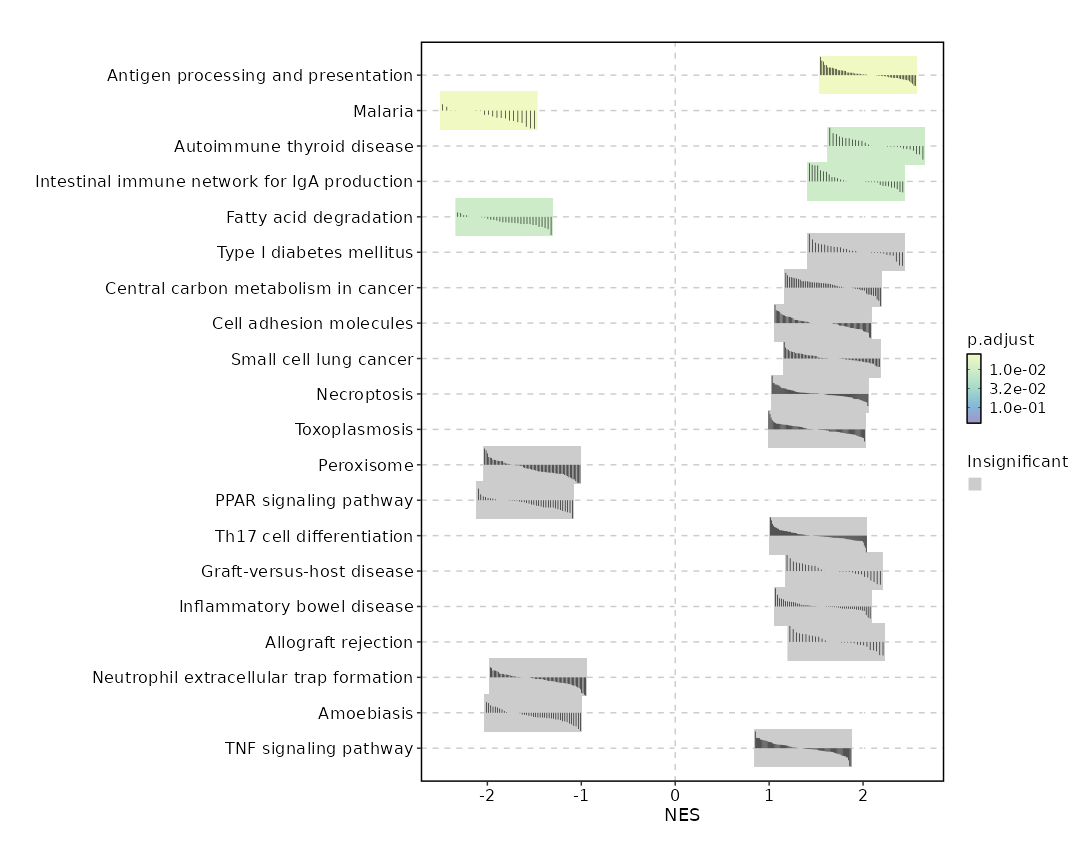
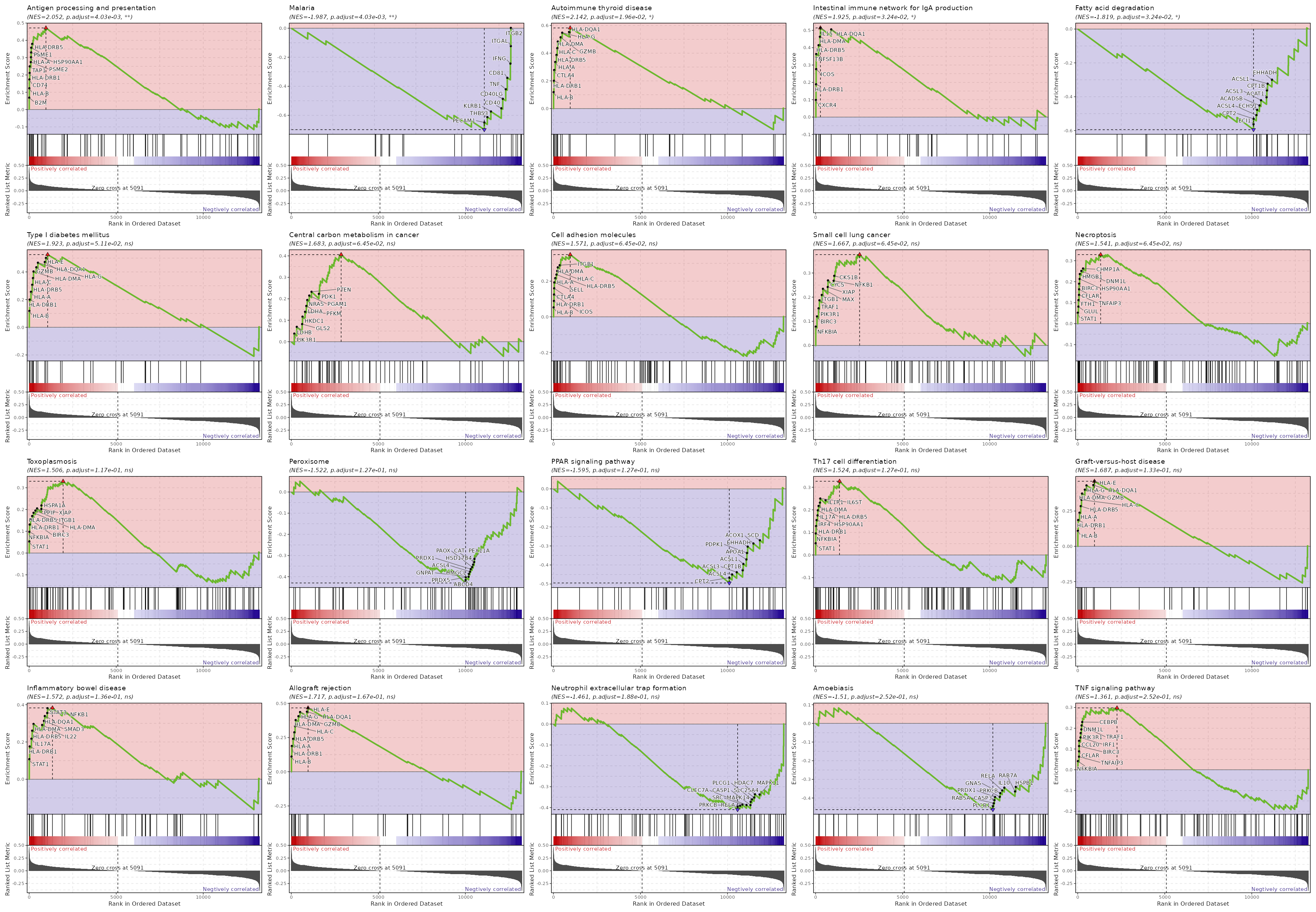
Summary plot for all subsets or idents
If you use each to separate the cells into different subsets, this is useful to
make a summary plot for all subsets. Or if you don't specify ident_1, the summary plot for all idents in group_by will be generated.
[ScFGSEA.envs]
group_by = "Diagnosis"
ident_1 = "Colitis"
ident_2 = "Control"
each = "seurat_clusters"

[ScFGSEA.envs.alleach_plots.Heatmap]
plot_type = "heatmap"
group_by = "Diagnosis"
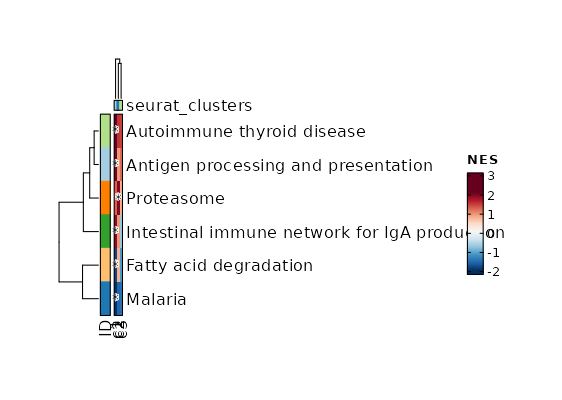
srtobj— The seurat object in RDS format
outdir— The output directory for the results and plots
alleach_plots(type=json) — Cases of the plots to generate for all pathways.The keys are the names of the cases and the values are the dicts inherited fromalleach_plots_defaults.alleach_plots_defaults(ns) — Default options for the plots to generate for all pathways.- - plot_type: The type of the plot, currently either dot or heatmap (default)
- - descr: A description of the plot to be shown above the plot image.
- - devpars (ns): The device parameters for the plots.
- res (type=int): The resolution of the plots.
- height (type=int): The height of the plots.
- width (type=int): The width of the plots. - -
: See https://pwwang.github.io/biopipen.utils.R/reference/VizGSEA.html.
assay— The assay to use. If not provided, the default assay will be used.cache(type=auto) — Where to cache the results.IfTrue, cache tooutdirof the job. IfFalse, don't cache. Otherwise, specify the directory to cache to.cases(type=json;order=99) — If you have multiple cases, you can specify them here.The keys are the names of the cases and the values are the above options exceptmutaters. If some options are not specified, the default values specified above will be used. If no cases are specified, the default case will be added with the nameGSEA.each— The column name in metadata to separate the cells into different subsets to do the analysis."ident"can be used as an alias for the default identity column (e.g."seurat_clusters").eps(type=float) — This parameter sets the boundary for calculating the p value.See https://rdrr.io/bioc/fgsea/man/fgseaMultilevel.htmlerror(flag) — Stop the job if errors happen.Helpful when no/not enough markers are found or no pathways are enriched. IfFalse, empty results will be returned.gmtfile— The pathways in GMT format, with the gene names/ids in the same format as the seurat object.You can use built-in dbs inenrichit, or provide your own gmt files. See also https://pwwang.github.io/enrichit/reference/FetchGMT.html. The built-in dbs include:- * "BioCarta" or "BioCarta_2016"
- * "GO_Biological_Process" or "GO_Biological_Process_2025"
- * "GO_Cellular_Component" or "GO_Cellular_Component_2025"
- * "GO_Molecular_Function" or "GO_Molecular_Function_2025"
- * "KEGG", "KEGG_Human", "KEGG_2021", or "KEGG_2021_Human"
- * "Hallmark", "MSigDB_Hallmark", or "MSigDB_Hallmark_2020"
- * "Reactome", "Reactome_Pathways", or "Reactome_Pathways_2024"
- * "WikiPathways", "WikiPathways_2024", "WikiPathways_Human", or "WikiPathways_2024_Human"
group_by— The column name in metadata to group the cells.ident_1— The first group of cells to compareident_2— The second group of cells to compare, if not provided, the rest of the cells that are notNAs ingroup_bycolumn are used forident_2.maxsize(type=int) — Maximal size of a gene set to test. All pathways above the threshold are excluded.method(choice) — The method to do the preranking.- - signal_to_noise: Signal to noise.
The larger the differences of the means (scaled by the standard deviations);
that is, the more distinct the gene expression is in each phenotype and the more the gene
acts as a "class marker". - - s2n: Alias of signal_to_noise.
- - abs_signal_to_noise: The absolute value of signal_to_noise.
- - abs_s2n: Alias of abs_signal_to_noise.
- - t_test: T test.
Uses the difference of means scaled by the standard deviation and number of samples. - - ratio_of_classes: Also referred to as fold change.
Uses the ratio of class means to calculate fold change for natural scale data. - - diff_of_classes: Difference of class means.
Uses the difference of class means to calculate fold change for nature scale data - - log2_ratio_of_classes: Log2 ratio of class means.
Uses the log2 ratio of class means to calculate fold change for natural scale data.
This is the recommended statistic for calculating fold change for log scale data.
- - signal_to_noise: Signal to noise.
minsize(type=int) — Minimal size of a gene set to test. All pathways below the threshold are excluded.mutaters(type=json) — The mutaters to mutate the metadata.The key-value pairs will be passed thedplyr::mutate()to mutate the metadata. You can also use the clone selectors to select the TCR clones/clusters. See https://pwwang.github.io/scplotter/reference/clone_selectors.html. You can also use key<newcol>:identto set the<newcol>as the default ident for the stats. See also https://pwwang.github.io/biopipen.utils.R/reference/MutateSeuratMeta.htmlncores(type=int) — Number of cores for parallelizationPassed tonprocoffgseaMultilevel().rest(type=json;order=98) — Rest arguments forfgsea()See also https://rdrr.io/bioc/fgsea/man/fgseaMultilevel.htmlsubset— An expression to subset the cells.top(type=auto) — Do gsea table and enrich plot for top N pathways.If it is < 1, will apply it topadj, selecting pathways withpadj<top.
bioconductor-fgsea—- check: {{proc.lang}} -e "library(fgsea)"
r-seurat—- check: {{proc.lang}} -e "library(seurat)"
__init_subclass__()— Do the requirements inferring since we need them to build up theprocess relationship </>from_proc(proc,name,desc,envs,envs_depth,cache,export,output_flatten,error_strategy,num_retries,forks,input_data,order,plugin_opts,requires,scheduler,scheduler_opts,submission_batch)(Type) — Create a subclass of Proc using another Proc subclass or Proc itself</>gc()— GC process for the process to save memory after it's done</>log(level,msg,*args,logger)— Log message for the process</>run()— Init all other properties and jobs</>
pipen.proc.ProcMeta(name, bases, namespace, **kwargs)
Meta class for Proc
from_proc(proc, name=None, desc=None, envs=None, envs_depth=None, cache=None, export=None, output_flatten=None, error_strategy=None, num_retries=None, forks=None, input_data=None, order=None, plugin_opts=None, requires=None, scheduler=None, scheduler_opts=None, submission_batch=None)
Create a subclass of Proc using another Proc subclass or Proc itself
proc(Type) — The Proc subclassname(str | none, optional) — The new name of the processdesc(str | none, optional) — The new description of the processenvs(Optional, optional) — The arguments of the process, will overwrite parent oneThe items that are specified will be inheritedenvs_depth(int | none, optional) — How deep to update the envs when subclassed.cache(bool | none, optional) — Whether we should check the cache for the jobsexport(bool | none, optional) — When True, the results will be exported to<pipeline.outdir>Defaults to None, meaning only end processes will export. You can set it to True/False to enable or disable exporting for processesoutput_flatten(bool | none, optional) — Whether to flatten the output when saving to the outputdirectory. Normally, the output will be saved in a subdirectory named after the job index (e.g.<outdir>/0,<outdir>/1, etc.). Ifoutput_flattenis True, the output will be saved directly in the output directory without the subdirectories. This is useful when you want the job outputs to be directly revealed in the output directory. Note that this only works for processes with export=True or end processes and make sure the name of the output files won't conflict for jobs with each other when flattening. It takes 3 possible values- - None (default): flatten the output for single-job processes only
- - True: flatten the output for all processes
- - False: never flatten the output
error_strategy(str | none, optional) — How to deal with the errors- - retry, ignore, halt
- - halt to halt the whole pipeline, no submitting new jobs
num_retries(int | none, optional) — How many times to retry to jobs once error occursforks(int | none, optional) — New forks for the new processinput_data(any | none, optional) — The input data for the process. Only when this processis a start processorder(int | none, optional) — The order to execute the new processplugin_opts(Optional, optional) — The new plugin options, unspecified items will beinherited.requires(Optional, optional) — The required processes for the new processscheduler(str | none, optional) — The new shedular to run the new processscheduler_opts(Optional, optional) — The new scheduler options, unspecified items willbe inherited.submission_batch(int | none, optional) — How many jobs to be submited simultaneously.
The new process class
__init_subclass__()
Do the requirements inferring since we need them to build up theprocess relationship
run()
Init all other properties and jobs
gc()
GC process for the process to save memory after it's done
log(level, msg, *args, logger=<LoggerAdapter pipen.core (WARNING)>)
Log message for the process
level(int | str) — The log level of the recordmsg(str) — The message to log*args— The arguments to format the messagelogger(LoggerAdapter, optional) — The logging logger
biopipen.ns.scrna.CellTypeAnnotation(*args, **kwds) → Proc
Annotate the cell clusters. Currently, the following ways are supported:
- Pass the cell type annotation directly (at cluster-level or cell-level)
- Use
ScType(cluster-level, marker-based) - Use
scCATCH(cluster-level, marker-based) - Use
hitype(cell-level or cluster-level, marker-based) - Use
celltypist(cell-level, model-based) - Use
scSorter(cell-level, marker-based) - Use
SCINA(cell-level, marker-based) - Use
SingleR(cluster-level, model-based) - Use
scHDeepInsight(cell-level, model-based) - Use
LLMCelltype(cluster-level, LLM-based, a fork ofgptcelltype) - Use
cellassign(cell-level, marker-based) - Use
scBERT(cell-level, model-based) - Use
CelliD(cell-level, marker-based) - Use
scAgentType(cluster-level, LLM-based, agentic) - Use
garnett(cell-level, model-based) - Use
UCell(cell-level, marker-based scoring) - Use
AUCell(cell-level, marker-based scoring) - Use
GSVA(cell-level, marker-based scoring) - Use
singscore(cell-level, marker-based scoring) - Use
scmap(cell-level or cluster-level, reference-based) - Use
CHETAH(cell-level, reference-based) - Use
scClassify(cell-level, reference-based) - Use
scPred(cell-level, reference-based) - Use
Azimuth(cluster-level, reference-based) - Use
SCSA(cluster-level, marker-based, python) - Use
MACA(cell-level, marker-based, python, a modernized fork should be used, https://github.com/pwwang/MACA/tree/modernize) - Use
scMapNet(cell-level, marker-based, python) - Use
mLLMCelltype(cluster-level, LLM-based) - Use
LICT(cluster-level, LLM-based, a modernized fork should be used, https://github.com/pwwang/LICT/tree/modernize) - Use
MapQuery(cell-level, reference-based) - Use
ScInfeR(cluster-level, marker-based; graph-based, in two rounds: it calls the clusters from the marker table first, then the cells within a cluster when two cell types score within 0.1 of each other; the marker table is either a universal one inenvs.scinfer.db, or one of ScInfeR's own ScInfeRDB tissues inenvs.scinfer.tissue) (Swain, Shekhawat & Yadav, 2025, doi:10.1093/bib/bbaf253; there is a published correction, doi:10.1093/bib/bbaf337)
The tools can be divided into two categories:
- Cluster-level tools: annotate the clusters, each cluster being assigned one cell type.
These include
sctype,sccatch,scsorter,singler,azimuth,llmcelltype,mllmcelltype,lict,scagenttype,scsa,scinfer, anddirect. - Cell-level tools: annotate the cells, each cell being assigned one cell type.
These include
scina,hitype,cellassign,cellid,scbert,schdeepinsight,llmcelltype,cell,garnett,ucell,aucell,gsva,singscore,scmap,cheetah,scclassify,scpred,mapquery,maca, andscmapnet. For cell-level tools, a cluster-level annotation can also be generated by specifyingenvs.ident(orenvs.cases.X.identfor a specific case), where each cluster is assigned the cell type by majority vote of the cells in the cluster. hitypecan run at either level: cell-level whenenvs.identis not set, or cluster-level whenenvs.identis set (hitype then scores each cluster as a whole and assigns its cell type directly, not by majority vote).celltypistis a special cell-level tool, which can also generate cluster-level annotations via its over-clustering mechanism (envs.celltypist.over_clusteringorenvs.ident).
scsa annotates the clusters like sctype and sccatch, but its wrapper maps
the cluster labels back onto the cells, so a per-cell column is produced as well
(the same shape as azimuth: a cluster-level mapping plus per-cell labels).
The tools can also be divided by their input types:
- Marker-based tools: take marker genes for the cell types, including
sctype,hitype,sccatch,scsorter,scina,cellassign, andcellid. They all accept the universal marker format (see the note below).scinferis marker-based as well: it takes the universal marker table throughenvs.scinfer.db, or, likesctypeandsccatchwith their bundled databases, a database of its own throughenvs.scinfer.tissue(ScInfeRDB: ScInfeR's own per-tissue cell type → marker → weight set, fetched at call time). The scorer family (ucell,aucell,gsva, andsingscore) is also marker-based: it scores the same marker table for every cell with equal weights (no learned weights), and assigns each cell the cell type with the highest score, so aweightcolumn in the marker table is ignored. - Model/reference-based tools: take a trained model or a reference object,
including
celltypist,scbert,singler,schdeepinsight,garnett,scmap,cheetah,scclassify,scpred,azimuth, andmapquery.mapqueryconsumes a labeled reference and annotates the cells of the query; like the other cell-level tools, the cluster-level view comes fromenvs.ident(orenvs.cases.X.ident), not from the tool itself. Agarnettclassifier is trained from marker genes and expression data (it is model-based, not a plain marker-table input like the marker-based tools). - Direct-annotation tools: take the cell types directly via
envs.cell_types, includingdirectandcell.
scsa, maca, and scmapnet are python-based tools, driven through wrapper
scripts under biopipen/scripts/scrna/ like the other python-based tools
(celltypist, scbert, schdeepinsight, scagenttype); their python
dependencies are not installed by biopipen, see the envs.<tool> below.
The annotated cell types will be saved to a new column (envs.anno_col, default: CellType)
in the metadata, so that the downstream processes will use the annotated cell types
(the identity will be set to the annotation column unless envs.set_ident is False).
Note
The original identity column (e.g. seurat_clusters) is never modified.
For tool set to direct, if envs.cell_types is not specified or is an empty list,
the original cell types will be kept and nothing will be changed.
If you are using a cluster-level tool (or a cell-level tool with envs.ident), a text file
containing the mapping from the original identity to the new cell types will be generated
and saved to cluster2celltype.tsv under the job output directory.
The per-cell annotations from cell-level tools will be saved to cell2celltype.tsv
under the job output directory.
Note
The following envs are deprecated and will be removed in future versions:
sctype_tissue, sctype_db, hitype_tissue, hitype_db, scsorter_db, scsorter_args,
scina_db, scina_args, singler_db, singler_args, schdeepinsight_ref,
schdeepinsight_args, llmcelltype_args, cellassign_db, cellassign_args,
scbert_ref, scbert_model, scbert_label_dict, scbert_args, cellid_db,
cellid_args, sccatch_args, celltypist_args, newcol, and backup_col.
Use the corresponding envs.<tool> namespace instead (e.g. envs.sctype_db →
envs.sctype.db). The deprecated envs still work, with a warning, and take precedence
over the new-style envs when both are provided.
envs.newcol is replaced by envs.anno_col, and envs.backup_col is no longer
needed (the original identity column is never modified).
Note
Universal marker format
The marker-based tools (sctype, hitype, sccatch, scsorter, scina,
cellassign, and cellid) accept a universal marker table in addition to
their native formats. The table can be a TSV, CSV, or an RDS/qs/qs2 file
containing a data.frame, in long format with one row per gene per cell type:
cell_type(required): the cell type.gene(required): the marker gene.direction:positive/negative(aliases:pos/neg/+/-). Forsctype/hitype, negative markers are used as down-regulated markers (geneSymbolmore2). Forscsorter, negative markers become negativeWeights. For the other tools (scina,cellassign,cellid,sccatch), negative markers cannot be represented and are ignored (only positive markers are used).weight: a numeric weight. Used byscsorter(as theWeightcolumn) and, when present, byhitype(hitype >= 0.0.6), where the weights are used as-is in the scoring. Ignored by the other tools.species,cancer,tissue: optional. When the matching env (envs.<tool>.species/cancer/tissue) is set, only the rows with the given value are kept (an error is raised if the table has no such column or no rows match). Forsctype/hitype,tissuealso becomes thetissueTypecolumn, and it can be used to filter a native ScType xlsx/TSV database as well (the other two columns only exist in universal tables).level: an integer, only used bysctype/hitype.
Column aliases are auto-detected: celltype/cellType/Type → cell_type,
marker/Marker/gene_symbol → gene, sign → direction, and
tissueType → tissue.
You can specify the columns after # in the file path, for example,
file:///path/to/markers.tsv#cell_type,gene,direction, using column names
(aliases allowed) or 1-based indices. The file:// prefix is optional.
A file without cell_type/gene columns is treated as the tool's native
format (e.g. a ScType xlsx for sctype/hitype, a per-cell-type-column CSV
for scina, a named-list RDS for scina/cellassign/cellid, an RDS
data.frame for sccatch, etc.).
cache— Should we detect whether the jobs are cached?desc— The description of the process. Will use the summary fromthe docstring by default.dirsig— When checking the signature for caching, whether should we walkthrough the content of the directory? This is sometimes time-consuming if the directory is big.envs— The arguments that are job-independent, useful for common optionsacross jobs.envs_depth— How deep to update the envs when subclassed.error_strategy— How to deal with the errors- - retry, ignore, halt
- - halt to halt the whole pipeline, no submitting new jobs
export— When True, the results will be exported to<pipeline.outdir>Defaults to None, meaning only end processes will export. You can set it to True/False to enable or disable exporting for processesforks— How many jobs to run simultaneously?input— The keys for the input channelinput_data— The input data (will be computed for dependent processes)lang— The language for the script to run. Should be the path to theinterpreter iflangis not in$PATH.name— The name of the process. Will use the class name by default.nexts— Computed fromrequiresto build the process relationshipsnum_retries— How many times to retry to jobs once error occursorder— The execution order for this process. The bigger the numberis, the later the process will be executed. Default: 0. Note that the dependent processes will always be executed first. This doesn't work for start processes either, whose orders are determined byPipen.set_starts()output— The output keys for the output channel(the data will be computed)output_data— The output data (to pass to the next processes)output_flatten— Whether to flatten the output when saving to the outputdirectory. Normally, the output will be saved in a subdirectory named after the job index (e.g.<outdir>/0,<outdir>/1, etc.). Ifoutput_flattenis True, the output will be saved directly in the output directory without the subdirectories. This is useful when you want the job outputs to be directly revealed in the output directory. Note that this only works for processes with export=True or end processes and make sure the name of the output files won't conflict for jobs with each other when flattening. It takes 3 possible values- - None (default): flatten the output for single-job processes only
- - True: flatten the output for all processes
- - False: never flatten the output
plugin_opts— Options for process-level pluginsrequires— The dependency processesscheduler— The scheduler to run the jobsscheduler_opts— The options for the schedulerscript— The script template for the processsubmission_batch— How many jobs to be submited simultaneously.The program entrance for some schedulers may take too much resources when submitting a job or checking the job status. So we may use a smaller number here to limit the simultaneous submissions.template— Define the template engine to use.This could be either a template engine or a dict with keyengineindicating the template engine and the rest the arguments passed to the constructor of thepipen.template.Templateobject. The template engine could be either the name of the engine, currently jinja2 and liquidpy are supported, or a subclass ofpipen.template.Template. You can subclasspipen.template.Templateto use your own template engine.
[CellTypeAnnotation.envs]tool = "direct"
cell_types = ["CellType1", "CellType2", "-", "CellType4"]
The cell types will be assigned as:
0 -> CellType1
1 -> CellType2
2 -> 2
3 -> CellType4
sobjfile— The single-cell object in RDS/qs/qs2/h5ad format.
outfile— The rds/qs/qs2/h5ad file of seurat object with cell type annotated.A text file containing the mapping from the old identity to the new cell types will be generated and saved tocluster2celltype.tsvunder the job output directory. Another text file containing the per-cell annotations will be generated and saved tocell2celltype.tsvunder the job output directory, with the cell barcodes in the first column (Cell) and one column per case that produces cell-level annotations. Note that the identity of the output Seurat object will be set to the annotation column (envs.anno_col) whenenvs.set_identisTrue(seeenvs.set_ident).
add_prefix(flag) — Whether to add a prefix to the new column names in metadata.Only used when in non-default cases. The prefix will be the case name followed by_.anno_col(type=str) — The name of the column to store the annotated cell types (default:CellType).For cluster-level tools (or cell-level tools withenvs.ident), the annotation column stores the cluster-level cell types. For cell-level tools, the per-cell annotations are also saved to a tool-specific column (e.g.scina_celltype), and ifenvs.identis specified,anno_colstores the majority-vote results of the clusters. For the default case (DEFAULT), the column is named asanno_col; for other cases, the case name is prefixed to the column name unlessenvs.add_prefixisFalse.assay— The assay to use for the analysis. If not specified, the default assay will be used.Will not be inherited by the cases underenvs.cases. To use a different assay for a case, specify it in the case args. This will be also used to convert Seurat object to h5ad if the input is Seurat object and the output is h5ad.aucell(ns) — The arguments forAUCell::AUCell_calcAUC()iftoolisaucell. The negative-direction markers of the marker table are dropped (a ranked list has no direction).- - db (type=str): The path to the marker table (required).
Must be a universal marker table (see the note above). - - assay (type=str): The assay to score. If not specified,
the default assay will be used. - - aucMaxRank (type=int): The number of top-ranked genes to
calculate the AUC on (default: 5% of the genes). - - normAUC (flag): Whether to normalize the AUC to the maximum
possible AUC (default: TRUE). - - tissue (type=str): Filter the marker table by tissue, e.g.
Immune system. - - cancer (type=str): Filter the marker table by cancer, e.g.
Breast cancer. - - species (type=str): Filter the marker table by species, e.g.
Human.
- - db (type=str): The path to the marker table (required).
azimuth(ns) — The arguments forAzimuth::RunAzimuth()iftoolisazimuth. The reference's own annotation levels are transferred to the query, and each cluster gets the majority call of its cells.- - ref (type=str): The reference name (looked up through
SeuratData,
e.g.pbmcref, downloaded when not installed) or the path to a
directory holdingref.Rds+idx.annoy(required). - - db (type=str): An alias of
ref. - - assay (type=str): The assay to transfer.
- - anno_col_in (type=str): The
predicted.*column of the Azimuth
result to use as the annotation. Defaults to
predicted.celltype.l1when present, otherwise the first
predicted.*column. - - dims: Ignored with a warning: the installed Azimuth reads the
dimensionality off the reference's own annoy index. - - k.anchor: Ignored with a warning, see
dims.
- - ref (type=str): The reference name (looked up through
cases(type=json) — Run multiple cases of cell type annotation on the same Seurat object.The keys are the prefix of column names added to the metadata (unlessadd_prefixisFalse), and the values will inherit the above options. The default case isDEFAULT, meaning no prefix will be added to the column names. The identity of the output Seurat object will be set according toenvs.set_identof each case (seeenvs.set_ident). If any case requires h5ad conversion (e.g.,celltypist), the object is pre-converted once and shared across those tools.cell_types(type=auto) — The cell types to use for direct or cell-level annotation.Fordirect, the cell types will be assigned to the clusters in the order of the original identities. If given as a list (array), you can use"-"or""as the placeholder for the clusters that you want to keep the original cell types. If the length ofcell_typesis shorter than the number of clusters, the remaining clusters will be kept as the original cell types. You can also useNAto remove the clusters from downstream analysis (the cells in these clusters will be removed from the Seurat object). If given as a dict (map), the keys are the original cluster names and the values are the new cell types. Forcell, it must be a TSV file with cell-level annotations. You can specify the column names after the#. For example,file:///path/to/cell_types.tsv#cell_id,cell_typewill usecell_idas the cell id column to match the cell ids in the Seurat object, andcell_typeas the cell type column to assign the cell types. Multiple cell type columns can be specified, and the first one will be used as the annotation column (the others will be added as additional annotation columns). You can also use 1-based column index to specify the columns, for example,file:///path/to/cell_types.tsv#1,3will use the first column as the cell id column and the third column as the cell type column. If cells in the Seurat object are not found in the cell type file,NAs will be assigned to those cells. If no columns are specified, the first two columns will be used as the cell id and cell type columns. Prefixfile://is optional.
Forcell, it must be a TSV file with cell-level annotations. You can specify the column names after the#. For example,file:///path/to/cell_types.tsv#cell_id,cell_typewill usecell_idas the cell id column to match the cell ids in the Seurat object, andcell_typeas the cell type column to assign the cell types. Multiple cell type columns can be specified, and the first one will be used as the new identity column. You can also use 1-based column index to specify the columns, for example,file:///path/to/cell_types.tsv#1,3will use the first column as the cell id column and the third column as the cell type column. If cells in the Seurat object are not found in the cell type file,NAs will be assigned to those cells. If not columns are specified, the first two columns will be used as the cell id and cell type columns. Prefixfile://is optional.cellassign(ns) — The arguments forcellassign::cellassign()iftooliscellassign.- - db (type=str): The path to the marker gene info
file forcellassign. Supports:
* RDS/qs2 file: a binary gene×celltype matrix or a
named list (cell type → vector of marker genes)
* CSV/TSV file: with columnsgeneandcell_type
Can also be a universal marker table (see the note above). - - tissue: Filter the markers by the
tissuecolumn of a universal
marker table (see the note above). Only works with a universal
marker table that has atissuecolumn. - - cancer: Filter the markers by the
cancercolumn of a universal
marker table (see the note above). Only works with a universal
marker table that has acancercolumn. - - species: Filter the markers by the
speciescolumn of a universal
marker table (see the note above). Only works with a universal
marker table that has aspeciescolumn. - - python (type=str): Path to Python with
tensorflowinstalled. - - assay (type=str): Assay to extract raw counts from.
- - min_delta (type=int): Min log-fold change for marker
overexpression (default: 2). - - B (type=int): Number of RBF dispersion bases
(default: 10). - - shrinkage (flag): Hierarchical shrinkage on delta
(default: TRUE). - - n_batches (type=int): Data subsample batches
(default: 1). - - learning_rate (type=float): ADAM learning rate
(default: 0.1). - - max_iter_em (type=int): Max EM iterations
(default: 20). - - verbose (flag): Print progress (default: TRUE).
- -
: Additional args to
cellassign::cellassign().
- - db (type=str): The path to the marker gene info
cellid(ns) — The arguments for CelliDiftooliscellid.- - db (type=str): The path to the marker gene set
file forcellid. Supports:
* RDS/qs2 file: a named list (cell type → vector
of marker genes)
* CSV/TSV file: with columnsgeneandcell_type
Can also be a universal marker table (see the note above). - - tissue: Filter the markers by the
tissuecolumn of a universal
marker table (see the note above). Only works with a universal
marker table that has atissuecolumn. - - cancer: Filter the markers by the
cancercolumn of a universal
marker table (see the note above). Only works with a universal
marker table that has acancercolumn. - - species: Filter the markers by the
speciescolumn of a universal
marker table (see the note above). Only works with a universal
marker table that has aspeciescolumn. - - nmcs (type=int): Number of MCA components
(default: 50). - - n_features (type=int): Top n features per
cell for hypergeometric test (default: 200). - - dims (type=auto): MCA dimensions to use
(default: seq(nmcs)). - - min_size (type=int): Min overlapping genes
(default: 10). - - log_trans (flag): -log10 transform p-values
(default: TRUE). - - p_adjust (flag): Benjamini-Hochberg correction
(default: TRUE). - - group_gsea (flag): Use CelliD's own cluster mode
(CelliD::RunGroupGSEA()): the clusters are annotated from the
gene-set enrichment scores of the whole group (the best-scoring
pathway by NES) instead of the engine aggregating the per-cell
hypergeometric test by majority vote (default: FALSE).
- - db (type=str): The path to the marker gene set
celltypist(ns) — The arguments forcelltypist::celltypist()iftooliscelltypist.- - model: The path to model file.
- - python: The python path where celltypist is installed.
- - majority_voting: When true, it refines cell identities within local subclusters after an over-clustering approach
at the cost of increased runtime. - - over_clustering (type=auto): The column name in metadata to use as clusters for majority voting.
Set toFalseto disable over-clustering.
Whenin.sobjfileis rds/qs/qs2 (supposing we have a Seurat object), the default ident is used by default.
Otherwise, it is False by default. - - assay: When converting a Seurat object to AnnData, the assay to use.
If input is h5seurat, this defaults to RNA.
If input is Seurat object in RDS, this defaults to the default assay.
cheetah(ns) — The arguments forCHETAH::CHETAHclassifier()iftoolischeetah. The reference is aSingleCellExperiment(or a Seurat object, converted on the fly) holding counts.- - db (type=str): The path to the reference (required).
- - assay (type=str): The assay of the reference and of the object
(default:RNA). - - input_c (type=str): The name of the assay of the input to use.
- - thresh (type=float): The confidence threshold below which a cell
is labeledUnassigned(default: 0.1). - - n_genes (type=int): The number of genes used for the classification.
- - pc_thresh (type=float): The threshold for the principal components.
- - only_pos (flag): Whether to use only the positively correlated
genes. Defaults to the CHETAH default. - - ref_ct (type=str): The reference's cell-type column name
(auto-detected when not given). - - label (type=str): The label vector/column used when the reference
carries several.
garnett(ns) — The arguments forgarnett::classify_cells()iftoolisgarnett. The process takes a trained classifier and predicts the cell types for each cell — no training step is performed. A classifier can be trained with theGarnettClassifierTrainerprocess from a Seurat object and marker genes, or you can use a pre-trained one from https://cole-trapnell-lab.github.io/garnett/classifiers/. The Seurat object is converted to a monocle3cell_data_setfor classification, and cells that cannot be confidently classified are labeledUnknown.- - classifier (type=str): The path to the trained classifier
file (an RDS file containing agarnett_classifierobject,
saved bygarnett::save_classifier()). - - db (type=str): The name of the installed annotation package
used to convert the gene IDs of the expression data to the
gene IDs the classifier was trained on (default:none, i.e.
no conversion). The official pre-trained classifiers are
trained on ENSEMBL gene IDs, so for expression data with gene
symbols you need e.g.db: org.Hs.eg.dbtogether with
cds_gene_id_type: SYMBOL. - - cds_gene_id_type (choice): The gene ID type of the expression
data, used whendbis notnone(default:custom).
Supported types includecustom,SYMBOL,ENSEMBL,ENTREZID. - - assay (type=str): The assay to use for classification.
If not specified,envs.assaywill be used.
The assay must contain raw counts. - - cluster_extend (flag): Use Garnett's own cluster mode: the
clusters are passed as thegarnett_clustercolumn of the
cell_data_set, andclassify_cells()extends the labels over
each cluster (cluster_ext_type) instead of the engine
aggregating the per-cell labels by majority vote
(default: FALSE). - -
: Other arguments for
garnett::classify_cells(),
e.g.rank_prob_ratio,
cluster_extend_max_frac_unknown,cluster_extend_max_frac_incorrect,
return_type_levels, andverbose.
- - classifier (type=str): The path to the trained classifier
gsva(ns) — The arguments forGSVA::gsva()iftoolisgsva. The negative-direction markers of the marker table are dropped (a gene set has no direction).- - db (type=str): The path to the marker table (required).
Must be a universal marker table (see the note above). - - assay (type=str): The assay to score. If not specified,
the default assay will be used. - - kcdf (choice): The kernel to use for the enrichment scores.
Gaussian(default),Poisson, ornone. - - minSize (type=int): The minimum number of genes in a gene set
(default: 1). - - maxSize (type=int): The maximum number of genes in a gene set
(default:Inf, i.e. no limit). - - tissue (type=str): Filter the marker table by tissue, e.g.
Immune system. - - cancer (type=str): Filter the marker table by cancer, e.g.
Breast cancer. - - species (type=str): Filter the marker table by species, e.g.
Human.
- - db (type=str): The path to the marker table (required).
hitype(ns) — The arguments forhitypeiftoolishitype.- - tissue: The tissue to use for
hitype.
Available tissues should be the first column (tissueType) ofdb.
If not specified, all rows indbwill be used. - - cancer: Filter the markers by the
cancercolumn of a universal
marker table (see the note above). Only works with a universal
marker table that has acancercolumn. - - species: Filter the markers by the
speciescolumn of a universal
marker table (see the note above). Only works with a universal
marker table that has aspeciescolumn. - - db: The database to use for hitype.
Compatible withsctype.db.
See also https://pwwang.github.io/hitype/articles/prepare-gene-sets.html
You can also use built-in databases, includinghitypedb_short,hitypedb_full, andhitypedb_pbmc3k.
Can also be a universal marker table (see the note above).
When the table has aweightcolumn (e.g. trained by
HitypeWeightTrainer), the weights are used as-is for
scoring (hitype >= 0.0.6). - - norm: The normalization method for
hitype::hitype_score().
One of "sqrt", "weight", "none" (default: "sqrt").
"weight" is recommended when scoring with learned weights. - - use_sensitivity: Whether to weight markers by their
sensitivity (default:True).Falseis recommended when
scoring with learned weights. - - threshold: The assignment threshold passed to
RunHitype
(default:0.0).
- - tissue: The tissue to use for
ident— The column name in metadata to use as the clusters.For cluster-level tools, this is required, and if not specified, the identity column will be used when input is rds/qs/qs2 (supposing we have a Seurat object). If input data is h5ad, this is required to run cluster-based annotation tools. For cell-level tools, if specified, a cluster-level annotation will also be generated by majority vote of the cells in each cluster, and saved tocluster2celltype.tsv. Forhitype, this switches to cluster-level scoring (cell-level is the default when it is not set). Forcelltypist, this is a shortcut to setover_clusteringinenvs.celltypist(seeenvs.celltypist.over_clustering)."ident"can be used as an alias for the identity column. To set it for a specific case, useenvs.cases.X.ident.layer— The layer in the assay to use for the analysis. If not specified, the default layer will be used.lict(ns) — The arguments forLICT::LLMCellType()iftoolislict.LICT queries every provider at once and combines the answers; the providers without a key are skipped.- - species (type=str): The species of the cells (default:
Human). - - tissue (type=str): The tissue of the cells.
- - topgenenumber (type=int): The number of top markers per cluster
put into the prompt (default: 30). - - validate (flag): Whether to validate the markers
(default: TRUE). - - percent (type=float): The percentage of the markers to use
(default: 0.5). - - keys (type=json): The API keys of the providers, as a map from the
environment variable name to its value, e.g.
{ "openai_api_key": "<key>" }. They are set in the R session
(and inherited by the child processes) before the call. - - provider (type=str): The provider whose answer to use. Defaults to
the first provider that answered.
- - species (type=str): The species of the cells (default:
llmcelltype(ns) — The arguments forLLMCelltype::llmcelltype()iftoolisllmcelltype.- - api_key (type=str): OpenAI API key
- - model (type=str): GPT model (required, e.g.
'gpt-4', 'gpt-4o'). - - base_url (type=str): Custom base URL for
OpenAI-compatible providers. - - tissuename (type=str): Tissue name for context.
- - sigmarkers (type=str): A expression to filter the result from
RunSeuratDEAnalysis(), e.g.avg_log2FC > 0.25 & p_val_adj < 0.05,
to be used for generating the marker gene list for LLM. - - assay (type=str): Assay to use for
FindAllMarkers(). - -
: Additional args passed to
biopipen.utils::RunSeuratDEAnalysis().
maca(ns) — The arguments forMACAiftoolismaca. MACA pinsscanpy==1.6.0andanndata==0.7.5, so it needs its own environment. The MACA script lives inbiopipen/scripts/scrna/maca-wrapper.py.- - db (type=str): The path to the marker table (required).
Must be a universal marker table (see the note above). - - python (type=str): The python path with MACA installed
(default: the same python as the pipeline). - - n_pcs (type=int): The number of principal components.
- - res (type=auto): The Louvain resolutions, e.g.
[1, 2, 3]
(default: MACA's own[1, 2, 3]). - - n_neis (type=auto): The numbers of neighbors, e.g.
[5, 10]
(default: MACA's own[5, 10]). - - freq (type=float): The frequency threshold of the cluster mapping
(default: 0.5). - - use_weight (flag): Whether to weight the markers by their order in
the marker table (default: FALSE).
- - db (type=str): The path to the marker table (required).
mapquery(ns) — The arguments forSeurat::MapQuery()iftoolismapquery. The reference's cell types are transferred to the cells of the query; as for the other cell-level tools, each cluster also gets the majority call of its cells whenenvs.identis set.- - db (type=str): The reference Seurat object file (required).
- - use (type=str): The metadata column of the reference holding the
cell types to transfer (required). - - ident_name (type=str): The metadata column of the query that receives
the transferred labels (kept distinct fromidentso the clustering
column is not overwritten) (default:predicted.id). - - refnorm (choice): The normalization method the reference used; the
same method is used for the query (default:auto).
- LogNormalize: Normalize the query withNormalizeData().
- SCT: Normalize the query withSCTransform().
- SCTransform: An alias ofSCT.
- auto: Automatically detect the normalization method. - - skip_if_normalized (flag): Whether to skip the normalization if the
query is already normalized (default: TRUE). - - ncores (type=int): Number of cores to use for the mapping.
- - map_query (ns): The arguments for
Seurat::MapQuery(). - - find_transfer_anchors (ns): The arguments for
Seurat::FindTransferAnchors(). - - sctransform (ns): The arguments for
Seurat::SCTransform(). - - normalize_data (ns): The arguments for
Seurat::NormalizeData().
merge(flag) — Whether to merge the clusters with the same cell types.Otherwise, a suffix will be added to the cell types (ie..1,.2, etc).mllmcelltype(ns) — The arguments formLLMCelltype::annotate_cell_types()iftoolismllmcelltype. One call is made per run, with the top markers of every cluster.- - tissue (type=str): The tissue of the cells (required),
e.g.human PBMC. - - model (type=str): The LLM to use (default:
gpt-5.5).
The model decides the provider, and so which API key is needed. - - api_key (type=str): The API key of the provider. When not set, the
key is read from the environment variable of the provider
(OPENAI_API_KEYorANTHROPIC_API_KEY); without one, only the
prompt is built and an error is raised instead of annotating. - - top_gene_count (type=int): The number of top markers per cluster
put into the prompt (default: 10). - - base_urls (type=str): The base URLs of the providers, for
OpenAI-compatible endpoints. A single URL is the request URL
mLLMCelltype posts to, so a host-only one (or a.../v1) is
completed with the/chat/completionspath; a named list of
per-provider URLs is used as it is. - - return_reasoning (flag): Whether to return the reasoning of the
model along with the cell types (default: FALSE).
- - tissue (type=str): The tissue of the cells (required),
more_cell_types(type=json) — The additional cell type annotations to add to the metadata.The keys are the new column names and the values are the cell types lists. The cell type lists work the same ascell_typesabove. This is useful when you want to keep multiple annotations of cell types.ncores(type=int) — Number of cores to use for parallel execution of multiple cases.When > 1, cases are run in parallel viamclapply. This is not inherited by individual cases.outtype(choice) — The output file type. Currently only works forcelltypist.An RDS file will be generated for other tools.- - input: Use the same file type as the input.
- - rds: Use RDS file.
- - qs: Use qs2 file.
- - qs2: Use qs2 file.
- - h5ad: Use AnnData file.
scagenttype(ns) — The arguments for the scAgentType annotation agentiftoolisscagenttype. It annotates each cluster via an agentic LLM workflow (ReAct) and needs Python >=3.10 with thescagenttypepackage installed, e.g.pip install "scagenttype[llm] @ git+https://github.com/sathyasjali/scAgentType.git".- - python: The python path where
scagenttypeis installed. - - api: The LLM provider:
openai,anthropic, orgoogle(default:openai). - - api_key: The API key for the provider.
When not set, the key is read from the environment variable of
the provider (OPENAI_API_KEY,ANTHROPIC_API_KEY, orGOOGLE_API_KEY). - - model: The model to use. Defaults are chosen per provider when not set.
- - base_url: Custom API base URL (e.g. for proxies).
Passed to the subprocess viaOPENAI_BASE_URLorANTHROPIC_BASE_URL. - - tissue: The tissue of the data, e.g.
Human peripheral blood.
Folded intotissue_contextwhentissue_contextis not set. - - species: The species of the data.
Folded intotissue_contextwhentissue_contextis not set. - - assay: When converting a Seurat object to AnnData, the assay to use.
- -
: Other arguments for AnnotationAgent(),
e.g.tissue_context,n_markers,max_react_steps,
confidence_threshold,self_consistency_n,cache_dir,
enable_cellxgene.
- - python: The python path where
scbert(ns) — The arguments for scBERT inferenceiftoolisscbert.- - ref (type=str): The path to the scBERT repo
directory (containingperformer_pytorch/). - - model (type=str): The path to the fine-tuned
model checkpoint (.pth file). - - label_dict (type=str): The path to the label
dictionary pickle file (maps class indices to cell
type names). - - python (type=str): Path to Python with scBERT
dependencies (torch, scanpy, etc.). - - bin_num (type=int): Number of bins for
expression embedding (default: 5). - - gene_num (type=int): Number of genes expected
by the model (default: 16906). - - seed (type=int): Random seed (default: 2021).
- - pos_embed (flag): Use Gene2vec positional
encoding (default: TRUE). - - novel_type (flag): Enable novel cell type
detection (default: FALSE). - - unassign_thres (type=float): Confidence
threshold for unassigned cells (default: 0.5). - -
: Additional args to the wrapper script.
- - ref (type=str): The path to the scBERT repo
sccatch(ns) — The arguments forscCATCH::findmarkergene()iftoolissccatch.- - species: The specie of cells.
Whenmarkeris a custom (universal) marker table, only the rows
matching the value are kept; otherwise it is used to filter the
built-in scCATCH database. - - cancer: If the sample is from cancer tissue, then the cancer type may be defined.
Defaults to "Normal" if notif_use_custom_marker.
Whenmarkeris a custom (universal) marker table, only the rows
matching the value are kept; otherwise it is used to filter the
built-in scCATCH database. - - tissue: Tissue origin of cells must be defined.
Whenmarkeris a custom (universal) marker table, only the rows
matching the value are kept; otherwise it is used to filter the
built-in scCATCH database. - - marker: The marker genes for cell type identification.
Can also be a universal marker table (see the note above).
An error is raised ifspecies,cancer, ortissueis set but
the table has no such column or no rows match. - - if_use_custom_marker (flag): Whether to use custom marker genes.
Whenmarkeris provided, this is set toTrueautomatically, and
species,cancer, andtissuefilter the custom markers if set. - -
: Other arguments for scCATCH::findmarkergene().
You can pass an RDS file tosccatch.markerto work as custom marker. If so,
if_use_custom_markerwill be set toTRUEautomatically.
- - species: The specie of cells.
scclassify(ns) — The arguments forscClassify::scClassify()/scClassify::predict_scClassify()iftoolisscclassify. The reference is either a labelled matrix (a list withexprsMatandcellTypes), or a pre-trained model fromscClassify::train_scClassify().- - db (type=str): The path to the reference (required).
- - assay (type=str): The assay to classify (default:
RNA). - - algorithm (choice): The algorithm to use.
WKNN(default),KNN,
orDWKNN(thelrof the scClassify docs is not supported by
the installed scClassify). - - topN (type=int): The number of features used by the model
(default: 50). - - prob_threshold (type=float): The probability threshold below which
a cell is labeledunassigned. - - parallel (flag): Whether to run scClassify in parallel.
schdeepinsight(ns) — The arguments for scHDeepInsightiftoolisschdeepinsight. Gated by default: theSCHdeepinsightpackage (0.3.5) is not installed, and the tool additionally needs a reference file and a pretrained checkpoint. To un-gate it, runpip install SCHdeepinsight(pluspip install git+https://github.com/alok-ai-lab/pyDeepInsight.git) inpythonand download the checkpoint from https://github.com/shangruJia/scHDeepInsight.- - ref (type=str): The path to the scHDeepInsight
reference RDS file. The bundledreference.rdsfrom the
scHDeepInsight repo provides immune cell reference.
See https://github.com/shangruJia/scHDeepInsight. - - batch_size (type=int): Batch size for CNN prediction
(default: 128). - - python (type=str): Path to Python executable with
SCHdeepinsightinstalled. - - assay (type=str): Assay to use for h5ad conversion.
- - ref (type=str): The path to the scHDeepInsight
scina(ns) — The arguments forSCINA::SCINA()iftoolisscina.- - db (type=str): The path to the SCINA signature file.
It can be an RDS file containing a named list of
signature genes (the names are the cell types and the
values are the marker gene symbols), or a CSV file
with the markers for each cell type in a column.
Can also be a universal marker table (see the note above). - - tissue: Filter the markers by the
tissuecolumn of a universal
marker table (see the note above). Only works with a universal
marker table that has atissuecolumn. - - cancer: Filter the markers by the
cancercolumn of a universal
marker table (see the note above). Only works with a universal
marker table that has acancercolumn. - - species: Filter the markers by the
speciescolumn of a universal
marker table (see the note above). Only works with a universal
marker table that has aspeciescolumn. - - max_iter (type=int): Maximum number of EM iterations (default: 100).
- - convergence_n (type=int): Stop if assignment stays stable for N consecutive rounds (default: 10).
- - convergence_rate (type=float): Fraction of cells with stable assignment for convergence (default: 0.99).
- - sensitivity_cutoff (type=float): Cutoff (0-1) for removing signatures of absent cell types (default: 1).
- - rm_overlap (flag): Whether to remove genes shared between multiple signatures (default: TRUE).
- - allow_unknown (flag): Whether to allow unknown cells (default: TRUE).
- -
: Other arguments for SCINA::SCINA().
- - db (type=str): The path to the SCINA signature file.
scinfer(ns) — The arguments forScInfeR::predict_celltype_scRNA_seurat()iftoolisscinfer. ScInfeR is a graph-based annotator (GPL-3, GitHub-only, not on CRAN): it scores the cell types of the marker table against the top cluster markers, and resolves a cluster cell by cell (over the reduction's neighborhood graph) when a second cell type scores within 0.1 of the best, so the per-cell labels are saved tocell2celltype.tsvalong with the cluster mapping. One ofdbandtissueis required, and thetissueroute needs network access.- - db (type=str): The path to the marker table (required, unless
tissueis set). Must be a universal marker table (see the note
above); aweightcolumn is used as the marker weight
(default: 1), and the negative-direction markers are dropped
(ScInfeR has no direction, so a negative marker would be counted
as a marker of the cell type). - - tissue (type=str): The tissue of the cells. With
db, it filters
the marker table by itstissuecolumn (see the note above).
Withoutdb, it selects one of ScInfeR's own tissues:Bladder,
Bone marrow,Brain,Breast,Eye,Heart,Intestine,
Kidney,Liver,Lungs,Pancreas,PBMC, orSkin.
ScInfeRDB is not part of the package, so the sheet of the tissue
is downloaded from GitHub at call time -- this route needs
network access, and an unknown tissue is an error. - - subtype_present (flag): Whether the marker table carries subtypes,
i.e. whether the cell types ofenvs.scinfer.subtype_infoare
rows of the marker table as well (default: FALSE). They are then
held out of the round-1 scoring of their parent cell type, and
each cell gets its subtype in the second round. - - subtype_info (type=json): The subtypes of each cell type, as a named
list mapping a cell type of the marker table to its subtypes,
e.g.{ "T-cell": ["CD8+ T-cell", "CD4+ T-cell"], "B cell": ["Naive B cell", "Memory B cell"] }.
Only read whensubtype_presentisTrue; a cell type without an
entry (or without the list at all) keeps its round-1 label. - - assay (type=str): The assay of the object to annotate
(default:RNA). - - slot (type=str): The slot of the assay (default:
counts).
Ignored by ScInfeR in this version: it reads the default layer of
the assay whichever slot is asked for. - - reduction (type=str): The reduction ScInfeR walks to resolve the
cells of a mixed cluster (default:umap). The object must carry
it; the run stops if it does not. - - own_weightage (type=float): The weight of a cell's own expression
(against that of its neighbors) in the per-cell prediction, from
0 to 1 (default: 0.5). - - n_neighbor (type=int): The number of neighbors whose expression is
averaged in the per-cell prediction, from 5 to 30 (default: 10).
- - db (type=str): The path to the marker table (required, unless
scmap(ns) — The arguments forscmap::scmapCluster()(scmap::scmapCell()whenuse_cell_indexisTrue) iftoolisscmap. The reference is aSingleCellExperiment(or a Seurat object, converted on the fly) with alogcountsassay.- - db (type=str): The path to the reference (required).
- - assay (type=str): The assay of the reference and of the object
(default:RNA). - - cluster_col (type=str): The column of the reference's
colData
holding the cell types (default:cell_type1). - - features (type=auto): The features used for the scmap index.
Defaults to all the features of the reference. - - threshold (type=float): The similarity threshold below which a
cell is labeledunassigned(default: 0.5). - - use_cell_index (flag): Use the scmap-cell (k-means) index instead
of the scmap-cluster index (default: FALSE).
scmapnet(ns) — The arguments forscMapNetiftoolisscmapnet. scMapNet turns each cell into a treemap image and classifies it with a vision transformer. Its pipeline (treemap image generation +main_finetune.py) is driven bybiopipen/scripts/scrna/scmapnet-wrapper.py. The pre-trained weights are a manual download and are licensed CC BY-NC 4.0 (non-commercial).- - db (type=str): The path to the marker table (required).
Must be a universal marker table (see the note above). - - python (type=str): The python path with the scMapNet dependencies
(torch,timm,torchvision) installed
(default: the same python as the pipeline). - - scmapnet_dir (type=str): The path to the cloned scMapNet repo
(required), i.e. the directory holdingmain_finetune.pyand
generate_image_script.sh. - - weights (type=str): The path to the checkpoint used for the
prediction (required). The pre-trained weights are not part of
the repo, see https://github.com/Yuz7/scMapNet. The checkpoint
must be fine-tuned on the cell types of the marker table, and
the cell types are indexed in their sorted order. - - organ (type=str): The organ of the cells. scMapNet builds the
treemap images from an organ → cell type → gene hierarchy, so
this is theorganof every marker in the table.
- - db (type=str): The path to the marker table (required).
scpred(ns) — The arguments forscPred::scPredict()iftoolisscpred. The reference is a labelled Seurat object, and the feature space is extracted and the model trained on it at runtime.- - db (type=str): The path to the reference (required).
- - assay (type=str): The assay to predict.
- - pvar (type=str): The metadata column of the reference holding the
cell types (default:cell_type). - - model (type=str): The model to train (default:
svmRadial). - - reduction (type=str): The reduction used for the feature space
(default:pca). - - threshold (type=float): The prediction-probability threshold
passed toscPredict()(default: 0.55).
scsa(ns) — The arguments forSCSAiftoolisscsa. SCSA is not on CRAN/Bioconductor/PyPI and itsSCSA.pydoes not run on current numpy/pandas, so the wrapper lives inbiopipen/scripts/scrna/scsa-wrapper.pyand ports its scoring; the marker table is all it needs (SCSA's own reference database is not used).- - db (type=str): The path to the marker table (required).
Must be a universal marker table (see the note above). - - foldchange (type=float): The minimum fold change of a marker for
it to be used (default: 2.0, SCSA's own-f). - - pvalue (type=float): The maximum adjusted p-value of a marker for
it to be used (default: 0.05, SCSA's own-p). A cluster with
no marker left is not annotated. - - python (type=str): The python path with the SCSA dependencies
(pandas,numpy,scanpy) installed
(default: the same python as the pipeline).
- - db (type=str): The path to the marker table (required).
scsorter(ns) — The arguments forscSorter::RunScSorter()iftoolisscsorter.- - db: The database to use for scSorter. It will be loaded and passed to the
anno
argument ofRunScSorter(). It could be either:
* A TSV file with cell type annotations, with columnsType,Marker, andWeight.
* A RDS/qs2 file of the annotation data frame with the same columns as above.
Can also be a universal marker table (see the note above).
You can also use#followed by the column names (aliases allowed)
or 1-based indices to specify the columns, for example,
file:///path/to/scsorter_db.tsv#celltype,marker,weight.
A third column is used asWeightonly if it is namedweight(or an alias of it). - - assay: The assay to use for
RunScSorter().
If not specified,envs.assaywill be used. - - tissue: Filter the markers by the
tissuecolumn of a universal
marker table (see the note above). Only works with a universal
marker table that has atissuecolumn. - - cancer: Filter the markers by the
cancercolumn of a universal
marker table (see the note above). Only works with a universal
marker table that has acancercolumn. - - species: Filter the markers by the
speciescolumn of a universal
marker table (see the note above). Only works with a universal
marker table that has aspeciescolumn. - -
: Other arguments for scSorter::RunScSorter().
- - db: The database to use for scSorter. It will be loaded and passed to the
sctype(ns) — The arguments forsctypeiftoolissctype.- - tissue: The tissue to use for
sctype.
Available tissues should be the first column (tissueType) ofdb.
If not specified, all rows indbwill be used. - - cancer: Filter the markers by the
cancercolumn of a universal
marker table (see the note above). Only works with a universal
marker table that has acancercolumn. - - species: Filter the markers by the
speciescolumn of a universal
marker table (see the note above). Only works with a universal
marker table that has aspeciescolumn. - - db: The database to use for sctype.
Check examples at https://github.com/IanevskiAleksandr/sc-type/blob/master/ScTypeDB_full.xlsx
Can also be a universal marker table (see the note above).
- - tissue: The tissue to use for
set_ident(flag) — Whether to set the identity of the output Seurat object to the annotation column.If all cases haveset_identset toFalse, the original identity is kept. If multiple cases haveset_identset toTrue, a warning is given and the last case wins. Can be set per case viaenvs.cases.X.set_ident(default: True).singler(ns) — The arguments forSingleR::SingleR()iftoolissingler.Both the Bioconductor and CRAN versions are auto-detected.- - db (type=str): The path to the SingleR reference file.
It can be an RDS, qs, or qs2 file containing a reference object,
supporting:
*SummarizedExperiment(e.g., from thecelldexpackage).
References can be obtained viacelldex::HumanPrimaryCellAtlasData(),
celldex::BlueprintEncodeData(),celldex::MonacoImmuneData(),
celldex::DatabaseImmuneCellExpressionData(),
celldex::NovershternHematopoieticData(),celldex::ImmGenData(),
celldex::MouseRNAseqData().
*Seuratobject. Labels are auto-detected from metadata.
Save withsaveRDS()orbiopipen.utils::write_obj().
Both the Bioconductor and CRAN versions of SingleR are supported
and auto-detected at runtime. - - label (type=str): The metadata/colData column name for
reference labels. Auto-detected fromlabel.main,
label.fine,label.ont,labelin order. - -
: See the SingleR documentation for your version:
Bioconductor
orCRAN.
- - db (type=str): The path to the SingleR reference file.
singscore(ns) — The arguments forsingscore::simpleScore()iftoolissingscore. Unlike the other scorers, the direction of the markers is used as-is (upSet/downSet).- - db (type=str): The path to the marker table (required).
Must be a universal marker table (see the note above). - - assay (type=str): The assay to score. If not specified,
the default assay will be used. - - subSamples (type=int): The number of random subsets of the ranked
genes to score. Cells left out are assignedNA. - - centerScore (flag): Whether to center the scores to a [0, 1]
range. - - tissue (type=str): Filter the marker table by tissue, e.g.
Immune system. - - cancer (type=str): Filter the marker table by cancer, e.g.
Breast cancer. - - species (type=str): Filter the marker table by species, e.g.
Human.
- - db (type=str): The path to the marker table (required).
tool(choice) — The tool to use for cell type annotation.- - sctype (cluster-level): Use
scTypeto annotate cell types.
See https://github.com/IanevskiAleksandr/sc-type - - hitype (cell-level): Use
hitypeto annotate cell types.
Runs at cell-level by default; setenvs.identfor cluster-level
annotations (hitype then scores each cluster as a whole and
assigns it one cell type). See https://github.com/pwwang/hitype - - sccatch (cluster-level): Use
scCATCHto annotate cell types.
See https://github.com/ZJUFanLab/scCATCH - - celltypist (cell-level): Use
celltypistto annotate cell types.
It can also generate cluster-level annotations via its over-clustering
mechanism (envs.celltypist.over_clusteringorenvs.ident).
See https://github.com/Teichlab/celltypist - - scsorter (cluster-level): Use
scSorterto annotate cell types.
See https://github.com/pwwang/scSorter, an optimized version of
https://pmc.ncbi.nlm.nih.gov/articles/PMC7898451/, which increases the
speed of the original scSorter. - - scina (cell-level): Use
SCINAto annotate cell types.
See https://github.com/jcao89757/SCINA - - singler (cluster-level): Use
SingleRto annotate cell types.
See https://github.com/dviraran/SingleR - - garnett (cell-level): Use
Garnettto annotate cell types with a
pre-trained classifier (trained from marker genes and expression data).
See https://cole-trapnell-lab.github.io/garnett/ - - schdeepinsight (cell-level): Use
scHDeepInsightto annotate cell types.
See https://github.com/shangruJia/scHDeepInsight - - llmcelltype (cluster-level): Use
LLMCelltypeto annotate cell types
with LLMs. See https://github.com/pwwang/LLMCelltype
It is the model provider agnostic version of
gptcelltype. - - cellassign (cell-level): Use
cellassignto annotate cell types
with a probabilistic model.
See https://github.com/Irrationone/cellassign - - scbert (cell-level): Use
scBERTto annotate cell types with a
BERT-based transformer model.
See https://github.com/TencentAILabHealthcare/scBERT - - cellid (cell-level): Use
CelliDto annotate cell types with MCA-based
per-cell gene signature enrichment.
See https://github.com/RausellLab/CelliD - - scagenttype (cluster-level): Use
scAgentTypeto annotate cell types
with an agentic LLM workflow.
See https://github.com/sathyasjali/scAgentType - - ucell (cell-level): Use
UCellto annotate cell types by scoring the
marker table with equal weights.
See https://github.com/carmonalab/UCell - - aucell (cell-level): Use
AUCellto annotate cell types by scoring the
marker table with equal weights.
See https://github.com/aertslab/AUCell - - gsva (cell-level): Use
GSVAto annotate cell types by scoring the
marker table with equal weights.
See https://bioconductor.org/packages/release/bioc/html/GSVA.html - - singscore (cell-level): Use
singscoreto annotate cell types by scoring
the marker table with equal weights.
See https://bioconductor.org/packages/release/bioc/html/singscore.html - - scmap (cell-level): Use
scmapto transfer the cell types of a
reference object.
See https://bioconductor.org/packages/release/bioc/html/scmap.html - - cheetah (cell-level): Use
CHETAHto transfer the cell types of a
reference object.
See https://bioconductor.org/packages/release/bioc/html/CHETAH.html - - scclassify (cell-level): Use
scClassifyto transfer the cell types of
a reference object.
See https://bioconductor.org/packages/release/bioc/html/scClassify.html - - scpred (cell-level): Use
scPredto transfer the cell types of a
reference object.
See https://github.com/powellgenomicslab/scPred - - azimuth (cell-level): Use
Azimuthto transfer the annotation levels of
a published reference.
See https://github.com/satijalab/azimuth - - scsa (cluster-level): Use
SCSAto annotate cell types.
See https://github.com/bioinfo-ibms-pumc/SCSA - - maca (cell-level): Use
MACAto annotate cell types.
See https://github.com/ImXman/MACA - - scmapnet (cell-level): Use
scMapNetto annotate cell types.
See https://github.com/Yuz7/scMapNet - - mllmcelltype (cluster-level): Use
mLLMCelltypeto annotate cell types
with LLMs. See https://github.com/cafferychen777/mLLMCelltype - - lict (cluster-level): Use
LICTto annotate cell types with LLMs.
See https://github.com/Glowworm-cell/LICT - - mapquery (cell-level): Use
Seurat::MapQuery()to transfer the cell
types of a reference object.
See https://satijalab.org/seurat/reference/mapquery - - direct (cluster-level): Directly assign cell types
- - cell (cell-level): Directly assign cell types, but at cell-level instead of cluster-level.
- - sctype (cluster-level): Use
ucell(ns) — The arguments forUCell::AddModuleScore_UCell()iftoolisucell. UCell scores the universal marker table with equal (unit) weights, and each cell gets the cell type of its highest score (see the marker-based note above).- - db (type=str): The path to the marker table (required).
Must be a universal marker table (see the note above). - - assay (type=str): The assay to score. If not specified,
the default assay will be used. - - maxRank (type=int): The number of top-ranked genes used to score
a signature (default: 1000). - - w_neg (type=float): The weight of the negative markers
(default: 1). - - name (type=str): The suffix of the score columns added to the
metadata (default:_UCell). - - tissue: Filter the markers by the
tissuecolumn of the universal
marker table (see the note above). - - cancer: Filter the markers by the
cancercolumn of the universal
marker table (see the note above). - - species: Filter the markers by the
speciescolumn of the universal
marker table (see the note above).
- - db (type=str): The path to the marker table (required).
r-HGNChelper—- if: {{proc.envs.tool == 'sctype'}}
- check: {{proc.lang}} -e "library(HGNChelper)"
r-dplyr—- if: {{proc.envs.tool == 'sctype'}}
- check: {{proc.lang}} -e "library(dplyr)"
r-garnett—- if: {{proc.envs.tool == 'garnett'}}
- check: {{proc.lang}} -e "library(garnett)"
r-monocle3—- if: {{proc.envs.tool == 'garnett'}}
- check: {{proc.lang}} -e "library(monocle3)"
r-openxlsx—- if: {{proc.envs.tool == 'sctype'}}
- check: {{proc.lang}} -e "library(openxlsx)"
r-seurat—- if: {{proc.envs.tool == 'sctype'}}
- check: {{proc.lang}} -e "library(Seurat)"
r-seuratwrappers—- if: {{proc.envs.tool == 'garnett'}}
- check: {{proc.lang}} -e "library(SeuratWrappers)"
__init_subclass__()— Do the requirements inferring since we need them to build up theprocess relationship </>from_proc(proc,name,desc,envs,envs_depth,cache,export,output_flatten,error_strategy,num_retries,forks,input_data,order,plugin_opts,requires,scheduler,scheduler_opts,submission_batch)(Type) — Create a subclass of Proc using another Proc subclass or Proc itself</>gc()— GC process for the process to save memory after it's done</>log(level,msg,*args,logger)— Log message for the process</>run()— Init all other properties and jobs</>
pipen.proc.ProcMeta(name, bases, namespace, **kwargs)
Meta class for Proc
from_proc(proc, name=None, desc=None, envs=None, envs_depth=None, cache=None, export=None, output_flatten=None, error_strategy=None, num_retries=None, forks=None, input_data=None, order=None, plugin_opts=None, requires=None, scheduler=None, scheduler_opts=None, submission_batch=None)
Create a subclass of Proc using another Proc subclass or Proc itself
proc(Type) — The Proc subclassname(str | none, optional) — The new name of the processdesc(str | none, optional) — The new description of the processenvs(Optional, optional) — The arguments of the process, will overwrite parent oneThe items that are specified will be inheritedenvs_depth(int | none, optional) — How deep to update the envs when subclassed.cache(bool | none, optional) — Whether we should check the cache for the jobsexport(bool | none, optional) — When True, the results will be exported to<pipeline.outdir>Defaults to None, meaning only end processes will export. You can set it to True/False to enable or disable exporting for processesoutput_flatten(bool | none, optional) — Whether to flatten the output when saving to the outputdirectory. Normally, the output will be saved in a subdirectory named after the job index (e.g.<outdir>/0,<outdir>/1, etc.). Ifoutput_flattenis True, the output will be saved directly in the output directory without the subdirectories. This is useful when you want the job outputs to be directly revealed in the output directory. Note that this only works for processes with export=True or end processes and make sure the name of the output files won't conflict for jobs with each other when flattening. It takes 3 possible values- - None (default): flatten the output for single-job processes only
- - True: flatten the output for all processes
- - False: never flatten the output
error_strategy(str | none, optional) — How to deal with the errors- - retry, ignore, halt
- - halt to halt the whole pipeline, no submitting new jobs
num_retries(int | none, optional) — How many times to retry to jobs once error occursforks(int | none, optional) — New forks for the new processinput_data(any | none, optional) — The input data for the process. Only when this processis a start processorder(int | none, optional) — The order to execute the new processplugin_opts(Optional, optional) — The new plugin options, unspecified items will beinherited.requires(Optional, optional) — The required processes for the new processscheduler(str | none, optional) — The new shedular to run the new processscheduler_opts(Optional, optional) — The new scheduler options, unspecified items willbe inherited.submission_batch(int | none, optional) — How many jobs to be submited simultaneously.
The new process class
__init_subclass__()
Do the requirements inferring since we need them to build up theprocess relationship
run()
Init all other properties and jobs
gc()
GC process for the process to save memory after it's done
log(level, msg, *args, logger=<LoggerAdapter pipen.core (WARNING)>)
Log message for the process
level(int | str) — The log level of the recordmsg(str) — The message to log*args— The arguments to format the messagelogger(LoggerAdapter, optional) — The logging logger
biopipen.ns.scrna.GarnettClassifierTrainer(*args, **kwds) → Proc
Train a Garnett classifierfrom a Seurat object and marker genes.
The classifier is trained with garnett::train_cell_classifier() (garnett
= 0.2.22, monocle3 branch) and can be fed to
CellTypeAnnotationwithtool = "garnett"/envs.garnett.classifierfor classification. Cell types whose marker genes are absent from the expression data are dropped with a warning, and cell types with too few cells (envs.min_observations) are dropped with a message.
cache— Should we detect whether the jobs are cached?desc— The description of the process. Will use the summary fromthe docstring by default.dirsig— When checking the signature for caching, whether should we walkthrough the content of the directory? This is sometimes time-consuming if the directory is big.envs— The arguments that are job-independent, useful for common optionsacross jobs.envs_depth— How deep to update the envs when subclassed.error_strategy— How to deal with the errors- - retry, ignore, halt
- - halt to halt the whole pipeline, no submitting new jobs
export— When True, the results will be exported to<pipeline.outdir>Defaults to None, meaning only end processes will export. You can set it to True/False to enable or disable exporting for processesforks— How many jobs to run simultaneously?input— The keys for the input channelinput_data— The input data (will be computed for dependent processes)lang— The language for the script to run. Should be the path to theinterpreter iflangis not in$PATH.name— The name of the process. Will use the class name by default.nexts— Computed fromrequiresto build the process relationshipsnum_retries— How many times to retry to jobs once error occursorder— The execution order for this process. The bigger the numberis, the later the process will be executed. Default: 0. Note that the dependent processes will always be executed first. This doesn't work for start processes either, whose orders are determined byPipen.set_starts()output— The output keys for the output channel(the data will be computed)output_data— The output data (to pass to the next processes)output_flatten— Whether to flatten the output when saving to the outputdirectory. Normally, the output will be saved in a subdirectory named after the job index (e.g.<outdir>/0,<outdir>/1, etc.). Ifoutput_flattenis True, the output will be saved directly in the output directory without the subdirectories. This is useful when you want the job outputs to be directly revealed in the output directory. Note that this only works for processes with export=True or end processes and make sure the name of the output files won't conflict for jobs with each other when flattening. It takes 3 possible values- - None (default): flatten the output for single-job processes only
- - True: flatten the output for all processes
- - False: never flatten the output
plugin_opts— Options for process-level pluginsrequires— The dependency processesscheduler— The scheduler to run the jobsscheduler_opts— The options for the schedulerscript— The script template for the processsubmission_batch— How many jobs to be submited simultaneously.The program entrance for some schedulers may take too much resources when submitting a job or checking the job status. So we may use a smaller number here to limit the simultaneous submissions.template— Define the template engine to use.This could be either a template engine or a dict with keyengineindicating the template engine and the rest the arguments passed to the constructor of thepipen.template.Templateobject. The template engine could be either the name of the engine, currently jinja2 and liquidpy are supported, or a subclass ofpipen.template.Template. You can subclasspipen.template.Templateto use your own template engine.
markerfile— The marker file. Either a garnett-native marker file or auniversal marker table (see below). The detection is by content: a file whose first non-comment line starts with>is garnett-native.
A garnett-native marker file is a text file with one block per cell type, headed by> <cell type>, followed by rules such asexpressed: <marker genes>andnot expressed: <genes>. See the garnett docs for the full grammar. It is used as is, sosubtype of:hierarchies andexpressed above:/below:/between:rules are supported.envs.species/envs.cancer/envs.tissuecannot be applied to this format (it has no such columns) and will raise an error if set.
A universal marker table is a TSV/CSV (or an RDS/qs/qs2 file containing a data.frame) in long format with one row per gene per cell type, withcell_type(required) andgene(required) columns. It can also have an optionaldirectioncolumn (positive/negative, aliases:pos/neg/+/-), where negative markers becomenot expressed:rules of the converted garnett marker file, and optionalspecies/cancer/tissuecolumns, used only when the matching env is set, which keeps the rows with the given value (an error is raised if the table has no such column or no rows match). Column aliases are auto-detected:celltype/cellType/Type→cell_type,marker/Marker/gene_symbol→gene,sign→direction, andtissueType→tissue. A table withoutcell_type/genecolumns is an error. The converted garnett marker file is saved as<stem>.markers.txtin the job output directory for inspection.srtobj— The Seurat object in RDS/qs/qs2 format with raw counts.
outfile— The classifier file (RDS with agarnett_classifierobject).Use it withCellTypeAnnotation(tool = "garnett") asenvs.garnett.classifier.
assay(type=str) — The assay of the Seurat object to use for training.It must contain raw counts. If not set, the default assay is used.cancer(type=str) — Filter the markers by thecancercolumn of auniversal marker table (seemarkerfileabove). An error if the marker file is garnett-native.cds_gene_id_type(choice) — The gene ID type of the expression data(default:custom). Supported types includeSYMBOL,ENSEMBL,ENTREZID.classifier_gene_id_type(choice) — The gene ID type of the gene models(default:custom).cores(type=int) — Number of CPU cores to use for training (default: 1).db(type=str) — The name of the installed annotation package(e.g.org.Hs.eg.db) to convert the gene IDs of the markers and the expression data to a common ID space (default:none, i.e. no conversion; then the gene IDs of the markers must match those of the expression data, and the classifier is said to havecustomgene IDs — classify with the garnett tool ofCellTypeAnnotationusingdb: noneand the defaultcds_gene_id_type: custom).fail_on_degenerate(flag) — Whether to fail, instead of merely warning,when the fitted node models are all degenerate, i.e. have all-zero coefficients (default:False). This happens when the cross-validation selects the first point of garnett's hard-coded lambda grid (unique(c(1e+05, 50000, seq(10000, 100, by = -200), ...)), fitted withstandardize = FALSE), which yields a null model predicting the class priors, so every cell ends up asUnknown(seeenvs.lambdasfor the remedy). The per-node diagnostics are always reported and written to<outfile>.diagnostics.tsv.lambdas(type=json) — The regularization parameters for theelastic-net models to consider (default:None, i.e. letcv.glmnetchoose). Usually no tuning is needed, but garnett's default grid starts at1e+05and the cross-validation may select that point, which gives an all-zero (degenerate) model (seeenvs.fail_on_degenerate); e.g.10^seq(1, -3, length.out = 30)avoids it.marker_file_gene_id_type(choice) — The gene ID type of the marker genes(default:custom).max_training_samples(type=int) — The maximum number of cells used totrain the model of each cell type (default: 500).min_observations(type=int) — The minimum number of cells a cell typemust have in the training data for its model to be trained (default: 8). Cell types with fewer cells are dropped with a message.num_unknown(type=int) — The maximum number of cells that do not matchany cell type to include in the training data as theUnknownclass (default: 500). Cells matching a cell type are all used for training (up toenvs.max_training_samples).propogate_markers(flag) — Whether to add the markers of parent celltypes to their subtypes (default:True). Note the spellingpropogateis garnett's.seed(type=int) — The random seed to make the training reproducible(default:None, i.e. not set). Note that theUnknownclass cells and the training samples are drawn at random. A warning is emitted when it is not set.species(type=str) — Filter the markers by thespeciescolumn of auniversal marker table (seemarkerfileabove). An error if the marker file is garnett-native.tissue(type=str) — Filter the markers by thetissuecolumn of auniversal marker table (seemarkerfileabove). An error if the marker file is garnett-native.
r-garnett—- check: {{proc.lang}} -e "library(garnett)"
r-monocle3—- check: {{proc.lang}} -e "library(monocle3)"
r-seurat—- check: {{proc.lang}} -e "library(Seurat)"
r-seuratwrappers—- check: {{proc.lang}} -e "library(SeuratWrappers)"
__init_subclass__()— Do the requirements inferring since we need them to build up theprocess relationship </>from_proc(proc,name,desc,envs,envs_depth,cache,export,output_flatten,error_strategy,num_retries,forks,input_data,order,plugin_opts,requires,scheduler,scheduler_opts,submission_batch)(Type) — Create a subclass of Proc using another Proc subclass or Proc itself</>gc()— GC process for the process to save memory after it's done</>log(level,msg,*args,logger)— Log message for the process</>run()— Init all other properties and jobs</>
pipen.proc.ProcMeta(name, bases, namespace, **kwargs)
Meta class for Proc
from_proc(proc, name=None, desc=None, envs=None, envs_depth=None, cache=None, export=None, output_flatten=None, error_strategy=None, num_retries=None, forks=None, input_data=None, order=None, plugin_opts=None, requires=None, scheduler=None, scheduler_opts=None, submission_batch=None)
Create a subclass of Proc using another Proc subclass or Proc itself
proc(Type) — The Proc subclassname(str | none, optional) — The new name of the processdesc(str | none, optional) — The new description of the processenvs(Optional, optional) — The arguments of the process, will overwrite parent oneThe items that are specified will be inheritedenvs_depth(int | none, optional) — How deep to update the envs when subclassed.cache(bool | none, optional) — Whether we should check the cache for the jobsexport(bool | none, optional) — When True, the results will be exported to<pipeline.outdir>Defaults to None, meaning only end processes will export. You can set it to True/False to enable or disable exporting for processesoutput_flatten(bool | none, optional) — Whether to flatten the output when saving to the outputdirectory. Normally, the output will be saved in a subdirectory named after the job index (e.g.<outdir>/0,<outdir>/1, etc.). Ifoutput_flattenis True, the output will be saved directly in the output directory without the subdirectories. This is useful when you want the job outputs to be directly revealed in the output directory. Note that this only works for processes with export=True or end processes and make sure the name of the output files won't conflict for jobs with each other when flattening. It takes 3 possible values- - None (default): flatten the output for single-job processes only
- - True: flatten the output for all processes
- - False: never flatten the output
error_strategy(str | none, optional) — How to deal with the errors- - retry, ignore, halt
- - halt to halt the whole pipeline, no submitting new jobs
num_retries(int | none, optional) — How many times to retry to jobs once error occursforks(int | none, optional) — New forks for the new processinput_data(any | none, optional) — The input data for the process. Only when this processis a start processorder(int | none, optional) — The order to execute the new processplugin_opts(Optional, optional) — The new plugin options, unspecified items will beinherited.requires(Optional, optional) — The required processes for the new processscheduler(str | none, optional) — The new shedular to run the new processscheduler_opts(Optional, optional) — The new scheduler options, unspecified items willbe inherited.submission_batch(int | none, optional) — How many jobs to be submited simultaneously.
The new process class
__init_subclass__()
Do the requirements inferring since we need them to build up theprocess relationship
run()
Init all other properties and jobs
gc()
GC process for the process to save memory after it's done
log(level, msg, *args, logger=<LoggerAdapter pipen.core (WARNING)>)
Log message for the process
level(int | str) — The log level of the recordmsg(str) — The message to log*args— The arguments to format the messagelogger(LoggerAdapter, optional) — The logging logger
biopipen.ns.scrna.HitypeWeightTrainer(*args, **kwds) → Proc
Train hitype marker weights from aSeurat object and marker genes.
The weights are learned with hitype::train_weights() (hitype >= 0.0.6;
the Seurat object is used as is — data layer, no scaling) and the output
is a weighted universal marker table (cell_type/gene/direction/
weight/level, one row per marker gene) that can be fed to
CellTypeAnnotation with tool = "hitype" / envs.hitype.db, where the
weights are used as-is for scoring.
The markers to train are either given by in.markerfile or, when not
given, first discovered from the data with hitype::find_markers() (over
the cell types of envs.ident or the current Idents) and then trained —
both branches converge to the same weighted output. The cell types of the
markers must be a subset of the cell types in envs.ident/the Idents (an
error otherwise); marker genes absent from the expression data are
dropped by hitype with a warning.
cache— Should we detect whether the jobs are cached?desc— The description of the process. Will use the summary fromthe docstring by default.dirsig— When checking the signature for caching, whether should we walkthrough the content of the directory? This is sometimes time-consuming if the directory is big.envs— The arguments that are job-independent, useful for common optionsacross jobs.envs_depth— How deep to update the envs when subclassed.error_strategy— How to deal with the errors- - retry, ignore, halt
- - halt to halt the whole pipeline, no submitting new jobs
export— When True, the results will be exported to<pipeline.outdir>Defaults to None, meaning only end processes will export. You can set it to True/False to enable or disable exporting for processesforks— How many jobs to run simultaneously?input— The keys for the input channelinput_data— The input data (will be computed for dependent processes)lang— The language for the script to run. Should be the path to theinterpreter iflangis not in$PATH.name— The name of the process. Will use the class name by default.nexts— Computed fromrequiresto build the process relationshipsnum_retries— How many times to retry to jobs once error occursorder— The execution order for this process. The bigger the numberis, the later the process will be executed. Default: 0. Note that the dependent processes will always be executed first. This doesn't work for start processes either, whose orders are determined byPipen.set_starts()output— The output keys for the output channel(the data will be computed)output_data— The output data (to pass to the next processes)output_flatten— Whether to flatten the output when saving to the outputdirectory. Normally, the output will be saved in a subdirectory named after the job index (e.g.<outdir>/0,<outdir>/1, etc.). Ifoutput_flattenis True, the output will be saved directly in the output directory without the subdirectories. This is useful when you want the job outputs to be directly revealed in the output directory. Note that this only works for processes with export=True or end processes and make sure the name of the output files won't conflict for jobs with each other when flattening. It takes 3 possible values- - None (default): flatten the output for single-job processes only
- - True: flatten the output for all processes
- - False: never flatten the output
plugin_opts— Options for process-level pluginsrequires— The dependency processesscheduler— The scheduler to run the jobsscheduler_opts— The options for the schedulerscript— The script template for the processsubmission_batch— How many jobs to be submited simultaneously.The program entrance for some schedulers may take too much resources when submitting a job or checking the job status. So we may use a smaller number here to limit the simultaneous submissions.template— Define the template engine to use.This could be either a template engine or a dict with keyengineindicating the template engine and the rest the arguments passed to the constructor of thepipen.template.Templateobject. The template engine could be either the name of the engine, currently jinja2 and liquidpy are supported, or a subclass ofpipen.template.Template. You can subclasspipen.template.Templateto use your own template engine.
markerfile— The marker file to train on, optional. When notgiven, the markers are found from the data first (seeenvs.find_markers). It is an optional input; note the trade-off that marker content changes do not invalidate cached jobs (same asCellTypeAnnotation'senvs.<tool>.db). The formats below are auto-detected byhitype::gs_prepare()(hitype >= 0.0.6):
A universal marker table — a TSV/CSV or an RDS/qs/qs2 file of a data.frame, long format, one row per gene per cell type, withcell_typeandgenecolumns (required) and optionaldirection/species/cancer/tissue/levelcolumns (column aliases auto-detected:celltype/cellType/Type→cell_type,marker/Marker/gene_symbol→gene,sign→direction,tissueType→tissue). Aweightcolumn, if any, is ignored — the weights are learned from the data.
A native hitype/ScType db-format file — a TSV withcellName/geneSymbolmore1/... columns, or a native ScType xlsx — is used as is.
The cell types of the markers must be a subset of the cell types inenvs.ident/the Idents.srtobj— The Seurat object in RDS/qs/qs2 format.
outfile— The trained marker weights (TSV, universal marker formatwith a numericweightcolumn). Use it withCellTypeAnnotation(tool = "hitype") asenvs.hitype.db.
assay(type=str) — The assay to use. If not set, the default assayis used.cancer(type=str) — Filter the markers by thecancercolumn of auniversal marker table given byin.markerfile. Same constraints asenvs.species. universal marker table given byin.markerfile. Same constraints asenvs.species. Note the trained output carries notissue/species/cancercolumns, so a downstreamenvs.hitype.tissueon it (inCellTypeAnnotation) will error.envs.hitype.tissueon it (inCellTypeAnnotation) will error.find_markers(ns) — Arguments forhitype::find_markers(), used whenin.markerfileis not given. Defaults mirror the function's.levelcomes fromenvs.level.- - method (choice):
fc/seurat/presto(default:fc). The
defaultfcneeds no extra packages;seuratrequires a
Seurat object (as given),prestorequires the presto
package. - - top (type=int): Number of markers to return per cell type
(default: 20). - - min_log2fc (type=float): Minimum log2 fold change for a gene
to be kept as a marker (default: 0.25). - - min_pct (type=float): Minimum fraction of cells in the cell
type expressing the gene (default: 0.1). - - pos_only (flag): Only keep genes higher in the cell type than
in the rest of the cells (default:True). - - top (type=auto): Number of markers per direction; a scalar or
[pos, neg] (default: [10, 10]). - - against (type=json): Reference group for one-vs-group contrast:
null (all other cells), a list of cell types, or "nearest"
(most-correlated type; default: null). - - max_pct_out (type=float): Drop positive candidates expressed
in more than this fraction of all other cells (pan-lineage
guard; default: 0.75).
- - method (choice):
ident(type=str) — The metadata column of the Seurat object whosevalues are the cell types (the labels to learn from; default: the current Idents).level(type=int) — The marker level to train/find (default: 1). Formarkers with multiplelevels, onlyenvs.levelis trained; the output has a singlelevel.species(type=str) — Filter the markers by thespeciescolumn of auniversal marker table given byin.markerfile. An error if the markers are a native db-format file (which has no such columns) or discovered from the data.train_weights(ns) — Arguments forhitype::train_weights().Defaults mirror the function's (includingseed).levelcomes fromenvs.level;scaledis forcedFalse(Seurat input);clusterscomes fromenvs.ident/the Idents.- - method (choice):
glmnet/lr/rf/xgb/lrp/correlation/
uniform(default:glmnet). - - data_split (type=json): Fractions for training/validation/
testing (default:[0.7, 0.2, 0.1]; with two elements, no
testing set is used). - - epochs (type=int): Number of epochs to train,
lrpmethod
only (default: 20). - - batch_size (type=int): The batch size,
lrpmethod only
(default: 32). - - run_weights_on_test (flag): Whether to run the weights on the
test set (default:True). Requires threedata_split
elements. - - cv_folds (type=int): Number of cross-validation folds for
weight estimation; > 1 averages weights across folds for
stability (default: 1). - - pos_only (flag): Only keep positive weights (default:
False). - - seed (type=int): The random seed for reproducibility
(default: 8525).
- - method (choice):
r-hitype—- check: {{proc.lang}} -e "library(hitype)"
r-seurat—- check: {{proc.lang}} -e "library(Seurat)"
__init_subclass__()— Do the requirements inferring since we need them to build up theprocess relationship </>from_proc(proc,name,desc,envs,envs_depth,cache,export,output_flatten,error_strategy,num_retries,forks,input_data,order,plugin_opts,requires,scheduler,scheduler_opts,submission_batch)(Type) — Create a subclass of Proc using another Proc subclass or Proc itself</>gc()— GC process for the process to save memory after it's done</>log(level,msg,*args,logger)— Log message for the process</>run()— Init all other properties and jobs</>
pipen.proc.ProcMeta(name, bases, namespace, **kwargs)
Meta class for Proc
from_proc(proc, name=None, desc=None, envs=None, envs_depth=None, cache=None, export=None, output_flatten=None, error_strategy=None, num_retries=None, forks=None, input_data=None, order=None, plugin_opts=None, requires=None, scheduler=None, scheduler_opts=None, submission_batch=None)
Create a subclass of Proc using another Proc subclass or Proc itself
proc(Type) — The Proc subclassname(str | none, optional) — The new name of the processdesc(str | none, optional) — The new description of the processenvs(Optional, optional) — The arguments of the process, will overwrite parent oneThe items that are specified will be inheritedenvs_depth(int | none, optional) — How deep to update the envs when subclassed.cache(bool | none, optional) — Whether we should check the cache for the jobsexport(bool | none, optional) — When True, the results will be exported to<pipeline.outdir>Defaults to None, meaning only end processes will export. You can set it to True/False to enable or disable exporting for processesoutput_flatten(bool | none, optional) — Whether to flatten the output when saving to the outputdirectory. Normally, the output will be saved in a subdirectory named after the job index (e.g.<outdir>/0,<outdir>/1, etc.). Ifoutput_flattenis True, the output will be saved directly in the output directory without the subdirectories. This is useful when you want the job outputs to be directly revealed in the output directory. Note that this only works for processes with export=True or end processes and make sure the name of the output files won't conflict for jobs with each other when flattening. It takes 3 possible values- - None (default): flatten the output for single-job processes only
- - True: flatten the output for all processes
- - False: never flatten the output
error_strategy(str | none, optional) — How to deal with the errors- - retry, ignore, halt
- - halt to halt the whole pipeline, no submitting new jobs
num_retries(int | none, optional) — How many times to retry to jobs once error occursforks(int | none, optional) — New forks for the new processinput_data(any | none, optional) — The input data for the process. Only when this processis a start processorder(int | none, optional) — The order to execute the new processplugin_opts(Optional, optional) — The new plugin options, unspecified items will beinherited.requires(Optional, optional) — The required processes for the new processscheduler(str | none, optional) — The new shedular to run the new processscheduler_opts(Optional, optional) — The new scheduler options, unspecified items willbe inherited.submission_batch(int | none, optional) — How many jobs to be submited simultaneously.
The new process class
__init_subclass__()
Do the requirements inferring since we need them to build up theprocess relationship
run()
Init all other properties and jobs
gc()
GC process for the process to save memory after it's done
log(level, msg, *args, logger=<LoggerAdapter pipen.core (WARNING)>)
Log message for the process
level(int | str) — The log level of the recordmsg(str) — The message to log*args— The arguments to format the messagelogger(LoggerAdapter, optional) — The logging logger
biopipen.ns.scrna.SeuratMap2Ref(*args, **kwds) → Proc
Map the seurat object to reference
See: https://satijalab.org/seurat/articles/integration_mapping.html and https://satijalab.org/seurat/articles/multimodal_reference_mapping.html
Details:
### Preparing a Seurat reference for mapping
#### Step 0: Create the Seurat reference object
Start from raw counts.
```r
reference <- CreateSeuratObject(counts = reference_counts)
```
At this stage the object should contain at least:
- * RNA counts
- * cell barcodes
#### Step 1: Choose normalization strategy
Two main normalization strategies are supported for reference mapping.
##### Option A — LogNormalize workflow
Recommended for:
- * standard scRNA-seq
- * single modality datasets
- * smaller references
```r
reference <- NormalizeData(reference, normalization.method = "LogNormalize", scale.factor = 10000)
reference <- FindVariableFeatures(reference, selection.method = "vst", nfeatures = 2000)
reference <- ScaleData(reference)
```
This produces the normalized expression matrix used for PCA.
##### Option B — SCTransform workflow
Recommended for:
- * large datasets
- * heterogeneous samples
- * multimodal references (e.g. CITE-seq)
```r
reference <- SCTransform(reference, verbose = FALSE)
```
Important notes:
- * Creates an **SCT assay**
- * Variable features and scaling are performed automatically
- * Mapping later requires `normalization.method = "SCT"`
#### Step 2: Choose dimensional reduction
The reference must contain a dimensional reduction used for mapping.
##### Option A — PCA (standard references)
Used with LogNormalize.
```r
reference <- RunPCA(reference, verbose = FALSE)
```
Typical usage:
- * 30-50 PCs
##### Option B — SPCA (supervised PCA)
Used with SCTransform references and often in multimodal workflows.
```r
reference <- RunSPCA(reference, assay = "SCT")
```
SPCA learns a projection supervised by a cell‑cell similarity graph and is commonly used in reference atlases.
#### Step 3: Compute neighbors and clustering (optional but recommended)
Precomputing neighbors allows faster anchor finding.
##### PCA reference
```r
reference <- FindNeighbors(reference, reduction = "pca", dims = 1:30)
reference <- FindClusters(reference, resolution = 0.5)
```
##### SPCA / multimodal reference
```r
reference <- FindMultiModalNeighbors(
reference,
reduction.list = list("spca"),
dims.list = list(1:30)
)
```
This creates a **weighted nearest neighbor (WNN)** graph.
#### Step 4: Compute UMAP and store the model
To allow `MapQuery` to project new cells into the same UMAP space, the model must be saved.
```r
reference <- RunUMAP(
reference,
reduction = "pca",
dims = 1:30,
return.model = TRUE
)
```
For WNN references:
```r
reference <- RunUMAP(
reference,
nn.name = "weighted.nn",
reduction.name = "wnn.umap",
return.model = TRUE
)
```
Storing the model enables **ProjectUMAP / MapQuery** to reuse the trained embedding.
#### Step 5: Annotate the reference
Reference mapping transfers metadata labels.
Add cell type annotations to metadata:
```r
reference$celltype <- annotated_celltypes
reference$celltype_l1 <- broad_labels
reference$celltype_l2 <- fine_labels
```
Any metadata field can later be transferred.
#### Step 6: Save the reference
```r
saveRDS(reference, "reference.rds")
```
Or save it in [qs2](https://github.com/qsbase/qs2) format for faster loading:
```r
biopipen.utils::save_obj(reference, "reference.qs")
```
This allows the reference to be reused across multiple mapping runs.
### Prepare the query dataset (can be done with `SeuratPreparing` process)
The **query must use the same normalization method as the reference**.
If the query is not normalized in the same way as the reference, you can specify arguments
in `envs.NormalizeData` or `envs.SCTransform` for this process to reproduce the same normalization.
You can also specify `envs.skip_if_normalized = false` to force re‑normalization of the query dataset.
### Find transfer anchors (arguments specified in `envs.FindTransferAnchors`)
Anchors link cells between the query and reference.
#### LogNormalize reference
```r
anchors <- FindTransferAnchors(
reference = reference,
query = query,
reference.reduction = "pca",
dims = 1:30,
normalization.method = "LogNormalize"
)
```
#### SCTransform reference
```r
anchors <- FindTransferAnchors(
reference = reference,
query = query,
reference.reduction = "spca",
dims = 1:30,
normalization.method = "SCT"
)
```
Optional useful parameters:
- * `reference.assay = "SCT"`
- * `recompute.residuals = TRUE`
- * `reference.neighbors = "pca.nn"` (reuse neighbor index if precomputed)
### Map the query (arguments specified in `envs.MapQuery`)
```r
query <- MapQuery(
anchorset = anchors,
query = query,
reference = reference,
refdata = list(celltype = "celltype"),
reference.reduction = "pca",
reduction.model = "umap"
)
```
`MapQuery` performs:
1. `TransferData`
2. `IntegrateEmbeddings`
3. `ProjectUMAP`
The query cells will:
- * receive predicted cell type labels
- * be projected into the reference UMAP
The reference UMAP reduction is reused and saved in the query object as `ref.umap`.
### Decision summary
| Reference type | Normalization | Reduction | Typical use |
| ----------------------- | ------------- | ---------- | --------------------------------- |
| Standard scRNA‑seq | LogNormalize | PCA | Single modality datasets |
| Large / atlas reference | SCTransform | SPCA | Large heterogeneous datasets |
| Multimodal reference | SCTransform | SPCA + WNN | CITE‑seq / multimodal integration |
---
### Important rules
1. Query and reference **must use the same normalization strategy**.
2. The **reference dimensional reduction must already exist**.
3. Metadata labels in the reference are required for label transfer.
4. Store a **UMAP model (`return.model = TRUE`)** to enable projection.
5. Precomputing neighbors improves performance for repeated mapping.
6. Use `ref.umap` for consistent visualization of mapped query cells.
### Practical advice
For high-quality reference atlases:
- * integrate multiple datasets first
- * curate annotations carefully
- * use ~30-50 PCs
- * keep metadata hierarchy (broad → fine labels)
The reference effectively acts as a **pretrained cell atlas** that new datasets can be projected onto.
cache— Should we detect whether the jobs are cached?desc— The description of the process. Will use the summary fromthe docstring by default.dirsig— When checking the signature for caching, whether should we walkthrough the content of the directory? This is sometimes time-consuming if the directory is big.envs— The arguments that are job-independent, useful for common optionsacross jobs.envs_depth— How deep to update the envs when subclassed.error_strategy— How to deal with the errors- - retry, ignore, halt
- - halt to halt the whole pipeline, no submitting new jobs
export— When True, the results will be exported to<pipeline.outdir>Defaults to None, meaning only end processes will export. You can set it to True/False to enable or disable exporting for processesforks— How many jobs to run simultaneously?input— The keys for the input channelinput_data— The input data (will be computed for dependent processes)lang— The language for the script to run. Should be the path to theinterpreter iflangis not in$PATH.name— The name of the process. Will use the class name by default.nexts— Computed fromrequiresto build the process relationshipsnum_retries— How many times to retry to jobs once error occursorder— The execution order for this process. The bigger the numberis, the later the process will be executed. Default: 0. Note that the dependent processes will always be executed first. This doesn't work for start processes either, whose orders are determined byPipen.set_starts()output— The output keys for the output channel(the data will be computed)output_data— The output data (to pass to the next processes)output_flatten— Whether to flatten the output when saving to the outputdirectory. Normally, the output will be saved in a subdirectory named after the job index (e.g.<outdir>/0,<outdir>/1, etc.). Ifoutput_flattenis True, the output will be saved directly in the output directory without the subdirectories. This is useful when you want the job outputs to be directly revealed in the output directory. Note that this only works for processes with export=True or end processes and make sure the name of the output files won't conflict for jobs with each other when flattening. It takes 3 possible values- - None (default): flatten the output for single-job processes only
- - True: flatten the output for all processes
- - False: never flatten the output
plugin_opts— Options for process-level pluginsrequires— The dependency processesscheduler— The scheduler to run the jobsscheduler_opts— The options for the schedulerscript— The script template for the processsubmission_batch— How many jobs to be submited simultaneously.The program entrance for some schedulers may take too much resources when submitting a job or checking the job status. So we may use a smaller number here to limit the simultaneous submissions.template— Define the template engine to use.This could be either a template engine or a dict with keyengineindicating the template engine and the rest the arguments passed to the constructor of thepipen.template.Templateobject. The template engine could be either the name of the engine, currently jinja2 and liquidpy are supported, or a subclass ofpipen.template.Template. You can subclasspipen.template.Templateto use your own template engine.
sobjfile— The seurat object
outfile— The rds file of seurat object with cell type annotated.Note that the reduction name will beref.umapfor the mapping. To visualize the mapping, you should useref.umapas the reduction name.
FindTransferAnchors(ns) — Arguments forFindTransferAnchors()- - normalization-method (choice): Name of normalization method used.
- LogNormalize: Log-normalize the data matrix
- SCT: Scale data using the SCTransform method
- auto: Automatically detect the normalization method.
Seeenvs.refnorm. - - reference-reduction: Name of dimensional reduction to use from the reference if running the pcaproject workflow.
Optionally enables reuse of precomputed reference dimensional reduction. - -
: See https://satijalab.org/seurat/reference/findtransferanchors.
Note that the hyphen (-) will be transformed into.for the keys.
- - normalization-method (choice): Name of normalization method used.
MapQuery(ns) — Arguments forMapQuery()- - reference-reduction: Name of reduction to use from the reference for neighbor finding
- - reduction-model:
DimReducobject that contains the umap model. - - refdata (type=json): Extra data to transfer from the reference to the query.
- -
: See https://satijalab.org/seurat/reference/mapquery.
Note that the hyphen (-) will be transformed into.for the keys.
NormalizeData(ns) — Arguments forNormalizeData()- - normalization-method: Normalization method.
- -
: See https://satijalab.org/seurat/reference/normalizedata.
Note that the hyphen (-) will be transformed into.for the keys.
SCTransform(ns) — Arguments forSCTransform()- - do-correct-umi (flag): Place corrected UMI matrix in assay counts layer?
- - do-scale (flag): Whether to scale residuals to have unit variance?
- - do-center (flag): Whether to center residuals to have mean zero?
- -
: See https://satijalab.org/seurat/reference/sctransform.
Note that the hyphen (-) will be transformed into.for the keys.
cache(type=auto) — Whether to cache the information at different steps.IfTrue, the seurat object will be cached in the job output directory, which will be not cleaned up when job is rerunning. The cached seurat object will be saved as<signature>.<kind>.RDSfile, where<signature>is the signature determined by the input and envs of the process. See https://github.com/satijalab/seurat/issues/7849, https://github.com/satijalab/seurat/issues/5358 and https://github.com/satijalab/seurat/issues/6748 for more details also about reproducibility issues. To not use the cached seurat object, you can either setcachetoFalseor delete the cached file at<signature>.RDSin the cache directory.ident— The name of the ident for query transferred fromenvs.useof the reference.mutaters(type=json) — The mutaters to mutate the metadata.This is helpful when we want to create new columns forsplit_by. See https://pwwang.github.io/biopipen.utils.R/reference/MutateSeuratMeta.html.ncores(type=int;order=-100) — Number of cores to use.Whensplit_byis used, this will be the number of cores for each object to map to the reference. Whensplit_byis not used, this is used infuture::plan(strategy = "multicore", workers = <ncores>)to parallelize some Seurat procedures. See also: https://satijalab.org/seurat/archive/v3.0/future_vignette.htmlplots(type=json) — The plots to generate.The keys are the names of the plots and the values are the arguments for the plot. The arguments will be passed tobiopipen.utils::VizSeuratMap2Ref()to generate the plots. The plots will be saved to the output directory. See https://pwwang.github.io/biopipen.utils.R/reference/VizSeuratMap2Ref.html.ref— The reference seurat object file.Either an RDS file or a h5seurat file that can be loaded bySeurat::LoadH5Seurat(). The file type is determined by the extension..rdsor.RDSfor RDS file,.h5seurator.h5for h5seurat file.refnorm(choice) — Normalization method the reference used. The same method will be used for the query.- - LogNormalize: Using
NormalizeData. - - SCTransform: Using
SCTransform. - - SCT: Alias of SCTransform.
- - auto: Automatically detect the normalization method.
If the default assay of reference isSCT, thenSCTransformwill be used.
- - LogNormalize: Using
skip_if_normalized— Skip normalization if the query is already normalized.Since the object is supposed to be generated bySeuratPreparing, it is already normalized. However, a different normalization method may be used. If the reference is normalized by the same method as the query, the normalization can be skipped. Otherwise, the normalization cannot be skipped. The normalization method used for the query set is determined by the default assay. IfSCT, thenSCTransformis used; otherwise,NormalizeDatais used. You can set this toFalseto force re-normalization (with or without the arguments previously used).split_by— The column name in metadata to split the query into multiple objects.This helps when the original query is too large to process.use— A column name of metadata from the reference(e.g.celltype.l1,celltype.l2) to transfer to the query as the cell types (ident) for downstream analysis. This field is required. If you want to transfer multiple columns, you can useenvs.MapQuery.refdata.
r-seurat—- check: {{proc.lang}} -e "library(Seurat)"
__init_subclass__()— Do the requirements inferring since we need them to build up theprocess relationship </>from_proc(proc,name,desc,envs,envs_depth,cache,export,output_flatten,error_strategy,num_retries,forks,input_data,order,plugin_opts,requires,scheduler,scheduler_opts,submission_batch)(Type) — Create a subclass of Proc using another Proc subclass or Proc itself</>gc()— GC process for the process to save memory after it's done</>log(level,msg,*args,logger)— Log message for the process</>run()— Init all other properties and jobs</>
pipen.proc.ProcMeta(name, bases, namespace, **kwargs)
Meta class for Proc
from_proc(proc, name=None, desc=None, envs=None, envs_depth=None, cache=None, export=None, output_flatten=None, error_strategy=None, num_retries=None, forks=None, input_data=None, order=None, plugin_opts=None, requires=None, scheduler=None, scheduler_opts=None, submission_batch=None)
Create a subclass of Proc using another Proc subclass or Proc itself
proc(Type) — The Proc subclassname(str | none, optional) — The new name of the processdesc(str | none, optional) — The new description of the processenvs(Optional, optional) — The arguments of the process, will overwrite parent oneThe items that are specified will be inheritedenvs_depth(int | none, optional) — How deep to update the envs when subclassed.cache(bool | none, optional) — Whether we should check the cache for the jobsexport(bool | none, optional) — When True, the results will be exported to<pipeline.outdir>Defaults to None, meaning only end processes will export. You can set it to True/False to enable or disable exporting for processesoutput_flatten(bool | none, optional) — Whether to flatten the output when saving to the outputdirectory. Normally, the output will be saved in a subdirectory named after the job index (e.g.<outdir>/0,<outdir>/1, etc.). Ifoutput_flattenis True, the output will be saved directly in the output directory without the subdirectories. This is useful when you want the job outputs to be directly revealed in the output directory. Note that this only works for processes with export=True or end processes and make sure the name of the output files won't conflict for jobs with each other when flattening. It takes 3 possible values- - None (default): flatten the output for single-job processes only
- - True: flatten the output for all processes
- - False: never flatten the output
error_strategy(str | none, optional) — How to deal with the errors- - retry, ignore, halt
- - halt to halt the whole pipeline, no submitting new jobs
num_retries(int | none, optional) — How many times to retry to jobs once error occursforks(int | none, optional) — New forks for the new processinput_data(any | none, optional) — The input data for the process. Only when this processis a start processorder(int | none, optional) — The order to execute the new processplugin_opts(Optional, optional) — The new plugin options, unspecified items will beinherited.requires(Optional, optional) — The required processes for the new processscheduler(str | none, optional) — The new shedular to run the new processscheduler_opts(Optional, optional) — The new scheduler options, unspecified items willbe inherited.submission_batch(int | none, optional) — How many jobs to be submited simultaneously.
The new process class
__init_subclass__()
Do the requirements inferring since we need them to build up theprocess relationship
run()
Init all other properties and jobs
gc()
GC process for the process to save memory after it's done
log(level, msg, *args, logger=<LoggerAdapter pipen.core (WARNING)>)
Log message for the process
level(int | str) — The log level of the recordmsg(str) — The message to log*args— The arguments to format the messagelogger(LoggerAdapter, optional) — The logging logger
biopipen.ns.scrna.RadarPlots(*args, **kwds) → Proc
Radar plots for cell proportion in different clusters.
This process generates the radar plots for the clusters of T cells. It explores the proportion of cells in different groups (e.g. Tumor vs Blood) in different T-cell clusters.
cache— Should we detect whether the jobs are cached?desc— The description of the process. Will use the summary fromthe docstring by default.dirsig— When checking the signature for caching, whether should we walkthrough the content of the directory? This is sometimes time-consuming if the directory is big.envs— The arguments that are job-independent, useful for common optionsacross jobs.envs_depth— How deep to update the envs when subclassed.error_strategy— How to deal with the errors- - retry, ignore, halt
- - halt to halt the whole pipeline, no submitting new jobs
export— When True, the results will be exported to<pipeline.outdir>Defaults to None, meaning only end processes will export. You can set it to True/False to enable or disable exporting for processesforks— How many jobs to run simultaneously?input— The keys for the input channelinput_data— The input data (will be computed for dependent processes)lang— The language for the script to run. Should be the path to theinterpreter iflangis not in$PATH.name— The name of the process. Will use the class name by default.nexts— Computed fromrequiresto build the process relationshipsnum_retries— How many times to retry to jobs once error occursorder— The execution order for this process. The bigger the numberis, the later the process will be executed. Default: 0. Note that the dependent processes will always be executed first. This doesn't work for start processes either, whose orders are determined byPipen.set_starts()output— The output keys for the output channel(the data will be computed)output_data— The output data (to pass to the next processes)output_flatten— Whether to flatten the output when saving to the outputdirectory. Normally, the output will be saved in a subdirectory named after the job index (e.g.<outdir>/0,<outdir>/1, etc.). Ifoutput_flattenis True, the output will be saved directly in the output directory without the subdirectories. This is useful when you want the job outputs to be directly revealed in the output directory. Note that this only works for processes with export=True or end processes and make sure the name of the output files won't conflict for jobs with each other when flattening. It takes 3 possible values- - None (default): flatten the output for single-job processes only
- - True: flatten the output for all processes
- - False: never flatten the output
plugin_opts— Options for process-level pluginsrequires— The dependency processesscheduler— The scheduler to run the jobsscheduler_opts— The options for the schedulerscript— The script template for the processsubmission_batch— How many jobs to be submited simultaneously.The program entrance for some schedulers may take too much resources when submitting a job or checking the job status. So we may use a smaller number here to limit the simultaneous submissions.template— Define the template engine to use.This could be either a template engine or a dict with keyengineindicating the template engine and the rest the arguments passed to the constructor of thepipen.template.Templateobject. The template engine could be either the name of the engine, currently jinja2 and liquidpy are supported, or a subclass ofpipen.template.Template. You can subclasspipen.template.Templateto use your own template engine.
Let's say we have a metadata like this:
| Cell | Source | Timepoint | seurat_clusters |
|---|---|---|---|
| A | Blood | Pre | 0 |
| B | Blood | Pre | 0 |
| C | Blood | Post | 1 |
| D | Blood | Post | 1 |
| E | Tumor | Pre | 2 |
| F | Tumor | Pre | 2 |
| G | Tumor | Post | 3 |
| H | Tumor | Post | 3 |
With configurations:
[RadarPlots.envs]
by = "Source"
Then we will have a radar plots like this:
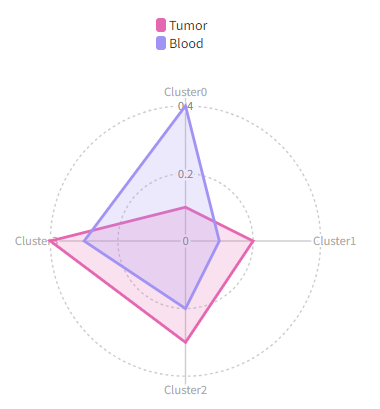
We can use each to separate the cells into different cases:
[RadarPlots.envs]
by = "Source"
each = "Timepoint"
Then we will have two radar plots, one for Pre and one for Post:
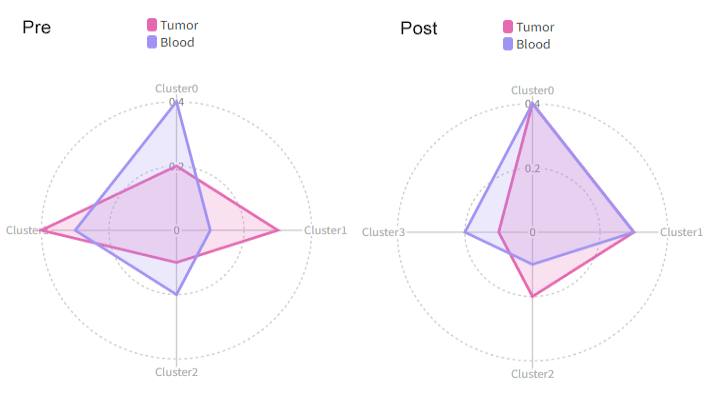
Using cluster_order to change the order of the clusters and show only the first 3 clusters:
[RadarPlots.envs]
by = "Source"
cluster_order = ["2", "0", "1"]
breaks = [0, 50, 100]  # also change the breaks
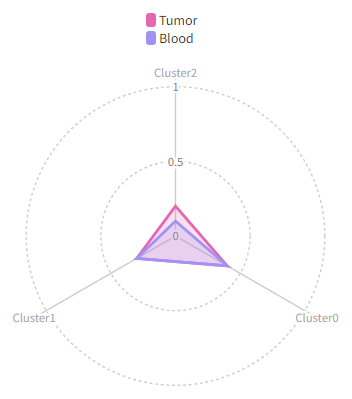
n. /
srtobj— The seurat object in RDS or qs/qs2 format
outdir— The output directory for the plots
bar_devpars(ns) — The parameters forpng()for the barplot- - res (type=int): The resolution of the plot
- - height (type=int): The height of the plot
- - width (type=int): The width of the plot
breakdown— An additional column with groups to break down the cellsdistribution in each cluster. For example, if you want to see the distribution of the cells in each cluster in different samples. In this case, you should have multiple values in eachby. These values won't be plotted in the radar plot, but a barplot will be generated with the mean value of each group and the error bar.breaks(list;itype=int) — breaks of the radar plots, from 0 to 100.If not given, the breaks will be calculated automatically.by— Which column to use to separate the cells in different groups.NAs will be ignored. For example, If you have a column namedSourcethat marks the source of the cells, and you want to separate the cells intoTumorandBloodgroups, you can setbytoSource. The there will be two curves in the radar plot, one forTumorand one forBlood.cases(type=json) — The cases for the multiple radar plots.Keys are the names of the cases and values are the arguments for the plots (each,by,order,breaks,direction,ident,cluster_orderanddevpars). If not cases are given, a default case will be used, with the keyDEFAULT. The keys must be valid string as part of the file name.cluster_order(list) — The order of the clusters.You may also use it to filter the clusters. If not given, all clusters will be used. If the cluster names are integers, use them directly for the order, even though a prefixClusteris added on the plot.colors— The colors for the groups inby. If not specified,the default colors will be used. Multiple colors can be separated by comma (,). You can specifybiopipento use thebiopipenpalette.devpars(ns) — The parameters forpng()- - res (type=int): The resolution of the plot
- - height (type=int): The height of the plot
- - width (type=int): The width of the plot
direction(choice) — Direction to calculate the percentages.- - inter-cluster: the percentage of the cells in all groups
in each cluster (percentage adds up to 1 for each cluster). - - intra-cluster: the percentage of the cells in all clusters.
(percentage adds up to 1 for each group).
- - inter-cluster: the percentage of the cells in all groups
each— A column with values to separate all cells in different casesWhen specified, the case will be expanded to multiple cases for each value in the column. If specified,sectionwill be ignored, and the case name will be used as the section name.ident— The column name of the cluster information.mutaters(type=json) — Mutaters to mutate the metadata of theseurat object. Keys are the column names and values are the expressions to mutate the columns. These new columns will be used to define your cases.order(list) — The order of the values inby. You can also limit(filter) the values we have inby. For example, if columnSourcehas valuesTumor,Blood,Spleen, and you only want to plotTumorandBlood, you can setorderto["Tumor", "Blood"]. This will also haveTumoras the first item in the legend andBloodas the second item.prefix_each(flag) — Whether to prefix theeachcolumn name to the values as thecase/section name.section— If you want to put multiple cases into a same sectionin the report, you can set this option to the name of the section. Only used in the report.subset— The subset of the cells to do the analysis.test(choice) — The test to use to calculate the p values.If there are more than 2 groups inby, the p values will be calculated pairwise group by group. Only works whenbreakdownis specified andbyhas 2 groups or more.- - wilcox: Wilcoxon rank sum test
- - t: T test
- - none: No test will be performed
__init_subclass__()— Do the requirements inferring since we need them to build up theprocess relationship </>from_proc(proc,name,desc,envs,envs_depth,cache,export,output_flatten,error_strategy,num_retries,forks,input_data,order,plugin_opts,requires,scheduler,scheduler_opts,submission_batch)(Type) — Create a subclass of Proc using another Proc subclass or Proc itself</>gc()— GC process for the process to save memory after it's done</>log(level,msg,*args,logger)— Log message for the process</>run()— Init all other properties and jobs</>
pipen.proc.ProcMeta(name, bases, namespace, **kwargs)
Meta class for Proc
from_proc(proc, name=None, desc=None, envs=None, envs_depth=None, cache=None, export=None, output_flatten=None, error_strategy=None, num_retries=None, forks=None, input_data=None, order=None, plugin_opts=None, requires=None, scheduler=None, scheduler_opts=None, submission_batch=None)
Create a subclass of Proc using another Proc subclass or Proc itself
proc(Type) — The Proc subclassname(str | none, optional) — The new name of the processdesc(str | none, optional) — The new description of the processenvs(Optional, optional) — The arguments of the process, will overwrite parent oneThe items that are specified will be inheritedenvs_depth(int | none, optional) — How deep to update the envs when subclassed.cache(bool | none, optional) — Whether we should check the cache for the jobsexport(bool | none, optional) — When True, the results will be exported to<pipeline.outdir>Defaults to None, meaning only end processes will export. You can set it to True/False to enable or disable exporting for processesoutput_flatten(bool | none, optional) — Whether to flatten the output when saving to the outputdirectory. Normally, the output will be saved in a subdirectory named after the job index (e.g.<outdir>/0,<outdir>/1, etc.). Ifoutput_flattenis True, the output will be saved directly in the output directory without the subdirectories. This is useful when you want the job outputs to be directly revealed in the output directory. Note that this only works for processes with export=True or end processes and make sure the name of the output files won't conflict for jobs with each other when flattening. It takes 3 possible values- - None (default): flatten the output for single-job processes only
- - True: flatten the output for all processes
- - False: never flatten the output
error_strategy(str | none, optional) — How to deal with the errors- - retry, ignore, halt
- - halt to halt the whole pipeline, no submitting new jobs
num_retries(int | none, optional) — How many times to retry to jobs once error occursforks(int | none, optional) — New forks for the new processinput_data(any | none, optional) — The input data for the process. Only when this processis a start processorder(int | none, optional) — The order to execute the new processplugin_opts(Optional, optional) — The new plugin options, unspecified items will beinherited.requires(Optional, optional) — The required processes for the new processscheduler(str | none, optional) — The new shedular to run the new processscheduler_opts(Optional, optional) — The new scheduler options, unspecified items willbe inherited.submission_batch(int | none, optional) — How many jobs to be submited simultaneously.
The new process class
__init_subclass__()
Do the requirements inferring since we need them to build up theprocess relationship
run()
Init all other properties and jobs
gc()
GC process for the process to save memory after it's done
log(level, msg, *args, logger=<LoggerAdapter pipen.core (WARNING)>)
Log message for the process
level(int | str) — The log level of the recordmsg(str) — The message to log*args— The arguments to format the messagelogger(LoggerAdapter, optional) — The logging logger
biopipen.ns.scrna.MetaMarkers(*args, **kwds) → Proc
Find markers between three or more groups of cells, using one-way ANOVAor Kruskal-Wallis test.
Sometimes, you may want to find the markers for cells from more than 2 groups. In this case, you can use this process to find the markers for the groups and do enrichment analysis for the markers. Each marker is examined using either one-way ANOVA or Kruskal-Wallis test. The p values are adjusted using the specified method. The significant markers are then used for enrichment analysis using enrichr api.
Other than the markers and the enrichment analysis as outputs, this process also generates violin plots for the top 10 markers.
cache— Should we detect whether the jobs are cached?desc— The description of the process. Will use the summary fromthe docstring by default.dirsig— When checking the signature for caching, whether should we walkthrough the content of the directory? This is sometimes time-consuming if the directory is big.envs— The arguments that are job-independent, useful for common optionsacross jobs.envs_depth— How deep to update the envs when subclassed.error_strategy— How to deal with the errors- - retry, ignore, halt
- - halt to halt the whole pipeline, no submitting new jobs
export— When True, the results will be exported to<pipeline.outdir>Defaults to None, meaning only end processes will export. You can set it to True/False to enable or disable exporting for processesforks— How many jobs to run simultaneously?input— The keys for the input channelinput_data— The input data (will be computed for dependent processes)lang— The language for the script to run. Should be the path to theinterpreter iflangis not in$PATH.name— The name of the process. Will use the class name by default.nexts— Computed fromrequiresto build the process relationshipsnum_retries— How many times to retry to jobs once error occursorder— The execution order for this process. The bigger the numberis, the later the process will be executed. Default: 0. Note that the dependent processes will always be executed first. This doesn't work for start processes either, whose orders are determined byPipen.set_starts()output— The output keys for the output channel(the data will be computed)output_data— The output data (to pass to the next processes)output_flatten— Whether to flatten the output when saving to the outputdirectory. Normally, the output will be saved in a subdirectory named after the job index (e.g.<outdir>/0,<outdir>/1, etc.). Ifoutput_flattenis True, the output will be saved directly in the output directory without the subdirectories. This is useful when you want the job outputs to be directly revealed in the output directory. Note that this only works for processes with export=True or end processes and make sure the name of the output files won't conflict for jobs with each other when flattening. It takes 3 possible values- - None (default): flatten the output for single-job processes only
- - True: flatten the output for all processes
- - False: never flatten the output
plugin_opts— Options for process-level pluginsrequires— The dependency processesscheduler— The scheduler to run the jobsscheduler_opts— The options for the schedulerscript— The script template for the processsubmission_batch— How many jobs to be submited simultaneously.The program entrance for some schedulers may take too much resources when submitting a job or checking the job status. So we may use a smaller number here to limit the simultaneous submissions.template— Define the template engine to use.This could be either a template engine or a dict with keyengineindicating the template engine and the rest the arguments passed to the constructor of thepipen.template.Templateobject. The template engine could be either the name of the engine, currently jinja2 and liquidpy are supported, or a subclass ofpipen.template.Template. You can subclasspipen.template.Templateto use your own template engine.
srtobj— The seurat object loaded bySeuratPreparing
outdir— The output directory for the markers
cases(type=json) — If you have multiple cases, you can specify themhere. The keys are the names of the cases and the values are the above options exceptncoresandmutaters. If some options are not specified, the default values specified above will be used. If no cases are specified, the default case will be added with the default values underenvswith the nameDEFAULT.dbs(list) — The dbs to do enrichment analysis for significant markers.You can use built-in dbs inenrichit, or provide your own gmt files. See also https://pwwang.github.io/enrichit/reference/FetchGMT.html. The built-in dbs include:- * "BioCarta" or "BioCarta_2016"
- * "GO_Biological_Process" or "GO_Biological_Process_2025"
- * "GO_Cellular_Component" or "GO_Cellular_Component_2025"
- * "GO_Molecular_Function" or "GO_Molecular_Function_2025"
- * "KEGG", "KEGG_Human", "KEGG_2021", or "KEGG_2021_Human"
- * "Hallmark", "MSigDB_Hallmark", or "MSigDB_Hallmark_2020"
- * "Reactome", "Reactome_Pathways", or "Reactome_Pathways_2024"
- * "WikiPathways", "WikiPathways_2024", "WikiPathways_Human", or "WikiPathways_2024_Human"
each— The column name in metadata to separate the cells into different cases.group-by— The column name in metadata to group the cells.If onlygroup-byis specified, andidentsare not specified, markers will be found for all groups in this column.NAgroup will be ignored.idents— The groups of cells to compare, values should be in thegroup-bycolumn.method(choice) — The method for the test.- - anova: One-way ANOVA
- - kruskal: Kruskal-Wallis test
mutaters(type=json) — The mutaters to mutate the metadataThe key-value pairs will be passed thedplyr::mutate()to mutate the metadata.ncores(type=int) — Number of cores to use to parallelize for genesp_adjust(choice) — The method to adjust the p values, which can be used to filter the significant markers.See also https://rdrr.io/r/stats/p.adjust.html- - holm: Holm-Bonferroni method
- - hochberg: Hochberg method
- - hommel: Hommel method
- - bonferroni: Bonferroni method
- - BH: Benjamini-Hochberg method
- - BY: Benjamini-Yekutieli method
- - fdr: FDR method of Benjamini-Hochberg
- - none: No adjustment
prefix_each(flag) — Whether to add theeachvalue as prefix to the case name.section— The section name for the report.Worked only wheneachis not specified. Otherwise, the section name will be constructed fromeachandgroup-by. IfDEFAULT, and it's the only section, it not included in the case/section names.sigmarkers— An expression passed todplyr::filter()to filter thesignificant markers for enrichment analysis. The default isp.value < 0.05. Ifmethod = 'anova', the variables that can be used for filtering are:sumsq,meansq,statistic,p.valueandp_adjust. Ifmethod = 'kruskal', the variables that can be used for filtering are:statistic,p.valueandp_adjust.subset— The subset of the cells to do the analysis.An expression passed todplyr::filter().
__init_subclass__()— Do the requirements inferring since we need them to build up theprocess relationship </>from_proc(proc,name,desc,envs,envs_depth,cache,export,output_flatten,error_strategy,num_retries,forks,input_data,order,plugin_opts,requires,scheduler,scheduler_opts,submission_batch)(Type) — Create a subclass of Proc using another Proc subclass or Proc itself</>gc()— GC process for the process to save memory after it's done</>log(level,msg,*args,logger)— Log message for the process</>run()— Init all other properties and jobs</>
pipen.proc.ProcMeta(name, bases, namespace, **kwargs)
Meta class for Proc
from_proc(proc, name=None, desc=None, envs=None, envs_depth=None, cache=None, export=None, output_flatten=None, error_strategy=None, num_retries=None, forks=None, input_data=None, order=None, plugin_opts=None, requires=None, scheduler=None, scheduler_opts=None, submission_batch=None)
Create a subclass of Proc using another Proc subclass or Proc itself
proc(Type) — The Proc subclassname(str | none, optional) — The new name of the processdesc(str | none, optional) — The new description of the processenvs(Optional, optional) — The arguments of the process, will overwrite parent oneThe items that are specified will be inheritedenvs_depth(int | none, optional) — How deep to update the envs when subclassed.cache(bool | none, optional) — Whether we should check the cache for the jobsexport(bool | none, optional) — When True, the results will be exported to<pipeline.outdir>Defaults to None, meaning only end processes will export. You can set it to True/False to enable or disable exporting for processesoutput_flatten(bool | none, optional) — Whether to flatten the output when saving to the outputdirectory. Normally, the output will be saved in a subdirectory named after the job index (e.g.<outdir>/0,<outdir>/1, etc.). Ifoutput_flattenis True, the output will be saved directly in the output directory without the subdirectories. This is useful when you want the job outputs to be directly revealed in the output directory. Note that this only works for processes with export=True or end processes and make sure the name of the output files won't conflict for jobs with each other when flattening. It takes 3 possible values- - None (default): flatten the output for single-job processes only
- - True: flatten the output for all processes
- - False: never flatten the output
error_strategy(str | none, optional) — How to deal with the errors- - retry, ignore, halt
- - halt to halt the whole pipeline, no submitting new jobs
num_retries(int | none, optional) — How many times to retry to jobs once error occursforks(int | none, optional) — New forks for the new processinput_data(any | none, optional) — The input data for the process. Only when this processis a start processorder(int | none, optional) — The order to execute the new processplugin_opts(Optional, optional) — The new plugin options, unspecified items will beinherited.requires(Optional, optional) — The required processes for the new processscheduler(str | none, optional) — The new shedular to run the new processscheduler_opts(Optional, optional) — The new scheduler options, unspecified items willbe inherited.submission_batch(int | none, optional) — How many jobs to be submited simultaneously.
The new process class
__init_subclass__()
Do the requirements inferring since we need them to build up theprocess relationship
run()
Init all other properties and jobs
gc()
GC process for the process to save memory after it's done
log(level, msg, *args, logger=<LoggerAdapter pipen.core (WARNING)>)
Log message for the process
level(int | str) — The log level of the recordmsg(str) — The message to log*args— The arguments to format the messagelogger(LoggerAdapter, optional) — The logging logger
biopipen.ns.scrna.Seurat2AnnData(*args, **kwds) → Proc
Convert seurat object to AnnData
cache— Should we detect whether the jobs are cached?desc— The description of the process. Will use the summary fromthe docstring by default.dirsig— When checking the signature for caching, whether should we walkthrough the content of the directory? This is sometimes time-consuming if the directory is big.envs— The arguments that are job-independent, useful for common optionsacross jobs.envs_depth— How deep to update the envs when subclassed.error_strategy— How to deal with the errors- - retry, ignore, halt
- - halt to halt the whole pipeline, no submitting new jobs
export— When True, the results will be exported to<pipeline.outdir>Defaults to None, meaning only end processes will export. You can set it to True/False to enable or disable exporting for processesforks— How many jobs to run simultaneously?input— The keys for the input channelinput_data— The input data (will be computed for dependent processes)lang— The language for the script to run. Should be the path to theinterpreter iflangis not in$PATH.name— The name of the process. Will use the class name by default.nexts— Computed fromrequiresto build the process relationshipsnum_retries— How many times to retry to jobs once error occursorder— The execution order for this process. The bigger the numberis, the later the process will be executed. Default: 0. Note that the dependent processes will always be executed first. This doesn't work for start processes either, whose orders are determined byPipen.set_starts()output— The output keys for the output channel(the data will be computed)output_data— The output data (to pass to the next processes)output_flatten— Whether to flatten the output when saving to the outputdirectory. Normally, the output will be saved in a subdirectory named after the job index (e.g.<outdir>/0,<outdir>/1, etc.). Ifoutput_flattenis True, the output will be saved directly in the output directory without the subdirectories. This is useful when you want the job outputs to be directly revealed in the output directory. Note that this only works for processes with export=True or end processes and make sure the name of the output files won't conflict for jobs with each other when flattening. It takes 3 possible values- - None (default): flatten the output for single-job processes only
- - True: flatten the output for all processes
- - False: never flatten the output
plugin_opts— Options for process-level pluginsrequires— The dependency processesscheduler— The scheduler to run the jobsscheduler_opts— The options for the schedulerscript— The script template for the processsubmission_batch— How many jobs to be submited simultaneously.The program entrance for some schedulers may take too much resources when submitting a job or checking the job status. So we may use a smaller number here to limit the simultaneous submissions.template— Define the template engine to use.This could be either a template engine or a dict with keyengineindicating the template engine and the rest the arguments passed to the constructor of thepipen.template.Templateobject. The template engine could be either the name of the engine, currently jinja2 and liquidpy are supported, or a subclass ofpipen.template.Template. You can subclasspipen.template.Templateto use your own template engine.
sobjfile— The seurat object file, in RDS or qs/qs2 format
outfile— The AnnData file
assay— The assay to use for AnnData.If not specified, the default assay will be used.
__init_subclass__()— Do the requirements inferring since we need them to build up theprocess relationship </>from_proc(proc,name,desc,envs,envs_depth,cache,export,output_flatten,error_strategy,num_retries,forks,input_data,order,plugin_opts,requires,scheduler,scheduler_opts,submission_batch)(Type) — Create a subclass of Proc using another Proc subclass or Proc itself</>gc()— GC process for the process to save memory after it's done</>log(level,msg,*args,logger)— Log message for the process</>run()— Init all other properties and jobs</>
pipen.proc.ProcMeta(name, bases, namespace, **kwargs)
Meta class for Proc
from_proc(proc, name=None, desc=None, envs=None, envs_depth=None, cache=None, export=None, output_flatten=None, error_strategy=None, num_retries=None, forks=None, input_data=None, order=None, plugin_opts=None, requires=None, scheduler=None, scheduler_opts=None, submission_batch=None)
Create a subclass of Proc using another Proc subclass or Proc itself
proc(Type) — The Proc subclassname(str | none, optional) — The new name of the processdesc(str | none, optional) — The new description of the processenvs(Optional, optional) — The arguments of the process, will overwrite parent oneThe items that are specified will be inheritedenvs_depth(int | none, optional) — How deep to update the envs when subclassed.cache(bool | none, optional) — Whether we should check the cache for the jobsexport(bool | none, optional) — When True, the results will be exported to<pipeline.outdir>Defaults to None, meaning only end processes will export. You can set it to True/False to enable or disable exporting for processesoutput_flatten(bool | none, optional) — Whether to flatten the output when saving to the outputdirectory. Normally, the output will be saved in a subdirectory named after the job index (e.g.<outdir>/0,<outdir>/1, etc.). Ifoutput_flattenis True, the output will be saved directly in the output directory without the subdirectories. This is useful when you want the job outputs to be directly revealed in the output directory. Note that this only works for processes with export=True or end processes and make sure the name of the output files won't conflict for jobs with each other when flattening. It takes 3 possible values- - None (default): flatten the output for single-job processes only
- - True: flatten the output for all processes
- - False: never flatten the output
error_strategy(str | none, optional) — How to deal with the errors- - retry, ignore, halt
- - halt to halt the whole pipeline, no submitting new jobs
num_retries(int | none, optional) — How many times to retry to jobs once error occursforks(int | none, optional) — New forks for the new processinput_data(any | none, optional) — The input data for the process. Only when this processis a start processorder(int | none, optional) — The order to execute the new processplugin_opts(Optional, optional) — The new plugin options, unspecified items will beinherited.requires(Optional, optional) — The required processes for the new processscheduler(str | none, optional) — The new shedular to run the new processscheduler_opts(Optional, optional) — The new scheduler options, unspecified items willbe inherited.submission_batch(int | none, optional) — How many jobs to be submited simultaneously.
The new process class
__init_subclass__()
Do the requirements inferring since we need them to build up theprocess relationship
run()
Init all other properties and jobs
gc()
GC process for the process to save memory after it's done
log(level, msg, *args, logger=<LoggerAdapter pipen.core (WARNING)>)
Log message for the process
level(int | str) — The log level of the recordmsg(str) — The message to log*args— The arguments to format the messagelogger(LoggerAdapter, optional) — The logging logger
biopipen.ns.scrna.AnnData2Seurat(*args, **kwds) → Proc
Convert AnnData to seurat object
cache— Should we detect whether the jobs are cached?desc— The description of the process. Will use the summary fromthe docstring by default.dirsig— When checking the signature for caching, whether should we walkthrough the content of the directory? This is sometimes time-consuming if the directory is big.envs— The arguments that are job-independent, useful for common optionsacross jobs.envs_depth— How deep to update the envs when subclassed.error_strategy— How to deal with the errors- - retry, ignore, halt
- - halt to halt the whole pipeline, no submitting new jobs
export— When True, the results will be exported to<pipeline.outdir>Defaults to None, meaning only end processes will export. You can set it to True/False to enable or disable exporting for processesforks— How many jobs to run simultaneously?input— The keys for the input channelinput_data— The input data (will be computed for dependent processes)lang— The language for the script to run. Should be the path to theinterpreter iflangis not in$PATH.name— The name of the process. Will use the class name by default.nexts— Computed fromrequiresto build the process relationshipsnum_retries— How many times to retry to jobs once error occursorder— The execution order for this process. The bigger the numberis, the later the process will be executed. Default: 0. Note that the dependent processes will always be executed first. This doesn't work for start processes either, whose orders are determined byPipen.set_starts()output— The output keys for the output channel(the data will be computed)output_data— The output data (to pass to the next processes)output_flatten— Whether to flatten the output when saving to the outputdirectory. Normally, the output will be saved in a subdirectory named after the job index (e.g.<outdir>/0,<outdir>/1, etc.). Ifoutput_flattenis True, the output will be saved directly in the output directory without the subdirectories. This is useful when you want the job outputs to be directly revealed in the output directory. Note that this only works for processes with export=True or end processes and make sure the name of the output files won't conflict for jobs with each other when flattening. It takes 3 possible values- - None (default): flatten the output for single-job processes only
- - True: flatten the output for all processes
- - False: never flatten the output
plugin_opts— Options for process-level pluginsrequires— The dependency processesscheduler— The scheduler to run the jobsscheduler_opts— The options for the schedulerscript— The script template for the processsubmission_batch— How many jobs to be submited simultaneously.The program entrance for some schedulers may take too much resources when submitting a job or checking the job status. So we may use a smaller number here to limit the simultaneous submissions.template— Define the template engine to use.This could be either a template engine or a dict with keyengineindicating the template engine and the rest the arguments passed to the constructor of thepipen.template.Templateobject. The template engine could be either the name of the engine, currently jinja2 and liquidpy are supported, or a subclass ofpipen.template.Template. You can subclasspipen.template.Templateto use your own template engine.
adfile— The AnnData .h5ad file
outfile— The seurat object file in RDS or qs/qs2 format
assay— The assay to use to convert to seurat object.dotplot_check(type=auto) — Whether to do a check with a dot plot.(scplotter::FeatureStatPlot(plot_type = "dot", ..)will be used) to see if the conversion is successful. Set toFalseto disable the check. IfTrue, top 10 variable genes will be used for the check. You can give a list of genes or a string of genes with comma (,) separated to use for the check.ident— The column name inadfile.obsto use as the identityfor the seurat object. If not specified, no identity will be set.ncores(type=int) — Number of cores to use for data loading and saving.
__init_subclass__()— Do the requirements inferring since we need them to build up theprocess relationship </>from_proc(proc,name,desc,envs,envs_depth,cache,export,output_flatten,error_strategy,num_retries,forks,input_data,order,plugin_opts,requires,scheduler,scheduler_opts,submission_batch)(Type) — Create a subclass of Proc using another Proc subclass or Proc itself</>gc()— GC process for the process to save memory after it's done</>log(level,msg,*args,logger)— Log message for the process</>run()— Init all other properties and jobs</>
pipen.proc.ProcMeta(name, bases, namespace, **kwargs)
Meta class for Proc
from_proc(proc, name=None, desc=None, envs=None, envs_depth=None, cache=None, export=None, output_flatten=None, error_strategy=None, num_retries=None, forks=None, input_data=None, order=None, plugin_opts=None, requires=None, scheduler=None, scheduler_opts=None, submission_batch=None)
Create a subclass of Proc using another Proc subclass or Proc itself
proc(Type) — The Proc subclassname(str | none, optional) — The new name of the processdesc(str | none, optional) — The new description of the processenvs(Optional, optional) — The arguments of the process, will overwrite parent oneThe items that are specified will be inheritedenvs_depth(int | none, optional) — How deep to update the envs when subclassed.cache(bool | none, optional) — Whether we should check the cache for the jobsexport(bool | none, optional) — When True, the results will be exported to<pipeline.outdir>Defaults to None, meaning only end processes will export. You can set it to True/False to enable or disable exporting for processesoutput_flatten(bool | none, optional) — Whether to flatten the output when saving to the outputdirectory. Normally, the output will be saved in a subdirectory named after the job index (e.g.<outdir>/0,<outdir>/1, etc.). Ifoutput_flattenis True, the output will be saved directly in the output directory without the subdirectories. This is useful when you want the job outputs to be directly revealed in the output directory. Note that this only works for processes with export=True or end processes and make sure the name of the output files won't conflict for jobs with each other when flattening. It takes 3 possible values- - None (default): flatten the output for single-job processes only
- - True: flatten the output for all processes
- - False: never flatten the output
error_strategy(str | none, optional) — How to deal with the errors- - retry, ignore, halt
- - halt to halt the whole pipeline, no submitting new jobs
num_retries(int | none, optional) — How many times to retry to jobs once error occursforks(int | none, optional) — New forks for the new processinput_data(any | none, optional) — The input data for the process. Only when this processis a start processorder(int | none, optional) — The order to execute the new processplugin_opts(Optional, optional) — The new plugin options, unspecified items will beinherited.requires(Optional, optional) — The required processes for the new processscheduler(str | none, optional) — The new shedular to run the new processscheduler_opts(Optional, optional) — The new scheduler options, unspecified items willbe inherited.submission_batch(int | none, optional) — How many jobs to be submited simultaneously.
The new process class
__init_subclass__()
Do the requirements inferring since we need them to build up theprocess relationship
run()
Init all other properties and jobs
gc()
GC process for the process to save memory after it's done
log(level, msg, *args, logger=<LoggerAdapter pipen.core (WARNING)>)
Log message for the process
level(int | str) — The log level of the recordmsg(str) — The message to log*args— The arguments to format the messagelogger(LoggerAdapter, optional) — The logging logger
biopipen.ns.scrna.ScSimulation(*args, **kwds) → Proc
Simulate single-cell data using splatter.
cache— Should we detect whether the jobs are cached?desc— The description of the process. Will use the summary fromthe docstring by default.dirsig— When checking the signature for caching, whether should we walkthrough the content of the directory? This is sometimes time-consuming if the directory is big.envs— The arguments that are job-independent, useful for common optionsacross jobs.envs_depth— How deep to update the envs when subclassed.error_strategy— How to deal with the errors- - retry, ignore, halt
- - halt to halt the whole pipeline, no submitting new jobs
export— When True, the results will be exported to<pipeline.outdir>Defaults to None, meaning only end processes will export. You can set it to True/False to enable or disable exporting for processesforks— How many jobs to run simultaneously?input— The keys for the input channelinput_data— The input data (will be computed for dependent processes)lang— The language for the script to run. Should be the path to theinterpreter iflangis not in$PATH.name— The name of the process. Will use the class name by default.nexts— Computed fromrequiresto build the process relationshipsnum_retries— How many times to retry to jobs once error occursorder— The execution order for this process. The bigger the numberis, the later the process will be executed. Default: 0. Note that the dependent processes will always be executed first. This doesn't work for start processes either, whose orders are determined byPipen.set_starts()output— The output keys for the output channel(the data will be computed)output_data— The output data (to pass to the next processes)output_flatten— Whether to flatten the output when saving to the outputdirectory. Normally, the output will be saved in a subdirectory named after the job index (e.g.<outdir>/0,<outdir>/1, etc.). Ifoutput_flattenis True, the output will be saved directly in the output directory without the subdirectories. This is useful when you want the job outputs to be directly revealed in the output directory. Note that this only works for processes with export=True or end processes and make sure the name of the output files won't conflict for jobs with each other when flattening. It takes 3 possible values- - None (default): flatten the output for single-job processes only
- - True: flatten the output for all processes
- - False: never flatten the output
plugin_opts— Options for process-level pluginsrequires— The dependency processesscheduler— The scheduler to run the jobsscheduler_opts— The options for the schedulerscript— The script template for the processsubmission_batch— How many jobs to be submited simultaneously.The program entrance for some schedulers may take too much resources when submitting a job or checking the job status. So we may use a smaller number here to limit the simultaneous submissions.template— Define the template engine to use.This could be either a template engine or a dict with keyengineindicating the template engine and the rest the arguments passed to the constructor of thepipen.template.Templateobject. The template engine could be either the name of the engine, currently jinja2 and liquidpy are supported, or a subclass ofpipen.template.Template. You can subclasspipen.template.Templateto use your own template engine.
seed— The seed for the simulationYou could also use string as the seed, and the seed will be generated bydigest::digest2int(). So this could also work as a unique identifier for the simulation (ie. Sample ID).
outfile— The output Seurat object/SingleCellExperiment in qs/qs2 format
method(choice) — which simulation method to use. Options are:- - single: produces a single population
- - groups: produces distinct groups (eg. cell types), or
- - paths: selects cells from continuous trajectories (eg. differentiation processes)
ncells(type=int) — The number of cells to simulatengenes(type=int) — The number of genes to simulatenspikes(type=int) — The number of spike-ins to simulateWhenngenes,ncells, andnspikesare not specified, the default params frommockSCE()will be used. By default,ngenes = 2000,ncells = 200, andnspikes = 100.outtype(choice) — The output file type.- - seurat: Seurat object
- - singlecellexperiment: SingleCellExperiment object
- - sce: alias for
singlecellexperiment
params(ns) — Other parameters for simulation.The parameters are initializedsplitEstimate(mockSCE())and then updated with the given parameters. See https://rdrr.io/bioc/splatter/man/SplatParams.html. Hyphens (-) will be transformed into dots (.) for the keys.
__init_subclass__()— Do the requirements inferring since we need them to build up theprocess relationship </>from_proc(proc,name,desc,envs,envs_depth,cache,export,output_flatten,error_strategy,num_retries,forks,input_data,order,plugin_opts,requires,scheduler,scheduler_opts,submission_batch)(Type) — Create a subclass of Proc using another Proc subclass or Proc itself</>gc()— GC process for the process to save memory after it's done</>log(level,msg,*args,logger)— Log message for the process</>run()— Init all other properties and jobs</>
pipen.proc.ProcMeta(name, bases, namespace, **kwargs)
Meta class for Proc
from_proc(proc, name=None, desc=None, envs=None, envs_depth=None, cache=None, export=None, output_flatten=None, error_strategy=None, num_retries=None, forks=None, input_data=None, order=None, plugin_opts=None, requires=None, scheduler=None, scheduler_opts=None, submission_batch=None)
Create a subclass of Proc using another Proc subclass or Proc itself
proc(Type) — The Proc subclassname(str | none, optional) — The new name of the processdesc(str | none, optional) — The new description of the processenvs(Optional, optional) — The arguments of the process, will overwrite parent oneThe items that are specified will be inheritedenvs_depth(int | none, optional) — How deep to update the envs when subclassed.cache(bool | none, optional) — Whether we should check the cache for the jobsexport(bool | none, optional) — When True, the results will be exported to<pipeline.outdir>Defaults to None, meaning only end processes will export. You can set it to True/False to enable or disable exporting for processesoutput_flatten(bool | none, optional) — Whether to flatten the output when saving to the outputdirectory. Normally, the output will be saved in a subdirectory named after the job index (e.g.<outdir>/0,<outdir>/1, etc.). Ifoutput_flattenis True, the output will be saved directly in the output directory without the subdirectories. This is useful when you want the job outputs to be directly revealed in the output directory. Note that this only works for processes with export=True or end processes and make sure the name of the output files won't conflict for jobs with each other when flattening. It takes 3 possible values- - None (default): flatten the output for single-job processes only
- - True: flatten the output for all processes
- - False: never flatten the output
error_strategy(str | none, optional) — How to deal with the errors- - retry, ignore, halt
- - halt to halt the whole pipeline, no submitting new jobs
num_retries(int | none, optional) — How many times to retry to jobs once error occursforks(int | none, optional) — New forks for the new processinput_data(any | none, optional) — The input data for the process. Only when this processis a start processorder(int | none, optional) — The order to execute the new processplugin_opts(Optional, optional) — The new plugin options, unspecified items will beinherited.requires(Optional, optional) — The required processes for the new processscheduler(str | none, optional) — The new shedular to run the new processscheduler_opts(Optional, optional) — The new scheduler options, unspecified items willbe inherited.submission_batch(int | none, optional) — How many jobs to be submited simultaneously.
The new process class
__init_subclass__()
Do the requirements inferring since we need them to build up theprocess relationship
run()
Init all other properties and jobs
gc()
GC process for the process to save memory after it's done
log(level, msg, *args, logger=<LoggerAdapter pipen.core (WARNING)>)
Log message for the process
level(int | str) — The log level of the recordmsg(str) — The message to log*args— The arguments to format the messagelogger(LoggerAdapter, optional) — The logging logger
biopipen.ns.scrna.CellCellCommunication(*args, **kwds) → Proc
Cell-cell communication inference
This is implemented based on LIANA, which is a Python package for cell-cell communication inference and provides a list of existing methods including CellPhoneDB, Connectome, log2FC, NATMI, SingleCellSignalR, Rank_Aggregate, Geometric Mean, scSeqComm, and CellChat.
You can also try python -c 'import liana; liana.mt.show_methods()' to see the methods available.
Note that this process does not do any visualization. You can use CellCellCommunicationPlots
to visualize the results.
Reference:
cache— Should we detect whether the jobs are cached?desc— The description of the process. Will use the summary fromthe docstring by default.dirsig— When checking the signature for caching, whether should we walkthrough the content of the directory? This is sometimes time-consuming if the directory is big.envs— The arguments that are job-independent, useful for common optionsacross jobs.envs_depth— How deep to update the envs when subclassed.error_strategy— How to deal with the errors- - retry, ignore, halt
- - halt to halt the whole pipeline, no submitting new jobs
export— When True, the results will be exported to<pipeline.outdir>Defaults to None, meaning only end processes will export. You can set it to True/False to enable or disable exporting for processesforks— How many jobs to run simultaneously?input— The keys for the input channelinput_data— The input data (will be computed for dependent processes)lang— The language for the script to run. Should be the path to theinterpreter iflangis not in$PATH.name— The name of the process. Will use the class name by default.nexts— Computed fromrequiresto build the process relationshipsnum_retries— How many times to retry to jobs once error occursorder— The execution order for this process. The bigger the numberis, the later the process will be executed. Default: 0. Note that the dependent processes will always be executed first. This doesn't work for start processes either, whose orders are determined byPipen.set_starts()output— The output keys for the output channel(the data will be computed)output_data— The output data (to pass to the next processes)output_flatten— Whether to flatten the output when saving to the outputdirectory. Normally, the output will be saved in a subdirectory named after the job index (e.g.<outdir>/0,<outdir>/1, etc.). Ifoutput_flattenis True, the output will be saved directly in the output directory without the subdirectories. This is useful when you want the job outputs to be directly revealed in the output directory. Note that this only works for processes with export=True or end processes and make sure the name of the output files won't conflict for jobs with each other when flattening. It takes 3 possible values- - None (default): flatten the output for single-job processes only
- - True: flatten the output for all processes
- - False: never flatten the output
plugin_opts— Options for process-level pluginsrequires— The dependency processesscheduler— The scheduler to run the jobsscheduler_opts— The options for the schedulerscript— The script template for the processsubmission_batch— How many jobs to be submited simultaneously.The program entrance for some schedulers may take too much resources when submitting a job or checking the job status. So we may use a smaller number here to limit the simultaneous submissions.template— Define the template engine to use.This could be either a template engine or a dict with keyengineindicating the template engine and the rest the arguments passed to the constructor of thepipen.template.Templateobject. The template engine could be either the name of the engine, currently jinja2 and liquidpy are supported, or a subclass ofpipen.template.Template. You can subclasspipen.template.Templateto use your own template engine.
sobjfile— The seurat object file in RDS or AnnData file.
outfile— The output file with the 'liana_res' data frame.Stats are provided for both ligand and receptor entities, more specifically: ligand and receptor are the two entities that potentially interact. As a reminder, CCC events are not limited to secreted signalling, but we refer to them as ligand and receptor for simplicity. Also, in the case of heteromeric complexes, the ligand and receptor columns represent the subunit with minimum expression, while *complex corresponds to the actual complex, with subunits being separated by . source and target columns represent the source/sender and target/receiver cell identity for each interaction, respectively- *
*_props: represents the proportion of cells that express the entity.
By default, any interactions in which either entity is not expressed in above 10%% of cells per cell type
is considered as a false positive, under the assumption that since CCC occurs between cell types, a sufficient
proportion of cells within should express the genes. - *
*_means: entity expression mean per cell type. - *
lr_means: mean ligand-receptor expression, as a measure of ligand-receptor interaction magnitude. - *
cellphone_pvals: permutation-based p-values, as a measure of interaction specificity.
ligand ligand_complex ligand_props ligand_trimean mat_max receptor receptor_complex receptor_props receptor_trimean source target lr_probs cellchat_pvals mag_score spec_score VIM VIM 1.00 0.36 8.73 CD44 CD44 0.77 0.16 c7 c3 0.10 0.00 0.10 0.00 MIF MIF 0.97 0.22 8.73 CXCR4 CD74_CXCR4 0.87 0.26 c5 c6 0.10 0.00 0.10 0.00 HLA-B HLA-B 1.00 0.44 8.73 KLRD1 KLRD1 0.73 0.13 c9 c2 0.10 0.00 0.10 0.00 HMGB1 HMGB1 0.99 0.26 8.73 CXCR4 CXCR4 0.81 0.21 c2 c7 0.10 0.00 0.10 0.00 CD48 CD48 0.94 0.20 8.73 CD2 CD2 0.99 0.28 c7 c8 0.10 0.00 0.10 0.00 HLA-C HLA-C 1.00 0.38 8.73 CD8B CD8B 0.73 0.15 c1 c9 0.10 0.00 0.10 0.00 LGALS1 LGALS1 0.95 0.17 8.73 CD69 CD69 0.99 0.34 c10 c5 0.10 0.00 0.10 0.00 - *
help(liana.mt.<method>.__call__)in Python.assay— The assay to use for the analysis.Only works for Seurat object.cases(type=json) — Different cases for the analysis.The keys are the names of the cases, which will be saved in theCasecolumn in the output file. The values are the arguments for fromenvsto override the default values, exceptmethod,speciesandrscript, to keep the output from different cases with the same columns. Note thatsubsetandsubset_usingwill not be inherited fromenvs, and onlysubset_using = "python"is supported for the cases. When using subset in the cases, the data is subsetted after the default subset inenvsis applied. If no cases are given, a default case will be used, with the arguments fromenvs, and noCasecolumn will be added in the output file.expr_prop(type=float) — Minimum expression proportion for the ligands andreceptors (+ their subunits) in the corresponding cell identities. Set to 0 to return unfiltered results.group_by— alias forgroupbygroupby— The column name in metadata to group the cells.Typically, this column should be the cluster id. If provided input is a Seurat object, the default identity will be used by default. Otherwise, it is recommended to provide this parameter. "seurat_clusters" will be used with a warning if the input is in AnnData format and this parameter is not provided.method(choice) — The method to use for cell-cell communication inference.- - CellPhoneDB: Use CellPhoneDB method.
Magnitude Score: lr_means; Specificity Score: cellphone_pvals. - - Connectome: Use Connectome method.
- - log2FC: Use log2FC method.
- - NATMI: Use NATMI method.
- - SingleCellSignalR: Use SingleCellSignalR method.
- - Rank_Aggregate: Use Rank_Aggregate method.
- - Geometric_Mean: Use Geometric Mean method.
- - scSeqComm: Use scSeqComm method.
- - CellChat: Use CellChat method.
- - cellphonedb: alias for
CellPhoneDB - - connectome: alias for
Connectome - - log2fc: alias for
log2FC - - natmi: alias for
NATMI - - singlesignaler: alias for
SingleCellSignalR - - rank_aggregate: alias for
Rank_Aggregate - - geometric_mean: alias for
Geometric_Mean - - scseqcomm: alias for
scSeqComm - - cellchat: alias for
CellChat
- - CellPhoneDB: Use CellPhoneDB method.
min_cells(type=int) — Minimum cells (per cell identity if grouped bygroupby)to be considered for downstream analysis.n_perms(type=int) — Number of permutations for the permutation test.Relevant only for permutation-based methods (e.g.,CellPhoneDB). If0is passed, no permutation testing is performed.ncores(type=int) — The number of cores to use.rscript— The path to the Rscript executable used to convert RDS file to AnnData.ifin.sobjfileis an RDS file, it will be converted to AnnData file (h5ad). You needSeurat,SeuratDiskanddigestinstalled.seed(type=int) — The seed for the random number generator.species(choice) — The species of the cells.- - human: Human cells, the 'consensus' resource will be used.
- - mouse: Mouse cells, the 'mouseconsensus' resource will be used.
split_by(auto) — The column names in metadata to split the cells to run the method separately.The results will be combined together with this column in the final output. Multiple columns can be provided as a list and the data will be split by the combination of the columns (the column values are concatenated only for the splitting). In the final output, each column will be recovered with its original values.subset— An expression in string to subset the cells.When a.rdsfile is provided forin.sobjfile, you can provide an expression inR, which will be passed tobase::subset()inRto subset the cells. But you can always pass an expression inpythonto subset the cells. See https://anndata.readthedocs.io/en/latest/tutorials/notebooks/getting-started.html#subsetting-using-metadata. You should useadatato refer to the AnnData object. For example,adata.obs.groups == "g1"will subset the cells withgroupsequal tog1.subset_using(choice) — The method to subset the cells.- - python: Use python to subset the cells.
The expression will be evaluated byadata.obs.query()to subset the cells, e.g.:groups == "g1". - - r: Use R to subset the cells.
A subset expression will be passed todplyr::filter()applying to the metadata of the Seurat object.
Note that this is only available when the input is a Seurat object in RDS format and
only available forenvs.subset_using, but not forcases.<case>.subset_using. - - R: alias for
r
- - python: Use python to subset the cells.
__init_subclass__()— Do the requirements inferring since we need them to build up theprocess relationship </>from_proc(proc,name,desc,envs,envs_depth,cache,export,output_flatten,error_strategy,num_retries,forks,input_data,order,plugin_opts,requires,scheduler,scheduler_opts,submission_batch)(Type) — Create a subclass of Proc using another Proc subclass or Proc itself</>gc()— GC process for the process to save memory after it's done</>log(level,msg,*args,logger)— Log message for the process</>run()— Init all other properties and jobs</>
pipen.proc.ProcMeta(name, bases, namespace, **kwargs)
Meta class for Proc
from_proc(proc, name=None, desc=None, envs=None, envs_depth=None, cache=None, export=None, output_flatten=None, error_strategy=None, num_retries=None, forks=None, input_data=None, order=None, plugin_opts=None, requires=None, scheduler=None, scheduler_opts=None, submission_batch=None)
Create a subclass of Proc using another Proc subclass or Proc itself
proc(Type) — The Proc subclassname(str | none, optional) — The new name of the processdesc(str | none, optional) — The new description of the processenvs(Optional, optional) — The arguments of the process, will overwrite parent oneThe items that are specified will be inheritedenvs_depth(int | none, optional) — How deep to update the envs when subclassed.cache(bool | none, optional) — Whether we should check the cache for the jobsexport(bool | none, optional) — When True, the results will be exported to<pipeline.outdir>Defaults to None, meaning only end processes will export. You can set it to True/False to enable or disable exporting for processesoutput_flatten(bool | none, optional) — Whether to flatten the output when saving to the outputdirectory. Normally, the output will be saved in a subdirectory named after the job index (e.g.<outdir>/0,<outdir>/1, etc.). Ifoutput_flattenis True, the output will be saved directly in the output directory without the subdirectories. This is useful when you want the job outputs to be directly revealed in the output directory. Note that this only works for processes with export=True or end processes and make sure the name of the output files won't conflict for jobs with each other when flattening. It takes 3 possible values- - None (default): flatten the output for single-job processes only
- - True: flatten the output for all processes
- - False: never flatten the output
error_strategy(str | none, optional) — How to deal with the errors- - retry, ignore, halt
- - halt to halt the whole pipeline, no submitting new jobs
num_retries(int | none, optional) — How many times to retry to jobs once error occursforks(int | none, optional) — New forks for the new processinput_data(any | none, optional) — The input data for the process. Only when this processis a start processorder(int | none, optional) — The order to execute the new processplugin_opts(Optional, optional) — The new plugin options, unspecified items will beinherited.requires(Optional, optional) — The required processes for the new processscheduler(str | none, optional) — The new shedular to run the new processscheduler_opts(Optional, optional) — The new scheduler options, unspecified items willbe inherited.submission_batch(int | none, optional) — How many jobs to be submited simultaneously.
The new process class
__init_subclass__()
Do the requirements inferring since we need them to build up theprocess relationship
run()
Init all other properties and jobs
gc()
GC process for the process to save memory after it's done
log(level, msg, *args, logger=<LoggerAdapter pipen.core (WARNING)>)
Log message for the process
level(int | str) — The log level of the recordmsg(str) — The message to log*args— The arguments to format the messagelogger(LoggerAdapter, optional) — The logging logger
biopipen.ns.scrna.CellCellCommunicationPlots(*args, **kwds) → Proc
Visualization for cell-cell communication inference.
cache— Should we detect whether the jobs are cached?desc— The description of the process. Will use the summary fromthe docstring by default.dirsig— When checking the signature for caching, whether should we walkthrough the content of the directory? This is sometimes time-consuming if the directory is big.envs— The arguments that are job-independent, useful for common optionsacross jobs.envs_depth— How deep to update the envs when subclassed.error_strategy— How to deal with the errors- - retry, ignore, halt
- - halt to halt the whole pipeline, no submitting new jobs
export— When True, the results will be exported to<pipeline.outdir>Defaults to None, meaning only end processes will export. You can set it to True/False to enable or disable exporting for processesforks— How many jobs to run simultaneously?input— The keys for the input channelinput_data— The input data (will be computed for dependent processes)lang— The language for the script to run. Should be the path to theinterpreter iflangis not in$PATH.name— The name of the process. Will use the class name by default.nexts— Computed fromrequiresto build the process relationshipsnum_retries— How many times to retry to jobs once error occursorder— The execution order for this process. The bigger the numberis, the later the process will be executed. Default: 0. Note that the dependent processes will always be executed first. This doesn't work for start processes either, whose orders are determined byPipen.set_starts()output— The output keys for the output channel(the data will be computed)output_data— The output data (to pass to the next processes)output_flatten— Whether to flatten the output when saving to the outputdirectory. Normally, the output will be saved in a subdirectory named after the job index (e.g.<outdir>/0,<outdir>/1, etc.). Ifoutput_flattenis True, the output will be saved directly in the output directory without the subdirectories. This is useful when you want the job outputs to be directly revealed in the output directory. Note that this only works for processes with export=True or end processes and make sure the name of the output files won't conflict for jobs with each other when flattening. It takes 3 possible values- - None (default): flatten the output for single-job processes only
- - True: flatten the output for all processes
- - False: never flatten the output
plugin_opts— Options for process-level pluginsrequires— The dependency processesscheduler— The scheduler to run the jobsscheduler_opts— The options for the schedulerscript— The script template for the processsubmission_batch— How many jobs to be submited simultaneously.The program entrance for some schedulers may take too much resources when submitting a job or checking the job status. So we may use a smaller number here to limit the simultaneous submissions.template— Define the template engine to use.This could be either a template engine or a dict with keyengineindicating the template engine and the rest the arguments passed to the constructor of thepipen.template.Templateobject. The template engine could be either the name of the engine, currently jinja2 and liquidpy are supported, or a subclass ofpipen.template.Template. You can subclasspipen.template.Templateto use your own template engine.
Network Plot
[CellCellCommunicationPlots.envs.cases."Cell-Cell Communication Network"]
plot_type = "network"
legend-position = "none"
theme = "theme_blank"
theme_args = {add_coord = false}
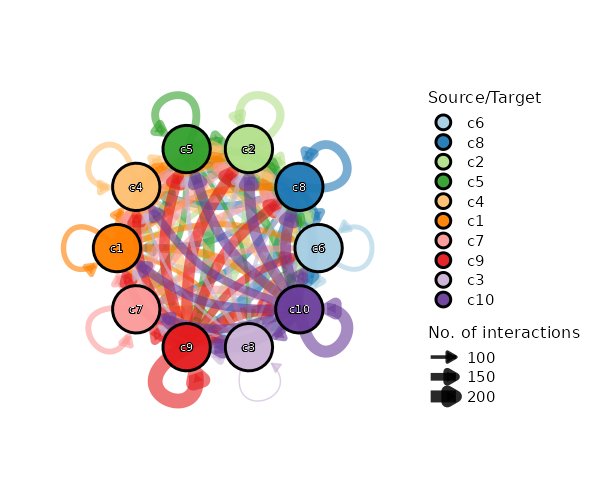
Circos Plot
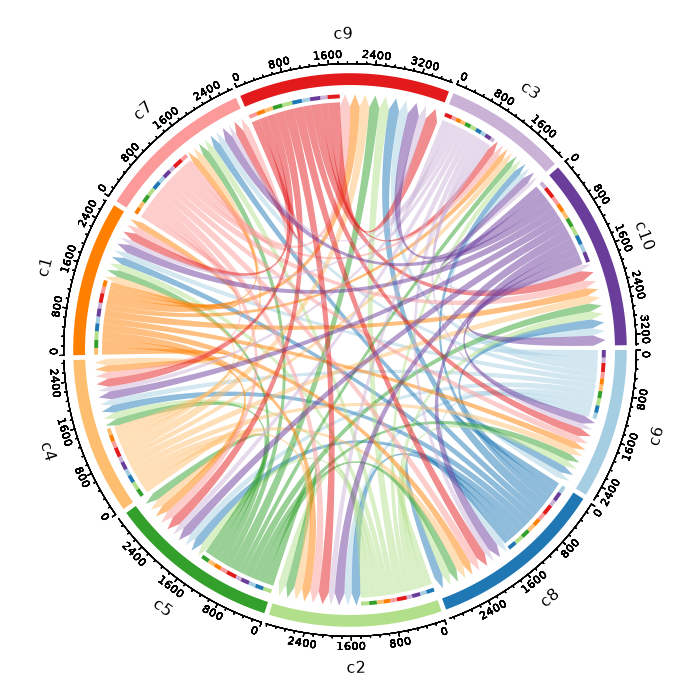
Heatmap Plot
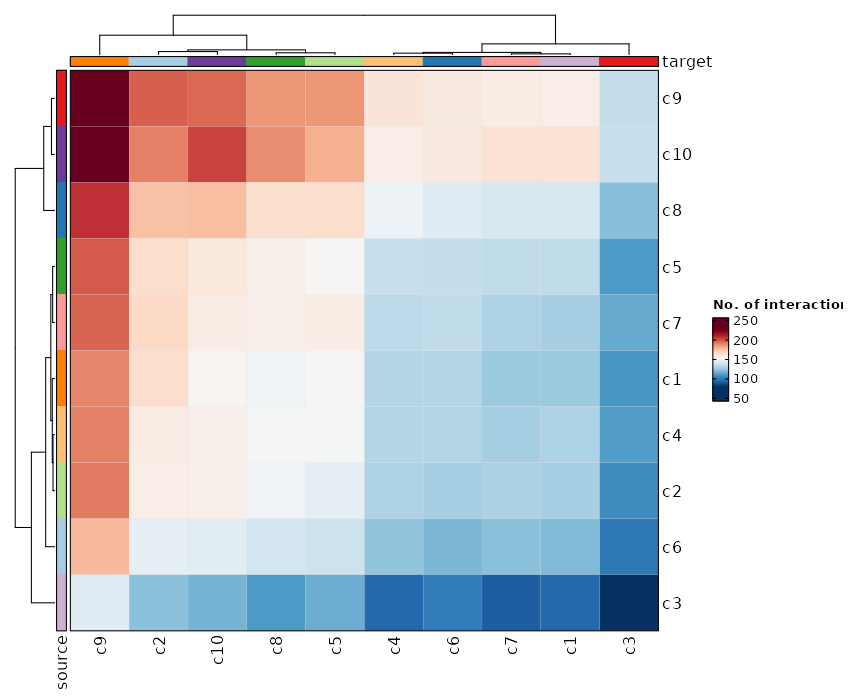
Cell-Cell Communication Interaction (Box Plot)
[CellCellCommunicationPlots.envs.cases."Cell-Cell Communication Interaction (Box Plot)"]
plot_type = "box"
x_text_angle = 90
method = "interaction"
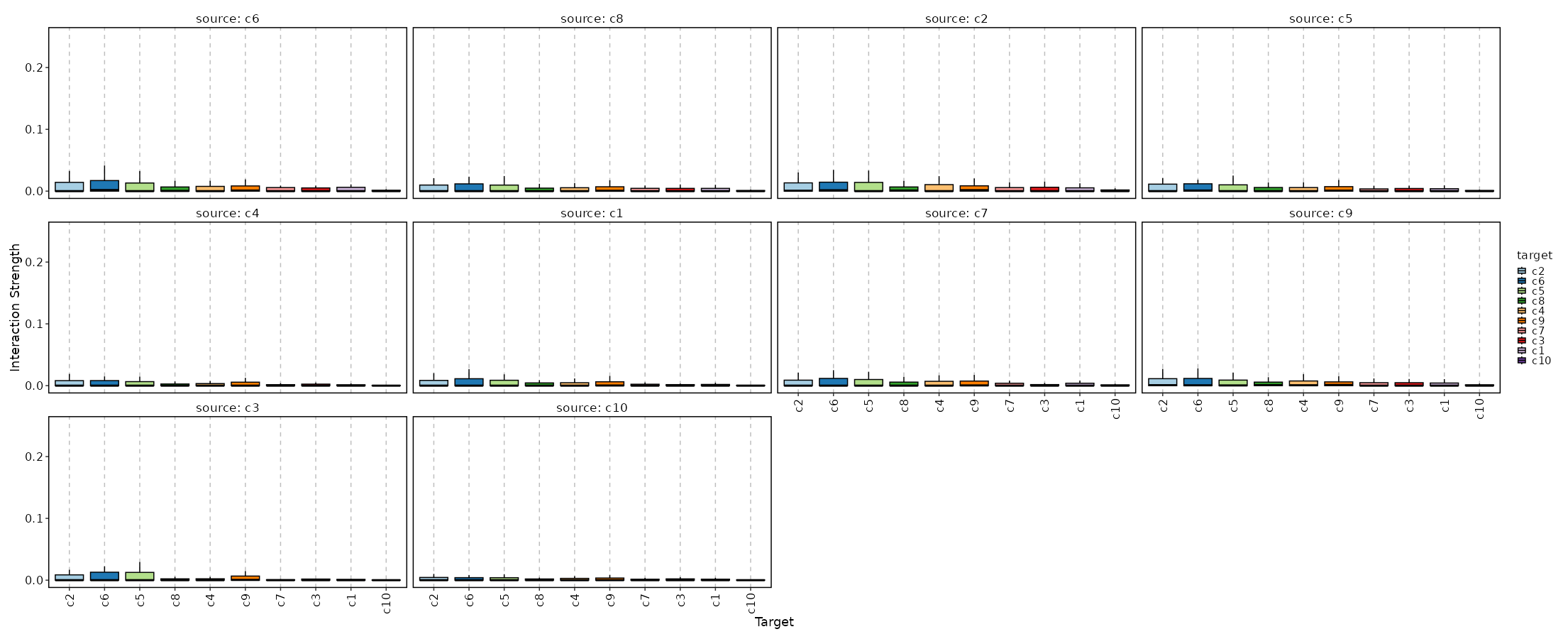
cccfile— The output file fromCellCellCommunication
outdir— The output directory for the plots.
cases(type=json) — The cases for the plots.The keys are the names of the cases and the values are the arguments for the plots. The arguments include the ones inherited fromenvs. You can have a specialplot_type"table"to generate a table for the ccc data to save as a text file and show in the report. If no cases are given, a default case will be used, with the keyCell-Cell Communication.descr— The description of the plot.devpars(ns) — The parameters for the plot.- - res (type=int): The resolution of the plot
- - height (type=int): The height of the plot
- - width (type=int): The width of the plot
ligand_expr— The name of the column containing the mean (or otherwise summarized) expression of the ligand.Only used when plot_type = "linkedheatmap". If not specified,ligand_meanswill be tried first, thenligand_trimean.magnitude— The column name in the data to use as the magnitude of thecommunication. By default, the second last column will be used. Seeli.mt.show_methods()for the available methods in LIANA. or https://liana-py.readthedocs.io/en/latest/notebooks/basic_usage.html#Tileplotmore_formats(type=list) — The additional formats to save the plots.receptor_expr— The name of the column containing the mean (or otherwise summarized) expression of the receptor.Only used when plot_type = "linkedheatmap". If not specified,receptor_meanswill be tried first, thenreceptor_trimean.specificity— The column name in the data to use as the specificity of the communication.By default, the last column will be used. If the method doesn't have a specificity, set it to None.subset— An expression to pass todplyr::filter()to subset the ccc data.
__init_subclass__()— Do the requirements inferring since we need them to build up theprocess relationship </>from_proc(proc,name,desc,envs,envs_depth,cache,export,output_flatten,error_strategy,num_retries,forks,input_data,order,plugin_opts,requires,scheduler,scheduler_opts,submission_batch)(Type) — Create a subclass of Proc using another Proc subclass or Proc itself</>gc()— GC process for the process to save memory after it's done</>log(level,msg,*args,logger)— Log message for the process</>run()— Init all other properties and jobs</>
pipen.proc.ProcMeta(name, bases, namespace, **kwargs)
Meta class for Proc
from_proc(proc, name=None, desc=None, envs=None, envs_depth=None, cache=None, export=None, output_flatten=None, error_strategy=None, num_retries=None, forks=None, input_data=None, order=None, plugin_opts=None, requires=None, scheduler=None, scheduler_opts=None, submission_batch=None)
Create a subclass of Proc using another Proc subclass or Proc itself
proc(Type) — The Proc subclassname(str | none, optional) — The new name of the processdesc(str | none, optional) — The new description of the processenvs(Optional, optional) — The arguments of the process, will overwrite parent oneThe items that are specified will be inheritedenvs_depth(int | none, optional) — How deep to update the envs when subclassed.cache(bool | none, optional) — Whether we should check the cache for the jobsexport(bool | none, optional) — When True, the results will be exported to<pipeline.outdir>Defaults to None, meaning only end processes will export. You can set it to True/False to enable or disable exporting for processesoutput_flatten(bool | none, optional) — Whether to flatten the output when saving to the outputdirectory. Normally, the output will be saved in a subdirectory named after the job index (e.g.<outdir>/0,<outdir>/1, etc.). Ifoutput_flattenis True, the output will be saved directly in the output directory without the subdirectories. This is useful when you want the job outputs to be directly revealed in the output directory. Note that this only works for processes with export=True or end processes and make sure the name of the output files won't conflict for jobs with each other when flattening. It takes 3 possible values- - None (default): flatten the output for single-job processes only
- - True: flatten the output for all processes
- - False: never flatten the output
error_strategy(str | none, optional) — How to deal with the errors- - retry, ignore, halt
- - halt to halt the whole pipeline, no submitting new jobs
num_retries(int | none, optional) — How many times to retry to jobs once error occursforks(int | none, optional) — New forks for the new processinput_data(any | none, optional) — The input data for the process. Only when this processis a start processorder(int | none, optional) — The order to execute the new processplugin_opts(Optional, optional) — The new plugin options, unspecified items will beinherited.requires(Optional, optional) — The required processes for the new processscheduler(str | none, optional) — The new shedular to run the new processscheduler_opts(Optional, optional) — The new scheduler options, unspecified items willbe inherited.submission_batch(int | none, optional) — How many jobs to be submited simultaneously.
The new process class
__init_subclass__()
Do the requirements inferring since we need them to build up theprocess relationship
run()
Init all other properties and jobs
gc()
GC process for the process to save memory after it's done
log(level, msg, *args, logger=<LoggerAdapter pipen.core (WARNING)>)
Log message for the process
level(int | str) — The log level of the recordmsg(str) — The message to log*args— The arguments to format the messagelogger(LoggerAdapter, optional) — The logging logger
biopipen.ns.scrna.ScVelo(*args, **kwds) → Proc
Velocity analysis for single-cell RNA-seq data
This process is implemented based on the Python package scvelo (v0.3.3).
Note that it doesn't work with numpy>=2.
cache— Should we detect whether the jobs are cached?desc— The description of the process. Will use the summary fromthe docstring by default.dirsig— When checking the signature for caching, whether should we walkthrough the content of the directory? This is sometimes time-consuming if the directory is big.envs— The arguments that are job-independent, useful for common optionsacross jobs.envs_depth— How deep to update the envs when subclassed.error_strategy— How to deal with the errors- - retry, ignore, halt
- - halt to halt the whole pipeline, no submitting new jobs
export— When True, the results will be exported to<pipeline.outdir>Defaults to None, meaning only end processes will export. You can set it to True/False to enable or disable exporting for processesforks— How many jobs to run simultaneously?input— The keys for the input channelinput_data— The input data (will be computed for dependent processes)lang— The language for the script to run. Should be the path to theinterpreter iflangis not in$PATH.name— The name of the process. Will use the class name by default.nexts— Computed fromrequiresto build the process relationshipsnum_retries— How many times to retry to jobs once error occursorder— The execution order for this process. The bigger the numberis, the later the process will be executed. Default: 0. Note that the dependent processes will always be executed first. This doesn't work for start processes either, whose orders are determined byPipen.set_starts()output— The output keys for the output channel(the data will be computed)output_data— The output data (to pass to the next processes)output_flatten— Whether to flatten the output when saving to the outputdirectory. Normally, the output will be saved in a subdirectory named after the job index (e.g.<outdir>/0,<outdir>/1, etc.). Ifoutput_flattenis True, the output will be saved directly in the output directory without the subdirectories. This is useful when you want the job outputs to be directly revealed in the output directory. Note that this only works for processes with export=True or end processes and make sure the name of the output files won't conflict for jobs with each other when flattening. It takes 3 possible values- - None (default): flatten the output for single-job processes only
- - True: flatten the output for all processes
- - False: never flatten the output
plugin_opts— Options for process-level pluginsrequires— The dependency processesscheduler— The scheduler to run the jobsscheduler_opts— The options for the schedulerscript— The script template for the processsubmission_batch— How many jobs to be submited simultaneously.The program entrance for some schedulers may take too much resources when submitting a job or checking the job status. So we may use a smaller number here to limit the simultaneous submissions.template— Define the template engine to use.This could be either a template engine or a dict with keyengineindicating the template engine and the rest the arguments passed to the constructor of thepipen.template.Templateobject. The template engine could be either the name of the engine, currently jinja2 and liquidpy are supported, or a subclass ofpipen.template.Template. You can subclasspipen.template.Templateto use your own template engine.
sobjfile— The seurat object file in RDS or h5seurat format or AnnData file.
outfile— The output object with the velocity embeddings and information.In either RDS, h5seurat or h5ad format, depending on theenvs.outtype. There will be also plots generated in the output directory (parent directory ofoutfile). Note that these plots will not be used in the report, but can be used as supplementary information for the velocity analysis. To visualize the velocity embeddings, you can use theSeuratClusterStatsprocess withv_reductionprovided to one of theenvs.dimplots.
calculate_velocity_genes(flag) — Whether to calculate the velocity genes.denoise(flag) — Whether to denoise the data.denoise_topn(type=int) — Number of genes with highest likelihood selected toinfer velocity directions.fitting_by(choice) — The mode to use for fitting the velocities.- - stochastic: Stochastic mode
- - deterministic: Deterministic mode
group_by— The column name in metadata to group the cells.Typically, this column should be the cluster id. If provided input is a Seurat object, the default identity will be used by default. Otherwise, it is recommended to provide this parameter. "seurat_clusters" will be used with a warning if the input is in AnnData format and this parameter is not provided.kinetics(flag) — Whether to compute the RNA velocity kinetics.kinetics_topn(type=int) — Number of genes with highest likelihood selected toinfer velocity directions.min_shared_counts(type=int) — Minimum number of counts(both unspliced and spliced) required for a gene.mode(type=list) — The mode to use for the velocity analysis.It should be a subset of['deterministic', 'stochastic', 'dynamical'], meaning that we can perform the velocity analysis in multiple modes.n_neighbors(type=int) — The number of neighbors to use for the velocity graph.n_pcs(type=int) — The number of PCs to use for the velocity graph.ncores(type=int) — Number of cores to use.outtype(choice) — The output file type.- - : The same as the input file type.
- - h5seurat: h5seurat file
- - h5ad: h5ad file
- - qs: qs/qs2 file
- - qs2: qs2 file
- - rds: RDS file
rscript— The path to the Rscript executable used to convert RDS file to AnnData.ifin.sobjfileis an RDS file, it will be converted to AnnData file (h5ad). You needSeurat,SeuratDiskanddigestinstalled.top_n(type=int) — The number of top features to plot.
__init_subclass__()— Do the requirements inferring since we need them to build up theprocess relationship </>from_proc(proc,name,desc,envs,envs_depth,cache,export,output_flatten,error_strategy,num_retries,forks,input_data,order,plugin_opts,requires,scheduler,scheduler_opts,submission_batch)(Type) — Create a subclass of Proc using another Proc subclass or Proc itself</>gc()— GC process for the process to save memory after it's done</>log(level,msg,*args,logger)— Log message for the process</>run()— Init all other properties and jobs</>
pipen.proc.ProcMeta(name, bases, namespace, **kwargs)
Meta class for Proc
from_proc(proc, name=None, desc=None, envs=None, envs_depth=None, cache=None, export=None, output_flatten=None, error_strategy=None, num_retries=None, forks=None, input_data=None, order=None, plugin_opts=None, requires=None, scheduler=None, scheduler_opts=None, submission_batch=None)
Create a subclass of Proc using another Proc subclass or Proc itself
proc(Type) — The Proc subclassname(str | none, optional) — The new name of the processdesc(str | none, optional) — The new description of the processenvs(Optional, optional) — The arguments of the process, will overwrite parent oneThe items that are specified will be inheritedenvs_depth(int | none, optional) — How deep to update the envs when subclassed.cache(bool | none, optional) — Whether we should check the cache for the jobsexport(bool | none, optional) — When True, the results will be exported to<pipeline.outdir>Defaults to None, meaning only end processes will export. You can set it to True/False to enable or disable exporting for processesoutput_flatten(bool | none, optional) — Whether to flatten the output when saving to the outputdirectory. Normally, the output will be saved in a subdirectory named after the job index (e.g.<outdir>/0,<outdir>/1, etc.). Ifoutput_flattenis True, the output will be saved directly in the output directory without the subdirectories. This is useful when you want the job outputs to be directly revealed in the output directory. Note that this only works for processes with export=True or end processes and make sure the name of the output files won't conflict for jobs with each other when flattening. It takes 3 possible values- - None (default): flatten the output for single-job processes only
- - True: flatten the output for all processes
- - False: never flatten the output
error_strategy(str | none, optional) — How to deal with the errors- - retry, ignore, halt
- - halt to halt the whole pipeline, no submitting new jobs
num_retries(int | none, optional) — How many times to retry to jobs once error occursforks(int | none, optional) — New forks for the new processinput_data(any | none, optional) — The input data for the process. Only when this processis a start processorder(int | none, optional) — The order to execute the new processplugin_opts(Optional, optional) — The new plugin options, unspecified items will beinherited.requires(Optional, optional) — The required processes for the new processscheduler(str | none, optional) — The new shedular to run the new processscheduler_opts(Optional, optional) — The new scheduler options, unspecified items willbe inherited.submission_batch(int | none, optional) — How many jobs to be submited simultaneously.
The new process class
__init_subclass__()
Do the requirements inferring since we need them to build up theprocess relationship
run()
Init all other properties and jobs
gc()
GC process for the process to save memory after it's done
log(level, msg, *args, logger=<LoggerAdapter pipen.core (WARNING)>)
Log message for the process
level(int | str) — The log level of the recordmsg(str) — The message to log*args— The arguments to format the messagelogger(LoggerAdapter, optional) — The logging logger
biopipen.ns.scrna.Slingshot(*args, **kwds) → Proc
Trajectory inference using Slingshot
This process is implemented based on the R package slingshot.
cache— Should we detect whether the jobs are cached?desc— The description of the process. Will use the summary fromthe docstring by default.dirsig— When checking the signature for caching, whether should we walkthrough the content of the directory? This is sometimes time-consuming if the directory is big.envs— The arguments that are job-independent, useful for common optionsacross jobs.envs_depth— How deep to update the envs when subclassed.error_strategy— How to deal with the errors- - retry, ignore, halt
- - halt to halt the whole pipeline, no submitting new jobs
export— When True, the results will be exported to<pipeline.outdir>Defaults to None, meaning only end processes will export. You can set it to True/False to enable or disable exporting for processesforks— How many jobs to run simultaneously?input— The keys for the input channelinput_data— The input data (will be computed for dependent processes)lang— The language for the script to run. Should be the path to theinterpreter iflangis not in$PATH.name— The name of the process. Will use the class name by default.nexts— Computed fromrequiresto build the process relationshipsnum_retries— How many times to retry to jobs once error occursorder— The execution order for this process. The bigger the numberis, the later the process will be executed. Default: 0. Note that the dependent processes will always be executed first. This doesn't work for start processes either, whose orders are determined byPipen.set_starts()output— The output keys for the output channel(the data will be computed)output_data— The output data (to pass to the next processes)output_flatten— Whether to flatten the output when saving to the outputdirectory. Normally, the output will be saved in a subdirectory named after the job index (e.g.<outdir>/0,<outdir>/1, etc.). Ifoutput_flattenis True, the output will be saved directly in the output directory without the subdirectories. This is useful when you want the job outputs to be directly revealed in the output directory. Note that this only works for processes with export=True or end processes and make sure the name of the output files won't conflict for jobs with each other when flattening. It takes 3 possible values- - None (default): flatten the output for single-job processes only
- - True: flatten the output for all processes
- - False: never flatten the output
plugin_opts— Options for process-level pluginsrequires— The dependency processesscheduler— The scheduler to run the jobsscheduler_opts— The options for the schedulerscript— The script template for the processsubmission_batch— How many jobs to be submited simultaneously.The program entrance for some schedulers may take too much resources when submitting a job or checking the job status. So we may use a smaller number here to limit the simultaneous submissions.template— Define the template engine to use.This could be either a template engine or a dict with keyengineindicating the template engine and the rest the arguments passed to the constructor of thepipen.template.Templateobject. The template engine could be either the name of the engine, currently jinja2 and liquidpy are supported, or a subclass ofpipen.template.Template. You can subclasspipen.template.Templateto use your own template engine.
sobjfile— The seurat object file in RDS or qs format.
outfile— The output object with the trajectory information.The lineages are stored in the metadata of the seurat object at columnsLineageX, where X is the lineage number. TheBranchIDcolumn contains the branch id for each cell. One can usescplotter::CellDimPlot(object, lineages = c("Lineage1", "Lineage2", ...))to visualize the trajectories.
align_start(flag) — Whether to align the starting pseudotime values at the maximum pseudotime.cases— A dictionary of cases to run the analysis.The keys are the names of the cases, which will be served as the prefix to add to the column names of the resulting pseudotime variable. For example, if the case name iscase1, the resulting pseudotime variable will be stored in the columncase1_LineageXandcase1_BranchID. The values are the arguments and will be inherited from theenvsabove, except forcases. The default case will be added with the default values underenvswith an empty prefix.dims(type=auto) — The dimensions to use for the analysis.A list or a string with comma separated values. Consecutive numbers can be specified with a colon (:) or a dash (-). Or a single number greater than 1, which will be expanded to1:number. IfNone, all dimensions will be used.end— The ending group for the Slingshot analysis.group_by— The column name in metadata to group the cells.Typically, this column should be the cluster id. Default is the default identity of the seurat object.ncores(type=int) — The number of cores to use for reading and writing the seurat object.reduction— The nonlinear reduction to use for the trajectory analysis.reverse(flag) — Logical value indicating whether to reverse the pseudotime variable.seed(type=int) — The seed for the random number generator.split_by— The column name in metadata to split the cells to run the method separately.After run, the results will be combined together with this column in the final output. The lineages will be all stored in the columns<prefix>_LineageXand<prefix>_BranchID. If a lineage is not found in a split, the corresponding columns will be filled withNA.start— The starting group for the Slingshot analysis.subset— An expression in string to subset the cells.
__init_subclass__()— Do the requirements inferring since we need them to build up theprocess relationship </>from_proc(proc,name,desc,envs,envs_depth,cache,export,output_flatten,error_strategy,num_retries,forks,input_data,order,plugin_opts,requires,scheduler,scheduler_opts,submission_batch)(Type) — Create a subclass of Proc using another Proc subclass or Proc itself</>gc()— GC process for the process to save memory after it's done</>log(level,msg,*args,logger)— Log message for the process</>run()— Init all other properties and jobs</>
pipen.proc.ProcMeta(name, bases, namespace, **kwargs)
Meta class for Proc
from_proc(proc, name=None, desc=None, envs=None, envs_depth=None, cache=None, export=None, output_flatten=None, error_strategy=None, num_retries=None, forks=None, input_data=None, order=None, plugin_opts=None, requires=None, scheduler=None, scheduler_opts=None, submission_batch=None)
Create a subclass of Proc using another Proc subclass or Proc itself
proc(Type) — The Proc subclassname(str | none, optional) — The new name of the processdesc(str | none, optional) — The new description of the processenvs(Optional, optional) — The arguments of the process, will overwrite parent oneThe items that are specified will be inheritedenvs_depth(int | none, optional) — How deep to update the envs when subclassed.cache(bool | none, optional) — Whether we should check the cache for the jobsexport(bool | none, optional) — When True, the results will be exported to<pipeline.outdir>Defaults to None, meaning only end processes will export. You can set it to True/False to enable or disable exporting for processesoutput_flatten(bool | none, optional) — Whether to flatten the output when saving to the outputdirectory. Normally, the output will be saved in a subdirectory named after the job index (e.g.<outdir>/0,<outdir>/1, etc.). Ifoutput_flattenis True, the output will be saved directly in the output directory without the subdirectories. This is useful when you want the job outputs to be directly revealed in the output directory. Note that this only works for processes with export=True or end processes and make sure the name of the output files won't conflict for jobs with each other when flattening. It takes 3 possible values- - None (default): flatten the output for single-job processes only
- - True: flatten the output for all processes
- - False: never flatten the output
error_strategy(str | none, optional) — How to deal with the errors- - retry, ignore, halt
- - halt to halt the whole pipeline, no submitting new jobs
num_retries(int | none, optional) — How many times to retry to jobs once error occursforks(int | none, optional) — New forks for the new processinput_data(any | none, optional) — The input data for the process. Only when this processis a start processorder(int | none, optional) — The order to execute the new processplugin_opts(Optional, optional) — The new plugin options, unspecified items will beinherited.requires(Optional, optional) — The required processes for the new processscheduler(str | none, optional) — The new shedular to run the new processscheduler_opts(Optional, optional) — The new scheduler options, unspecified items willbe inherited.submission_batch(int | none, optional) — How many jobs to be submited simultaneously.
The new process class
__init_subclass__()
Do the requirements inferring since we need them to build up theprocess relationship
run()
Init all other properties and jobs
gc()
GC process for the process to save memory after it's done
log(level, msg, *args, logger=<LoggerAdapter pipen.core (WARNING)>)
Log message for the process
level(int | str) — The log level of the recordmsg(str) — The message to log*args— The arguments to format the messagelogger(LoggerAdapter, optional) — The logging logger
biopipen.ns.scrna.LoomTo10X(*args, **kwds) → Proc
Convert Loom file to 10X format
cache— Should we detect whether the jobs are cached?desc— The description of the process. Will use the summary fromthe docstring by default.dirsig— When checking the signature for caching, whether should we walkthrough the content of the directory? This is sometimes time-consuming if the directory is big.envs— The arguments that are job-independent, useful for common optionsacross jobs.envs_depth— How deep to update the envs when subclassed.error_strategy— How to deal with the errors- - retry, ignore, halt
- - halt to halt the whole pipeline, no submitting new jobs
export— When True, the results will be exported to<pipeline.outdir>Defaults to None, meaning only end processes will export. You can set it to True/False to enable or disable exporting for processesforks— How many jobs to run simultaneously?input— The keys for the input channelinput_data— The input data (will be computed for dependent processes)lang— The language for the script to run. Should be the path to theinterpreter iflangis not in$PATH.name— The name of the process. Will use the class name by default.nexts— Computed fromrequiresto build the process relationshipsnum_retries— How many times to retry to jobs once error occursorder— The execution order for this process. The bigger the numberis, the later the process will be executed. Default: 0. Note that the dependent processes will always be executed first. This doesn't work for start processes either, whose orders are determined byPipen.set_starts()output— The output keys for the output channel(the data will be computed)output_data— The output data (to pass to the next processes)output_flatten— Whether to flatten the output when saving to the outputdirectory. Normally, the output will be saved in a subdirectory named after the job index (e.g.<outdir>/0,<outdir>/1, etc.). Ifoutput_flattenis True, the output will be saved directly in the output directory without the subdirectories. This is useful when you want the job outputs to be directly revealed in the output directory. Note that this only works for processes with export=True or end processes and make sure the name of the output files won't conflict for jobs with each other when flattening. It takes 3 possible values- - None (default): flatten the output for single-job processes only
- - True: flatten the output for all processes
- - False: never flatten the output
plugin_opts— Options for process-level pluginsrequires— The dependency processesscheduler— The scheduler to run the jobsscheduler_opts— The options for the schedulerscript— The script template for the processsubmission_batch— How many jobs to be submited simultaneously.The program entrance for some schedulers may take too much resources when submitting a job or checking the job status. So we may use a smaller number here to limit the simultaneous submissions.template— Define the template engine to use.This could be either a template engine or a dict with keyengineindicating the template engine and the rest the arguments passed to the constructor of thepipen.template.Templateobject. The template engine could be either the name of the engine, currently jinja2 and liquidpy are supported, or a subclass ofpipen.template.Template. You can subclasspipen.template.Templateto use your own template engine.
loomfile— The Loom file
outdir— The output directory for the 10X format files,including thematrix.mtx.gz,barcodes.tsv.gzandfeatures.tsv.gzfiles.
__init_subclass__()— Do the requirements inferring since we need them to build up theprocess relationship </>from_proc(proc,name,desc,envs,envs_depth,cache,export,output_flatten,error_strategy,num_retries,forks,input_data,order,plugin_opts,requires,scheduler,scheduler_opts,submission_batch)(Type) — Create a subclass of Proc using another Proc subclass or Proc itself</>gc()— GC process for the process to save memory after it's done</>log(level,msg,*args,logger)— Log message for the process</>run()— Init all other properties and jobs</>
pipen.proc.ProcMeta(name, bases, namespace, **kwargs)
Meta class for Proc
from_proc(proc, name=None, desc=None, envs=None, envs_depth=None, cache=None, export=None, output_flatten=None, error_strategy=None, num_retries=None, forks=None, input_data=None, order=None, plugin_opts=None, requires=None, scheduler=None, scheduler_opts=None, submission_batch=None)
Create a subclass of Proc using another Proc subclass or Proc itself
proc(Type) — The Proc subclassname(str | none, optional) — The new name of the processdesc(str | none, optional) — The new description of the processenvs(Optional, optional) — The arguments of the process, will overwrite parent oneThe items that are specified will be inheritedenvs_depth(int | none, optional) — How deep to update the envs when subclassed.cache(bool | none, optional) — Whether we should check the cache for the jobsexport(bool | none, optional) — When True, the results will be exported to<pipeline.outdir>Defaults to None, meaning only end processes will export. You can set it to True/False to enable or disable exporting for processesoutput_flatten(bool | none, optional) — Whether to flatten the output when saving to the outputdirectory. Normally, the output will be saved in a subdirectory named after the job index (e.g.<outdir>/0,<outdir>/1, etc.). Ifoutput_flattenis True, the output will be saved directly in the output directory without the subdirectories. This is useful when you want the job outputs to be directly revealed in the output directory. Note that this only works for processes with export=True or end processes and make sure the name of the output files won't conflict for jobs with each other when flattening. It takes 3 possible values- - None (default): flatten the output for single-job processes only
- - True: flatten the output for all processes
- - False: never flatten the output
error_strategy(str | none, optional) — How to deal with the errors- - retry, ignore, halt
- - halt to halt the whole pipeline, no submitting new jobs
num_retries(int | none, optional) — How many times to retry to jobs once error occursforks(int | none, optional) — New forks for the new processinput_data(any | none, optional) — The input data for the process. Only when this processis a start processorder(int | none, optional) — The order to execute the new processplugin_opts(Optional, optional) — The new plugin options, unspecified items will beinherited.requires(Optional, optional) — The required processes for the new processscheduler(str | none, optional) — The new shedular to run the new processscheduler_opts(Optional, optional) — The new scheduler options, unspecified items willbe inherited.submission_batch(int | none, optional) — How many jobs to be submited simultaneously.
The new process class
__init_subclass__()
Do the requirements inferring since we need them to build up theprocess relationship
run()
Init all other properties and jobs
gc()
GC process for the process to save memory after it's done
log(level, msg, *args, logger=<LoggerAdapter pipen.core (WARNING)>)
Log message for the process
level(int | str) — The log level of the recordmsg(str) — The message to log*args— The arguments to format the messagelogger(LoggerAdapter, optional) — The logging logger
biopipen.ns.scrna.PseudoBulkDEG(*args, **kwds) → Proc
Pseduo-bulk differential gene expression analysis
This process performs differential gene expression analysis, instead of on single-cell level, on the pseudo-bulk data, aggregated from the single-cell data.
cache— Should we detect whether the jobs are cached?desc— The description of the process. Will use the summary fromthe docstring by default.dirsig— When checking the signature for caching, whether should we walkthrough the content of the directory? This is sometimes time-consuming if the directory is big.envs— The arguments that are job-independent, useful for common optionsacross jobs.envs_depth— How deep to update the envs when subclassed.error_strategy— How to deal with the errors- - retry, ignore, halt
- - halt to halt the whole pipeline, no submitting new jobs
export— When True, the results will be exported to<pipeline.outdir>Defaults to None, meaning only end processes will export. You can set it to True/False to enable or disable exporting for processesforks— How many jobs to run simultaneously?input— The keys for the input channelinput_data— The input data (will be computed for dependent processes)lang— The language for the script to run. Should be the path to theinterpreter iflangis not in$PATH.name— The name of the process. Will use the class name by default.nexts— Computed fromrequiresto build the process relationshipsnum_retries— How many times to retry to jobs once error occursorder— The execution order for this process. The bigger the numberis, the later the process will be executed. Default: 0. Note that the dependent processes will always be executed first. This doesn't work for start processes either, whose orders are determined byPipen.set_starts()output— The output keys for the output channel(the data will be computed)output_data— The output data (to pass to the next processes)output_flatten— Whether to flatten the output when saving to the outputdirectory. Normally, the output will be saved in a subdirectory named after the job index (e.g.<outdir>/0,<outdir>/1, etc.). Ifoutput_flattenis True, the output will be saved directly in the output directory without the subdirectories. This is useful when you want the job outputs to be directly revealed in the output directory. Note that this only works for processes with export=True or end processes and make sure the name of the output files won't conflict for jobs with each other when flattening. It takes 3 possible values- - None (default): flatten the output for single-job processes only
- - True: flatten the output for all processes
- - False: never flatten the output
plugin_opts— Options for process-level pluginsrequires— The dependency processesscheduler— The scheduler to run the jobsscheduler_opts— The options for the schedulerscript— The script template for the processsubmission_batch— How many jobs to be submited simultaneously.The program entrance for some schedulers may take too much resources when submitting a job or checking the job status. So we may use a smaller number here to limit the simultaneous submissions.template— Define the template engine to use.This could be either a template engine or a dict with keyengineindicating the template engine and the rest the arguments passed to the constructor of thepipen.template.Templateobject. The template engine could be either the name of the engine, currently jinja2 and liquidpy are supported, or a subclass ofpipen.template.Template. You can subclasspipen.template.Templateto use your own template engine.
sobjfile— The seurat object file in RDS or qs/qs2 format.
outdir— The output containing the results of the differential gene expressionanalysis.
aggregate_by— The column names in metadata to aggregate the cells.allenrich_plots(type=json) — Cases of the plots to generate for the enrichment analysis.The keys are the names of the cases and the values are the dicts inherited fromallenrich_plots_defaults. The cases underenvs.casescan inherit this options.allenrich_plots_defaults(ns) — Default options for the plots to generate for the enrichment analysis.- - plot_type: The type of the plot.
- - descr: A description of the plot to be shown above the plot image.
- - devpars (ns): The device parameters for the plots.
- res (type=int): The resolution of the plots.
- height (type=int): The height of the plots.
- width (type=int): The width of the plots. - - db (type=str): The database(s) to apply for the plot. If not specified, all databases will be applied.
dbscan also be used as an alias for this parameter. - -
: See https://pwwang.github.io/scplotter/reference/EnrichmentPlot.html.
allmarker_plots(type=json) — All marker plot cases.The keys are the names of the cases and the values are the dicts inherited fromallmarker_plots_defaults.allmarker_plots_defaults(ns) — Default options for the plots for all markers whenident_1is not specified.- - plot_type: The type of the plot.
See https://pwwang.github.io/scplotter/reference/FeatureStatPlot.html.
Available types areviolin,box,bar,ridge,dim,heatmapanddot. - - descr: A description of the plot to be shown above the plot image.
- - more_formats (type=list): The extra formats to save the plot in.
- - save_code (flag): Whether to save the code to generate the plot.
- - devpars (ns): The device parameters for the plots.
- res (type=int): The resolution of the plots.
- height (type=int): The height of the plots.
- width (type=int): The width of the plots. - - order_by: an expression to order the markers, passed by
dplyr::arrange(). - - genes: The number of top genes to show or an expression passed to
dplyr::filter()to filter the genes. - -
: Other arguments passed to scplotter::FeatureStatPlot().
- - plot_type: The type of the plot.
assay— The assay to pull and aggregate the data.cache(type=auto) — Where to cache the results.IfTrue, cache tooutdirof the job. IfFalse, don't cache. Otherwise, specify the directory to cache to.cases(type=json) — The cases for the analysis.The keys are the names of the cases and the values are the arguments for the analysis. The arguments include the ones inherited fromenvs. If no cases are specified, a default case will be added with the nameDEG Analysisand the default values specified above.dbs(list) — The databases to use for enrichment analysis.You can use built-in dbs inenrichit, or provide your own gmt files. See also https://pwwang.github.io/enrichit/reference/FetchGMT.html. The built-in dbs include:- * "BioCarta" or "BioCarta_2016"
- * "GO_Biological_Process" or "GO_Biological_Process_2025"
- * "GO_Cellular_Component" or "GO_Cellular_Component_2025"
- * "GO_Molecular_Function" or "GO_Molecular_Function_2025"
- * "KEGG", "KEGG_Human", "KEGG_2021", or "KEGG_2021_Human"
- * "Hallmark", "MSigDB_Hallmark", or "MSigDB_Hallmark_2020"
- * "Reactome", "Reactome_Pathways", or "Reactome_Pathways_2024"
- * "WikiPathways", "WikiPathways_2024", "WikiPathways_Human", or "WikiPathways_2024_Human"
each— The column name in metadata to separate the cells into different cases.When specified, the case will be expanded to multiple cases for each value in the column."ident"can be used as an alias for the default identity column (e.g."seurat_clusters").enrich_plots(type=json) — Cases of the plots to generate for the enrichment analysis.The keys are the names of the cases and the values are the dicts inherited fromenrich_plots_defaults. The cases underenvs.casescan inherit this options.enrich_plots_defaults(ns) — Default options for the plots to generate for the enrichment analysis.- - plot_type: The type of the plot.
See https://pwwang.github.io/scplotter/reference/EnrichmentPlot.html.
Available types arebar,dot,lollipop,network,enrichmapandwordcloud. - - descr: A description of the plot to be shown above the plot image.
- - more_formats (type=list): The extra formats to save the plot in.
- - save_code (flag): Whether to save the code to generate the plot.
- - devpars (ns): The device parameters for the plots.
- res (type=int): The resolution of the plots.
- height (type=int): The height of the plots.
- width (type=int): The width of the plots. - -
: See https://pwwang.github.io/scplotter/reference/EnrichmentPlot.htmll.
- - plot_type: The type of the plot.
enrich_style(choice) — The style of the enrichment analysis.- - enrichr: Use
enrichr-style for the enrichment analysis. - - clusterProfiler: Use
clusterProfiler-style for the enrichment analysis.
- - enrichr: Use
error(flag) — Stop the job if errors happen.Helpful when no/not enough markers are found or no pathways are enriched. IfFalse, empty results will be returned.group_by— The column name in metadata to group the cells.ident_1— The first identity to compare.ident_2— The second identity to compare.If not specified, the rest of the identities will be compared withident_1.layer— The layer to pull and aggregate the data.marker_plots(type=json) — Cases of the plots to generate for the markers.Plot cases. The keys are the names of the cases and the values are the dicts inherited frommarker_plots_defaults. The cases underenvs.casescan inherit this options.marker_plots_defaults(ns) — Default options for the plots to generate for the markers.- - plot_type: The type of the plot.
See https://pwwang.github.io/scplotter/reference/FeatureStatPlot.html.
Available types areviolin,box,bar,ridge,dim,heatmapanddot.
There are two additional types available -volcano_pctandvolcano_log2fc. - - descr: A description of the plot to be shown above the plot image.
- - more_formats (type=list): The extra formats to save the plot in.
- - save_code (flag): Whether to save the code to generate the plot.
- - devpars (ns): The device parameters for the plots.
- res (type=int): The resolution of the plots.
- height (type=int): The height of the plots.
- width (type=int): The width of the plots. - - order_by: an expression to order the markers, passed by
dplyr::arrange(). - - genes: The number of top genes to show or an expression passed to
dplyr::filter()to filter the genes. - -
: Other arguments passed to scplotter::FeatureStatPlot().
Ifplot_typeisvolcano_pctorvolcano_log2fc, they will be passed to
scplotter::VolcanoPlot().
- - plot_type: The type of the plot.
mutaters(type=json) — Mutaters to mutate the metadata of theseurat object. Keys are the new column names and values are the expressions to mutate the columns. These new columns can be used to define your cases. You can also use the clone selectors to select the TCR clones/clusters. See https://pwwang.github.io/scplotter/reference/clone_selectors.html. You can also use key<newcol>:identto set the<newcol>as the default ident for the stats. See https://pwwang.github.io/biopipen.utils.R/reference/MutateSeuratMeta.htmlncores(type=int) — Number of cores to use for parallelization.overlaps(type=json) — Cases for investigating the overlapping of significant markers between different cases or comparisons.The keys are the names of the cases and the values are the dicts inherited fromoverlaps_defaults. There are two situations that we can perform overlaps: 1. Ifident_1is not specified, the overlaps can be performed between different comparisons. 2. Ifeachis specified, the overlaps can be performed between different cases, where in each case,ident_1must be specified.overlaps_defaults(ns) — Default options for investigating the overlapping of significant markers between different cases or comparisons.This means eitherident_1should be empty, so that they can be expanded to multiple comparisons.- - sigmarkers: The expression to filter the significant markers for each case.
If not provided,envs.sigmarkerswill be used. - - descr: A description of the plot to be shown above the plot image.
- - plot_type (choice): The type of the plot to generate for the overlaps.
- venn: Useplotthis::VennDiagram().
- upset: Useplotthis::UpsetPlot(). - - more_formats (type=list): The extra formats to save the plot in.
- - save_code (flag): Whether to save the code to generate the plot.
- - devpars (ns): The device parameters for the plots.
- res (type=int): The resolution of the plots.
- height (type=int): The height of the plots.
- width (type=int): The width of the plots. - -
: More arguments pased to plotthis::VennDiagram()
(https://pwwang.github.io/plotthis/reference/venndiagram1.html)
orplotthis::UpsetPlot()
(https://pwwang.github.io/plotthis/reference/upsetplot1.html)
- - sigmarkers: The expression to filter the significant markers for each case.
paired_by— The column name in metadata to mark the paired samples.For example, subject. If specified, the paired test will be performed.plots(type=json) — The parameters for the plots.The keys are the names of the plots and the values are the parameters for the plots. The parameters will override the defaults inplots_defaults. If not specified, no plots will be generated.plots_defaults(ns) — The default parameters for the plots.- -
: Parameters passed to biopipen.utils::VizBulkDEGs().
See: https://pwwang.github.io/biopipen.utils.R/reference/VizBulkDEGs.html
- -
sigmarkers— An expression passed todplyr::filter()to filter thesignificant markers for enrichment analysis. The default isp_val_adj < 0.05. Iftool = 'DESeq2', the variables that can be used for filtering are:baseMean,log2FC,lfcSE,stat,p_val,p_val_adj. Iftool = 'edgeR', the variables that can be used for filtering are:logCPM,log2FC,LR,p_val,p_val_adj.subset— An expression in string to subset the cells.tool(choice) — The method to use for the differential expression analysis.- - DESeq2: Use DESeq2 for the analysis.
- - edgeR: Use edgeR for the analysis.
__init_subclass__()— Do the requirements inferring since we need them to build up theprocess relationship </>from_proc(proc,name,desc,envs,envs_depth,cache,export,output_flatten,error_strategy,num_retries,forks,input_data,order,plugin_opts,requires,scheduler,scheduler_opts,submission_batch)(Type) — Create a subclass of Proc using another Proc subclass or Proc itself</>gc()— GC process for the process to save memory after it's done</>log(level,msg,*args,logger)— Log message for the process</>run()— Init all other properties and jobs</>
pipen.proc.ProcMeta(name, bases, namespace, **kwargs)
Meta class for Proc
from_proc(proc, name=None, desc=None, envs=None, envs_depth=None, cache=None, export=None, output_flatten=None, error_strategy=None, num_retries=None, forks=None, input_data=None, order=None, plugin_opts=None, requires=None, scheduler=None, scheduler_opts=None, submission_batch=None)
Create a subclass of Proc using another Proc subclass or Proc itself
proc(Type) — The Proc subclassname(str | none, optional) — The new name of the processdesc(str | none, optional) — The new description of the processenvs(Optional, optional) — The arguments of the process, will overwrite parent oneThe items that are specified will be inheritedenvs_depth(int | none, optional) — How deep to update the envs when subclassed.cache(bool | none, optional) — Whether we should check the cache for the jobsexport(bool | none, optional) — When True, the results will be exported to<pipeline.outdir>Defaults to None, meaning only end processes will export. You can set it to True/False to enable or disable exporting for processesoutput_flatten(bool | none, optional) — Whether to flatten the output when saving to the outputdirectory. Normally, the output will be saved in a subdirectory named after the job index (e.g.<outdir>/0,<outdir>/1, etc.). Ifoutput_flattenis True, the output will be saved directly in the output directory without the subdirectories. This is useful when you want the job outputs to be directly revealed in the output directory. Note that this only works for processes with export=True or end processes and make sure the name of the output files won't conflict for jobs with each other when flattening. It takes 3 possible values- - None (default): flatten the output for single-job processes only
- - True: flatten the output for all processes
- - False: never flatten the output
error_strategy(str | none, optional) — How to deal with the errors- - retry, ignore, halt
- - halt to halt the whole pipeline, no submitting new jobs
num_retries(int | none, optional) — How many times to retry to jobs once error occursforks(int | none, optional) — New forks for the new processinput_data(any | none, optional) — The input data for the process. Only when this processis a start processorder(int | none, optional) — The order to execute the new processplugin_opts(Optional, optional) — The new plugin options, unspecified items will beinherited.requires(Optional, optional) — The required processes for the new processscheduler(str | none, optional) — The new shedular to run the new processscheduler_opts(Optional, optional) — The new scheduler options, unspecified items willbe inherited.submission_batch(int | none, optional) — How many jobs to be submited simultaneously.
The new process class
__init_subclass__()
Do the requirements inferring since we need them to build up theprocess relationship
run()
Init all other properties and jobs
gc()
GC process for the process to save memory after it's done
log(level, msg, *args, logger=<LoggerAdapter pipen.core (WARNING)>)
Log message for the process
level(int | str) — The log level of the recordmsg(str) — The message to log*args— The arguments to format the messagelogger(LoggerAdapter, optional) — The logging logger
biopipen.ns.scrna.CellSNPLite(*args, **kwds) → Proc
Genotyping bi-allelic SNPs on single cells using cellsnp-lite.
The output from cellsnp-lite can be directly used for downstream analysis such as -
- Donor deconvolution in multiplexed single-cell RNA-seq data (e.g., with vireo).
- Allele-specific CNV analysis in single-cell or spatial transcriptomics data (e.g., with Numbat, XClone, or CalicoST).
- Clonal substructure discovery using single cell mitochondrial variants (e.g., with MQuad).
Here we only support model 1a/2a in cellsnp-lite, which is designed for a single bam file as input.
For model 1b/2b, which is designed for multiple bam files as input (e.g., one per cell), you can still
run with this process, but only one bam file is allowed.
See https://github.com/single-cell-genetics/cellsnp-lite for more details about cellsnp-lite.
cache— Should we detect whether the jobs are cached?desc— The description of the process. Will use the summary fromthe docstring by default.dirsig— When checking the signature for caching, whether should we walkthrough the content of the directory? This is sometimes time-consuming if the directory is big.envs— The arguments that are job-independent, useful for common optionsacross jobs.envs_depth— How deep to update the envs when subclassed.error_strategy— How to deal with the errors- - retry, ignore, halt
- - halt to halt the whole pipeline, no submitting new jobs
export— When True, the results will be exported to<pipeline.outdir>Defaults to None, meaning only end processes will export. You can set it to True/False to enable or disable exporting for processesforks— How many jobs to run simultaneously?input— The keys for the input channelinput_data— The input data (will be computed for dependent processes)lang— The language for the script to run. Should be the path to theinterpreter iflangis not in$PATH.name— The name of the process. Will use the class name by default.nexts— Computed fromrequiresto build the process relationshipsnum_retries— How many times to retry to jobs once error occursorder— The execution order for this process. The bigger the numberis, the later the process will be executed. Default: 0. Note that the dependent processes will always be executed first. This doesn't work for start processes either, whose orders are determined byPipen.set_starts()output— The output keys for the output channel(the data will be computed)output_data— The output data (to pass to the next processes)output_flatten— Whether to flatten the output when saving to the outputdirectory. Normally, the output will be saved in a subdirectory named after the job index (e.g.<outdir>/0,<outdir>/1, etc.). Ifoutput_flattenis True, the output will be saved directly in the output directory without the subdirectories. This is useful when you want the job outputs to be directly revealed in the output directory. Note that this only works for processes with export=True or end processes and make sure the name of the output files won't conflict for jobs with each other when flattening. It takes 3 possible values- - None (default): flatten the output for single-job processes only
- - True: flatten the output for all processes
- - False: never flatten the output
plugin_opts— Options for process-level pluginsrequires— The dependency processesscheduler— The scheduler to run the jobsscheduler_opts— The options for the schedulerscript— The script template for the processsubmission_batch— How many jobs to be submited simultaneously.The program entrance for some schedulers may take too much resources when submitting a job or checking the job status. So we may use a smaller number here to limit the simultaneous submissions.template— Define the template engine to use.This could be either a template engine or a dict with keyengineindicating the template engine and the rest the arguments passed to the constructor of thepipen.template.Templateobject. The template engine could be either the name of the engine, currently jinja2 and liquidpy are supported, or a subclass ofpipen.template.Template. You can subclasspipen.template.Templateto use your own template engine.
crdir— The cellranger output directory or the directory containingthe bam file and barcode file. It should contain theouts/possorted_genome_bam.bamfile and theouts/filtered_feature_bc_matrix/barcodes.tsv.gzfile.
outdir— The output directory for cellsnp-lite results.
genotype(flag) — Whether to perform genotyping.IfFalse, only the allele counts will be computed.gzip(flag) — Whether to gzip the output files.ncores(type=int) — The number of cores to use.Will pass to-poption in cellsnp-lite.regionsVCF— A vcf file listing all candidate SNPs, for fetch each variants.
__init_subclass__()— Do the requirements inferring since we need them to build up theprocess relationship </>from_proc(proc,name,desc,envs,envs_depth,cache,export,output_flatten,error_strategy,num_retries,forks,input_data,order,plugin_opts,requires,scheduler,scheduler_opts,submission_batch)(Type) — Create a subclass of Proc using another Proc subclass or Proc itself</>gc()— GC process for the process to save memory after it's done</>log(level,msg,*args,logger)— Log message for the process</>run()— Init all other properties and jobs</>
pipen.proc.ProcMeta(name, bases, namespace, **kwargs)
Meta class for Proc
from_proc(proc, name=None, desc=None, envs=None, envs_depth=None, cache=None, export=None, output_flatten=None, error_strategy=None, num_retries=None, forks=None, input_data=None, order=None, plugin_opts=None, requires=None, scheduler=None, scheduler_opts=None, submission_batch=None)
Create a subclass of Proc using another Proc subclass or Proc itself
proc(Type) — The Proc subclassname(str | none, optional) — The new name of the processdesc(str | none, optional) — The new description of the processenvs(Optional, optional) — The arguments of the process, will overwrite parent oneThe items that are specified will be inheritedenvs_depth(int | none, optional) — How deep to update the envs when subclassed.cache(bool | none, optional) — Whether we should check the cache for the jobsexport(bool | none, optional) — When True, the results will be exported to<pipeline.outdir>Defaults to None, meaning only end processes will export. You can set it to True/False to enable or disable exporting for processesoutput_flatten(bool | none, optional) — Whether to flatten the output when saving to the outputdirectory. Normally, the output will be saved in a subdirectory named after the job index (e.g.<outdir>/0,<outdir>/1, etc.). Ifoutput_flattenis True, the output will be saved directly in the output directory without the subdirectories. This is useful when you want the job outputs to be directly revealed in the output directory. Note that this only works for processes with export=True or end processes and make sure the name of the output files won't conflict for jobs with each other when flattening. It takes 3 possible values- - None (default): flatten the output for single-job processes only
- - True: flatten the output for all processes
- - False: never flatten the output
error_strategy(str | none, optional) — How to deal with the errors- - retry, ignore, halt
- - halt to halt the whole pipeline, no submitting new jobs
num_retries(int | none, optional) — How many times to retry to jobs once error occursforks(int | none, optional) — New forks for the new processinput_data(any | none, optional) — The input data for the process. Only when this processis a start processorder(int | none, optional) — The order to execute the new processplugin_opts(Optional, optional) — The new plugin options, unspecified items will beinherited.requires(Optional, optional) — The required processes for the new processscheduler(str | none, optional) — The new shedular to run the new processscheduler_opts(Optional, optional) — The new scheduler options, unspecified items willbe inherited.submission_batch(int | none, optional) — How many jobs to be submited simultaneously.
The new process class
__init_subclass__()
Do the requirements inferring since we need them to build up theprocess relationship
run()
Init all other properties and jobs
gc()
GC process for the process to save memory after it's done
log(level, msg, *args, logger=<LoggerAdapter pipen.core (WARNING)>)
Log message for the process
level(int | str) — The log level of the recordmsg(str) — The message to log*args— The arguments to format the messagelogger(LoggerAdapter, optional) — The logging logger
biopipen.ns.scrna.MQuad(*args, **kwds) → Proc
Clonal substructure discovery using single cell mitochondrial variants with MQuad.
MQuad uses a Mixture Model for Mitochondrial Mutation detection in single-cell omics data.
MQuad is a tool that detects mitochondrial mutations that are informative for clonal substructure inference. It uses a binomial mixture model to assess the heteroplasmy of mtDNA variants among background noise.
cache— Should we detect whether the jobs are cached?desc— The description of the process. Will use the summary fromthe docstring by default.dirsig— When checking the signature for caching, whether should we walkthrough the content of the directory? This is sometimes time-consuming if the directory is big.envs— The arguments that are job-independent, useful for common optionsacross jobs.envs_depth— How deep to update the envs when subclassed.error_strategy— How to deal with the errors- - retry, ignore, halt
- - halt to halt the whole pipeline, no submitting new jobs
export— When True, the results will be exported to<pipeline.outdir>Defaults to None, meaning only end processes will export. You can set it to True/False to enable or disable exporting for processesforks— How many jobs to run simultaneously?input— The keys for the input channelinput_data— The input data (will be computed for dependent processes)lang— The language for the script to run. Should be the path to theinterpreter iflangis not in$PATH.name— The name of the process. Will use the class name by default.nexts— Computed fromrequiresto build the process relationshipsnum_retries— How many times to retry to jobs once error occursorder— The execution order for this process. The bigger the numberis, the later the process will be executed. Default: 0. Note that the dependent processes will always be executed first. This doesn't work for start processes either, whose orders are determined byPipen.set_starts()output— The output keys for the output channel(the data will be computed)output_data— The output data (to pass to the next processes)output_flatten— Whether to flatten the output when saving to the outputdirectory. Normally, the output will be saved in a subdirectory named after the job index (e.g.<outdir>/0,<outdir>/1, etc.). Ifoutput_flattenis True, the output will be saved directly in the output directory without the subdirectories. This is useful when you want the job outputs to be directly revealed in the output directory. Note that this only works for processes with export=True or end processes and make sure the name of the output files won't conflict for jobs with each other when flattening. It takes 3 possible values- - None (default): flatten the output for single-job processes only
- - True: flatten the output for all processes
- - False: never flatten the output
plugin_opts— Options for process-level pluginsrequires— The dependency processesscheduler— The scheduler to run the jobsscheduler_opts— The options for the schedulerscript— The script template for the processsubmission_batch— How many jobs to be submited simultaneously.The program entrance for some schedulers may take too much resources when submitting a job or checking the job status. So we may use a smaller number here to limit the simultaneous submissions.template— Define the template engine to use.This could be either a template engine or a dict with keyengineindicating the template engine and the rest the arguments passed to the constructor of thepipen.template.Templateobject. The template engine could be either the name of the engine, currently jinja2 and liquidpy are supported, or a subclass ofpipen.template.Template. You can subclasspipen.template.Templateto use your own template engine.
cellsnpout— The output directory fromCellSNPLiteprocess, which should containAD and DP sparse matrices (.mtx) or the vcf file.
outdir— The output directory for MQuad results.
ncores(type=int) — The number of cores to use.It will be passed to--nprocoption in MQuad.seed(type=int) — The seed for the random number generator.It will be passed to--randSeedoption in MQuad.
__init_subclass__()— Do the requirements inferring since we need them to build up theprocess relationship </>from_proc(proc,name,desc,envs,envs_depth,cache,export,output_flatten,error_strategy,num_retries,forks,input_data,order,plugin_opts,requires,scheduler,scheduler_opts,submission_batch)(Type) — Create a subclass of Proc using another Proc subclass or Proc itself</>gc()— GC process for the process to save memory after it's done</>log(level,msg,*args,logger)— Log message for the process</>run()— Init all other properties and jobs</>
pipen.proc.ProcMeta(name, bases, namespace, **kwargs)
Meta class for Proc
from_proc(proc, name=None, desc=None, envs=None, envs_depth=None, cache=None, export=None, output_flatten=None, error_strategy=None, num_retries=None, forks=None, input_data=None, order=None, plugin_opts=None, requires=None, scheduler=None, scheduler_opts=None, submission_batch=None)
Create a subclass of Proc using another Proc subclass or Proc itself
proc(Type) — The Proc subclassname(str | none, optional) — The new name of the processdesc(str | none, optional) — The new description of the processenvs(Optional, optional) — The arguments of the process, will overwrite parent oneThe items that are specified will be inheritedenvs_depth(int | none, optional) — How deep to update the envs when subclassed.cache(bool | none, optional) — Whether we should check the cache for the jobsexport(bool | none, optional) — When True, the results will be exported to<pipeline.outdir>Defaults to None, meaning only end processes will export. You can set it to True/False to enable or disable exporting for processesoutput_flatten(bool | none, optional) — Whether to flatten the output when saving to the outputdirectory. Normally, the output will be saved in a subdirectory named after the job index (e.g.<outdir>/0,<outdir>/1, etc.). Ifoutput_flattenis True, the output will be saved directly in the output directory without the subdirectories. This is useful when you want the job outputs to be directly revealed in the output directory. Note that this only works for processes with export=True or end processes and make sure the name of the output files won't conflict for jobs with each other when flattening. It takes 3 possible values- - None (default): flatten the output for single-job processes only
- - True: flatten the output for all processes
- - False: never flatten the output
error_strategy(str | none, optional) — How to deal with the errors- - retry, ignore, halt
- - halt to halt the whole pipeline, no submitting new jobs
num_retries(int | none, optional) — How many times to retry to jobs once error occursforks(int | none, optional) — New forks for the new processinput_data(any | none, optional) — The input data for the process. Only when this processis a start processorder(int | none, optional) — The order to execute the new processplugin_opts(Optional, optional) — The new plugin options, unspecified items will beinherited.requires(Optional, optional) — The required processes for the new processscheduler(str | none, optional) — The new shedular to run the new processscheduler_opts(Optional, optional) — The new scheduler options, unspecified items willbe inherited.submission_batch(int | none, optional) — How many jobs to be submited simultaneously.
The new process class
__init_subclass__()
Do the requirements inferring since we need them to build up theprocess relationship
run()
Init all other properties and jobs
gc()
GC process for the process to save memory after it's done
log(level, msg, *args, logger=<LoggerAdapter pipen.core (WARNING)>)
Log message for the process
level(int | str) — The log level of the recordmsg(str) — The message to log*args— The arguments to format the messagelogger(LoggerAdapter, optional) — The logging logger
biopipen.ns.scrna.MQuadVcf(*args, **kwds) → Proc
Clonal substructure discovery using single cell mitochondrial variants with MQuad.
MQuad uses a Mixture Model for Mitochondrial Mutation detection in single-cell omics data.
MQuad is a tool that detects mitochondrial mutations that are informative for clonal substructure inference. It uses a binomial mixture model to assess the heteroplasmy of mtDNA variants among background noise.
cache— Should we detect whether the jobs are cached?desc— The description of the process. Will use the summary fromthe docstring by default.dirsig— When checking the signature for caching, whether should we walkthrough the content of the directory? This is sometimes time-consuming if the directory is big.envs— The arguments that are job-independent, useful for common optionsacross jobs.envs_depth— How deep to update the envs when subclassed.error_strategy— How to deal with the errors- - retry, ignore, halt
- - halt to halt the whole pipeline, no submitting new jobs
export— When True, the results will be exported to<pipeline.outdir>Defaults to None, meaning only end processes will export. You can set it to True/False to enable or disable exporting for processesforks— How many jobs to run simultaneously?input— The keys for the input channelinput_data— The input data (will be computed for dependent processes)lang— The language for the script to run. Should be the path to theinterpreter iflangis not in$PATH.name— The name of the process. Will use the class name by default.nexts— Computed fromrequiresto build the process relationshipsnum_retries— How many times to retry to jobs once error occursorder— The execution order for this process. The bigger the numberis, the later the process will be executed. Default: 0. Note that the dependent processes will always be executed first. This doesn't work for start processes either, whose orders are determined byPipen.set_starts()output— The output keys for the output channel(the data will be computed)output_data— The output data (to pass to the next processes)output_flatten— Whether to flatten the output when saving to the outputdirectory. Normally, the output will be saved in a subdirectory named after the job index (e.g.<outdir>/0,<outdir>/1, etc.). Ifoutput_flattenis True, the output will be saved directly in the output directory without the subdirectories. This is useful when you want the job outputs to be directly revealed in the output directory. Note that this only works for processes with export=True or end processes and make sure the name of the output files won't conflict for jobs with each other when flattening. It takes 3 possible values- - None (default): flatten the output for single-job processes only
- - True: flatten the output for all processes
- - False: never flatten the output
plugin_opts— Options for process-level pluginsrequires— The dependency processesscheduler— The scheduler to run the jobsscheduler_opts— The options for the schedulerscript— The script template for the processsubmission_batch— How many jobs to be submited simultaneously.The program entrance for some schedulers may take too much resources when submitting a job or checking the job status. So we may use a smaller number here to limit the simultaneous submissions.template— Define the template engine to use.This could be either a template engine or a dict with keyengineindicating the template engine and the rest the arguments passed to the constructor of thepipen.template.Templateobject. The template engine could be either the name of the engine, currently jinja2 and liquidpy are supported, or a subclass ofpipen.template.Template. You can subclasspipen.template.Templateto use your own template engine.
cellvcf— The output cell vcf fromCellSNPLiteprocess.
outdir— The output directory for MQuad results.
ncores(type=int) — The number of cores to use.It will be passed to--nprocoption in MQuad.seed(type=int) — The seed for the random number generator.It will be passed to--randSeedoption in MQuad.
__init_subclass__()— Do the requirements inferring since we need them to build up theprocess relationship </>from_proc(proc,name,desc,envs,envs_depth,cache,export,output_flatten,error_strategy,num_retries,forks,input_data,order,plugin_opts,requires,scheduler,scheduler_opts,submission_batch)(Type) — Create a subclass of Proc using another Proc subclass or Proc itself</>gc()— GC process for the process to save memory after it's done</>log(level,msg,*args,logger)— Log message for the process</>run()— Init all other properties and jobs</>
pipen.proc.ProcMeta(name, bases, namespace, **kwargs)
Meta class for Proc
from_proc(proc, name=None, desc=None, envs=None, envs_depth=None, cache=None, export=None, output_flatten=None, error_strategy=None, num_retries=None, forks=None, input_data=None, order=None, plugin_opts=None, requires=None, scheduler=None, scheduler_opts=None, submission_batch=None)
Create a subclass of Proc using another Proc subclass or Proc itself
proc(Type) — The Proc subclassname(str | none, optional) — The new name of the processdesc(str | none, optional) — The new description of the processenvs(Optional, optional) — The arguments of the process, will overwrite parent oneThe items that are specified will be inheritedenvs_depth(int | none, optional) — How deep to update the envs when subclassed.cache(bool | none, optional) — Whether we should check the cache for the jobsexport(bool | none, optional) — When True, the results will be exported to<pipeline.outdir>Defaults to None, meaning only end processes will export. You can set it to True/False to enable or disable exporting for processesoutput_flatten(bool | none, optional) — Whether to flatten the output when saving to the outputdirectory. Normally, the output will be saved in a subdirectory named after the job index (e.g.<outdir>/0,<outdir>/1, etc.). Ifoutput_flattenis True, the output will be saved directly in the output directory without the subdirectories. This is useful when you want the job outputs to be directly revealed in the output directory. Note that this only works for processes with export=True or end processes and make sure the name of the output files won't conflict for jobs with each other when flattening. It takes 3 possible values- - None (default): flatten the output for single-job processes only
- - True: flatten the output for all processes
- - False: never flatten the output
error_strategy(str | none, optional) — How to deal with the errors- - retry, ignore, halt
- - halt to halt the whole pipeline, no submitting new jobs
num_retries(int | none, optional) — How many times to retry to jobs once error occursforks(int | none, optional) — New forks for the new processinput_data(any | none, optional) — The input data for the process. Only when this processis a start processorder(int | none, optional) — The order to execute the new processplugin_opts(Optional, optional) — The new plugin options, unspecified items will beinherited.requires(Optional, optional) — The required processes for the new processscheduler(str | none, optional) — The new shedular to run the new processscheduler_opts(Optional, optional) — The new scheduler options, unspecified items willbe inherited.submission_batch(int | none, optional) — How many jobs to be submited simultaneously.
The new process class
__init_subclass__()
Do the requirements inferring since we need them to build up theprocess relationship
run()
Init all other properties and jobs
gc()
GC process for the process to save memory after it's done
log(level, msg, *args, logger=<LoggerAdapter pipen.core (WARNING)>)
Log message for the process
level(int | str) — The log level of the recordmsg(str) — The message to log*args— The arguments to format the messagelogger(LoggerAdapter, optional) — The logging logger
biopipen.ns.scrna.MQuadMerge(*args, **kwds) → Proc
Merge multiple MQuad results for multiple samples.
We will merge the passed_ad.mtx, passed_dp.mtx and passed_variant_names.txt files from multiple samples
cache— Should we detect whether the jobs are cached?desc— The description of the process. Will use the summary fromthe docstring by default.dirsig— When checking the signature for caching, whether should we walkthrough the content of the directory? This is sometimes time-consuming if the directory is big.envs— The arguments that are job-independent, useful for common optionsacross jobs.envs_depth— How deep to update the envs when subclassed.error_strategy— How to deal with the errors- - retry, ignore, halt
- - halt to halt the whole pipeline, no submitting new jobs
export— When True, the results will be exported to<pipeline.outdir>Defaults to None, meaning only end processes will export. You can set it to True/False to enable or disable exporting for processesforks— How many jobs to run simultaneously?input— The keys for the input channelinput_data— The input data (will be computed for dependent processes)lang— The language for the script to run. Should be the path to theinterpreter iflangis not in$PATH.name— The name of the process. Will use the class name by default.nexts— Computed fromrequiresto build the process relationshipsnum_retries— How many times to retry to jobs once error occursorder— The execution order for this process. The bigger the numberis, the later the process will be executed. Default: 0. Note that the dependent processes will always be executed first. This doesn't work for start processes either, whose orders are determined byPipen.set_starts()output— The output keys for the output channel(the data will be computed)output_data— The output data (to pass to the next processes)output_flatten— Whether to flatten the output when saving to the outputdirectory. Normally, the output will be saved in a subdirectory named after the job index (e.g.<outdir>/0,<outdir>/1, etc.). Ifoutput_flattenis True, the output will be saved directly in the output directory without the subdirectories. This is useful when you want the job outputs to be directly revealed in the output directory. Note that this only works for processes with export=True or end processes and make sure the name of the output files won't conflict for jobs with each other when flattening. It takes 3 possible values- - None (default): flatten the output for single-job processes only
- - True: flatten the output for all processes
- - False: never flatten the output
plugin_opts— Options for process-level pluginsrequires— The dependency processesscheduler— The scheduler to run the jobsscheduler_opts— The options for the schedulerscript— The script template for the processsubmission_batch— How many jobs to be submited simultaneously.The program entrance for some schedulers may take too much resources when submitting a job or checking the job status. So we may use a smaller number here to limit the simultaneous submissions.template— Define the template engine to use.This could be either a template engine or a dict with keyengineindicating the template engine and the rest the arguments passed to the constructor of thepipen.template.Templateobject. The template engine could be either the name of the engine, currently jinja2 and liquidpy are supported, or a subclass ofpipen.template.Template. You can subclasspipen.template.Templateto use your own template engine.
mquaddirs— The output directories fromMQuadprocess for multiple samples.
outdir— The output directory for merged MQuad results.This can be later used as input toVireoSNPprocess.
__init_subclass__()— Do the requirements inferring since we need them to build up theprocess relationship </>from_proc(proc,name,desc,envs,envs_depth,cache,export,output_flatten,error_strategy,num_retries,forks,input_data,order,plugin_opts,requires,scheduler,scheduler_opts,submission_batch)(Type) — Create a subclass of Proc using another Proc subclass or Proc itself</>gc()— GC process for the process to save memory after it's done</>log(level,msg,*args,logger)— Log message for the process</>run()— Init all other properties and jobs</>
pipen.proc.ProcMeta(name, bases, namespace, **kwargs)
Meta class for Proc
from_proc(proc, name=None, desc=None, envs=None, envs_depth=None, cache=None, export=None, output_flatten=None, error_strategy=None, num_retries=None, forks=None, input_data=None, order=None, plugin_opts=None, requires=None, scheduler=None, scheduler_opts=None, submission_batch=None)
Create a subclass of Proc using another Proc subclass or Proc itself
proc(Type) — The Proc subclassname(str | none, optional) — The new name of the processdesc(str | none, optional) — The new description of the processenvs(Optional, optional) — The arguments of the process, will overwrite parent oneThe items that are specified will be inheritedenvs_depth(int | none, optional) — How deep to update the envs when subclassed.cache(bool | none, optional) — Whether we should check the cache for the jobsexport(bool | none, optional) — When True, the results will be exported to<pipeline.outdir>Defaults to None, meaning only end processes will export. You can set it to True/False to enable or disable exporting for processesoutput_flatten(bool | none, optional) — Whether to flatten the output when saving to the outputdirectory. Normally, the output will be saved in a subdirectory named after the job index (e.g.<outdir>/0,<outdir>/1, etc.). Ifoutput_flattenis True, the output will be saved directly in the output directory without the subdirectories. This is useful when you want the job outputs to be directly revealed in the output directory. Note that this only works for processes with export=True or end processes and make sure the name of the output files won't conflict for jobs with each other when flattening. It takes 3 possible values- - None (default): flatten the output for single-job processes only
- - True: flatten the output for all processes
- - False: never flatten the output
error_strategy(str | none, optional) — How to deal with the errors- - retry, ignore, halt
- - halt to halt the whole pipeline, no submitting new jobs
num_retries(int | none, optional) — How many times to retry to jobs once error occursforks(int | none, optional) — New forks for the new processinput_data(any | none, optional) — The input data for the process. Only when this processis a start processorder(int | none, optional) — The order to execute the new processplugin_opts(Optional, optional) — The new plugin options, unspecified items will beinherited.requires(Optional, optional) — The required processes for the new processscheduler(str | none, optional) — The new shedular to run the new processscheduler_opts(Optional, optional) — The new scheduler options, unspecified items willbe inherited.submission_batch(int | none, optional) — How many jobs to be submited simultaneously.
The new process class
__init_subclass__()
Do the requirements inferring since we need them to build up theprocess relationship
run()
Init all other properties and jobs
gc()
GC process for the process to save memory after it's done
log(level, msg, *args, logger=<LoggerAdapter pipen.core (WARNING)>)
Log message for the process
level(int | str) — The log level of the recordmsg(str) — The message to log*args— The arguments to format the messagelogger(LoggerAdapter, optional) — The logging logger
biopipen.ns.scrna.VireoSNP(*args, **kwds) → Proc
Demultiplexing of single-cell RNA-seq data using vireoSNP.
VireoSNP is a Bayesian method for demultiplexing pooled single-cell RNA-seq data using natural genetic variations (SNPs) without requiring genotype reference.
Refers to https://github.com/single-cell-genetics/vireo/blob/master/examples/vireoSNP_clones.ipynb for more details.
cache— Should we detect whether the jobs are cached?desc— The description of the process. Will use the summary fromthe docstring by default.dirsig— When checking the signature for caching, whether should we walkthrough the content of the directory? This is sometimes time-consuming if the directory is big.envs— The arguments that are job-independent, useful for common optionsacross jobs.envs_depth— How deep to update the envs when subclassed.error_strategy— How to deal with the errors- - retry, ignore, halt
- - halt to halt the whole pipeline, no submitting new jobs
export— When True, the results will be exported to<pipeline.outdir>Defaults to None, meaning only end processes will export. You can set it to True/False to enable or disable exporting for processesforks— How many jobs to run simultaneously?input— The keys for the input channelinput_data— The input data (will be computed for dependent processes)lang— The language for the script to run. Should be the path to theinterpreter iflangis not in$PATH.name— The name of the process. Will use the class name by default.nexts— Computed fromrequiresto build the process relationshipsnum_retries— How many times to retry to jobs once error occursorder— The execution order for this process. The bigger the numberis, the later the process will be executed. Default: 0. Note that the dependent processes will always be executed first. This doesn't work for start processes either, whose orders are determined byPipen.set_starts()output— The output keys for the output channel(the data will be computed)output_data— The output data (to pass to the next processes)output_flatten— Whether to flatten the output when saving to the outputdirectory. Normally, the output will be saved in a subdirectory named after the job index (e.g.<outdir>/0,<outdir>/1, etc.). Ifoutput_flattenis True, the output will be saved directly in the output directory without the subdirectories. This is useful when you want the job outputs to be directly revealed in the output directory. Note that this only works for processes with export=True or end processes and make sure the name of the output files won't conflict for jobs with each other when flattening. It takes 3 possible values- - None (default): flatten the output for single-job processes only
- - True: flatten the output for all processes
- - False: never flatten the output
plugin_opts— Options for process-level pluginsrequires— The dependency processesscheduler— The scheduler to run the jobsscheduler_opts— The options for the schedulerscript— The script template for the processsubmission_batch— How many jobs to be submited simultaneously.The program entrance for some schedulers may take too much resources when submitting a job or checking the job status. So we may use a smaller number here to limit the simultaneous submissions.template— Define the template engine to use.This could be either a template engine or a dict with keyengineindicating the template engine and the rest the arguments passed to the constructor of thepipen.template.Templateobject. The template engine could be either the name of the engine, currently jinja2 and liquidpy are supported, or a subclass ofpipen.template.Template. You can subclasspipen.template.Templateto use your own template engine.
cellsnpout— The output directory fromCellSNPLiteprocess, which shouldcontain AD and DP sparse matrices (.mtx) or the vcf file. To investigate the clonal substructure using mitochondrial variants, runMQuadfirst to select the informative variants, and then use the filtered vcf file from MQuad as input to this process.
outdir— The output directory for vireoSNP results.
max_iter(type=int) — The maximum number of iterations to perform.min_iter(type=int) — The minimum number of iterations to perform.n_clones(type=auto) — The number of clones in the pooled single-cell RNA-seq data.(Refered asn_donorin vireoSNP documentation.) If a 2-element list of provided, we will try to estimate the best number of clones between the two values using the elbow plot method.n_init(type=int) — The number of random initializations to perform.ncores(type=int) — The number of cores to use for model fitting fordifferent number of clones.seed(type=int) — The seed for the random number generator.
__init_subclass__()— Do the requirements inferring since we need them to build up theprocess relationship </>from_proc(proc,name,desc,envs,envs_depth,cache,export,output_flatten,error_strategy,num_retries,forks,input_data,order,plugin_opts,requires,scheduler,scheduler_opts,submission_batch)(Type) — Create a subclass of Proc using another Proc subclass or Proc itself</>gc()— GC process for the process to save memory after it's done</>log(level,msg,*args,logger)— Log message for the process</>run()— Init all other properties and jobs</>
pipen.proc.ProcMeta(name, bases, namespace, **kwargs)
Meta class for Proc
from_proc(proc, name=None, desc=None, envs=None, envs_depth=None, cache=None, export=None, output_flatten=None, error_strategy=None, num_retries=None, forks=None, input_data=None, order=None, plugin_opts=None, requires=None, scheduler=None, scheduler_opts=None, submission_batch=None)
Create a subclass of Proc using another Proc subclass or Proc itself
proc(Type) — The Proc subclassname(str | none, optional) — The new name of the processdesc(str | none, optional) — The new description of the processenvs(Optional, optional) — The arguments of the process, will overwrite parent oneThe items that are specified will be inheritedenvs_depth(int | none, optional) — How deep to update the envs when subclassed.cache(bool | none, optional) — Whether we should check the cache for the jobsexport(bool | none, optional) — When True, the results will be exported to<pipeline.outdir>Defaults to None, meaning only end processes will export. You can set it to True/False to enable or disable exporting for processesoutput_flatten(bool | none, optional) — Whether to flatten the output when saving to the outputdirectory. Normally, the output will be saved in a subdirectory named after the job index (e.g.<outdir>/0,<outdir>/1, etc.). Ifoutput_flattenis True, the output will be saved directly in the output directory without the subdirectories. This is useful when you want the job outputs to be directly revealed in the output directory. Note that this only works for processes with export=True or end processes and make sure the name of the output files won't conflict for jobs with each other when flattening. It takes 3 possible values- - None (default): flatten the output for single-job processes only
- - True: flatten the output for all processes
- - False: never flatten the output
error_strategy(str | none, optional) — How to deal with the errors- - retry, ignore, halt
- - halt to halt the whole pipeline, no submitting new jobs
num_retries(int | none, optional) — How many times to retry to jobs once error occursforks(int | none, optional) — New forks for the new processinput_data(any | none, optional) — The input data for the process. Only when this processis a start processorder(int | none, optional) — The order to execute the new processplugin_opts(Optional, optional) — The new plugin options, unspecified items will beinherited.requires(Optional, optional) — The required processes for the new processscheduler(str | none, optional) — The new shedular to run the new processscheduler_opts(Optional, optional) — The new scheduler options, unspecified items willbe inherited.submission_batch(int | none, optional) — How many jobs to be submited simultaneously.
The new process class
__init_subclass__()
Do the requirements inferring since we need them to build up theprocess relationship
run()
Init all other properties and jobs
gc()
GC process for the process to save memory after it's done
log(level, msg, *args, logger=<LoggerAdapter pipen.core (WARNING)>)
Log message for the process
level(int | str) — The log level of the recordmsg(str) — The message to log*args— The arguments to format the messagelogger(LoggerAdapter, optional) — The logging logger